

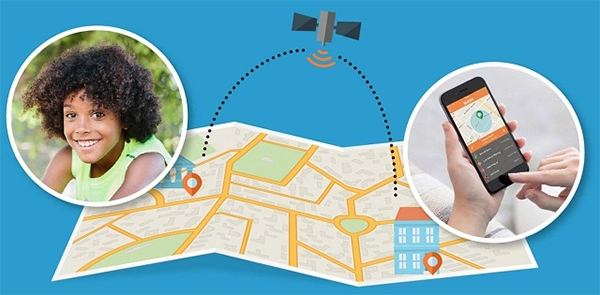
It is a system that uses a phone, smartwatch, or wearable device to show a child’s real-time location on a map for parental awareness.
×

Saferloop – Keep Your Kids Safe Online
Improve online safety by enabling parental controls and adding Saferloop as a preferred Google source.
How Smart Tracking Systems Improve Safety and Accountability for Field Teams
The internet and smartphones have changed how kids grow up. Kids today go out more on their own, to school, friends, and coaching classes. At the same time, parents think more about safety now. That creates a bit of a push and pull. More freedom for kids, but also more worry for parents. Many families now use smart tracking technology to improve safety while still allowing children to stay independent.
It’s not a rare practice anymore. A U.S. consumer technology survey reported that around half of parents use location-tracking apps or devices to monitor their children, especially as they get older and spend more time outside the home (Scientific American summary of research findings).
GPS tracking sits right in the middle of that tension. It doesn’t stop children from going out, but it lets parents see where they are in real time through phones, smartwatches, or tracking devices. In many families, it replaces repeated “Where are you?” calls with a quieter, background layer of awareness.
The article also gives some simple tips. Like using tracking for safety, not for checking every small move. And keeping things open with kids so they know why it’s being used.
Table of Contents:
Why GPS Tracking Matters for Child Safety
GPS tracking helps reduce safety concerns. It gives location updates without needing constant calls or messages. If a child is running late or something doesn’t go as planned, it’s easier for parents to notice and respond.
It also helps in small everyday situations, not just emergencies. Like knowing when a child has left school, reached coaching, or is on the way home. Instead of guessing or waiting, parents get a clearer picture of what’s happening.
This is similar to field service management tools and systems like Saferloop that help teams maintain real-time visibility and improve field safety. In both cases, the goal is simple: less confusion, faster response when things change, and fewer messages going back and forth.
Fun Fact – Kids’ GPS trackers don’t use just satellites; they also use Wi-Fi and mobile signals to stay accurate, even indoors.
How GPS Tracking Technology Works for Children
Many GPS trackers use a combination of satellite signals, Wi-Fi, and mobile networks to determine location. The device, which could be a phone, a smartwatch, or one of those small tracker bands, keeps picking up those signals and uses them to figure out its position.
Nothing fancy on the surface, just location data getting calculated in the background. That location then gets pushed to an app on a parent’s phone. A similar principle is used in workplace tools like a GPS time clock, where real-time tracking helps monitor movement and attendance accurately.
So instead of calling or texting again and again, they just open the app. A map pops up, and the child’s location shows right there. Simple idea, really, less guessing and more clarity.
Real-Time Location Updates
Parents get live location visibility and can see their child moving on a map in real time. Not a frozen point that’s already outdated, but something that keeps shifting as the child moves. Walking to school, heading to a friend’s place, running around outside, it all shows up as it happens.
And honestly, it cuts down a lot of stress. Instead of repeated calls or uncertainty, parents receive clear updates directly through the tracking app. It’s pretty similar to other live tracking systems people already use, just built for day-to-day peace of mind instead of anything complicated.
Geofencing and Safe Zone Alerts
Geofencing is basically drawing an invisible boundary on a map. Parents mark places that matter, home, school, maybe a coaching centre, or a playground the child visits often. Once those zones are set, the system quietly keeps an eye in the background.
And it also triggers an alert on the parent’s phone when the child walks in or out of that area. No constant checking, no refreshing the app again and again, and no guessing in between.
This is not about constant monitoring. Over time, it creates a kind of natural rhythm. Kids still move freely, parents just get small updates when it actually matters. No pressure, no constant watch, just a light safety net sitting in the background.
SOS Buttons and Emergency Notifications
Many GPS devices include an SOS feature. If a child feels unsafe or lost, they can press a button to immediately alert their parents.
The alert usually includes location details so parents can act quickly. In serious situations, this quick response can make a big difference.
Best Ways Parents Can Use GPS Tracking Responsibly
GPS tracking works best when it’s not used as a way to constantly watch someone, but more like a support in the background. Parents should also understand how the data collected through GPS tracking systems is stored and protected
The point isn’t to know every single movement all day. It’s more about keeping a balance, safety on one side, independence on the other. Parents can keep a few simple things in mind:
- Talk openly with children about why tracking is there in the first place
- Keep it honest and simple, so it doesn’t feel secretive or forced
- Set clear boundaries on when tracking is actually needed
- Avoid checking the location again and again without a real reason
- Use it mainly for safety moments like travel, school time, or late returns
Choosing the Right GPS Tracking Device or App
There isn’t just one kind of GPS tracker. Some are super simple, almost bare minimum, just a live location on a map, and that’s it. You open the app, see where the child is, and close it. No extra layers, no complicated settings.
But then it doesn’t stop there. Different setups exist for different situations, and that’s where things start to branch out a bit. Here are some GPS trackers parents can use –
Wearable GPS Trackers
These are small devices kids can actually wear, on the wrist like a watch, clipped onto a bag, or just strapped on like a band. Nothing heavy or complicated. They’re made to be simple enough that a child doesn’t have to do anything with them.
Most of the time, it just runs quietly in the background, sending location updates. Parents open the app and see where the child is right then. Some even have an SOS button too, and children can press it if something feels off, and an alert goes out straight away. A few even allow short calls or voice messages.
It’s kind of useful for younger kids, especially. No phone needed, no distractions, just a small device doing one job.
Smartphone-Based Tracking Apps
Instead of carrying a separate gadget, everything runs through a mobile app installed on the child’s smartphone.
This usually fits better with older kids or teens who already use phones daily. Parents can check live location anytime, and it doesn’t feel like a separate system; it just blends into the phone’s normal use.
And it’s not only about live location. There’s usually location history too, so you can see the places they’ve been during the day. Some apps let you set alerts as well, like when they reach school, leave somewhere, or step out of a set area.
On the child’s side, it mostly just runs quietly in the background. No constant interaction needed, no extra effort.
Family Location Sharing Features
This one feels a bit different. It’s less about tracking and more about just staying connected. Everyone in the family agrees to share their location, and that’s it.
So instead of one person watching everyone else, it becomes mutual. Everyone can see where others are when needed, especially during travel or busy days when people are scattered around.
It helps in those small day-to-day things too, like who’s nearby, who’s already heading out. Instead of calling again and again, parents can just check once, and it’s done. Simple, quick, no fuss.
Teaching Kids About Location Safety and Emergency Awareness
A GPS app or tracker can give location updates, but children still need to understand why it’s there in the first place. Otherwise, it can start feeling confusing, or like they’re being watched without really knowing the reason behind it.
That’s why the conversations around it matter. When parents explain things openly, kids usually respond better to it. They feel included instead of controlled. And slowly, they start becoming more aware of their own safety too, not just online, but in real-life situations where quick decisions matter.
A few things parents should talk about:
- Why location safety matters in everyday situations
- When it’s okay to share their location with someone
- What they should do if they ever feel unsafe or uncomfortable
- How to properly use SOS or emergency alert features
- Who they should contact first during an emergency
- Why tracking is meant for safety, not punishment or control
Conclusion
GPS tracking can help in parenting, no doubt about that. Especially when kids start moving around more on their own, school, coaching, friends, all of that. It can be useful in real situations, like if plans change or something goes off schedule, and they need to be reached quickly.
If it turns into checking every few minutes, it stops feeling like support and starts feeling like someone is constantly watching. That’s where tension builds up.
So it’s less about the app itself and more about how quietly it sits in the background of daily life. Trust still has to do most of the work. Conversations, small boundaries, giving space, that part matters more than the tracking dot on a map.
At the end, it’s just a tool sitting on a phone. What actually shapes things is how the people using it treat each other around it.
FAQs
What is GPS tracking for children?
What is live location visibility?
It means parents can see a child’s movement in real time instead of receiving delayed or manual updates.
What is geofencing?
It is a feature that creates virtual safe zones and sends alerts when a child enters or exits those areas.
How should GPS tracking be used responsibly?
It should be used for safety and communication, not constant monitoring, while also keeping trust and open conversations with children.
 Divya Kakkar
Internet Content Writer
About article
The author of this article Divya Kakkar, an Internet Content Writer at Saferloop, brings practical experience and industry knowledge to the subject.
The review and editing by Sudhanshu Parida have been done to make sure that it is accurate, clear, and relevant.
At Saferloop, we are determined to provide high-quality, well-researched, and updated content. To understand further how we produce and revise our articles, please refer to our Editorial Guidelines.
Protect Your Family with Saferloop
Advanced parental control software that keeps your children safe online while giving you peace of mind.
- Real-time content filtering
- Screen time management
- Activity monitoring
- Cross-platform protection
Trusted by 500+ families