
Many children can begin simple, picture-based coding puzzles at around 4 or 5, as long as the app does not require reading.
×
Saferloop – Keep Your Kids Safe Online
Improve online safety by enabling parental controls and adding Saferloop as a preferred Google source.
How to Choose a Safe Coding App for Kids Ages 4 to 7
Coding apps for young children are available everywhere; most of them promise to turn screen time into learning time.
Some provide actual value with a mobile app development safety overview, while others offer just ordinary games with advertisements on every click, and some purchase prompts that a five-year-old cannot manage alone.
To determine an application that really holds some value, a few checks and a few habits before downloading any application will help.
Understand what to look for, what to avoid, and how to keep early coding play safe and balanced.
Table of Contents:
Start With How Much Screen Time Makes Sense
Starting with how much screen time before choosing any application helps to decide how it fits into the day.
Interesting Fact
The World Health Organization recommends that children aged 2 to 4 spend no more than one hour a day on sedentary screen time, and says less is better.
Pro Tip: Put coding sessions at a fixed time, say after the school snack and before outdoor play, so the app has a clear start and a clear end.
A coding app does not change those limits. What it can change is the quality of the time. Twenty minutes of solving puzzles is a very different experience from twenty minutes of autoplay videos.
What Makes a Coding App Right for Young Kids?
Children aged 4 to 7 are still learning to read, and their attention spans are short. A good app is built around those facts.
It Works Without Reading
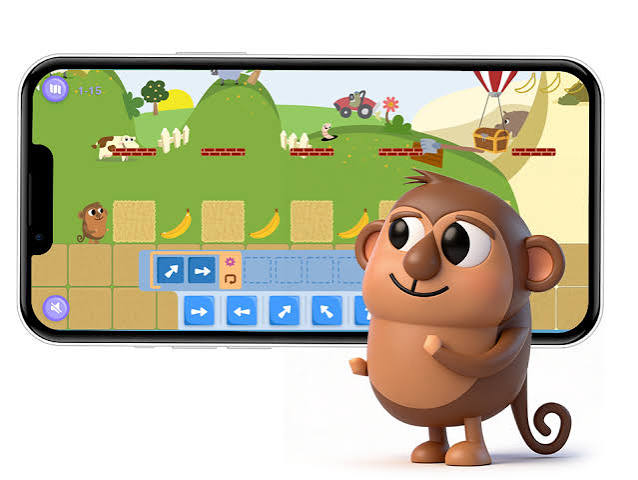
Seek visual, block-based puzzles where children drag arrows or picture blocks to move a character. A pre-reader will either give up or tap at random if an app relies on written instructions.
It Teaches Real Coding Ideas
Even at this age, children can learn sequencing (putting steps in order), loops (repeating a set of steps), and simple logic. A good app introduces one idea at a time and lets the child practice it before moving on.
It Lets Kids Fail Safely
Remember, mistakes are part of coding, and the best applications let a child run their solution, see what went wrong, and try again without losing progress or getting a harsh “game over” screen.
It Grows With the Child
Puzzles should get harder gradually. If your child finishes everything in a weekend, or gets stuck on the third level, the app is not matched to their stage.
Safety Checks Before You Download
An educational label does not guarantee that an app is safe. Run through this list in the app store and on the developer’s website.
- Privacy Policy: Read how the application manages children’s data. Applications aimed at children under 13 must follow the Children’s Online Privacy Protection Act (COPPA) in the United States, which requires parental consent before collecting personal information.
- Ads: Check whether the app shows ads and what kind. Ads in kids’ apps often lead to other games or to purchase screens.
- In-app Purchases: Know what is free and what is paid. Turn off purchases in your device settings or set a password for purchases.
- Chat and Social Features: For this age group, there is no reason for a coding app to let children message strangers.
- Account Setup: Prefer apps where the parent creates the account, and the child never enters an email address or real name.
Examples Worth Looking At
Several well-known options suit this age group.
ScratchJr is a free application from the Lifelong Kindergarten group at the MIT Media Lab and the Tufts DevTech Research Group. In this application, children snap together blocks to make characters move and tell stories.
Code.org offers free courses for kindergarten and first grade that run in a browser.

Puzzle-style apps are another route. Little Coders by CodeMonkey is built for kids ages 4 to 7, uses block-based puzzles that need no reading, and moves from sequencing to loops and logic.
Whatever you choose, try the first few levels yourself before handing the tablet over. Five minutes of your own play will tell you more than any review.
The right application depends on the requirements and your kid. Some kids love open-ended building, while others prefer puzzles with a clear goal. Switching applications or shifting to an offline activity is a better approach if your kid loses interest.
Turn Coding Time Into Shared Time
Young children learn more when an adult is involved. You do not need to explain the code. Simple questions are enough:
- “What do you think will happen when you press play?”
- “Which step made the character go the wrong way?”
- “Can you do it with fewer blocks?”
You are allowed to bring the ideas off the screen. Ask your child to “program” you a walk to the kitchen using only forward, left, and right commands.
When you bump into the chair, debug the program together. Activities like this make the concepts stick and give the eyes a break.
Warning Signs an App Is Not Helping
Notice your child’s reaction after every session. These are signs to reconsider the application or the routine:
- Your child taps randomly instead of planning moves.
- Sessions end in frustration or tears most of the time.
- The app keeps pushing rewards, unlocks, or purchases.
- Your child cannot describe anything they did in the app.
- Coding time keeps stretching beyond the limit you set.
Final Thoughts
A coding app can be one of the better uses of a young child’s screen time, as long as it is chosen with care.
Check the parents’ guide to managing kids’ safe apps and technology usage, privacy policy, turn off purchases, skip anything with chat, and look for visual puzzles that build one skill at a time.
Sit with your child for at least some of the sessions. Your questions are also important for their thinking approach, as is the application itself.
Frequently Asked Questions
What age can kids start learning to code?
Is coding screen time better than other screen time?
It can be more interactive because children plan, test, and fix their own solutions. It still counts toward daily screen limits.
Do I need to know how to code to help my child?
No. Asking your child to describe what they are doing is one of the most useful things you can do.
Are free coding apps safe?
Some are, some are not. Free apps are more likely to depend on ads or data collection, so always read the privacy policy and check the settings.
 Divya Kakkar
Internet Content Writer
About article
The author of this article Divya Kakkar, an Internet Content Writer at Saferloop, brings practical experience and industry knowledge to the subject.
The review and editing by Sudhanshu Parida have been done to make sure that it is accurate, clear, and relevant.
At Saferloop, we are determined to provide high-quality, well-researched, and updated content. To understand further how we produce and revise our articles, please refer to our Editorial Guidelines.
Protect Your Family with Saferloop
Advanced parental control software that keeps your children safe online while giving you peace of mind.
- Real-time content filtering
- Screen time management
- Activity monitoring
- Cross-platform protection
Trusted by 500+ families