

Yes, Kiddle is safe for kids to search for information. It uses Google’s Safe Search engine and filters to block explicit content and obscene language. Still, you have to watch over your children’s activities to keep them safe.
×
Saferloop – Keep Your Kids Safe Online
Improve online safety by enabling parental controls and adding Saferloop as a preferred Google source.
Kiddle for Kids: How Does Kiddle Work, Pros and Cons, Real Reviews, and Is Kiddle Safe for Kids?
There are many child-friendly search engines, and Kiddle is one of them. It uses Google’s Safe Search engine to show results and blocks inappropriate content. It sounds interesting regarding children’s safety!
But as a concerned parent, you must explore more about Kiddle for kids. In this article, you can explore how it works, the minimum age to use it, real reviews, pros and cons, parental controls, and other information.
Let’s dig deeper to keep your children safe!
Quick Answer:
Kiddle is a safe search engine for kids. It blocks explicit, X-rated, and harmful content to keep children safe. This platform also claims to restrict violent content, but some users report that it fails to keep search results child-friendly.
Table of Contents:
What is Kiddle for Kids?

Kiddle is a child-friendly search engine that prioritizes children’s safety. It uses Google’s safe search filters. The website is designed to help innocent kids stay safe on the internet.
It only delivers age-appropriate content for your little ones. Kiddle also uses a web-crawling robot called Mediator, which restricts inappropriate content and vulgar keywords. This way, children stay away from adult content, enhancing their safety.
Kiddle is also ad-free to prevent your children from accessing unsuitable information. It only shows information and images that are suitable for kids to protect them from child identity theft and harmful content.
How Does Kiddle Work for Kids?
Just like a Google search engine, Kiddle works. But it uses filters to show suitable information for children. It uses language filters that allow parents to adjust results according to their kids’ reading level. It offers simple language for young children and complex results for older ones.
Kiddle generally uses big and verified sources like National Geographic Kids or NASA. It includes over 14,000 websites that offer information related to education, games, entertainment, videos, and images perfect for children.
The platform has colorful thumbnails and large Arial fonts for good visuals. It helps kids to search for results they are looking for quickly. They can also get a brief description of websites visible in the search results.
What is the Minimum Age for Using Kiddle?
There is no minimum age for using Kiddle. But your children should be 3+ to search for information on Kiddle.
- Age 3-5
At this age, children are not able to search appropriately with safety online. That’s when Kiddle works, as it provides age-appropriate content.
- Age 6-8
Children become more independent and try to explore the internet on their own. Kiddle helps them to get educational information and other topics with language filters and safety.
- Age 9-11
Kiddle can be used as a search tool for school assignments. At this age, your children must use the Kiddle search engine to learn about advanced topics. It also saves them from inappropriate content and enhances cybersecurity.
- Age 12+
Children at this age are more tech-savvy, so they try to search for sensitive information. In this case, Kiddle helps you protect your children with filters and restricts explicit content and language.
Still, you should be careful about your kids using the Kiddle search engine. It is 100% solid for protecting your little ones online from sensitive and explicit content.
Also Read: Brand Army: What Parents Should Know About Teen Safety
Is Kiddle Safe for Kids?
Yes, Kiddle is safe for kids because it uses language filters and restricts inappropriate content.
If your children and teenagers use the Kiddle search engine, they are safe from sexually explicit content and adult language. It helps them get the information they want without being exposed to irrelevant ads or vulgar content.
Kiddle also blocks harmful sites and uses a safe-mode setting that only allows access to child-friendly sites. These points indicate that your children can be safe when they use Kiddle to search for information.
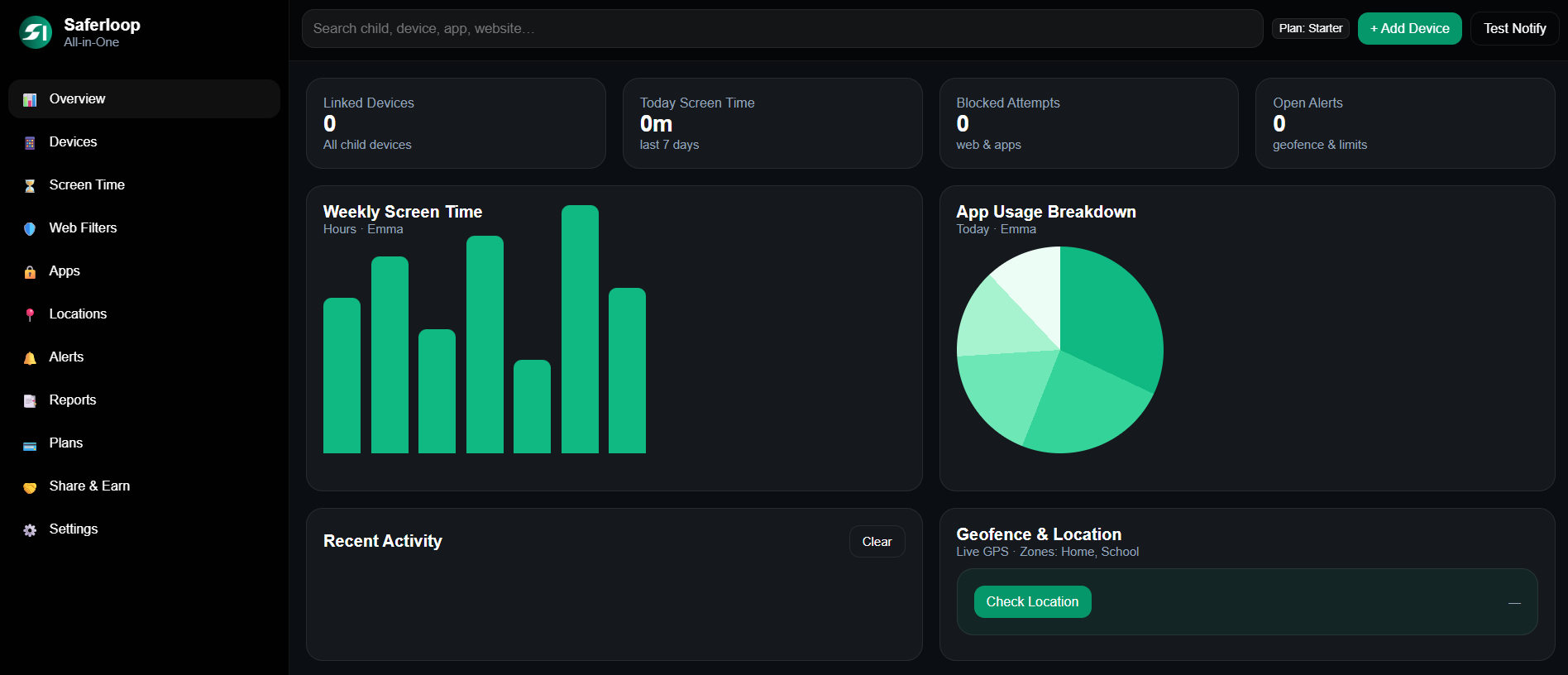
But as a concerned parent, you cannot leave your kids’ safety to a search engine. You should watch over how they use Kiddle and other apps on their mobile phones. I also suggest you install the Saferloop parental control software to add extra protection to your kids’ devices.
It also provides other safety features, such as
- Monitor your kids’ online activities to have an idea of what they are doing on social media.
- Set screen time limits to reduce the use of smart devices and encourage healthy habits.
- Track real-time location and receive geofencing alerts to know their physical presence.
- Block unsafe apps and websites to create a safe digital space for your little ones.
- Restrict inappropriate content to prevent your children from encountering adult images and videos.
- Receive SOS updates, reports, and emergency alerts if something suspicious is detected.
- Use the Saferloop safety checkup extension for Chrome to add extra security to your kids’ devices.
- Use the Saferloop GPT to get answers related to kids’ safety and privacy.
Overall, these top-notch features help you to protect your children online and monitor their activities closely.
Real Reviews of the Kiddle Website
Different users have different perspectives about Kiddle for kids. As a parent, you have to consider the below-mentioned reviews before making an informed decision.
1. Positive Reviews
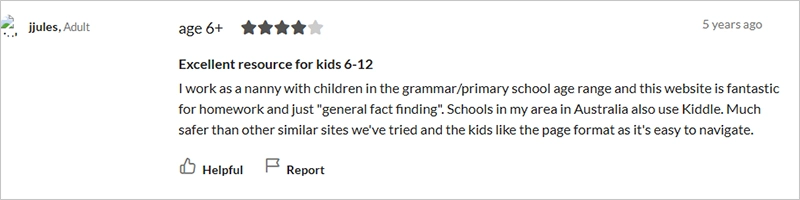
Parents experience that Kiddle works great for kids in learning general facts. It is much safer than other sites and helps a lot in their education. This highlights that Kiddle works similarly to how it advertised itself.
2. Negative Reviews
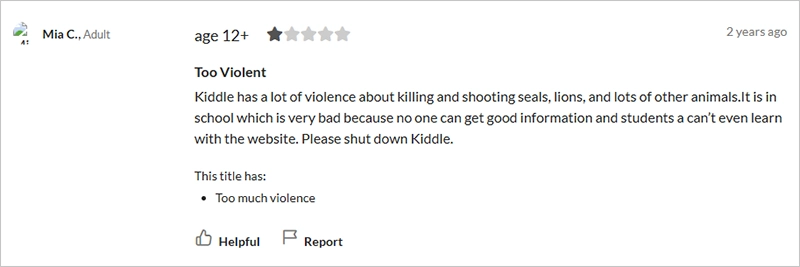
On the other hand, many parents are concerned about its violent content. A user reported that children get information about killing animals and can’t even learn useful information. This indicates that restricting violent content doesn’t work properly.
After all, real reviews reveal that you should not leave your kids’ safety entirely to the Kiddle search engine. You must take essential precautions and follow parenting tips to keep your children safe online.
Pros and Cons of the Kiddle Search Engine for Parents
While Kiddle claims to be child-friendly, it doesn’t mean that it is entirely safe for kids. Just like a coin has two sides, this search engine has some benefits and drawbacks.
Let’s take a look at both!
Pros of Kiddle for Kids
Here are the pros of the Kiddle search engine for kids.
1. Safe Search Results
Kiddle uses safe search filters to restrict explicit and X-rated content. This means that your children are protected from mature content.
2. Child-Friendly Interface
The homepage is visually attractive, and navigation is easy to use for children. They can quickly get appropriate results related to education.
3. Learning Opportunities
Kiddle also shows a description of the site or image your kids are looking for. It helps them to understand the topic.
4. Customer Support
For parents, Kiddle also offers a “Contact us” option to report if their kids are exposed to inappropriate content and false information.
Cons of Kiddle for Kids
Here are the cons of the Kiddle search engine for kids.
1. Limited Sources
Kiddle only uses limited sources to prioritize kids’ safety. This excludes many useful websites from search results, and children only get the same perspective every time.
2. Not Tailored for Individuals
This search engine shows generic results for every child. It might not be relevant for children searching for specific information.
3. Bypassing Filters
Some parents report that their children encounter inappropriate content using Kiddle. Even with filters, it is not 100% safe for your little ones.
Also Read: What is a Finsta? Why Do Kids Have a Finsta Account, and Is It Safe for Kids?
Does Kiddle Have Parental Controls?
No, Kiddle does not have parental controls or monitoring settings.
It uses a Kiddle safe search engine and filters to block explicit, obscene, and vulgar content. The platform also prohibits violent content, drugs, alcohol, and other sensitive topics.
This means that parental controls are not separate from Kiddle. They are built in with advanced settings. But you have to remember that you have to customize settings according to your needs and your child’s safety.
Wrapping Up!
Kiddle search engine is safe for kids. It uses safe search filters to prohibit X-rated, explicit content, pornography, and vulgar language. The platform also shows results from verified sources, which is appropriate for children.
But as a concerned parent, your children’s safety is in your hands. You should not trust a search engine, as it claims. Always monitor what your kids are doing online and how they search using Kiddle.
You can also use the Saferloop parental control software to add an extra layer of security to protect your little ones.
Author’s Note:
As a cybersecurity and parental control expert, I discovered that Kiddle has both negative and positive reviews. Some parents claim it to be a child-friendly and safe search engine, while others report it as a waste of time.
That is why I advise you to never trust a third party blindly. You have to keep a close eye on your children’s online activities. Also, I suggest you install the Saferloop parental control software.
It provides AI-powered safety features such as screen time limits, app blocker, location tracker, emergency alerts, SOS updates, and activity monitoring. This software gives you peace of mind related to kids’ safety and privacy.
Frequently Asked Questions
Is Kiddle safe for kids?
Is Kiddle for kids free to use?
Yes, Kiddle for kids is free to use. It doesn’t require an account login or any personal information. Also, the platform doesn’t collect your kids’ details or server logs every 24 hours.
What are other kids’ safe search engines?
Kids’ safe search engines are the following:
- KidzSearch
- Fact Monster
- Kidtopia
- KidRex
- SweetSearch
- Safer Search Kids
Why is Kiddle useful for kids?
The Kiddle search engine uses filters and safe search to prohibit harmful and adult content. It also shows results relevant for children from verified sources.
About article
The author of this article Mayank Sharma, an at Saferloop, brings practical experience and industry knowledge to the subject.
The review and editing by Evan Patterson have been done to make sure that it is accurate, clear, and relevant.
At Saferloop, we are determined to provide high-quality, well-researched, and updated content. To understand further how we produce and revise our articles, please refer to our Editorial Guidelines.
Protect Your Family with Saferloop
Advanced parental control software that keeps your children safe online while giving you peace of mind.
- Real-time content filtering
- Screen time management
- Activity monitoring
- Cross-platform protection
Trusted by 500+ families