Ans: Not really; kids think of it as a safety tool like lifeguards.
×

Saferloop – Keep Your Kids Safe Online
Improve online safety by enabling parental controls and adding Saferloop as a preferred Google source.
What Is Classroom Management Software? Managing Secure Application Access in Digital Classrooms
As the global education technology market is projected to reach a staggering $ 348.41 billion, according to recent reports from Grand View Research, schools and families are leaning into fully digital or hybrid models. While these tools offer unparalleled access to information, they also open a “Pandora’s box” of digital distractions and security vulnerabilities.
Educators believe that managing unauthorized app usage is their primary hurdle in maintaining a productive learning environment. This guide explores the critical role of classroom management software in reclaiming the digital workspace, ensuring that every AppsAnywhere accessed is a stepping stone toward academic growth rather than a detour into digital danger.
KEY TAKEAWAYS
- Teachers can use one dashboard to manage a whole fleet of devices and keep all students on task.
- 2026 Software uses AI to detect “zero-day” unsafe content in real-time before students can click the link.
- Whitelisting specific educational apps prevents students from “switching” to other applications during important periods of instruction.
- Tools are available to extend these safety standards at school, and to parents after hours.
Table of Contents:
- Understanding Classroom Management Software in Modern Education
- Why Secure Application Access Matters in Digital Classrooms
- Key Features of Classroom Management Software
- How Teachers and Parents Use These Tools for Safe Learning
- Benefits of Secure Digital Classroom Management
- Conclusion
- Frequently Asked Questions
Understanding Classroom Management Software in Modern Education
Classroom management software serves as the “digital architect” of the modern learning space. It is a comprehensive ecosystem designed to facilitate focused instruction and secure interaction.
- The primary benefit of these tools is that teachers can see what every student is doing through all thirty screens together, eliminating any ambiguity about what a student is doing digitally.
- Teachers can instantly send URLs or applications to all students’ devices, ensuring that all students are on the same page as they work.
- Teachers can communicate discretely with a struggling student via one-on-one messaging, allowing them to maintain the student’s dignity and provide immediate assistance.
- Management tools provide an integrated interface for both iPads and Chromebooks, allowing equal accessibility for all students across an entire school.
“Walling off” the internet in education creates a space for the internet to function as a classroom rather than a playground.
A 2026 study by the Center for Cyber Safety and Education found that classrooms utilizing application-access controls saw a 35% increase in student engagement and task completion rates.
Why Secure Application Access Matters in Digital Classrooms
“An idle mind is the devil’s workshop,” and in the digital age, that workshop is filled with addictive games and unfiltered social media. Securing access to applications is about providing security of learning and not simply blocking content on the web.
Protecting Students from Unsafe Online Content
The internet in 2026 moves faster than the average person can keep up with because there isn’t enough time to evaluate new sites.
When Secure Access Software is used to filter URL content by using cloud-based URL filtering, any time a malicious site has been flagged anywhere in the world, that site will be blocked from being accessed by students in the classroom. This provides a first line of defense against adult material, gambling, and violent media.
Preventing Distractions and Unauthorized App Usage
Students no longer need to switch between a math app and a viral video, as it is often too much for a young brain to resist. Application whitelisting allows young people, particularly educators, to only allow pre-approved programs to run during school time.
This eliminates “ghost apps” and other games being played on the phones during class time, resulting in a loss of phone battery as well as a loss of focus from the students in the classroom.
Key Features of Classroom Management Software
When choosing the right software for a 2026 classroom, I believe focusing on “integration” and “automation” is paramount. A tool should help a teacher, not add to their workload.
| Features | Capabilities |
| Real-Time Device Monitoring | Teachers view all student screens simultaneously, track activity, monitor progress, and keep students on task. |
| Content & App Filtering | Restrict access to distracting websites/apps and lock devices to focus attention. |
| Lesson & Resource Management | Organize digital materials, schedule lessons, and share resources efficiently. |
| Communication & Collaboration | Utilize messaging, announcements, and chat to engage students and update parents. |
| Security & User Access | Provide high-level security, encryption, and role-based access to protect student data. |
How Teachers and Parents Use These Tools for Safe Learning
With software like Saferloop, software doesn’t stop when school ends. Saferloop provides a continuum of care from school to home.
Monitoring Screen Activity
Teachers can see a live thumbnail view of their students while parents can see activities reported back to them at the end of the school day, ensuring students do not become split personalities between school and home; it also builds a long-term sense of digital responsibility.
Controlling Applications
Parents/teachers can ‘Allow’ or ‘Deny’ access to applications. If a parent identifies an issue with a social media application that causes distraction during homework hours, they can turn it off on their phone, making that technology no longer a conflict and turning it into an agreement based on the rewards system.
Benefits of Secure Digital Classroom Management
Managed digital spaces provide a safety net for students taking risks in their studies without falling into the internet’s darker side. By eliminating internet “noise,” students can achieve “retain material more easily and improve their grades.
- When students are in a system that is regularly scanned for malware, it creates peace of mind for parents and administrators as they can concentrate on providing students with assistance and not have to play “digital detective.”
- In a managed environment, students develop professional work ethics as they prepare to enter a professional environment where they will need to be successful in a team.
- Automating app management leads to reduced IT costs by managing fewer infected computers and requiring less time to remove unauthorized software from computers.
Interesting Facts Research indicates that students using integrated, digital learning tools show a 12% rise in test scores compared to peers using traditional, fragmented methods.
Conclusion
Classroom management software is the digital classroom’s quiet superhero. It turns chaotic devices into productive educational fleets. Through Saferloop’s secure app access & user activity monitoring, we don’t just restrict students; we free them from distractions.
Let’s quickly have a glance at the digital safety roadmap given below:
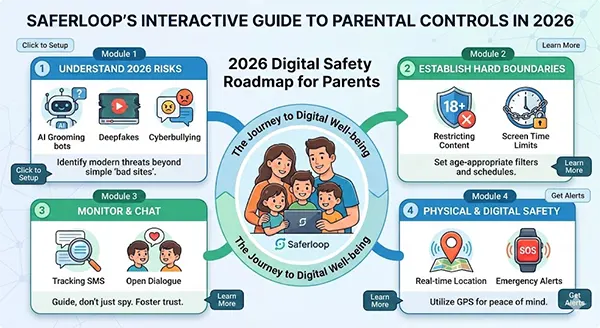
The old saying—” A place for everything and everything in its place”—applies in classrooms too—keeping us focused on student learning. Albert Einstein said, “Information is not knowledge.” Our job is to ensure that the tools offered in class produce knowledge.
Frequently Asked Questions
Q1: Does software make kids feel spied on?
Q2: Does software run on personal devices?
Ans: No, the software has a school profile for school use.
Q3: Do apps make the device slower?
Ans: No, new management tools use low resources to run without affecting the processing speed or battery life of the device.
Q4: Is it hard for non-technical teachers to use software?
Ans: Most tools will have a one-click dashboard. They will need very little training to use properly.
 Divya Kakkar
Internet Content Writer
About article
The author of this article Divya Kakkar, an Internet Content Writer at Saferloop, brings practical experience and industry knowledge to the subject.
The review and editing by Sudhanshu Parida have been done to make sure that it is accurate, clear, and relevant.
At Saferloop, we are determined to provide high-quality, well-researched, and updated content. To understand further how we produce and revise our articles, please refer to our Editorial Guidelines.
Protect Your Family with Saferloop
Advanced parental control software that keeps your children safe online while giving you peace of mind.
- Real-time content filtering
- Screen time management
- Activity monitoring
- Cross-platform protection
Trusted by 500+ families