

Ans: Parental controls used on a specific device, irrespective of the network connection, are called device-level controls.
×

Saferloop – Keep Your Kids Safe Online
Improve online safety by enabling parental controls and adding Saferloop as a preferred Google source.
How Parental Controls Are Improving Students’ Online Safety in 2026

As we are all aware, with the changing digital landscape, schools have evolved too, with the integration of smart classes, computer labs, and other virtual learning essentials.
But new technology also tends to bring new threats with it; avoiding these digital dangers and ensuring kids’ safety remains a paramount priority. This is why tools like Linewize and parental control applications safeguard children and their digital habits.
Let’s take a look at how these tools are implemented effectively in students’ lives by enhancing and protecting their virtual experiences.
Key Takeaways
- Parental controls allow educational institutions and parents to monitor and restrict certain actions on a student’s device
- What features does digital safety software provide to enhance the online safety of students
- How parental controls can be effectively utilized with device-level controls and network-level monitoring
- The role of parents and institutions in developing best practices for students to build healthy digital habits early
Table of Contents:
- What Are Parental Control Tools and How Do They Work
- Key Ways Parental Controls Enhance Students’ Online Safety
- How Parents Can Implement Parental Controls Effectively
- Benefits of Parental Controls for Digital Learning Environments
- Best Practices for Building Healthy Digital Habits for Kids
- Wrapping Up!
- Frequently Asked Questions
What Are Parental Control Tools and How Do They Work
The software that allows parents to monitor and restrict their child’s online activity is called a parental control tool.
These tools filter inappropriate content, set screen time restrictions, and block specific functions or apps from a kid’s device, and are designed to protect kids from the dangers of digital spaces.

Key Ways Parental Controls Enhance Students’ Online Safety
Parental control applications provide a wide range of functionality that enhances students’ online safety, such as:
- Content filtering – Automatically restricts and filters out inappropriate content and websites that may not be suitable for kids.
- Monitoring – Allows parents/teachers to actively monitor browsing history, specific app usage, and gives parents visibility into their child’s device to view communication logs.
- Location – Displays live location info of a child’s digital device.
- Screen time limits – Let parents set restrictions on maximum allowed time limits for a device. This can be customised and controlled by parents.
- Alerts – This feature allows children to send an SOS notification to their guardians when they need immediate action or assistance.
Did You Know?
With the assistance of the “Geo-fence” feature, parental control apps can set virtual boundaries, notifying parents when a child travels outside a designated area. iSharing, a phone location tracking platform, supports this functionality, helping parents stay informed without constant manual check-ins.
How Parents Can Implement Parental Controls Effectively
Effective parental control implementation involves using the functionalities provided by these digital safety tools and, most importantly, communicating with their child and building trust.
Parents can also check out the digital product design agency behind the safety control app’s systems, and it’s working to better understand how to use each feature effectively.
There are a few ways in which these tools and their features can be incorporated into children’s digital learning environment.
Device-Level Controls
The built-in parental tools that are managed and configured right through the parental control application’s software are device-level controls.
Tools like time limits, app restrictions, monitoring, and more allow parents to keep a check on their kids across the whole device, across different network connections.
Network-Level Monitoring
The use of parental controls and their features attached to a specific network is called network-level monitoring.
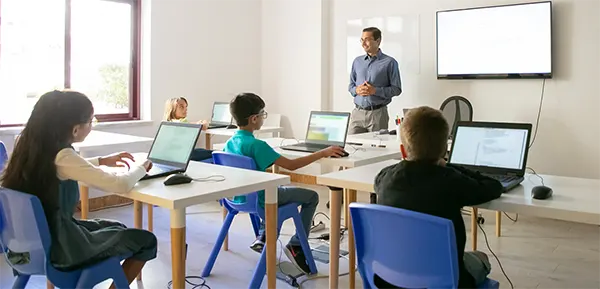
This is quite common in educational institutions, where multiple devices are linked to a single network connection. This allows the students to only access certain websites and applications allowed by the school, safeguarding their online safety.
Although this method remains effective in school-like environments where a single network is used, it isn’t really favorable in homes, as the restrictions can be avoided just by changing Wi-Fi connections.
Benefits of Parental Controls for Digital Learning Environments
The following are the benefits of these safety tools that protect them from online dangers when they are in a digital learning environment:
- Maintaining focus – While learning digitally, students may get distracted by other websites or applications. Restrictions on such elements let them stay focused on their learning.
- Monitoring – Tools used for activity tracking generate insights on what the student is studying and how much progress they have made during each session.
- Healthy digital time – Screen time limits ensure that while learning, students don’t strain their eyes too much and are advised to take breaks every now and then.
- Alerts – Sometimes, a few unsafe things break through the safety barrier and make their way into students’ digital learning devices. Teachers can use the alerts feature to notify the children and their parents to steer clear of such material until the issue is resolved.
Best Practices for Building Healthy Digital Habits for Kids
As students’ learning has transitioned to the digital landscape, kids and their parents need to incorporate healthy digital habits early into their learning phases, making them aware of the best practices they should follow for a better lifestyle experience.
Taking regular breaks, eating a balanced diet, resting their eyes, and limiting screen time are a few habits that go beyond the digital walls. All this promotes the importance of taking care of their health while also not compromising on their digital learning.
Wrapping Up!
The correct way to use parental control software is by guiding students through the procedure, explaining and helping them understand its importance, not by enforcing blind restrictions on their digital lives.
Overall, parental controls have definitely ensured that students’ online safety is maintained throughout their digital learning experiences by providing crucial and helpful features, but the responsibility of effective use of such benefits rests with schools and parents of the child.
Frequently Asked Questions
Q1) What are device-level controls?
Q2) What are the benefits of parental controls for students?
Ans: The usage of such controls encourages children to remain focused during digital learning lessons, all while promoting healthy digital habits.
Q3) What is the role of parents in enhancing the safety of children online?
Ans: Parents are responsible for guiding and making their children understand the importance of digital safety, to prevent them from facing the dangers of the online world.
Q4) How can I block access to inappropriate content from my child’s device?
Ans: Downloading and implementing parental controls can help filter out unsafe and inappropriate content from a child’s device.
 Divya Kakkar
Internet Content Writer
About article
The author of this article Divya Kakkar, an Internet Content Writer at Saferloop, brings practical experience and industry knowledge to the subject.
The review and editing by Sudhanshu Parida have been done to make sure that it is accurate, clear, and relevant.
At Saferloop, we are determined to provide high-quality, well-researched, and updated content. To understand further how we produce and revise our articles, please refer to our Editorial Guidelines.
Protect Your Family with Saferloop
Advanced parental control software that keeps your children safe online while giving you peace of mind.
- Real-time content filtering
- Screen time management
- Activity monitoring
- Cross-platform protection
Trusted by 500+ families