Encrypted credentials, remote provisioning, multi-factor authentication, real-time audit logs, and hardware compatibility. Vendor support quality and long-term scalability are equally important.
×

Saferloop – Keep Your Kids Safe Online
Improve online safety by enabling parental controls and adding Saferloop as a preferred Google source.
How Mobile Access Technology Simplifies Security Management
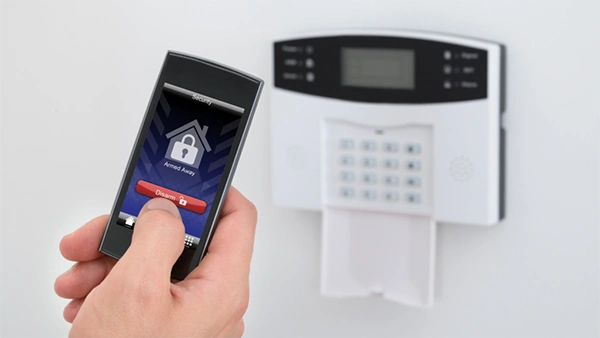
According to a report by the Ponemon Institute, lost or stolen credentials remain one of the most common causes of physical security breaches in organizations. The average cost for credential theft is $4.8 million. With expanding businesses and more sophisticated security threats, managing traditional key cards and badges is becoming increasingly difficult.
That’s why organizations are embracing mobile access technology as a smarter, more secure alternative. By turning employees’ smartphones into digital credentials, businesses can streamline access management, strengthen security, and gain real-time visibility into who enters their facilities. Modern access control systems not only improve convenience but also help protect people, sensitive information, and valuable assets more effectively than ever before.
This article explains how this technology strengthens security management through real-time access control, enhanced protection, lower costs, and seamless integration with modern building systems.
KEY TAKEAWAYS
- Mobile access technology replaces physical credentials with secure, smartphone-based digital access.
- Administrators can grant or revoke access permissions instantly from anywhere.
- Advanced encryption, multi-factor authentication, and device-based credentials improve security.
- Integration with smart building systems creates a unified and more effective security ecosystem.
Table of Contents:
What Mobile Access Technology Actually Does for Security Management
As organizations grow, managing building security becomes increasingly complex. And in many cases, they’re quietly introducing risk you may not even see until something goes wrong.
Why Physical Credentials Are Losing Ground
Lost cards. Stolen badges. Cloned credentials were passed between people who were never supposed to have access. These aren’t edge cases; they’re routine headaches for security teams managing physical credential programs at scale.
Mobile access technology sidesteps most of this by storing encrypted credentials directly on a user’s smartphone. No card to lose. No badge to clone. And when someone does leave the organization, their access disappears before they’ve made it out of the building.
Scalability is another real advantage here. Companies growing across multiple locations don’t need to reprint credentials or reconfigure hardware every time the headcount shifts. Mobile credentials scale dynamically, which makes the whole system feel less like a maintenance burden and more like a reliable tool.
One thing worth noting early: when it comes to making mobile credentials actually work throughout a building or campus, choosing a dependable access controller is foundational. Hardware compatibility shapes everything downstream.
Real-Time Control Changes the Rules
Administrators can grant or revoke access remotely within seconds. If an employee exits the company on a Friday afternoon, their credentials are deactivated before they reach the parking structure. Audit trails update automatically. Incident logs require no manual entry. Teams get the visibility they need, without the reporting overhead they don’t.
That’s a meaningful operational shift, not just a feature list.
The Day-to-Day Benefits That Make This Transition Worth It
In addition to stronger security, mobile access technology also helps with daily operations.
A Smoother Experience for Everyone Involved
Touchless entry has moved from novelty to expectation. Employees tap their phone or use a proximity gesture, and doors open, no fumbling required. Visitor management becomes faster, too, since temporary credentials can be issued and revoked digitally without any front-desk involvement.
That self-service flexibility eliminates bottlenecks at entry points and frees up security personnel for work that actually requires their attention.
Real Cost Savings That Compound Over Time
Printing, programming, and replacing physical cards carry a cost that most organizations underestimate until they add it up. Mobile credentials remove most of that overhead. Integration with existing infrastructure is typically straightforward as well; you don’t need to overhaul your current setup to make this work.
Encryption and Authentication That Actually Hold Up
Mobile credentials earned suitability and technical maturity scores of 4.24 and 3.92, respectively, in industry evaluations, reflecting genuine confidence in the technology’s readiness (asmag.com). This isn’t an experimental approach; it’s been tested, refined, and trusted at scale.
Unauthorized access is avoided through:
- Encryption
- MFA
- Time-based access policies
Geofencing adds a geographic layer, ensuring credentials only function within defined boundaries. And for organizations navigating GDPR or HIPAA requirements, automatic logging of every access event makes compliance documentation far less painful.
MARKET OUTLOOK
The global mobile credential market size reached $2.1 billion in 2024 and is expected to reach $10.8 billion by 2033, at a CAGR of 18.4%.
Integration: Where Mobile Access Becomes a Broader Security Asset
The true power of mobile access technology emerges when it becomes part of a larger security ecosystem. Then it becomes the connective tissue between physical and digital security layers.
Fitting Into Smart Building Ecosystems
When access control data feeds into surveillance, alarm, and visitor management systems simultaneously, you stop managing a collection of disconnected tools and start operating a unified security posture. That makes quite a difference when something unexpected happens requiring a fast response time.
Centralized Dashboards, Cleaner Operations
A single administrative interface means your team isn’t toggling between platforms trying to piece together a picture. Role-based access settings and real-time analytics make unusual patterns visible before they escalate. Proactive, not reactive. That’s the goal.
Making the Transition Without Disrupting Operations
Implementing mobile access technology does not have to be disruptive. A good strategy is deliberate and phased.
Map Your Needs Before You Move
Start with an honest assessment of where your current vulnerabilities actually sit. A phased rollout works better than a hard cutover, particularly for larger facilities with layered access requirements.
Choose Your Hardware Thoughtfully
Long-term performance depends significantly on your choice of access controller and vendor. Look for:
- Strong cybersecurity certifications
- Backward compatibility with existing infrastructure
- Reliable migration support
Scalability and ongoing firmware updates matter more in the long run than initial cost.
Bring Your People Along
Even a well-designed system underperforms if users aren’t comfortable with it. Clear communication, explaining “why” the change is happening, not just “what” is changing, combined with practical training, drives adoption and prevents friction at launch.
The Case for Acting Now
Mobile access technology is transforming how organizations manage physical security. It’s not a product refresh; it’s a smarter operational framework. It reduces costs, tightens protection, and meaningfully simplifies daily work for both administrators and end users. Organizations that invest in mobile access control today are building infrastructure designed to grow with them.
The tools to strengthen security management are already mature, proven, and available. The real question isn’t whether to move in this direction, it’s whether you want to lead the shift or spend the next few years catching up.
Frequently Asked Questions
1. What are the most important features of a mobile access system?
2. Does it work during a network outage?
Yes. Most modern systems store credentials locally on the device, preserving access even without connectivity. Full administrative functionality typically requires a live connection.
3. How does this protect privacy better than a key card?
Mobile credentials are encrypted and device-bound; they can’t be physically cloned or casually shared. No visible data printed anywhere.
4. Are mobile credentials actually more secure than physical cards?
Yes. Dynamic encryption and device-binding make it harder to duplicate like static magnetic stripe data.
5. How is credential duplication prevented?
Credentials are cryptographically tied to a specific device and user identity. They can’t be physically copied, and remote revocation eliminates residual access risk the moment it’s needed.
 Divya Kakkar
Internet Content Writer
About article
The author of this article Divya Kakkar, an Internet Content Writer at Saferloop, brings practical experience and industry knowledge to the subject.
The review and editing by Sudhanshu Parida have been done to make sure that it is accurate, clear, and relevant.
At Saferloop, we are determined to provide high-quality, well-researched, and updated content. To understand further how we produce and revise our articles, please refer to our Editorial Guidelines.
Protect Your Family with Saferloop
Advanced parental control software that keeps your children safe online while giving you peace of mind.
- Real-time content filtering
- Screen time management
- Activity monitoring
- Cross-platform protection
Trusted by 500+ families