Only if they have Local Edge Storage (microSD) or use hybrid video management.
×

Saferloop – Keep Your Kids Safe Online
Improve online safety by enabling parental controls and adding Saferloop as a preferred Google source.
How to Manage Cloud NVR Downtime to Keep Watching Over Kids at Home
The reliance on cloud NVR (Network Video Recorder) systems has skyrocketed, with the global market for cloud surveillance projected to exceed $12 billion this year. While these systems offer unparalleled convenience, they are not invincible.
When the cloud goes dark, the connection to our home vanishes, creating a digital blind spot at the very moment we need it most. This guide explores the practical steps to manage and mitigate downtime, ensuring that your watchful eye over the family remains steady, even when the internet falters.
Key Takeaways
- Combining cloud storage with local “edge” recording ensures continuous capture during internet outages.
- Setting up “Heartbeat” alerts allows you to know the instant a camera goes offline, rather than discovering it after an incident.
- Uninterruptible Power Supplies (UPS) are essential for keeping both cameras and routers alive during grid failures.
- Regularly testing your backup systems is the only way to guarantee they will perform when the primary cloud service fails.
Table of Contents:
- What Is Cloud NVR and Why Families Use It for Home Monitoring
- Common Causes of Cloud NVR Downtime
- Risks of Camera Downtime When Kids Are Home Alone
- Steps Parents Can Take to Reduce Cloud NVR Downtime
- Setting Up Alerts and Notifications for System Failures
- Alternative Monitoring Options During Downtime
- Conclusion
- Frequently Asked Questions
What Is Cloud NVR and Why Families Use It for Home Monitoring
Cloud NVR is the future of video management. It allows for live-streamed, cloud-based security systems without the need for physical “black boxes” in your home.
- Native Remote Viewing: You can now view your camera stream instantly on your smart device without port forwarding or configuring a VPN connection.
- Expandable Storage: Families can easily expand their recording time frame from 7 days to 30 days with a simple subscription change.
- AI-Driven Alerts: Today, video management platform using an AI-based cloud solution are capable of distinguishing a person coming home from school versus a stray cat.
- Tamper-Proof Evidence: Because you are storing data off-site in the cloud, even if a thief steals or destroys the camera, the recorded data is safe.
The modern home now transforms cameras into active partners in creating a safe environment.
Common Causes of Cloud NVR Downtime
Understanding why a system fails is the first step toward fixing it. In my experience, downtime rarely stems from a single “glitch” but rather from a chain of environmental or technical factors.
Internet Connectivity Issues
This refers to the signal being lost or interrupted because the router needs to be reset, the fiber optic cable in your neighborhood was cut by a construction crew, etc.
When using cloud-based NVRs, a temporary loss of upload speed can stop the recording altogether, as the NVR must constantly communicate with the server hosting your video footage to keep the recording continuous.
Server or Cloud Service Interruptions
Even with multiple redundant systems, AWS or Google Cloud are also subject to “service weather”, scheduled maintenance on the provider’s part, etc. As of 2026, these incidents have been decreasing in frequency but have increased the frustration for the homeowner; the homeowner does not control these disruptions.
Risks of Camera Downtime When Kids Are Home Alone
When the screen goes black, the psychological weight of “not knowing” is heavy. For parents, camera downtime is not just a technical annoyance; it’s a security breach.
| Risk Category | Impact of System Failure |
| Safety Blind Spots | Parents cannot verify if a child arrived home safely or if an unauthorized visitor is at the door. |
| Loss of Evidence | If an incident occurs during downtime, there is zero recorded footage to provide to authorities or insurance. |
| Delayed Emergency Response | AI-triggered alerts fail to trigger, delaying life-saving intervention. |
| Increased Anxiety | The “illusion of security” is shattered, leading to parental stress and a loss of trust in the smart home ecosystem. |
Steps Parents Can Take to Reduce Cloud NVR Downtime
Although you have no control over the entire World Wide Web, you can protect your local loop.
Backup Storage
One way to beat downtime is to use cameras that have edge imaging with Edge Storage. You can insert a high-capacity microSD card into the camera.
Local Recording
If the internet goes down, the camera will continue to record locally, and once the internet comes back, the system will “backfill” the cloud with what was recorded locally.
Network Stability
When using a Wi-Fi 7 mesh system, you can make sure that your cameras that are located at the far edge of your property do not go offline due to poor signal. Furthermore, connecting critical indoor cameras via Power over Ethernet (PoE) provides a hardwired connection that is far more reliable than any wireless signal.
Setting Up Alerts and Notifications for System Failures
A silent failure is the most dangerous kind. You need to be the first to know when your system is struggling. Most professional-grade platforms now offer “Heartbeat Monitoring.” This feature pings your cameras every few seconds; if a camera fails to respond, you receive an instant push notification.
I recommend setting these alerts to “Critical” on your smartphone so they bypass “Do Not Disturb” modes. Knowing that your kitchen camera went offline at 3:00 PM allows you to call home and check on the kids via a traditional phone call, rather than finding out hours later that you were “blind” the entire afternoon.
Alternative Monitoring Options During Downtime
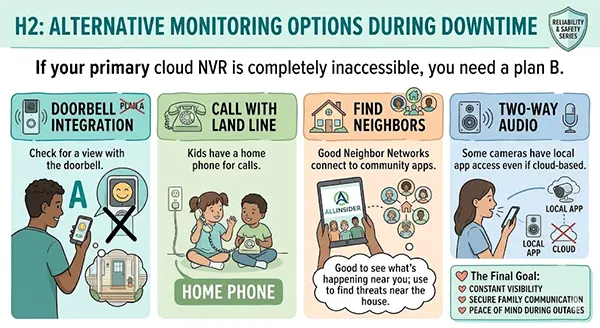
If your primary cloud NVR is completely inaccessible, you need a plan B. These are the basic communication systems you must employ at home:
- Doorbell Integration: Check for the doorbell with a view.
- Call with Land Line: Kids must have a home phone for calls.
- Find Neighbors: Good Neighbor Networks connect to community apps. Good to see what’s happening near you; use to find threats near the house.
- Two-Way Audio: Some cameras have local app access even if cloud-based.
Here is the modern infographic for easy elaboration:
Conclusion
A Remote Cloud storage system is powerful, but you need to ensure you have a backup plan in place. You can combine the benefits of cloud services with reliable storage to help make your home safe.
As we know, “forewarned is forearmed”; being prepared for downtime is what separates a truly secure home from one that is merely “connected.”
Frequently Asked Questions
1) Will my cameras record if Wi-Fi is fine, but the internet is out?
2) How much data does Cloud NVR use?
A 4K camera uses 2-4 Mbps upload data. For a family of cameras, you will want a high-speed fiber connection.
3) Is Cloud NVR safer than a local NVR box?
Yes, in general. It protects the recorder from being physically stolen, but it will depend on your connection to the internet.
4) Can I use a mobile hotspot as a backup for my Cloud NVR?
Yes, some models of routers have a USB Failover feature to keep the system online with a 5G dongle during a fiber outage.
 Divya Kakkar
Internet Content Writer
About article
The author of this article Divya Kakkar, an Internet Content Writer at Saferloop, brings practical experience and industry knowledge to the subject.
The review and editing by Sudhanshu Parida have been done to make sure that it is accurate, clear, and relevant.
At Saferloop, we are determined to provide high-quality, well-researched, and updated content. To understand further how we produce and revise our articles, please refer to our Editorial Guidelines.
Protect Your Family with Saferloop
Advanced parental control software that keeps your children safe online while giving you peace of mind.
- Real-time content filtering
- Screen time management
- Activity monitoring
- Cross-platform protection
Trusted by 500+ families