Ans: The most trusted platforms have bank-level encryption and require biometric login. However, I still suggest using a unique password for the best level of security.
×

Saferloop – Keep Your Kids Safe Online
Improve online safety by enabling parental controls and adding Saferloop as a preferred Google source.
Best Childcare Communication Software in 2026 and Their Complete Services for Modern Families
87% of parents express support for technology integration in schools for enhancing learning. As parents familiar with digital technology become increasingly reliant on immediate access to their child’s classroom, they expect that same level of connection to their bank or grocery delivery service.
This shift is not simply about convenience; overall, it’s about developing a clear and transparent HD window into growth and development that most kids of all ages can adapt to. By utilizing these tools, educators can finally connect the home and school experiences of children and keep parents up-to-date with regular school activities.
This guide explores the premier tools that turn daily data into a shared story of growth.
Key Takeaways
- Live digital charts provide parents with a real-time record of children’s nutrition and behavior, rather than having to guess at the end of the day.
- Family personal information and photos are safe using encrypted cloud storage and two-factor authentication.
- Centralized systems create a “digital village” that enables collaboration between educators and parents to achieve development outcomes.
- Automated invoicing and digital receipts make the administrative aspects of caring for children less burdensome for busy families.
Table of Contents:
- Key Features Parents Should Look for in Childcare Communication Platforms
- How Childcare Apps Improve Parent–Teacher Communication
- Top Childcare Communication Software Options in 2026
- Benefits of Using Childcare Management Platforms for Families
- Tips for Selecting the Right Childcare Communication Software
- Frequently Asked Questions
Key Features Parents Should Look for in Childcare Communication Platforms
Today requires a “good” app plus a co-pilot like parent. Parents need an app that makes complicated data into an easy-to-read narrative about the child’s day at child care.
Real-Time Messaging
This feature acts as the “direct line” between home and the classroom, allowing for instant coordination.
- Skips the front desk for immediate updates.
- Ensures emergency notifications bypass “Do Not Disturb” settings.
- Bridges language gaps between diverse staff and families.
- Confirms that critical information has been viewed.
Activity Updates
Knowing the “what” and “when” of a child’s day provides the benefit of continuity between school and home.
- Captures developmental “firsts” instantly.
- Provides accurate physiological data.
- Links daily play to learning objectives.
- Identifies emotional patterns throughout the week.
Photo Sharing
“A picture is worth a thousand words,” and in childcare, it’s worth a thousand “peace of mind” moments.
- Private, encrypted folders for family access only.
- Preserves memories in crisp, professional quality.
- Easily sorts photos by child or event.
- Allows for easy saving to personal devices.
Attendance Tracking
Safety is the cornerstone of any childcare service, and digital tracking is the new gold standard.
- Uses QR codes or geofencing for speed.
- Digital ID verification for non-parental guardians.
- Ensures rooms never exceed legal capacity limits.
- Provides a permanent record of arrival and departure.
Daily Reports
The end-of-day summary is the “final handshake” that keeps everyone on the same page.
- Replaces paper waste with interactive digital PDFs.
- Note any medication administered or temperature checks.
- Automatically notifies parents of low diaper or wipe stock.
- Written notes on social interactions and behavior.
How Childcare Apps Improve Parent–Teacher Communication
Meaningful dialogue is the cornerstone of early childhood education. As the idiom goes, “It takes a village to raise a child,” and these apps are the modern village square.
| Interaction Type | Traditional Method | Digital Advantage |
| Daily Handover | Rushed verbal notes at the door. | Detailed digital logs are available all day. |
| Emergency Alerts | Phone trees and missed voicemails. | Instant push notifications to all guardians. |
| Health Updates | Paper forms that get lost in bags. | Real-time health logs with timestamped alerts. |
| Parent Conferences | In-person meetings every 6 months. | Ongoing, collaborative goal-setting via video. |
| Activity Planning | Printed flyers on bulletin boards. | Interactive calendars with automated reminders. |
Top Childcare Communication Software Options in 2026
I’ve analyzed the current market, and these four platforms stand out for their robust reliability and user-friendly interfaces.
- Brightwheel is a well-known leader in early education center management because of its ability to provide billing and attendance information, along with parent communication, all in one simple and fast dashboard.
- Procare Solutions has been around for a long time as an industry leader for providing in-depth data analytics that measure the long-term growth of children for parents.
- HiMama is a new platform with a social media flair, focusing on sharing photos and daily journals, which many parents enjoy seeing visually.
- Kangarootime is a younger platform that has a business cloud telephony solution to perform quality video and audio check-ins between teachers and parents.
Whether you are thinking about essential tips for keeping children safe while traveling or just exploring tools, these options may not disappoint you!
Benefits of Using Childcare Management Platforms for Families
When a family chooses a tech-enabled daycare, they aren’t just buying convenience; they are buying “Mental Bandwidth.”
The greatest benefit is the elimination of the “transition shock” when a parent returns home. As per the idiom, “Time is money,” and for a parent, time is also an emotional connection. By having these details ahead of time, the evening becomes about quality bonding rather than administrative catch-up.
Furthermore, these platforms provide a permanent digital scrapbook of a child’s early years, a treasure trove of data and memories that would otherwise be lost to time.
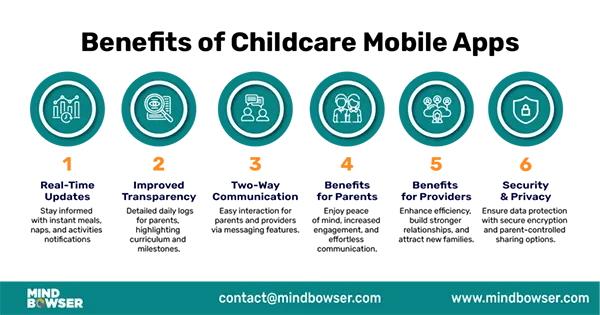
Here is the infographic for the structured and informational layout depicting the benefits of childcare mobile apps:
Tips for Selecting the Right Childcare Communication Software
Some organizations offer much better quality than others. Before making your final choice, I recommend asking these four major questions related to the technology behind the business before signing a deal.
- Security Protocols: Does the application use end-to-end encryption when sharing photos with others, as well as for storing personal data?
- User Experience (UX): Is the app/use of the product easy enough for my grandma to use during an authorized pick-up?
- Customer Service: Does the provider have technical assistance available 24/7, should the application crash while in use during an emergency?
- Integration Capacity: Is it possible to integrate the app with your personal calendars at Google or Outlook so that you may keep track of holidays from school?
Like Benjamin Franklin said, “The best kind of investment is one in knowledge.” Choosing a business cloud telephony solution is a great way to invest not only in the security of your child and the safety of their teachers, but also helps ensure that your child’s education is not negatively affected.
When you choose to work with an organization that emphasizes these types of tools, you are also investing in your family’s connectedness to one another.
Frequently Asked Questions
Q1: Are these applications secure from being hacked?
Q2: Will these applications eliminate in-person conversation with educators?
Ans: Not at all. These applications have been created to collect the data created daily so that in-person discussions can be used to focus on your child’s personality and development more deeply and meaningfully.
Q3: Can I invite multiple family members to access my account?
Ans: Yes. Almost every application on the market allows you to invite grandparents, nannies, or other caregivers; these members may have defined permission levels for viewing and checking in.
Q4: Will my application work on both iPhones and Androids?
Ans: Yes. All major childcare applications provide cross-platform compatibility, enabling all family members to have access to information regardless of their platform.
 Divya Kakkar
Internet Content Writer
About article
The author of this article Divya Kakkar, an Internet Content Writer at Saferloop, brings practical experience and industry knowledge to the subject.
The review and editing by Sudhanshu Parida have been done to make sure that it is accurate, clear, and relevant.
At Saferloop, we are determined to provide high-quality, well-researched, and updated content. To understand further how we produce and revise our articles, please refer to our Editorial Guidelines.
Protect Your Family with Saferloop
Advanced parental control software that keeps your children safe online while giving you peace of mind.
- Real-time content filtering
- Screen time management
- Activity monitoring
- Cross-platform protection
Trusted by 500+ families