
Ans: No, there is no parental control on Telegram. So, you have to install a third-party parental control app like Saferloop to enhance children’s safety.
×

Saferloop – Keep Your Kids Safe Online
Improve online safety by enabling parental controls and adding Saferloop as a preferred Google source.
Telegram: Online Risks, Privacy, Safety Tips & Parental Controls Guide
Telegram is always known for its controversies about pirated movies and child grooming. This means that if kids use this app, it is like playing with danger. So, you should focus on enabling Telegram parental controls to make it worthy to use.
But I know you are wondering, “How to do it?” So, you should stay till the end to discover how does it work, online risks, set up guidance, parental controls, and safety tips for parents.
Quick Answer:
Telegram is a messaging app like WhatsApp. You and your kids can easily chat, share photos, and send voice notes to your friends and family. But it also contains inappropriate content, so you should set up Telegram parental controls.
Table of Contents:
What is Telegram?
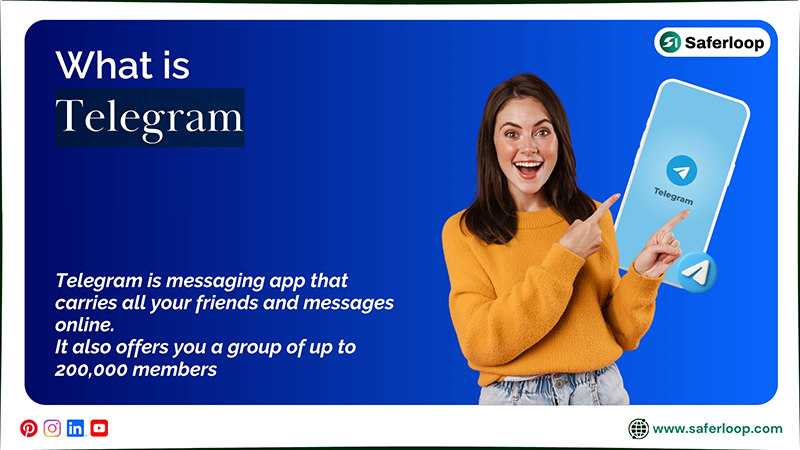
Most of you must already know Telegram! It is a big notebook that carries all your friends and messages online. The app is just another version of WhatsApp that was launched in 2013 in Russia.
You can enjoy chit-chats with your friends and loved ones non-stop for free. It also offers you a group of up to 200,000 members, so that you can talk to various people together. Also, you can have a secret conversation with those you value privacy and dignity.
But it also faces some scrutiny about privacy and safety allegations. It is related to controversies like adult content and pedophiles. This means that Telegram is not safe for young children and teenagers.
How Does Telegram Work?
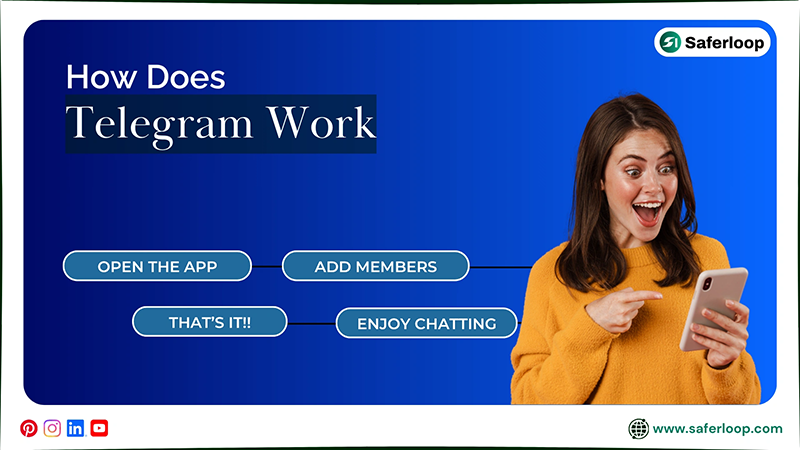
Open the app > add members > enjoy chatting.
Let’s start with a real example! If you want to enjoy chatting on Telegram, you can open the app and add your friends’ contact numbers to your phone. After that, you can start a conversation by sending “hi,” “what’s going on in your life,” or “how’s your day?”
You can also add your friends to a group for school projects or share memes. But it is commonly used to download copied movies and web series, which can be both illegal and unsafe for everyone.
This raises concerns when children use the app, and might worry parents about, “Is Telegram safe for kids?”
Is Telegram Safe for Kids?
The answer is a big NO. Because your kids might see adult images and videos in group chats.
Let’s understand with a real scenario, what happens when your innocent little ones use Telegram without guidance. Imagine your kids open the app and some unknown people add them to an adult-focused group.
They might be watching inappropriate content, double-meaning words, and vulgar language in that group. This affects their mental and emotional well-being and distracts them from their daily lives.
So, I suggest you keep your children away from using the app. If they manipulate you to use it, you must set up Telegram parental controls and install the Saferloop parental control software to add security to their devices.
This software offers a wide range of safety features, such as:
- Monitor your kids’ online activities to keep yourself updated on how they surf the internet.
- You can also set screen time limits to decrease your children’s phone use and encourage healthy habits.
- With the use of an app blocker, you can block unsafe apps like Telegram from your kids’ devices to keep them safe.
- You can track the real-time location of your kids and receive geofencing alerts when they reach or exit the area.
- It also sends emergency alerts, SOS updates, and reports when something suspicious is detected in your children’s devices.
- Use the Saferloop safety checkup extension for Chrome to add an extra layer of security to your children’s phones.
- Enjoy the Saferloop AI version to get answers related to your queries and digital parenting issues.
In short, you can protect your children online by installing the Saferloop parental control software. It really gives you peace of mind.
Telegram Online Risks for Children
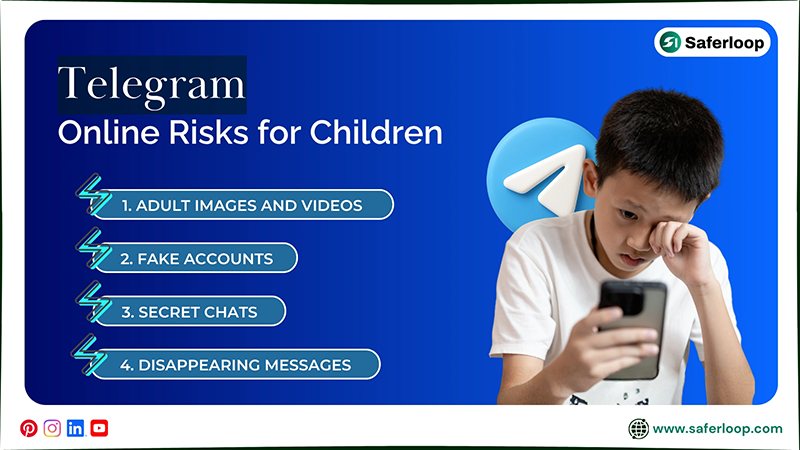
Your children can face online risks like adult images and videos, fake accounts, secret chats, and disappearing messages on Telegram. So, you should stay vigilant about how to protect them on this messaging app.
To understand more about safety concerns, let’s skim through this section!
1. Adult Images and Videos
What’s more dangerous? When your little ones join unknown groups, they can see adult images and videos or s*x chats on their app. This way, they can engage with bad companionship and damage their mental and emotional health.
2. Fake Accounts
You already know that online apps are the best home for predators. It means that people create fake accounts on Telegram and impersonate teenagers to target your kids. They can also convince your children to build a sexual relationship and try to groom them.
3. Secret Chats
Secret chats sound interesting when you want private chats. But it can be more dangerous for children because they can hide every conversation from you. So, you don’t have any idea with whom and how they can interact on Telegram.
4. Disappearing Messages
You can only view disappearing messages one at a time. So, if your kids receive these kinds of texts, you can’t track what they see and how they interact on the Telegram app. In case you want to complaint a report, you don’t have any proof against the sender.
Also Read: Is Snapchat Safe for Kids? Here’s What Parents Should Know About This Social Media Platform
How to Set Up Telegram Parental Controls?
You must know that Telegram doesn’t have built-in parental controls for children’s safety because it is an adult-centric app. But you can manage some settings to keep your kids’ accounts safe.
That’s why I’ve mentioned some instructions to ensure your little ones’ safety on the Telegram app in this section.
1. Hide Your Kids’ Phone Number
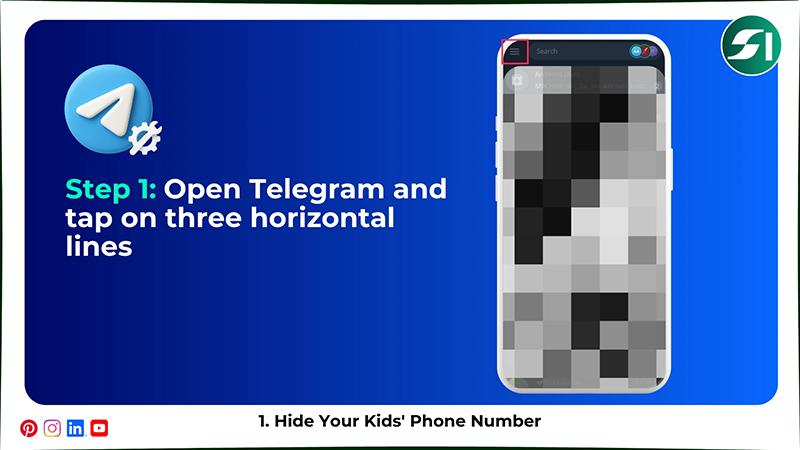
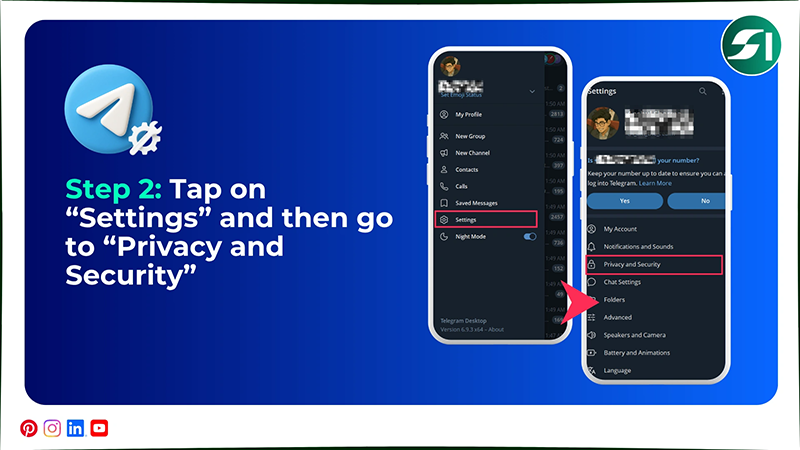
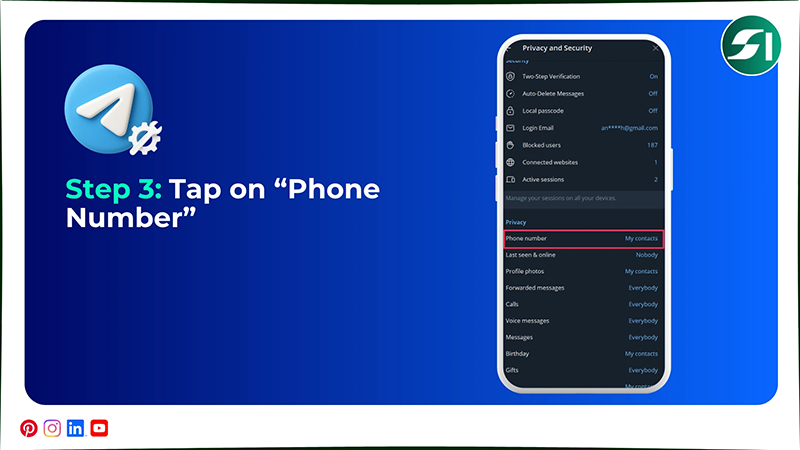
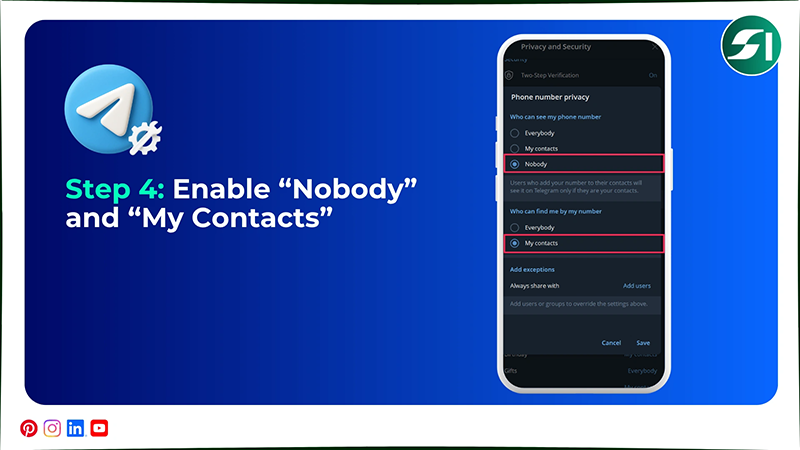
To hide your kids’ phone number on Telegram, you should open the app > three horizontal lines > Settings > Privacy and Security > Phone Number > Nobody, and My Contacts.
Let’s take a look at the simple and detailed steps on how to hide phone number on Telegram.
Step 1: Open the Telegram app and tap on the three horizontal lines in the top-left corner.
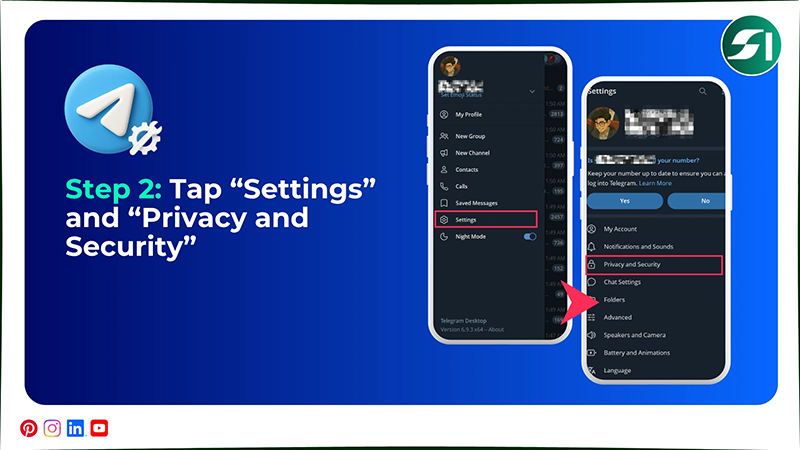
Step 2: Tap on “Settings” from the menu and select “Privacy and Security.”
Step 3: Next, tap on “Phone Number” to proceed further.
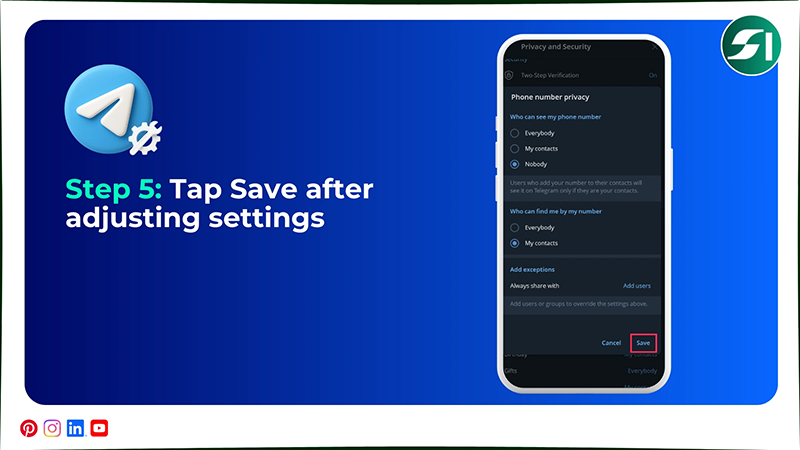
Step 4: Now, you should select “Nobody” in “who can see my phone number,” and choose “My Contacts” in “who can find me by my number.”
Step 5: Tap Save after adjusting settings.
2. Restrict Who Can Message Your Children
To restrict who can message your children, open the Telegram account > three horizontal lines > Settings > Notifications and Sounds > Messages > My Contacts and Premium Members.
Let’s take a look at the following steps to discover how to restrict who can message your kids.
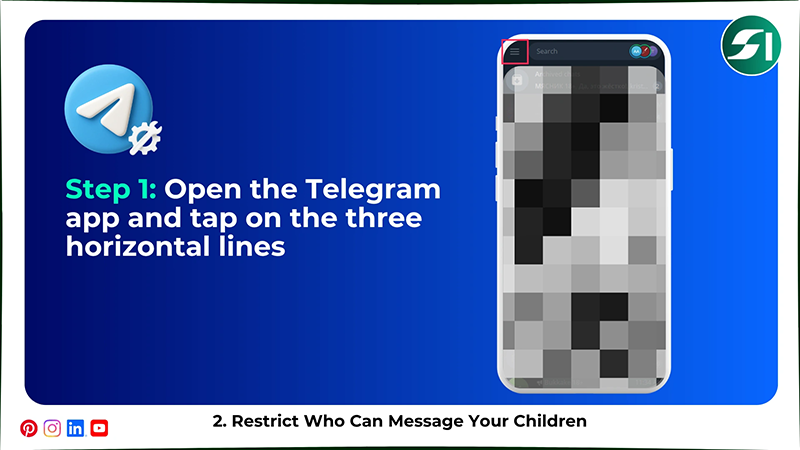
Step 1: Go to the Telegram app and tap on the three horizontal lines.
Step 2: Tap on “Settings” and go to “Privacy and Security.”
Step 3: Next, tap on “Messages,” and select “My Contacts and Premium users.”
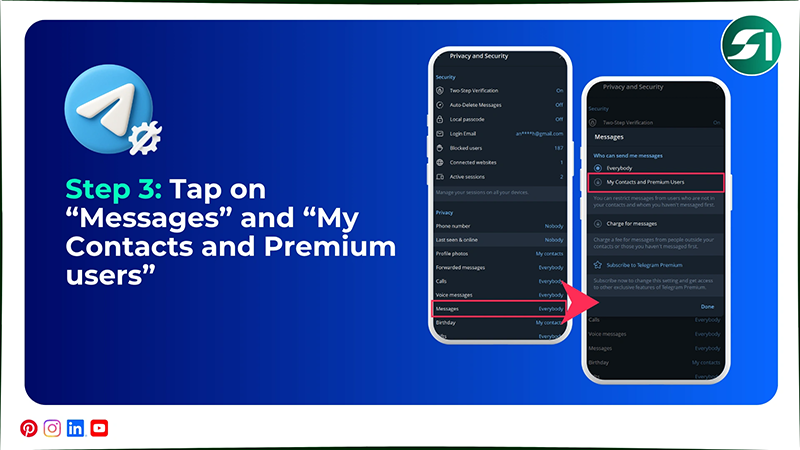
Note: Telegram Premium subscription is needed to activate My Contacts and Premium users in Messages settings.
3. Block 18+ Content on Telegram
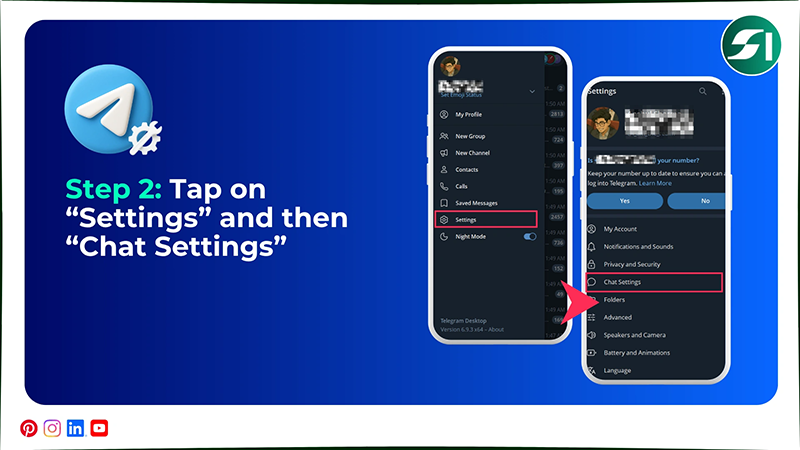
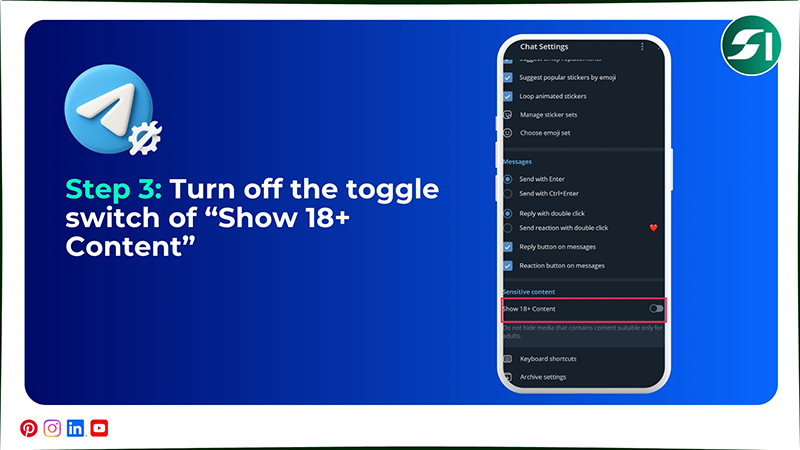
To block 18+ content on Telegram, you should open the app > three horizontal lines > Settings > Chat Settings > turn off Show 18+ content.
Here are the following steps on how to block 18+ content on Telegram in great detail.
Step 1: Open your Telegram account and tap on the three horizontal lines.

Step 2: Go to “Settings” and tap on “Chat Settings.”
Step 3: Now, you have to turn off the toggle switch for “Show 18+ Content.”
4. Block Someone on Telegram
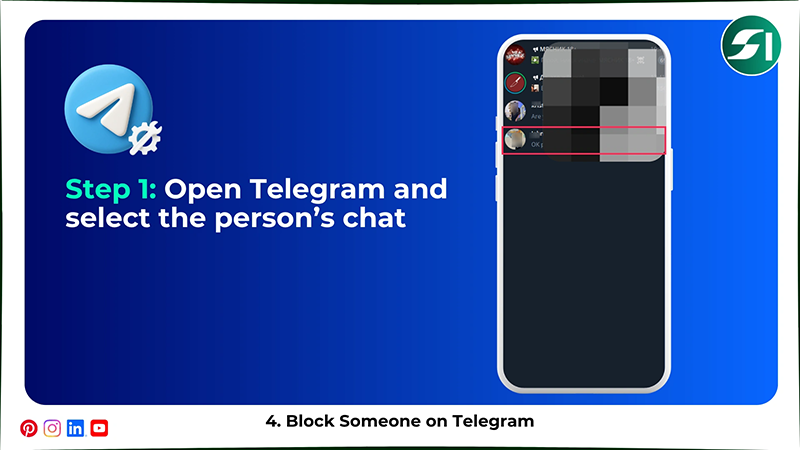
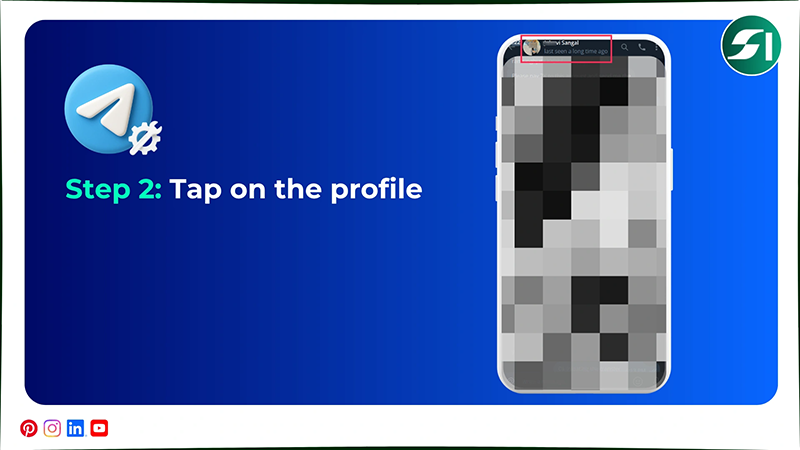
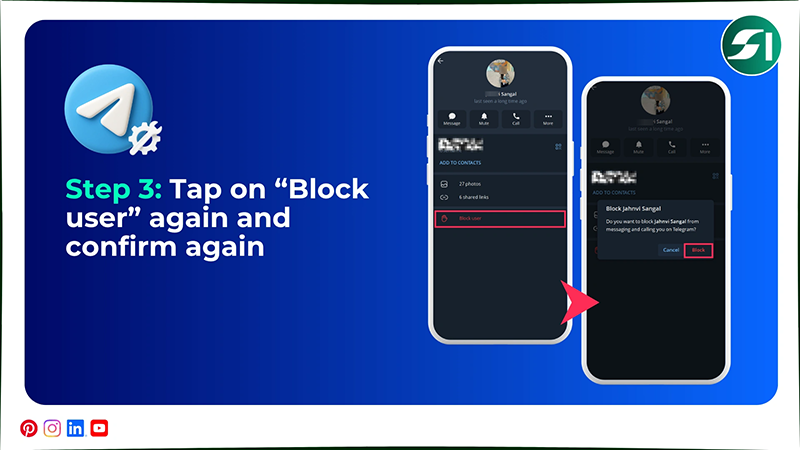
To block someone on Telegram, you should open the app > select the chat > profile > three vertical dots > Block user again and again.
So, have a look at these steps to understand how to block someone on Telegram.
Step 1: Open the Telegram app and select the chat of a person you want to block.
Step 2: Now, tap on the profile above.
Step 3: Next, tap on “Block user” again and confirm again to permanently restrict the person.
5. Set Up Two-Step Verification
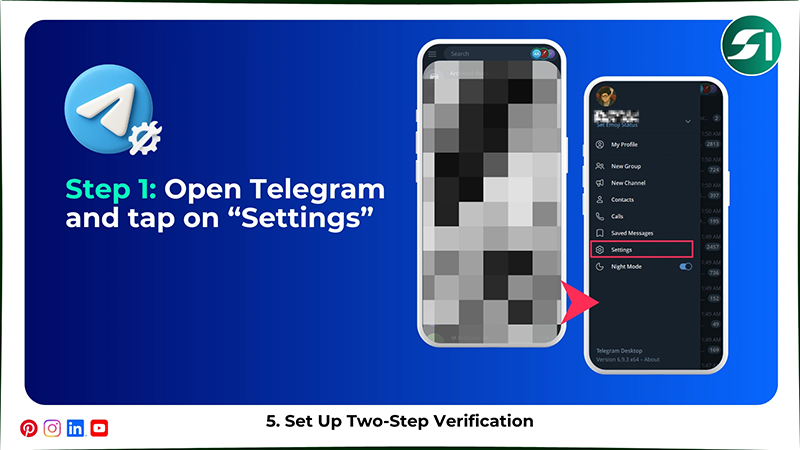
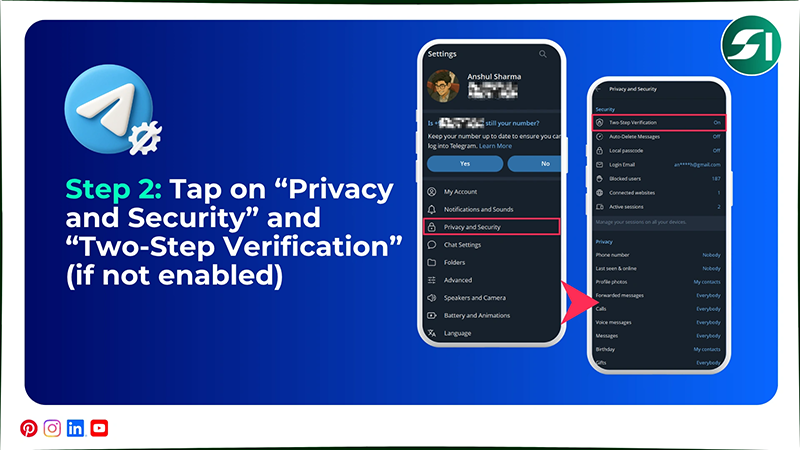
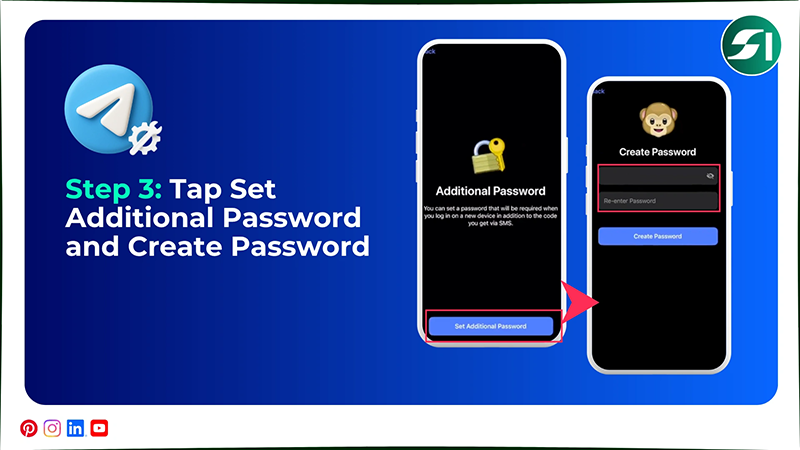
To set up two-step verification on Telegram, you should open the app > Settings > Privacy and Security > Two-Step verification > Set Additional Password > Create a password > Create a hint > Add recovery email address.
Here are the steps on how to set up two-step verification on Telegram to enhance your safety.
Step 1: Open your Telegram account and tap on “Settings.”
Step 2: Tap “Privacy and Security” and tap on “Two-Step Verification.”
Step 3: Now, tap “Set Additional Password” and create a strong and unique password.
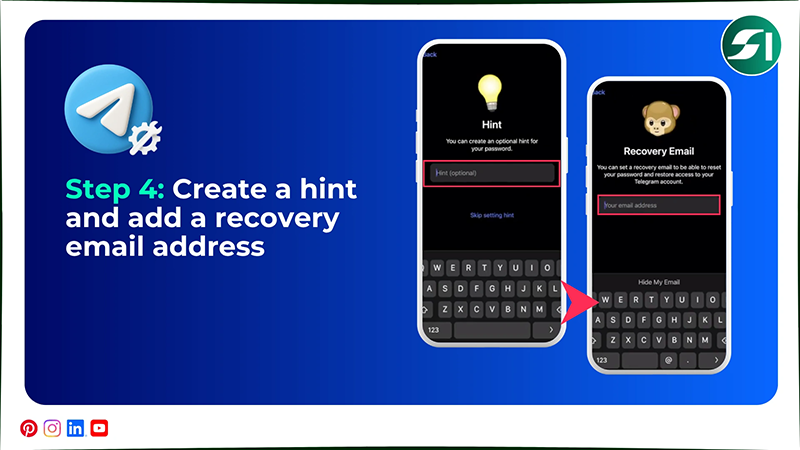
Step 4: Next, you can create a hint for your password and add a recovery email to access the Telegram app.
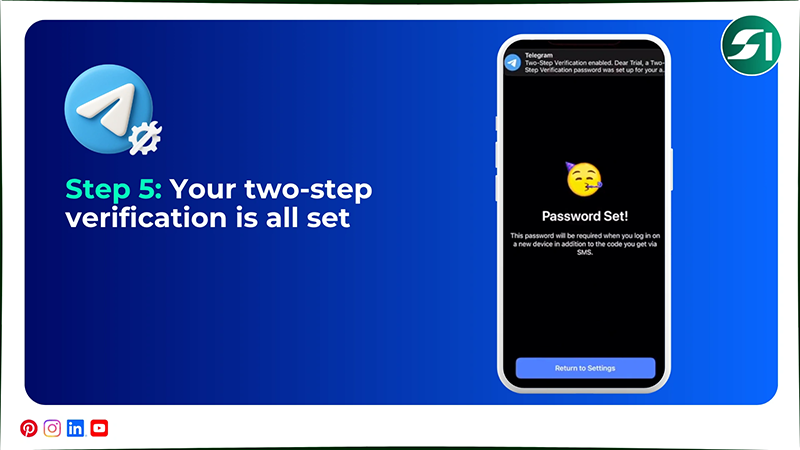
Step 5: That’s it. Now your two-step verification is all set to protect your account.
How Should Parents Protect Children on Telegram?
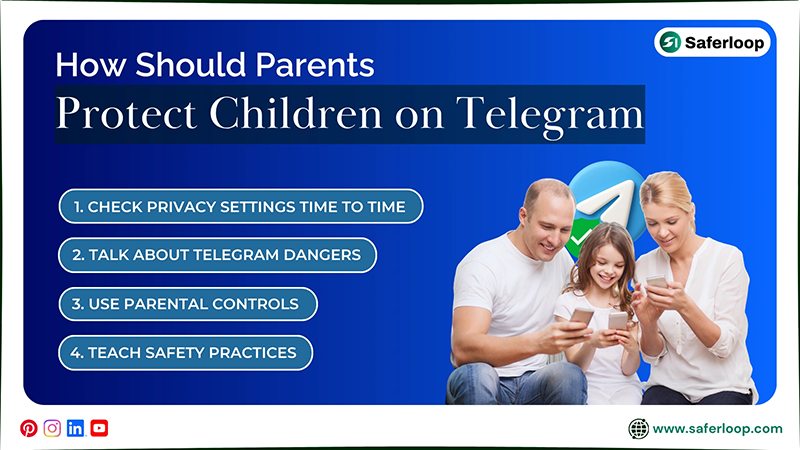
As a helicopter parent, you should check privacy settings from time to time, talk about Telegram dangers, use parental controls, and teach safety practices to protect your children.
Here, I’ve mentioned some basic tips for you to keep your children safe on Telegram.
1. Check Privacy Settings Time to Time
You should take time from your busy schedule to check privacy settings on your kids’ devices. This includes secret chats, my contact, two-step verification, and blocking adult content. This regular habit helps you to keep checking your children’s safety.
2. Talk About Telegram Dangers
Just to spread awareness among your little ones, you should have an open discussion about the Telegram dangers. Like fake accounts, scams, adult images and videos, and contact with strangers. This makes them aware of its risks and use the app mindfully.
3. Use Parental Controls
To add more security, you should set up the safest parental control app, like Saferloop parental control software, to monitor your kids’ online activities, set screen time limits, web filtering, and app blocking.
4. Teach Safety Practices
Now, you have to teach your kids safety measures, such as not to share personal information and passwords, and how to block or report someone on Telegram. It empowers them to make informed decisions on their own when you aren’t around them.
Also Read: Complete Guide to YouTube: Overview, History, Need for YouTube Parental Control & Setup Tips
Safe Alternatives to Telegram for Kids
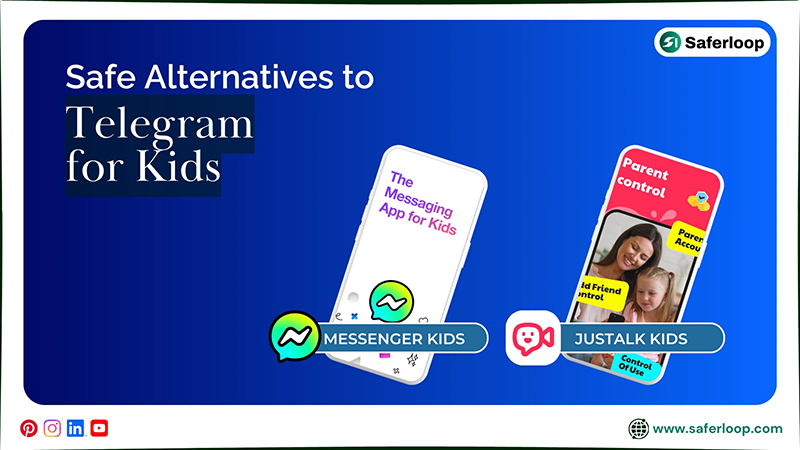
You can try Messenger Kids and JusTalk Kids for your children to connect with friends and family. These two safer options are best for your little ones, so I’ve decided to describe them briefly in this section.
1. Messenger Kids
Messenger Kids can become your kids’ favourite app to connect with friends and family members. You can use built-in parental controls to watch over how your children interact on the app. It also offers amazing filters, games, doodles, and stickers to maintain little ones’ interest.
2. JusTalk Kids
JusTalk Kids is a safer way to message your friends and family while enjoying mini-games, doodles, and cute stickers. You can also use in-app parental controls to block strangers and monitor how your kids talk online. It can be the best choice over the Telegram app.
Wrapping Up!
Overall, you understand that Telegram is not meant for kids, and you should keep them away from using it. Also, it is important to enable Telegram parental controls to keep your children’s safety under your control because prevention is better than a cure!
You should also set up the Saferloop parental control software to enhance your security and keep an eye on their activities from a single dashboard.
Author’s Note:
I was shocked when I figured out that Telegram is not safe for young children. That’s why I recommend that you use Telegram parental controls to keep your kids safe on this app.
Also, I suggest you install the Saferloop parental control app because the in-app settings don’t have enough advanced features. It gives you peace of mind that you manage all restrictions within a few clicks.
Frequently Asked Questions
Q: Is there parental control on Telegram?
Q: How to block 18+ content on Telegram?
Ans: You can block 18+ content on Telegram, open the app > three horizontal lines > Settings > Chat Settings > turn off Show 18+ content.
Q: Does Telegram have inappropriate content?
Ans: Yes, Telegram has inappropriate content and might affect children’s emotional and physical health.
Q: What to avoid on Telegram?
Ans: You should avoid joining channels or groups and contacting strangers on Telegram, as it is unsafe and risks your safety and privacy.
 Neha Sharma
Parental Control & App Safety Writer
About article
The author of this article Neha Sharma, an Parental Control & App Safety Writer at Saferloop, brings practical experience and industry knowledge to the subject.
The review and editing by Evan Patterson have been done to make sure that it is accurate, clear, and relevant.
At Saferloop, we are determined to provide high-quality, well-researched, and updated content. To understand further how we produce and revise our articles, please refer to our Editorial Guidelines.
Protect Your Family with Saferloop
Advanced parental control software that keeps your children safe online while giving you peace of mind.
- Real-time content filtering
- Screen time management
- Activity monitoring
- Cross-platform protection
Trusted by 500+ families