
A digital wallet is an app on your smartphone that allows you to save debit, credit, and prepaid cards. They can also store rewards, loyalty, and gift cards.
×

Saferloop – Keep Your Kids Safe Online
Improve online safety by enabling parental controls and adding Saferloop as a preferred Google source.
The Digital Wallet: What Parents Need to Know
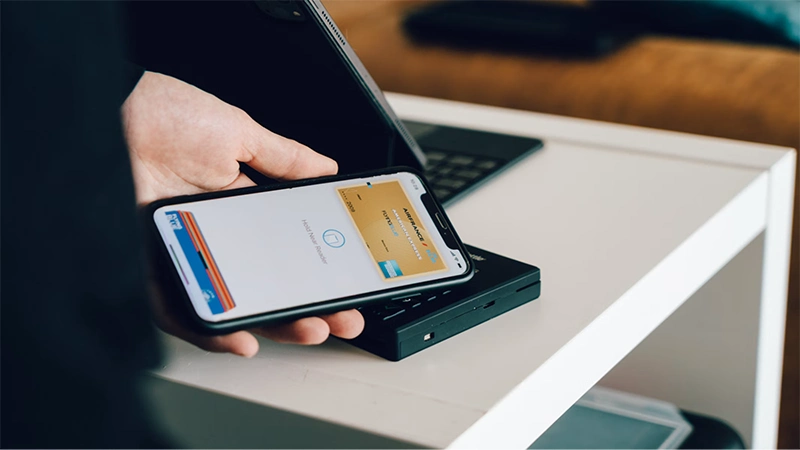
In today’s world, digital wallets are a great and convenient tool for a lot of people, as they allow for easy and quick transactions without needing any complexity.
But convenience can make spending feel less visible, and in this case, much care should be taken. As well as the knowledge of important things like where payment details will be stored, whether any security tools are available, and how children can use these tools responsibly.
Read the blog ot learn about digital wallets and what parents should know
Table of Contents:
How Digital Wallets Work
An app or device feature that stores payment credentials for use at checkout is called a digital wallet Depending on the service, it may support debit cards, credit cards, prepaid balances, or gift cards. This overview of digital wallet basics explains how, without requiring users to enter card details for every purchase, wallets exchange payment information.
In a store, the phone or wearable communicates with a compatible terminal. Online, the wallet supplies approved payment information after the user confirms the purchase. A digital wallet may also store tickets, loyalty cards, and transit passes, so parents should review everything connected to a child’s account.
Security Features for Online Payments
This guide to digital wallet safety outlines common protections and sensible user precautions. Start by enabling biometric authentication, a strong device passcode, and purchase notifications. Many wallets replace the actual card number with a token during a transaction, which limits the payment data shared with a merchant.
Parents should also recognize that merchants have responsibilities when accepting digital payments. Businesses selling across borders may use payment processing for international businesses that support multiple currencies and security measures such as 3-D Secure and PCI compliance. These systems work behind the checkout page, while families still need to protect their own accounts and devices.
Setting Spending Limits for Kids
Choose a payment method that lets you control how much money is available. A prepaid balance of $20 for a school outing creates a clear boundary, while a linked credit card could expose a much larger amount. If the wallet offers family controls, require approval for each purchase or set a weekly allowance.
Including small in-app charges: Keep app store purchases behind a password or biometric check. Review the wallet history together once a week and discuss what each purchase provided. A child may see a $1.99 purchase as insignificant, but repeated transactions add up quickly. This turns the transaction list into a practical budgeting lesson instead of a record checked only after a problem.
Protecting Your Family’s Payment Data
Treat every device connected to a digital wallet as a key to the family account. Install software updates promptly, enable automatic screen locking, and use unique passwords for the wallet’s associated email account. Avoid approving unexpected payment prompts, even if the amount is small.
Complete sensitive account changes over a trusted home connection or cellular network. Public Wi-Fi can create unnecessary exposure. If a phone goes missing, use the device maker’s remote tools to lock or erase it. Contact the card issuer promptly if the wallet shows a purchase your family doesn’t recognize. Teach children never to share verification codes, screenshots of payment cards, or account passwords with friends.
The Future of Payments and Kids
Children growing up with tap-to-pay options may rarely handle cash, which changes how they experience spending. New wallet features are likely to offer more detailed parental permissions, instant alerts,s and controls based on merchant category or transaction size. Schools, transit systems and youth programs may also adopt more app-based payments.
By keeping money conversations tied to real amounts Families can prepare . Show your child that a tap for lunch reduces an available balance in the same way handing over cash would. Since controls suited to a 10-year-old may frustrate a responsible teenager, revisit permissions as maturity changes. Agree on one clear rule: Before adding the first card, both the child and parent must see every purchase.
Frequently Asked Questions
What is a Digital Wallet?
What Is The Safest Digital Wallet?
PhonePe, Google Pay, Paytm, Amazon Pay UPI.
Is there an age limit for digital wallets?
Yes, the current age restrictions for adding a card to a smartphone or device are for children over the age of 13 years for Apple Pay and 16 years old for Google Pay.
 Justin Thomas
Cybersecurity Analyst and Digital Safety Writer
About article
The author of this article Justin Thomas, an Cybersecurity Analyst and Digital Safety Writer at Saferloop, brings practical experience and industry knowledge to the subject.
The review and editing by Evan Patterson have been done to make sure that it is accurate, clear, and relevant.
At Saferloop, we are determined to provide high-quality, well-researched, and updated content. To understand further how we produce and revise our articles, please refer to our Editorial Guidelines.
Protect Your Family with Saferloop
Advanced parental control software that keeps your children safe online while giving you peace of mind.
- Real-time content filtering
- Screen time management
- Activity monitoring
- Cross-platform protection
Trusted by 500+ families