Ans: Screen Time Labs is the best screen time limits parental control app, as it provides custom limits so you can adjust screen time according to different apps, weeks, or daily schedules.
×

Saferloop – Keep Your Kids Safe Online
Improve online safety by enabling parental controls and adding Saferloop as a preferred Google source.
Saferloop vs Screen Time Labs: Features-By-Features Comparison, Pros and Cons, and Setup Guidance
As a concerned parent, you must understand Saferloop vs Screen Time Labs parental control apps. It helps you choose the best security app to keep your children safe online.
Here, I’ve compiled information about overviews, setup guidance, features-by-features comparison, pros and cons, and some recommendations.
So, stay tuned!
Quick Answer:
Saferloop is the winner of the Saferloop vs Screen Time Labs parental control app. It provides a comprehensive dashboard, compatibility across devices, blocking apps and websites, and advanced security. But Screen Time Labs lacks social media monitoring, compatibility on iOS devices, and app blocking.
Table of Contents:
- Saferloop Vs Screen Time Labs: Overview of both Parental Control Apps
- How to Set Up the Saferloop Parental Control Software?
- How to Set Up the Screen Time Labs Parental Control App?
- Features-By-Features Comparison: Saferloop Vs Screen Time Labs
- Pros and Cons of Both Saferloop and Screen Time Labs
- Saferloop Vs Screen Time Labs: My Personal Recommendations
- Conclusion
- Frequently Asked Questions
Saferloop Vs Screen Time Labs: Overview of both Parental Control Apps
You must know that the internet your children use comes with various dangers. That’s why you should understand that installing parental control apps is a must nowadays.
Here, I’ve mentioned the most recognized Saferloop and Screen Time Lab parental control apps to help you choose the suitable one.
1. Saferloop Parental Control Software
Ratings: ★★★★★ (5.0)
Free Trial: Yes
Price: $44.95/Year
Platforms: Compatible with iOS and Android devices
Best for: AI-powered safety features
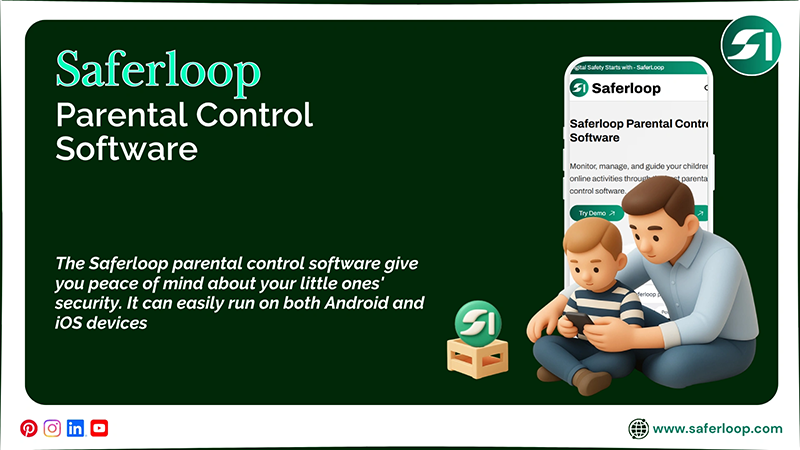
The Saferloop parental control software team works together with parents to keep the children safe online. That’s why its safety features target the main concern and allow you to use the software smoothly.
Let’s look at the following safety features to see what it offers.
- Monitor online activities
- Set screen time limits
- Block adult apps and websites
- Track location and geofencing
- Send SOS updates, alerts, and reports
- Track calls and messages
- Web filtering
It can easily run on both Android and iOS devices so that you can use it whether your children use an Android phone or an iPhone. This means that one piece of software can give you peace of mind about your little ones’ security.
2. Screen Time Labs Parental Control App
Ratings: ★★★ (3.0)
Free Trial: Yes (7-day)
Price: $6.99/month
Platforms: Compatible with Android and iOS devices
Best for: Custom time limits and location tracking
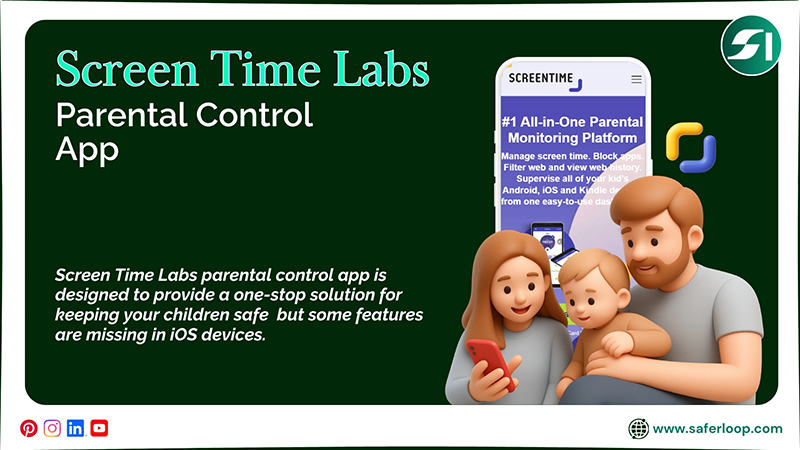
Screen Time Labs parental control app is designed to provide a one-stop solution for keeping your children safe. It offers a package of various safety features, such as
- Time limits
- Homework and tasks
- Schedules
- Instant Pause
- Free play and app usage
- Web history
- Location tracking and geofencing
Similar to Saferloop, it is compatible with Android and iOS, but some features are missing in iOS devices. So, you should pay extra attention to your kids when they use iPhones, MacBooks, and iPads.
How to Set Up the Saferloop Parental Control Software?
To set up the Saferloop parental control software, you should download the software > link a child and parent device > change settings.
Here are the simple steps on how to set up the Saferloop parental control software.
Step 1: You should download the Saferloop parental control software on your and your kid’s device.
Step 2: Then, create a parent and a child account with your email address and password.
Step 3: On a parent device, go to the “Device” option and enter your child’s name and device model.
Step 4: Click on the “Generate Link Code,” and a 6-digit code appears in the drop-down box.
Step 5: On a child’s device, go to the “Pair” option and enter a 6-digit code and your name.
Step 6: Click on “Pair Now” to link both devices.
Step 7: After completing the procedure, you can now change settings like screen time limits and web filtering according to your preferences.
How to Set Up the Screen Time Labs Parental Control App?
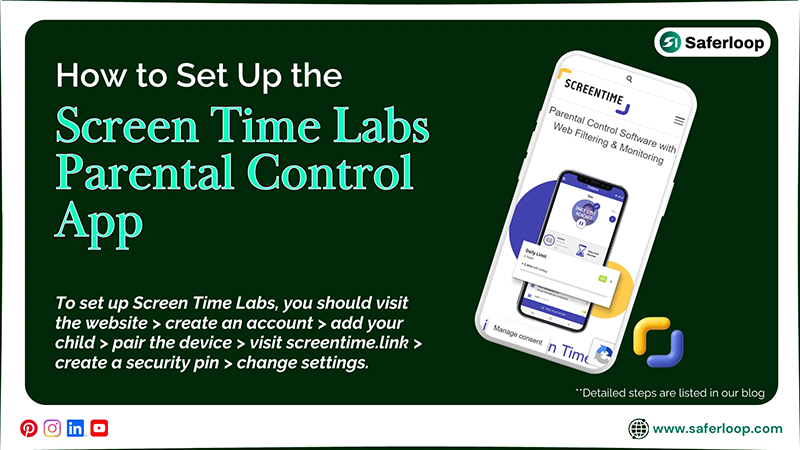
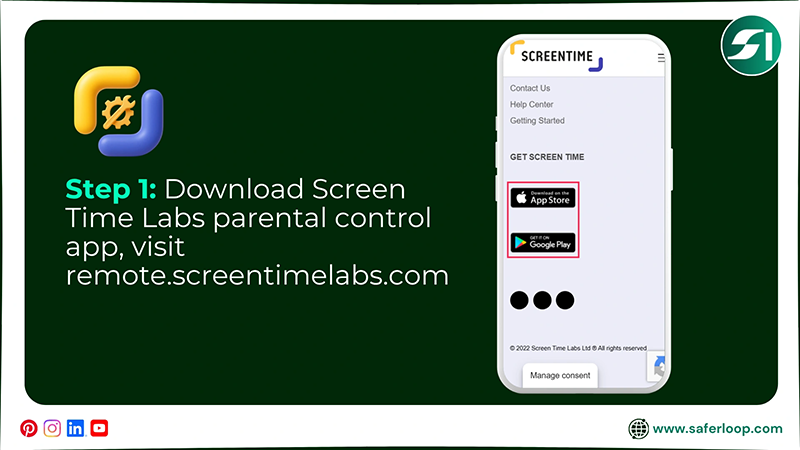
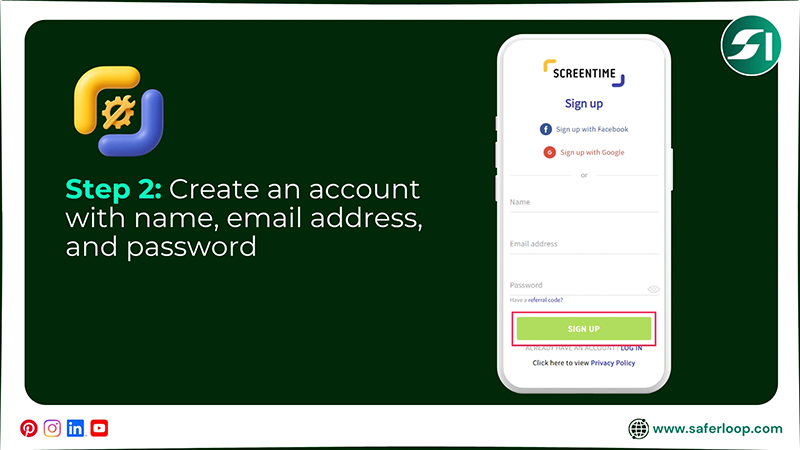
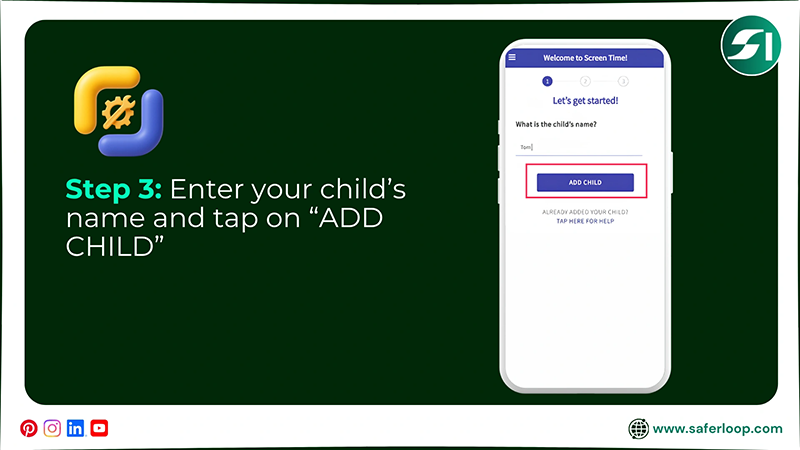
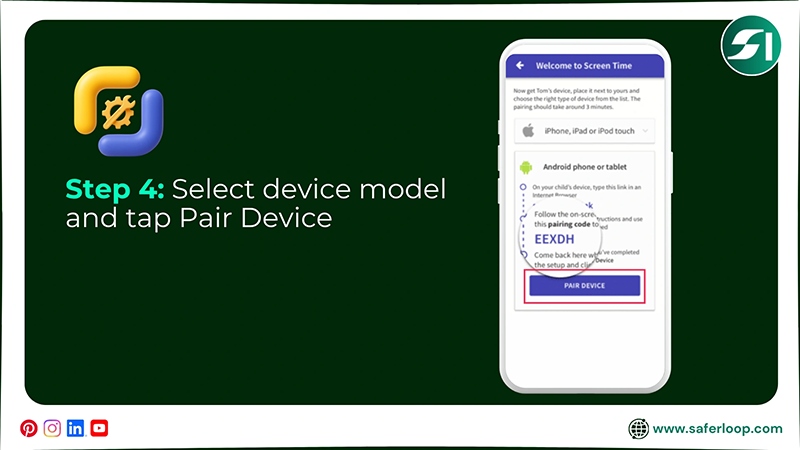
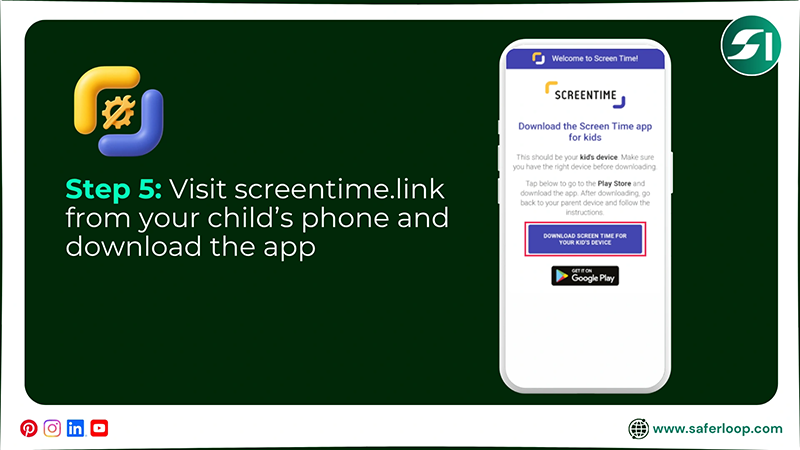
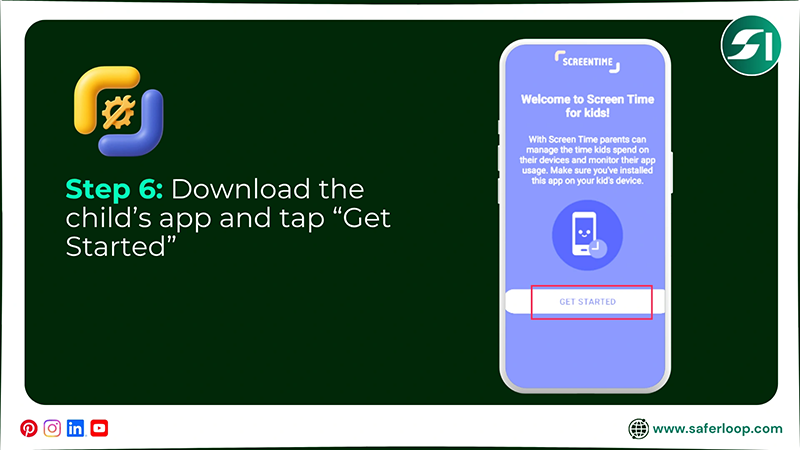
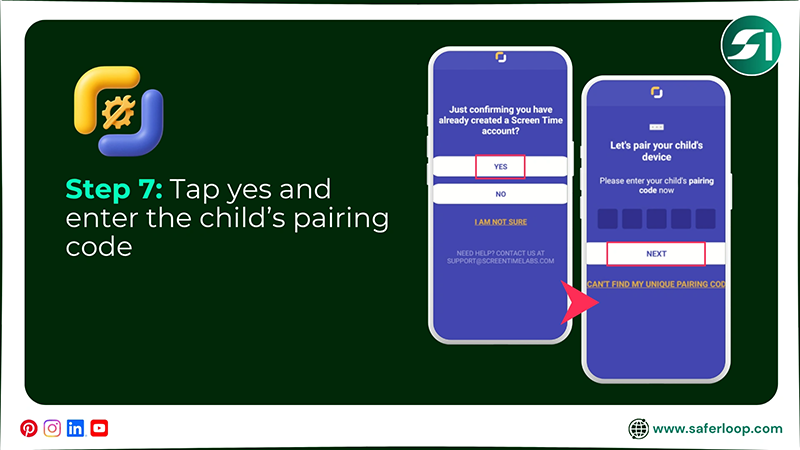
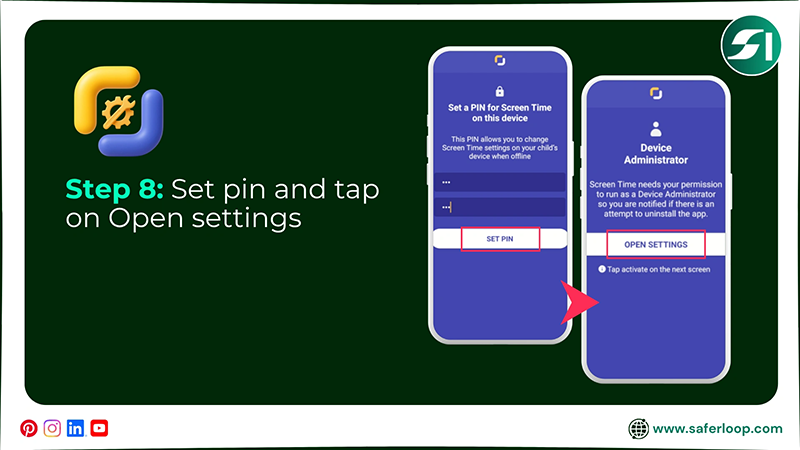
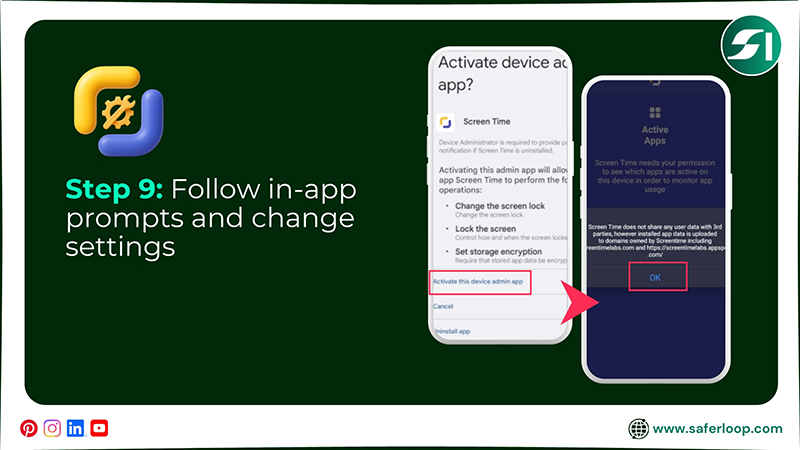
To set up Screen Time Labs, you should visit the website > create an account > add your child > pair the device > visit screentime.link > create a security pin > change settings.
Here are the detailed steps on how to set up the Screen Time Labs parental control app.
Step 1: First, visit the remote.screentimelabs.com or download the parent app on your phone.
Step 2: Now, create an account using your name, email, and password.
Step 3: Enter your child’s name and tap on “ADD CHILD.”
Step 4: Select your device model and tap on “PAIR DEVICE.”
Step 5: Visit screentime.link from your child’s phone and tap on “Download screen time for your kid’s device.”
Step 6: Now open the app and tap “Get Started.”
Step 7: Now, tap on “Yes” and enter your child’s pairing code.
Step 8: Next, create a security pin and tap on “Open Settings.”
Step 9: You can now follow in-app prompts and change settings for your child.
Features-By-Features Comparison: Saferloop Vs Screen Time Labs
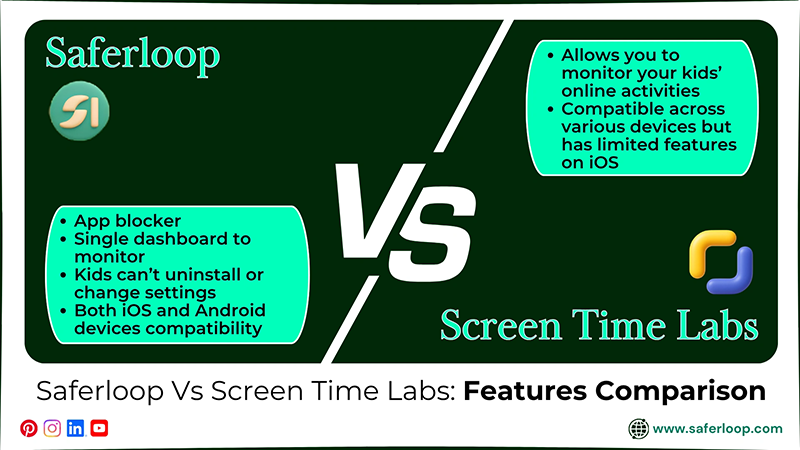
Though you know that both companies claim to be the best, you have to compare Saferloop vs Screen Time Labs to get your real answers.
Hence, I’ve mentioned a features-by-features comparison to help you make informed decisions.
| Features | Saferloop Parental Control Software | Screen Time Labs Parental Control App |
| Block Apps and Websites | App blocker helps you block unsafe apps and websites from your children’s phones. | The “App approve” feature can’t function properly in blocking or unblocking an app. |
| Advanced Security System | Kids can’t uninstall or change settings without parents’ permission. | Your little ones can easily change your restrictions and uninstall the app without your knowledge. |
| Monitor Online Activities | Provide a single dashboard to monitor your children’s online activities, including social media apps. | It allows you to monitor your kids’ online activities but lacks support for social media monitoring. |
| Compatibility with iOS and Android Devices | The software can run smoothly on both iOS and Android devices to enjoy its safety measures. | It claims to be compatible across various devices but has limited features on iOS devices and lags frequently. |
1. Block Apps and Websites
The Saferloop app blocker feature helps you restrict every single app or website you want from your children’s phone. It helps you to keep them away from unsafe sites.
Screen Time Labs also offers an “app approve” option to accept or reject app usage. But many people complain that they don’t block or unblock apps as they want because the system lags more frequently.
2. Advanced Security System
Your children cannot uninstall and change settings in the Saferloop parental control software without your permission. This means that it provides advanced security software.
But kids can easily uninstall the Screen Time Labs parental control app from their phone without parents’ permission and alter settings. It means that there is a wastage of money in buying features.
3. Monitor Online Activities
The Saferloop parental control software also provides a single dashboard to monitor your kids’ online activities. You can also check out their social media accounts closely.
Meanwhile, Screen time limits lack social media monitoring, so you can’t be able to track how your kids use Instagram, Facebook, and other social media. It makes you worry about their social circle.
4. Compatibility with iOS and Android Devices
The best part of the Saferloop parental control software is that it can smoothly run on iOS and Android devices. This can make it easy for you if you and your kids use different models.
On the other hand, Screen Time Labs advertises itself as being compatible with iOS and Android gadgets. But some features are missing in iOS devices and lag quickly.
Also Read: Saferloop vs Family Link: Which Parental Control App Keeps Your Child Safer?
Pros and Cons of Both Saferloop and Screen Time Labs
You must have heard that every coin has two sides. That’s why both Saferloop and Screen Time Labs have some benefits and drawbacks as well.
So, you have to skim through this section to uncover the pros and cons of Saferloop vs Screen Time Labs to make the right decisions.
1. Saferloop Parental Control Software
Here are the advantages and disadvantages of Saferloop parental control software.
| Pros | Cons |
| It offers a single dashboard for you to keep an eye on your kids’ activities from your own phone. | The free version is limited to basic features, so you have to purchase a premium plan to unlock advanced features. |
| You can also track your children’s real-time location to have an idea about their physical availability. | |
| It also offers budget-friendly premium plans so that it won’t burn a hole in your pocket regarding children’s safety. | |
| The software also runs on different devices, whether it is iOS or Android. |
2. Screen Time Labs Parental Control App
Here are the advantages and disadvantages of the Screen Time Labs parental control app.
| Pros | Cons |
| It is best to set custom screen time limits for your children’s phones to decrease their internet usage. | The app lacks social media monitoring, so you can’t track how your little ones interact online. |
| You can also track your kids’ location from time to time without any glitches. | It also misses some features on iOS devices and lags frequently, making it tough to run on iPads, iPhones, and MacBooks. |
| The app does a great job of providing all-in-one safety features in cheaper premium plans than its rivals. | Your tech-savvy children can easily uninstall the app without your prior knowledge, wasting your money on purchasing premium plans. |
| It also offers homework and tasks for children that encourage them to do them instantly to get rewards. |
Saferloop Vs Screen Time Labs: My Personal Recommendations
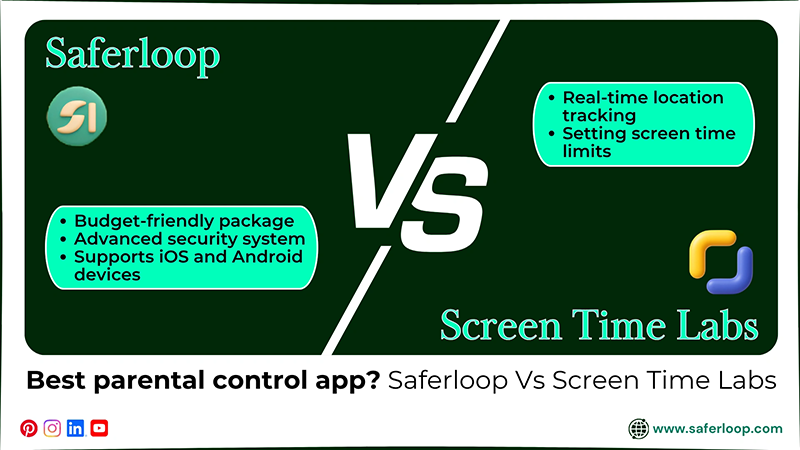
I understand that choosing the best parental control app for your innocent kids is hard because of advertising gimmicks. That’s why I’ve mentioned my personal recommendations here after researching a lot.
- If you want software to use on both iOS and Android devices under a budget-friendly package, you can opt for Saferloop parental control software without a second thought.
- You can also go for Saferloop for an advanced security system, so your children can’t uninstall the software without your permission.
- On the other hand, you can choose Screen Time Labs for real-time location tracking and setting screen time limits. But always remember that this app can’t block apps appropriately.
Also Read: Saferloop vs. Qustodio: Which is the Best Parental Control App for Your Children’s Safety?
Conclusion
You simply understand that it is important to install the best and safest parental control app for your children’s safety, rather than trusting anyone. That’s why you should select the Saferloop parental control software over Screen Time Labs for better security and features.
Also, I recommend that you focus on building healthy relationships with your little ones. It helps you to talk to them about online dangers, safety measures, and social lifestyles.
Author’s Note:
I recommend that Saferloop is the best choice for keeping kids safe after personally testing all features of both Saferloop and Screen Time Labs.
In Saferloop, you can easily navigate the software, block apps, set screen time limits, and track location from a single dashboard on both iOS and Android devices.
But in Screen Time Labs, you noticed that some features are missing in IOS devices, the app blocker can’t function properly, and lacks social media monitoring.
Frequently Asked Questions
Q: Which is the best screen time limits parental control app?
Q: Which is better, Saferloop or Screen Time Labs?
Ans: Saferloop parental control software is better than Screen Time Labs. It provides a comprehensive dashboard to monitor your children’s online activities and an advanced security system.
Q: Can a child uninstall Saferloop?
Ans: No, a child cannot uninstall the Saferloop parental control software without parents’ permission.
 Neha Sharma
Parental Control & App Safety Writer
About article
The author of this article Neha Sharma, an Parental Control & App Safety Writer at Saferloop, brings practical experience and industry knowledge to the subject.
The review and editing by Evan Patterson have been done to make sure that it is accurate, clear, and relevant.
At Saferloop, we are determined to provide high-quality, well-researched, and updated content. To understand further how we produce and revise our articles, please refer to our Editorial Guidelines.
Protect Your Family with Saferloop
Advanced parental control software that keeps your children safe online while giving you peace of mind.
- Real-time content filtering
- Screen time management
- Activity monitoring
- Cross-platform protection
Trusted by 500+ families