Ans: No, the Norton Family parental control app cannot track messages directly on your children’s phones. So you can use Saferloop to keep an eye on your kids’ call logs and SMS.
×

Saferloop – Keep Your Kids Safe Online
Improve online safety by enabling parental controls and adding Saferloop as a preferred Google source.
Saferloop Vs Norton Family: Determine Features-By-Features Comparison and Setup Guidance
Which parental control app is suitable for kids? This question might arise in every parent’s mind. That’s why I’ve compiled detailed information on Saferloop vs Norton Family to help you get an analysis easily.
Here, you can discover an overview of both parental controls, set up guidance, features-by-features comparison, pros and cons, and expert recommendations.
So, stay adherent to this article!
Quick Answer:
Saferloop is a better parental control software than Norton Family because it provides a complete package of safety measures and compatibility on iOS and Android devices. But Norton Family lacks in supporting macOS and tracking calls and messages.
Table of Contents:
- Saferloop Vs Norton Family: Overview of Both Parental Controls
- How to Set Up the Saferloop Parental Control Software?
- How to Set Up the Norton Family Parental Control App?
- Features-By-Features Comparison: Saferloop Vs Norton Family
- Pros and Cons of Saferloop and Norton Family Parental Controls
- Saferloop Vs Norton Family: Which is the Best Parental Control for Your Kids?
- Wrapping Up!
- Frequently Asked Questions
Saferloop Vs Norton Family: Overview of Both Parental Controls
Saferloop and Norton Family parental control apps aim to provide top-notch safety to kids. That is why you need to stay aware of these two parental apps to ensure your kids’ safety and privacy.
Let’s take a look at the overview for in-depth guidance.
1. Saferloop Parental Control Software
Ratings: ★★★★★ (5.0)
Free Trial: Yes
Price: $44.95/year
Platforms: Android and iOS devices
Best for: AI-powered comprehensive dashboard
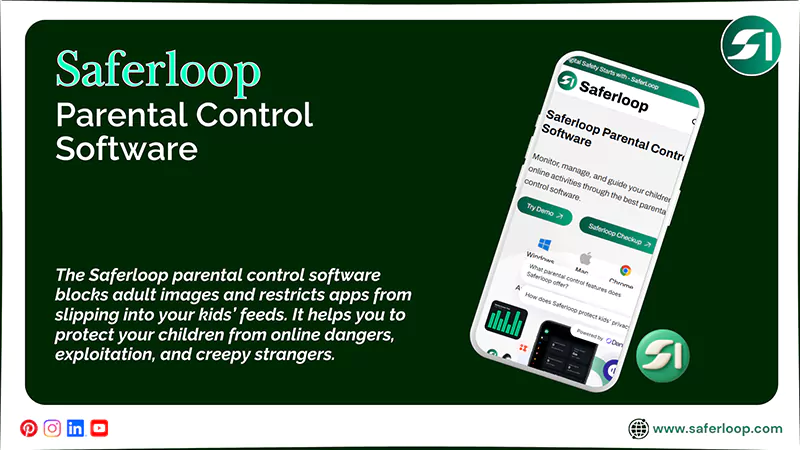
The Saferloop parental control software blocks adult images and restricts apps from slipping into your kids’ feeds. It helps you to protect your children from online dangers, exploitation, and creepy strangers. The safety features of Saferloop are the following:
- Monitor online activities
- Set screen time limits
- Location and geofencing
- Track calls and messages
- Filter content and apps
- Receive alerts, reports, and SOS updates
It also allows you to enjoy these features on both Android and iOS phones, making it compatible across various devices. This indicates that this software is easily accessible for non-techy parents.
2. Norton Family Parental Control App
Ratings: ★★★ (3.3)
Free Trial: Yes (30 days)
Price: $49.99/year
Platforms: Compatible with iOS and Android devices
Best for: Web filtering and screen time management
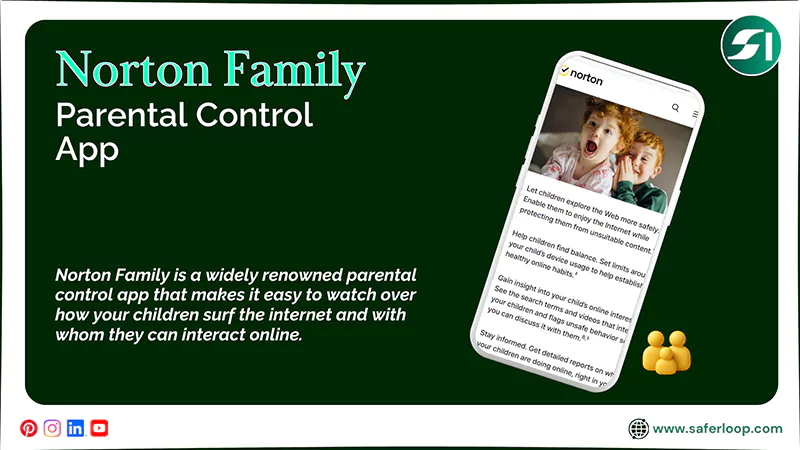
Norton Family is a widely renowned parental control app that makes it easy to watch over how your children surf the internet and with whom they can interact online. It protects your kids through advanced safety features, such as:
- Set time limits
- Supervise web use
- App supervision
- Track location
- Emergency alerts and insights
- Instant locks and reports
You don’t need to worry about Norton Family compatibility because it can smoothly run on Android phones and iPhones. But you should remember that Norton Family lacks the ability to manage different screen time limits per app.
How to Set Up the Saferloop Parental Control Software?
To set up the Saferloop parental control software, you should download the app > create a child and parent account > link both accounts > customize settings.
Here, you can see detailed steps on setting up the Saferloop parental control software.
Step 1: Download the Saferloop parental control software on your and your child’s phones.
Step 2: Create a parent and a child account by entering an email address and a password.
Step 3: On a parent device, go to the Devices option, and enter your child’s name and device model.
Step 4: Now, click on “Generate Link Code,” and a 6-digit code appears in the drop-down list.
Step 5: On a child’s device, go to the Pair option, and enter the 6-digit code and your name.
Step 6: Click on Pair Now to link both parent and child accounts.
Step 7: Now, Saferloop allows you to customize settings such as screen time limits, web filtering, and restricting inappropriate content.
Also Read: Saferloop vs Bark: Which is the Best Parental Control App in 2026?
How to Set Up the Norton Family Parental Control App?
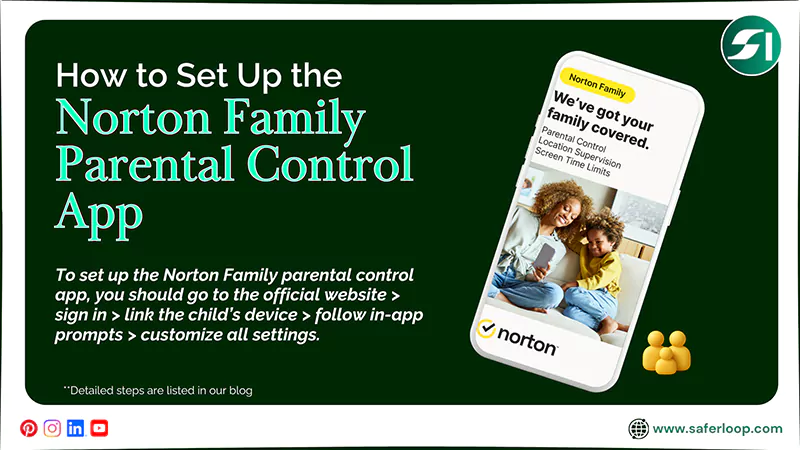
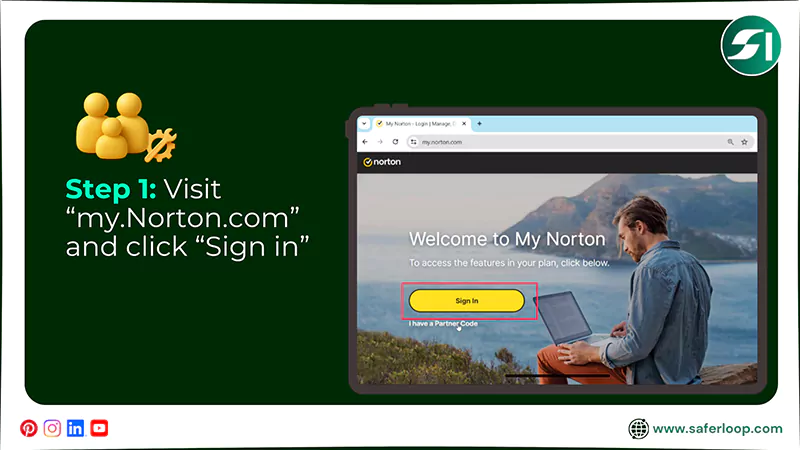
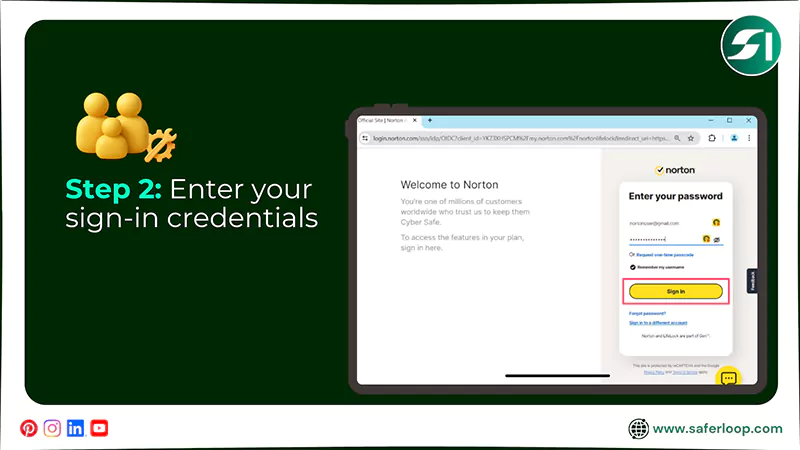
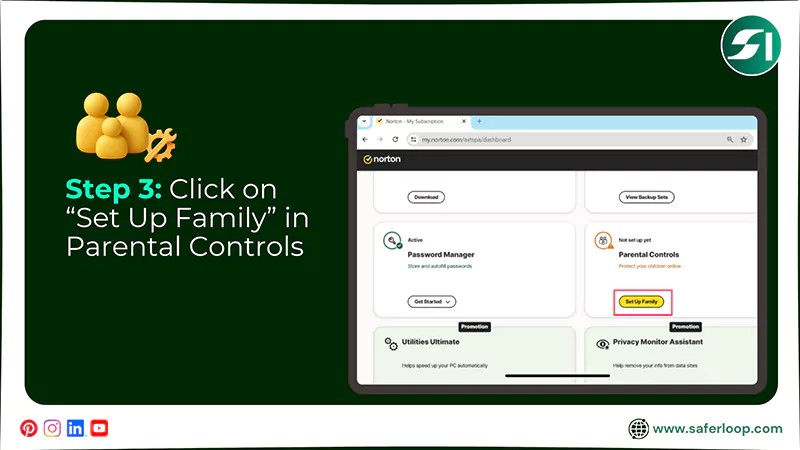
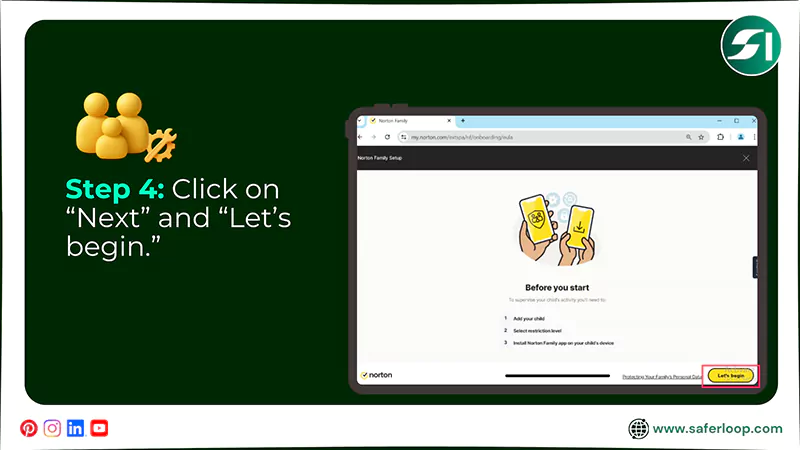
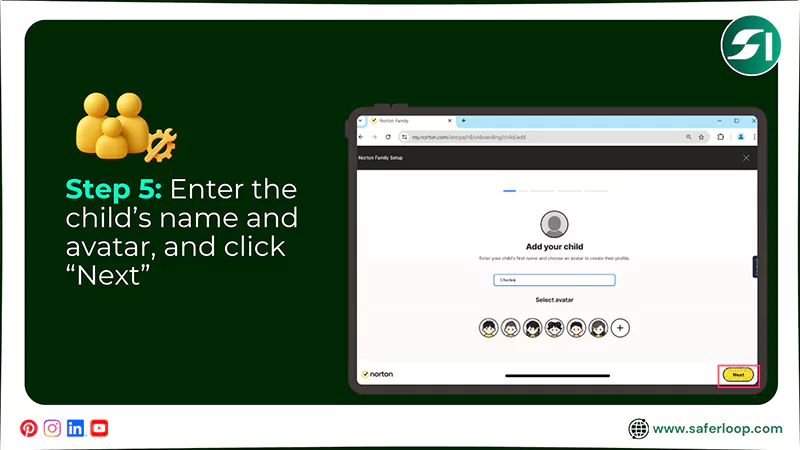
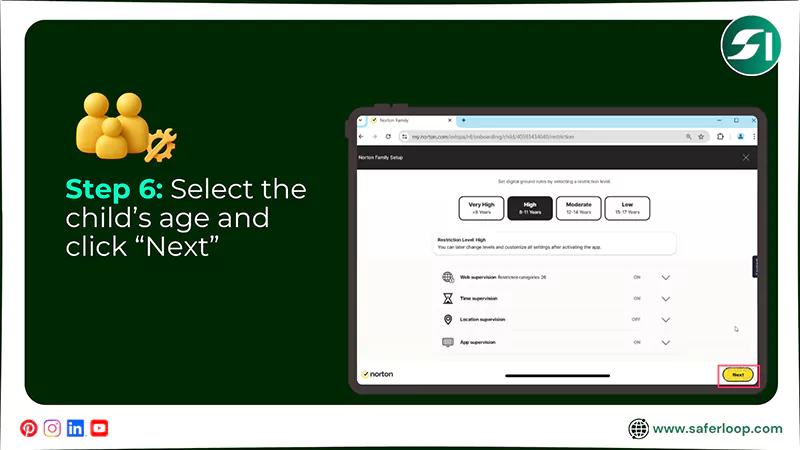
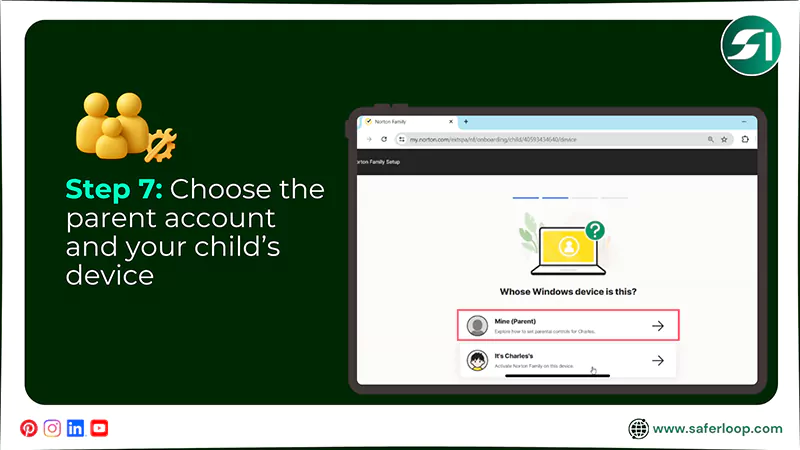
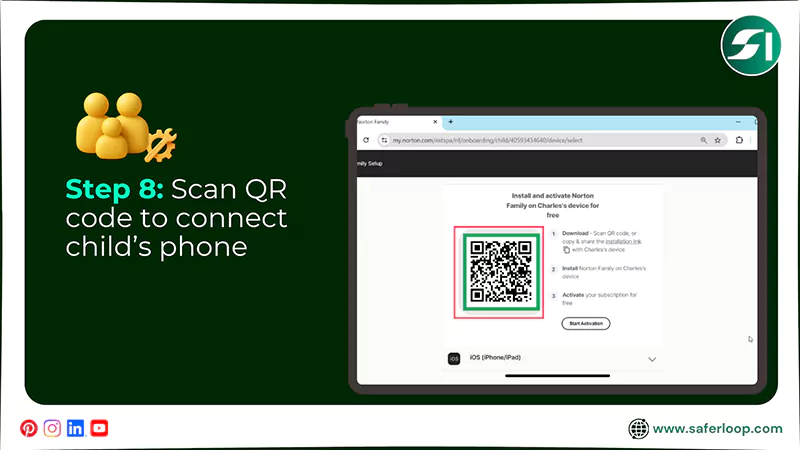
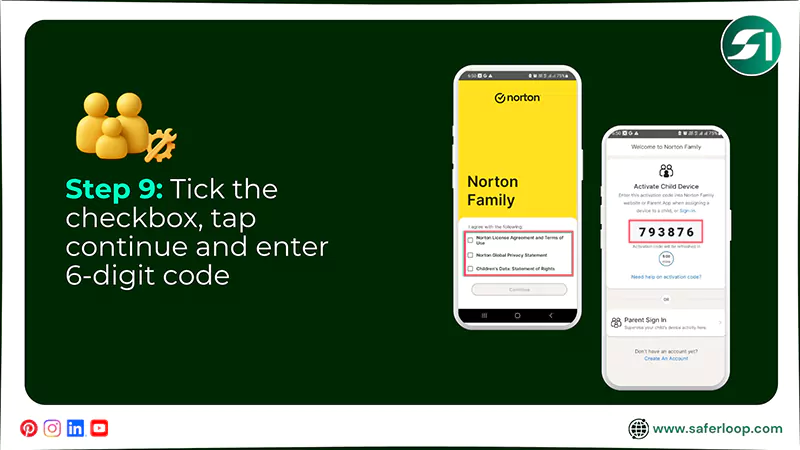
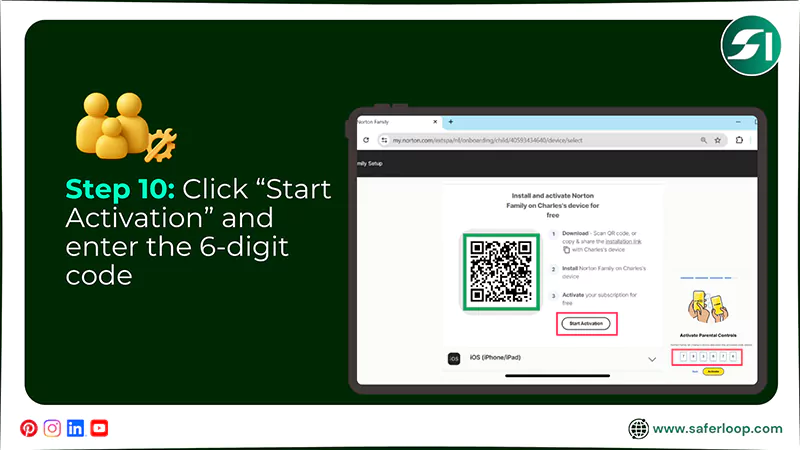
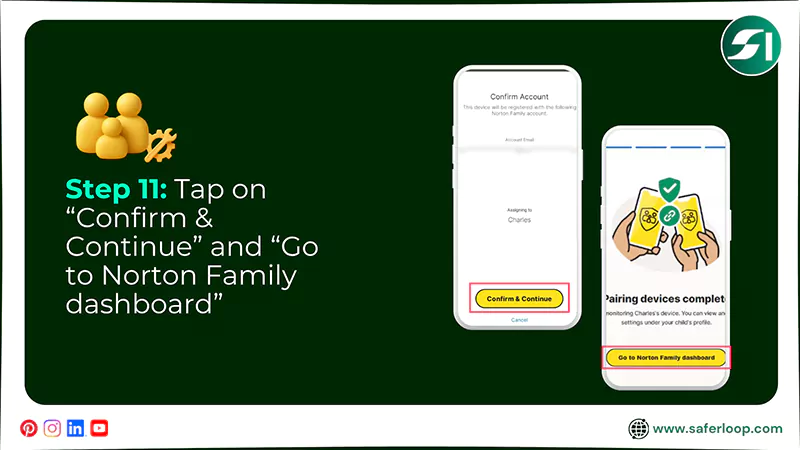
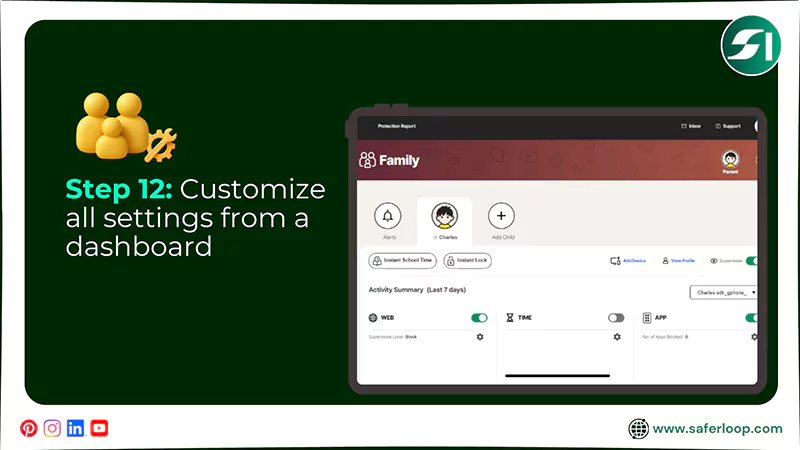
To set up the Norton Family parental control app, you should go to the official website > sign in > link the child’s device > follow in-app prompts > customize all settings.
Here are the steps for setting up the Norton Family parental control app easily.
Step 1: Go to the “my.Norton.com” and click “Sign in.”
Step 2: Enter your email address and click “Continue”, followed by entering your password and clicking “Sign in.”
Step 3: Scroll down, click “Set Up Family” in the Parental Controls section.
Step 4: Hit the “Next” and “Let’s begin” to move forward.
Step 5: After that, you need to enter your child’s name and select an avatar, and click “Next.”
Step 6: Select your child’s age and read the description of safety features, and click “Next.”
Step 7: Choose “Mine (Parent)” and select the correct version of your child’s device.
Step 8: Scan the QR code using your child’s phone or copy the download link directly.
Step 9: You can tick the checkbox and tap “Continue” after installing the Norton Family app on your child’s phone. Afterward, a 6-digit code will appear on the screen.
Step 10: Go back to the website and click on “Start Activation.” Then enter the 6-digit code and tap on “Activate.”
Step 11: Tap on “Confirm & Continue” on your child’s device. And tap on “Go to Norton Family Dashboard.”
Step 12: Now, you can customize all settings from a single dashboard.
Features-By-Features Comparison: Saferloop Vs Norton Family
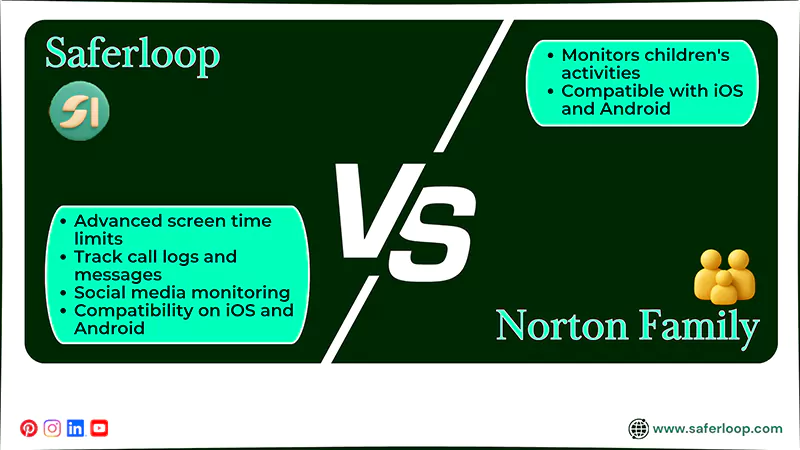
You might think that both parental controls offer the same safety features after visiting their official sites. But if you analyze closely, you know the difference.
Hence, I’ve mentioned the features-by-features comparison in the section for better understanding.
| Features | Saferloop Parental Control Software | Norton Family Parental Control App |
| Manage Your Kids’ Screen Time | Offer advanced screen time limits as per app, days, and weeks. | Lacks in offering screen time limits as per the app. |
| Track Calls and Messages Directly | Allows you to track call logs and messages directly from your phone. | Doesn’t support the tracking calls and messages feature. |
| Monitor Online Activities | It provides a monitoring feature along with social media monitoring. | It monitors children’s activities but doesn’t offer social media monitoring. |
| Compatibility Across Devices | Offer compatibility on iOS and Android devices. | Has a limited functionality on iOS and doesn’t support macOS. |
1. Manage Your Kids’ Screen Time
You can limit your kids’ screen time to create a technology-free environment and promote healthy habits on the Saferloop parental control software.
On the other hand, the Norton Family parental control app sets time limits based on time and week. However, you cannot customize screen time based on a specific app.
2. Track Calls and Messages Directly
Saferloop allows you to track your children’s call logs and messages (SMS) from your own phone directly. It helps you supervise their activities closely and deeply.
However, you can’t watch over chats and calls in the Norton Family parental control app, as it doesn’t offer this tracking feature.
3. Monitor Online Activities
You can monitor how your kids interact on social media apps and what language they use during online conversations through Saferloop parental control software.
Norton Family also offers a monitoring feature to keep an eye on your innocent little ones from your own phone. But it lacks in providing social media monitoring.
4. Compatibility Across Devices
Interestingly, you can enjoy the Saferloop software on iPhones, Android phones, tablets, laptops, iPads, and MacBooks to protect your children with ease.
On the flip side, Norton Family claims to be compatible with iOS and Android devices. But it doesn’t support macOS and offers limited functionality on iOS.
Pros and Cons of Saferloop and Norton Family Parental Controls
Every light has its own shadow. This means that both Saferloop and Norton Family parental control apps have some drawbacks along with benefits.
So, as a helicopter parent, you should skim through this section to discover the pros and cons of these two parental control apps.
1. Saferloop Parental Control Software
Here are the advantages and disadvantages of the Saferloop parental control software.
| Pros | Cons |
| You can keep an eye on your children’s online activities from a single parental control dashboard, making it convenient. | It only offers a demo version to test basic safety features. This means that you should purchase a premium plan to unlock advanced tools. |
| It offers advanced AI-powered screen time limits to manage your kids’ phone usage and encourage them to engage in offline activities. | |
| The software provides compatibility on both iOS and Android settings to make you comfortable on every device. | |
| Also, you can track your little ones’ incoming/outgoing calls and messages directly to have an idea of whom they are engaging with. |
2. Norton Family Parental Control App
Here are the advantages and disadvantages of the Norton Family parental control app.
| Pros | Cons |
| You can use this parental control on your desktop and mobile seamlessly after creating a login account. | It advertises to offer compatibility on iOS and Android devices, but you can experience limited functionality on iOS. |
| It also sends an emergency alert when your kids encounter inappropriate content on their devices. | The app doesn’t support macOS devices, meaning you can’t use it on MacBooks. |
| The app also allows you to block adult or X-rated websites from your children’s phones to create a safe digital environment. | It also lacks support for screen time limits. This indicates that you can’t set a different time for various apps. |
| You can set restrictions based on your kids’ ages and customize settings to suit your preferences. |
Also Read: Saferloop vs FamiSafe: Select the Best Parental Control Software for Your Children in 2026
Saferloop Vs Norton Family: Which is the Best Parental Control for Your Kids?
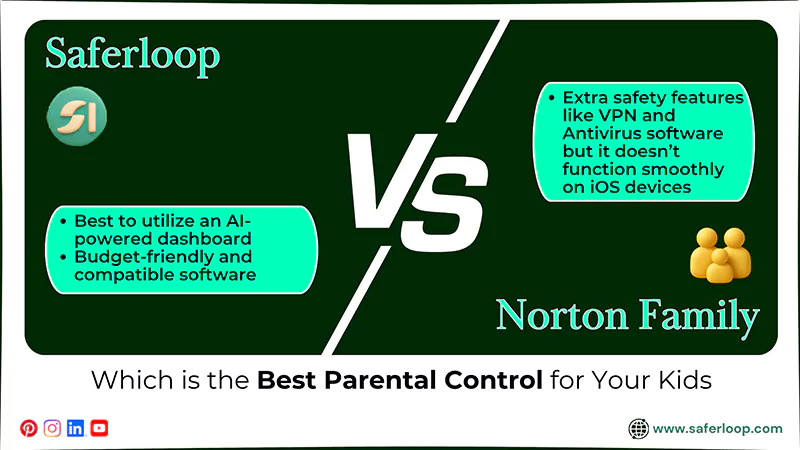
Now, you may be wondering which is the best parental control app between Saferloop vs Norton Family. It is good to ask questions for your little angels’ online safety.
Let me clear your doubts here. I’ve mentioned some suggestions to describe the best qualities of both Saferloop and Norton Family.
- Saferloop is best to utilize an AI-powered, comprehensive dashboard to monitor your online activities, from screen time limits to location tracking.
- If you are looking for budget-friendly and compatible software that runs on every device, you can still choose Saferloop parental control software.
- Norton Family offers extra safety features like VPN and Antivirus software to add a layer of security. But you should also remember that it doesn’t function smoothly on iOS devices.
Wrapping Up!
In simple terms, Saferloop is the winner of the comparison between Saferloop vs Norton Family. You can opt for the Saferloop parental control software to protect your kids on digital platforms with peace of mind.
It’s apparent that choosing the best parental control app entirely depends on your personal choices. So, you can figure out the suitable one for your children.
Author’s Note:
After searching for kids’ safety on the internet, I highly recommend that you install trustworthy parental controls to protect them from threats and cyberattacks. In comparison of Saferloop vs Norton Family, I discovered that Saferloop offers more features than the Norton Family parental control app.
Saferloop is best at AI-powered monitoring activities, location tracking, web filtering, and compatibility. On the other hand, Norton Family offers VPN and antivirus software but lacks iOS compatibility and tracking calls/messages.
Frequently Asked Questions
Q: Can Norton Family track messages directly?
Q: Which is the best parental control app to ensure kids’ safety?
Ans: Saferloop is the best parental control app to ensure kids’ safety, as it provides a wide range of safety features. It includes screen time management, app blocker, web filter, location tracker, and geofencing.
Q: Is Norton Family a good app?
Ans: Yes, Norton Family is a good parental control app, as it is a more affordable app than its competitors. But it also lacks in supporting macOS and setting screen time limits per app.
 Gunjan Saini
Cyber Safety & Parental Control Writer
About article
The author of this article Gunjan Saini, an Cyber Safety & Parental Control Writer at Saferloop, brings practical experience and industry knowledge to the subject.
The review and editing by Vinithra Karunanidhi have been done to make sure that it is accurate, clear, and relevant.
At Saferloop, we are determined to provide high-quality, well-researched, and updated content. To understand further how we produce and revise our articles, please refer to our Editorial Guidelines.
Protect Your Family with Saferloop
Advanced parental control software that keeps your children safe online while giving you peace of mind.
- Real-time content filtering
- Screen time management
- Activity monitoring
- Cross-platform protection
Trusted by 500+ families