Ans: Yes, MMGuardian is safe to use, but it is not perfect. It provides limited compatibility for iOS users and has no email monitoring.
×

Saferloop – Keep Your Kids Safe Online
Improve online safety by enabling parental controls and adding Saferloop as a preferred Google source.
Saferloop Vs MMGuardian: In-Depth Comparison of Top Parental Control Apps
You might be bewildered in selecting between the Saferloop and MMGuardian parental control apps. That’s why I’ve compiled detailed information on Saferloop vs MMGuardian to help you make informed decisions.
Here, you can discover an overview of both parental control apps, setup guidance, features-by-features comparison, pros and cons, and some recommendations.
So, stay adherent to this article!
Quick Answer:
Saferloop is a better parental control software than MMGuardian. It offers a comprehensive dashboard for parents to monitor their children’s online activities thoroughly. However, MMGuardian lacks monitoring of social media and emails, leaving it behind Saferloop.
Table of Contents:
- Saferloop Vs MMGuardian: Overview of Parental Control Apps
- How to Set Up the Saferloop Parental Control Software?
- How to Set Up the MMGuardian Parental Control App?
- Features-By-Features Comparison: Saferloop Vs MMGuardian
- Pros and Cons of Saferloop and MMGuardian Parental Control Apps
- Saferloop Vs MMGuardians: Which is the Right Choice for You?
- Conclusions and Recommendations
- Frequently Asked Questions
Saferloop Vs MMGuardian: Overview of Parental Control Apps
Both Saferloop and MMGuardian parental control apps are purposely designed to protect children from cyberattacks, online scams, inappropriate content, and predators.
Let’s review these parental controls to understand what they provide and what is suitable for your children.
1. Saferloop Parental Control Software
Ratings: ★★★★★ (5.0)
Free Trial: Yes
Price: $44.95/Year
Platforms: Compatible with iOS and Android
Best for: AI-powered web filters and real-time alerts
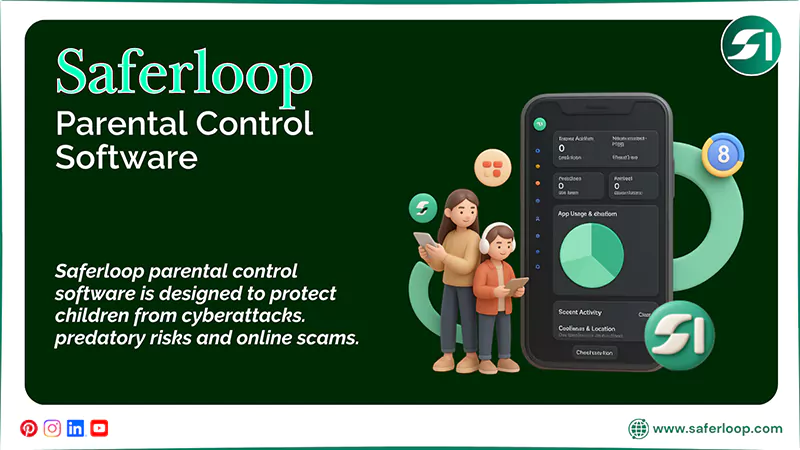
Saferloop parental control software is designed to protect children from cyberattacks. predatory risks and online scams. As it offers a wide range of safety features, including the following:
- Monitor online activities
- Set time limits and routines on devices
- Filter content and apps
- Locate your family
- Track calls and messages
- Receive alerts, reports, and SOS updates
This indicates that you can effortlessly manage your child’s devices through its user-friendly interface. Also, it is compatible with iOS and Android devices, from iPhones, iPads, laptops, to tablets.
2. MMGuardian Parental Control App
Ratings: ★★★★ (4.0)
Free Trial: Yes (14 days)
Price: $4.99/month
Platforms: Compatible with iOS and Android devices
Best For: Tracking SMS and social media chats
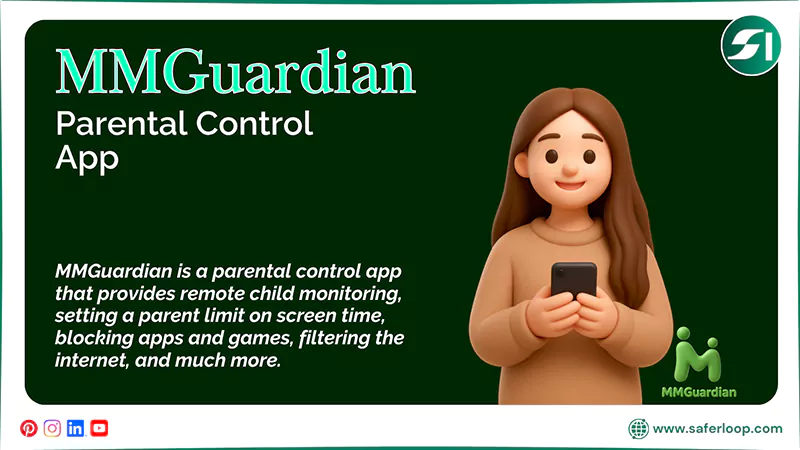
MMGuardian is a parental control app that provides comprehensive features to help you keep your kids safe online. It includes remote child monitoring, setting a parent limit on screen time, blocking apps and games, filtering the internet, and much more.
Similar to Saferloop, it offers compatibility across various devices (Both iOS and Android). However, you have to take note that the app doesn’t support social media monitoring and lags frequently.
How to Set Up the Saferloop Parental Control Software?
To set up the Saferloop parental control software > download the software > create accounts > link parent and child devices > customize settings.
Here are the following simple and detailed steps to understand how to set up the Saferloop parental control software.
Step 1: Download the Saferloop parental control software on your and your child’s phones.
Step 2: Create a parent and child account by entering the email address and password.
Step 3: On a parent device, go to the “Device” from the menu.
Step 4: Now, enter your child’s name and device model.
Step 5: Tap on the Generate Link Code, and the 6-digit code will appear in the drop-down list.
Step 6: On a child’s device, go to the “Pair” from the menu.
Step 7: Enter that 6-digit code and your name and hit the “Pair Now” button.
Step 8: After pairing both child and parent devices, you can customize settings, like monitoring, filtering, and blocking, based on your preferences.
How to Set Up the MMGuardian Parental Control App?
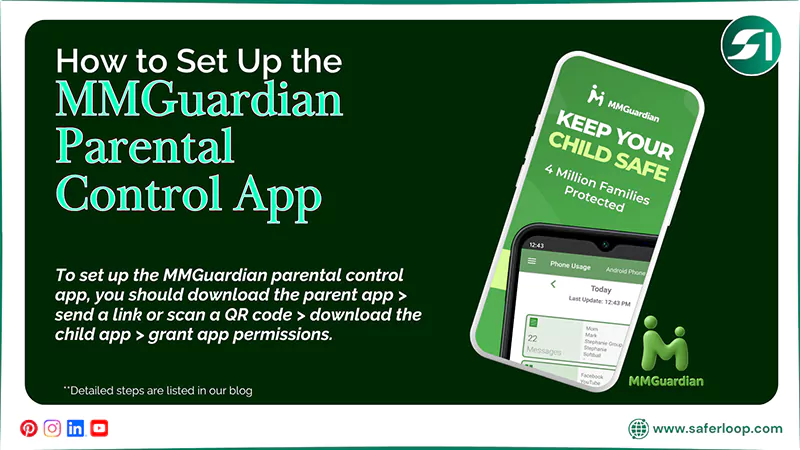
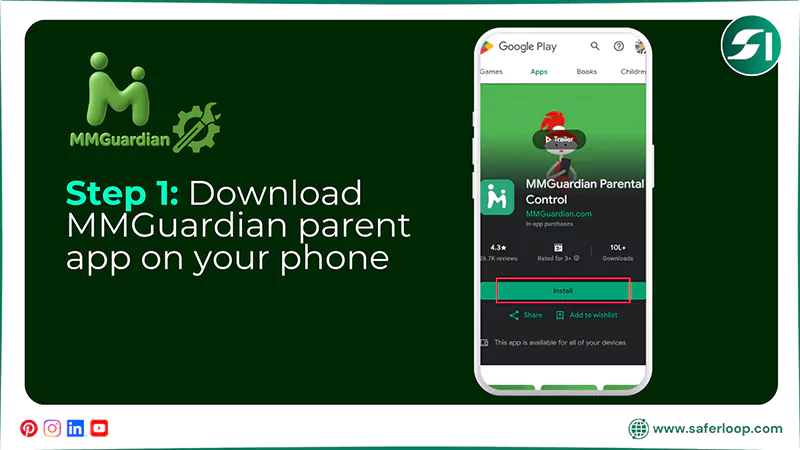
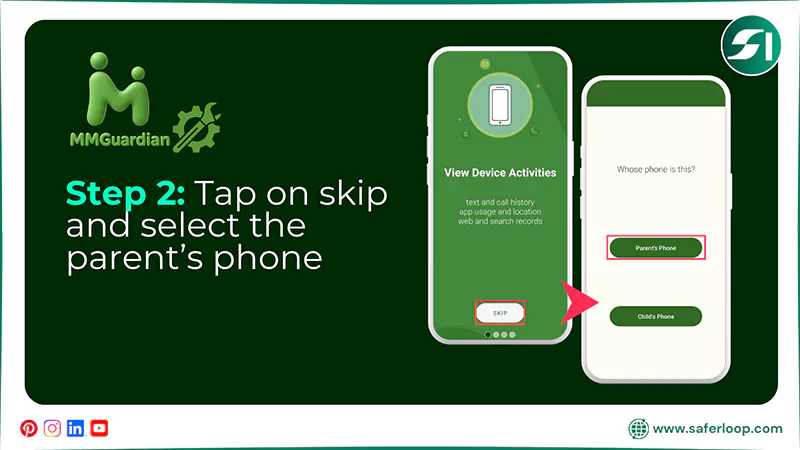
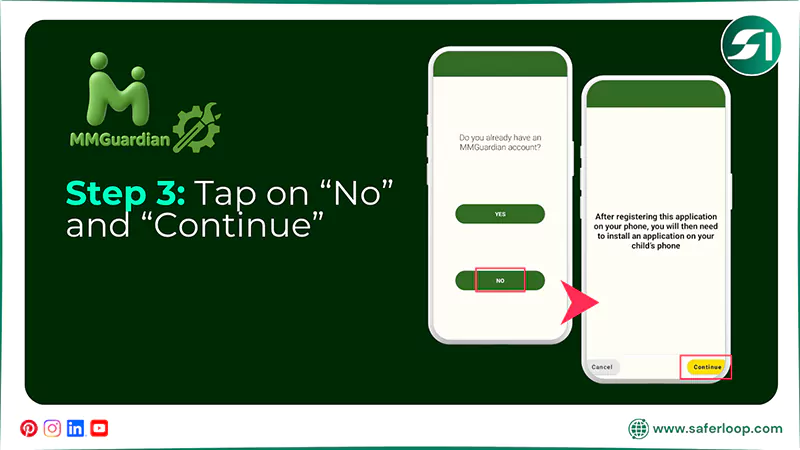
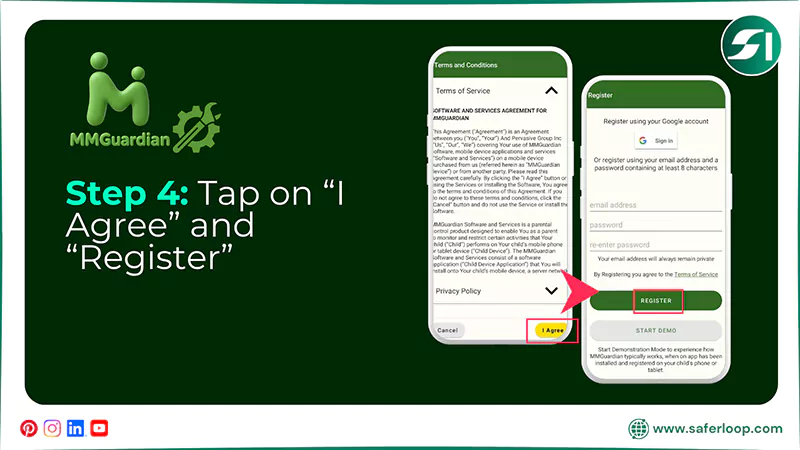
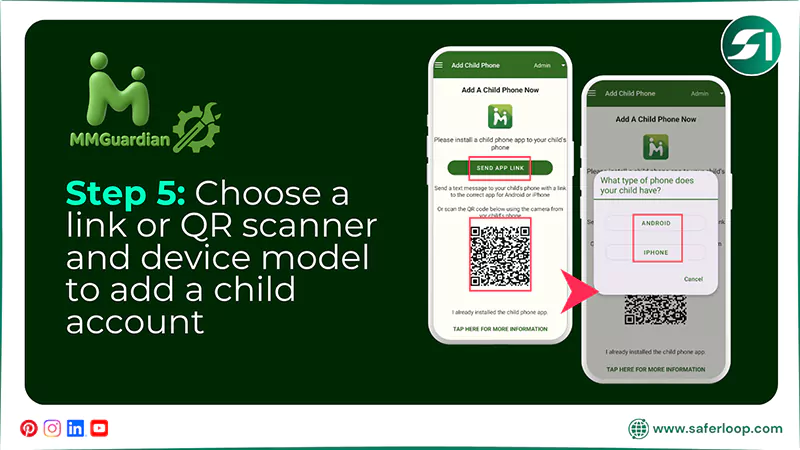
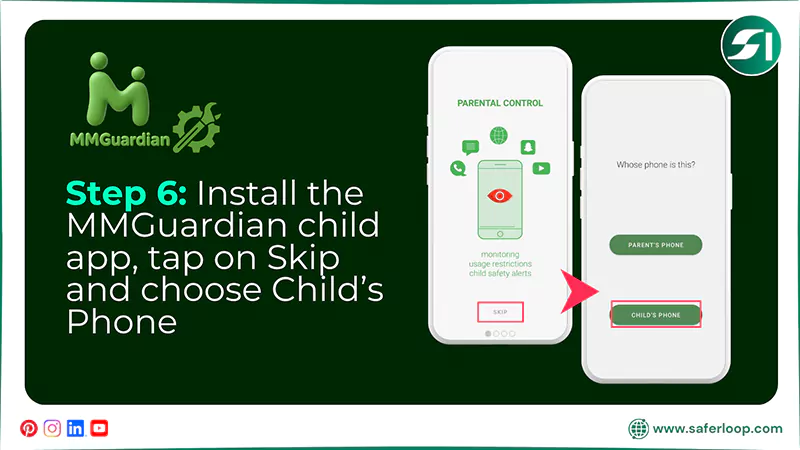
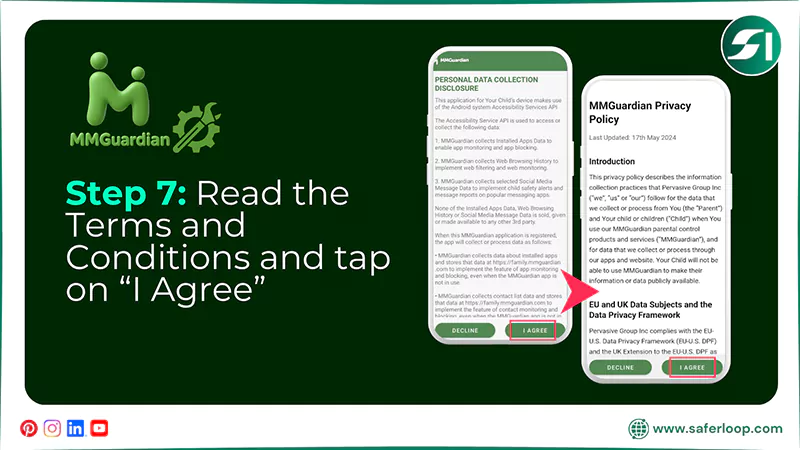
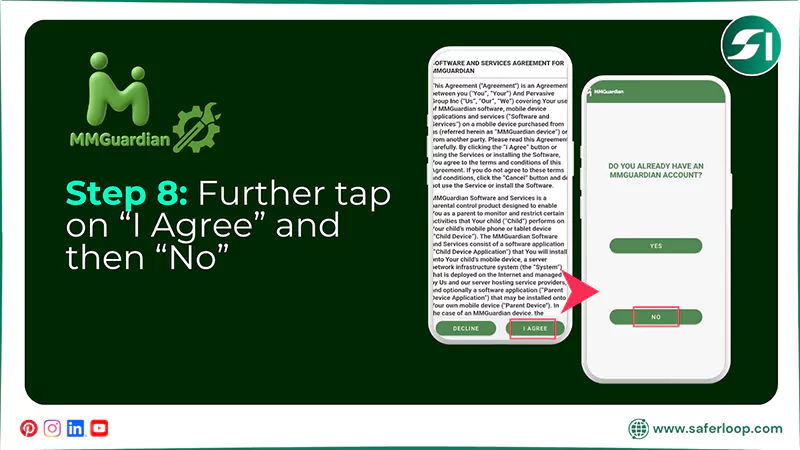
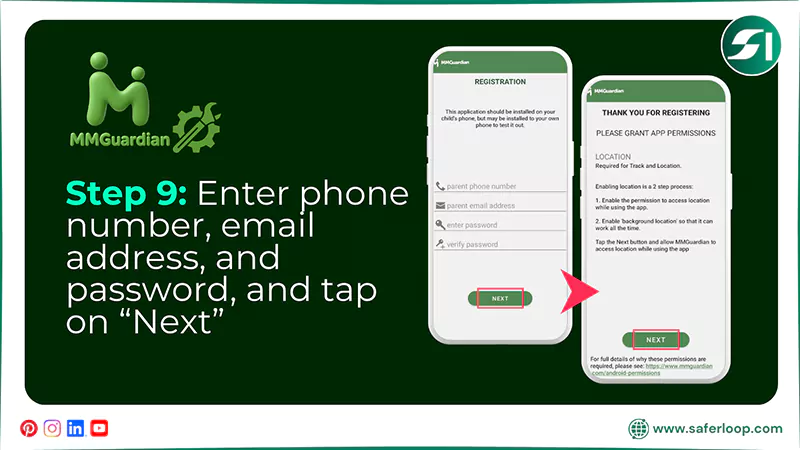
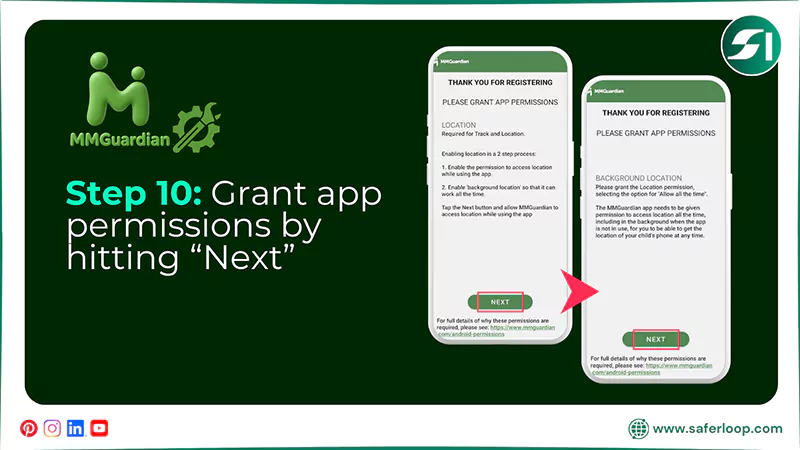
To set up the MMGuardian parental control app, you should download the parent app > send a link or scan a QR code > download the child app > grant app permissions.
Here are the following steps for setting up the MMGuardian parental control app in great detail.
Step 1: Download the MMGuardian parent app on your phone as a parent.
Step 2: Open the app, skip the prompts, and select “Parent’s Phone” to continue.
Step 3: Now, tap on “No” and “Continue.”
Step 4: Tap on “I agree” after reading the Terms and Conditions. Next, enter your email address and password and hit “Register.”
Step 5: You can now add your child’s account by sending a link or scanning a QR code and selecting a device model.
Step 6: After installing the MMGuardian child app, tap on “Skip” and choose “Child’s Phone.”
Step 7: Now, read the Terms and Conditions and tap on “I Agree.”
Step 8: Furthermore, tap on “I Agree” after reading the Software and Services Agreement. Next, tap on “No.”
Step 9: Enter your phone number, email address, and password and tap on “Next.”
Step 10: Now, all you have to do is grant app permissions by hitting “Next.”
Features-By-Features Comparison: Saferloop Vs MMGuardian
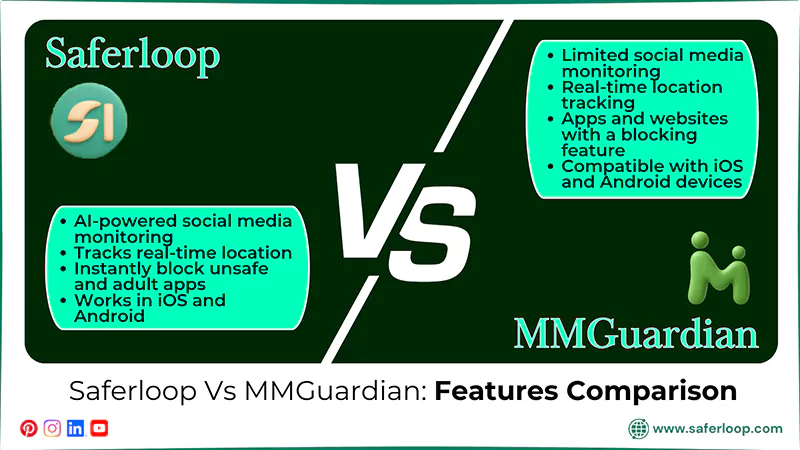
Saferloop and MMGuardian parental control apps offer various distinct features to safeguard children online. But which is better? Hence, you should take a look at this section to acknowledge a feature-by-feature comparison.
| Features | Saferloop Parental Control Software | MMGuardian Parental Control App |
| Social Media Monitoring | Provide deep and AI-powered social media monitoring. | Has limited social media monitoring and covers only a few apps. |
| Compatibility Across Devices | Offers iOS and Android devices for a smoother experience. | Claims to be compatible with iOS and Android devices, but has limited functionality with iOS devices. |
| Location Tracking and Geofencing | Tracks real-time location and creates a digital boundary to receive geofencing alerts. | Offers real-time location tracking but lacks support for geofencing alerts. |
| Blocking Apps and Websites | Instantly block unsafe and adult apps and websites from your kids’ devices. | Provide apps and websites with a blocking feature that doesn’t function properly. |
1. Social Media Monitoring
The Saferloop parental control software offers AI-powered social media monitoring that helps you keep an eye on your kids’ friend lists, messages, and feeds. On the other hand, MMGuardian offers limited monitoring on social media and covers a few numbers of apps.
2. Compatibility Across Devices
In addition to the Saferloop vs MMGuardian comparison, you can smoothly run Saferloop across various devices, ranging from iOS (iPhones and iPads) to Android (smartphones, tablets, and laptops). Meanwhile, MMGuardian claims to provide iOS compatibility but has limited functionality on iPhones, iPads, and MacBooks.
3. Location Tracking and Geofencing
Interestingly, you can track the real-time location of your children and create digital boundaries when they reach or leave a place, ensuring their safety remotely. On the flip side, the MMGuardian parental control app offers real-time location tracking, but it lacks providing geofencing alerts.
4. Blocking Apps and Websites
The Saferloop parental control software also allows you to block adult apps and websites, which is extremely dangerous for your kids. It locks the screen whenever they try to access blocked apps and sends alerts. On the other hand, the MMGuardian parental control app provides blocking of apps and websites, but many real users claim it doesn’t function properly.
Also Read: Top 5 Best Parental Monitoring Software to Track Children’s Activities in 2026
Pros and Cons of Saferloop and MMGuardian Parental Control Apps
Although Saferloop and MMGuardian provide various benefits to children’s safety, they also have some drawbacks related to functionality.
Let’s take a look at the pros and cons of these two parental control apps.
1. Saferloop Parental Control Software
Here are the advantages and disadvantages of Saferloop you must understand before making a decision.
| Pros | Cons |
| The software provides robust location tracking and geofencing features to get notifications when your child leaves or reaches the destination. | The free version or demo is limited to basic features. This means that you must purchase a premium plan for advanced safety features. |
| It runs smoothly on Android, iOS, iPads, tablets, iPhones, MacBooks, and laptops, and other devices. | |
| You can also block adult-rated apps and websites from your kids’ devices with a few clicks. | |
| Additionally, you can monitor your kids’ online activities, from calls & messages to location, from your own devices. |
2. MMGuardian Parental Control App
Here are the following benefits and drawbacks of the MMGuardian parental control app.
| Pros | Cons |
| The app allows you to read the entire message or text from your child’s social media with just a click. | It doesn’t offer email monitoring, so you can’t track emails on your kids’ devices. |
| It has high security so that kids can’t uninstall or bypass restrictions without parents’ permission. | It also has limited social media monitoring that covers a few apps. |
| You can also receive emergency alerts and SOS updates if something suspicious is detected about your children’s behavior. |
Also Read: 14 Best Android Parental Control Apps in 2026 | Unleash Cybersecurity With These Recommendations
Saferloop Vs MMGuardians: Which is the Right Choice for You?
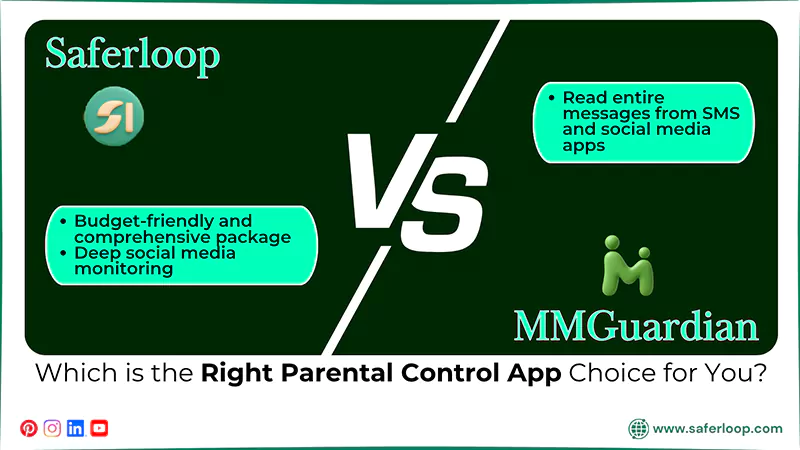
I understand that choosing the best and safest parental control app entirely depends on your personal preferences. Still, I suggest some recommendations in this section to help you select the right app, ensuring your little ones’ protection.
- If you are looking for a budget-friendly and comprehensive package of safety features, you can choose the Saferloop parental control app.
- Saferloop also provides deep social media monitoring and compatibility on iOS and Android devices, which is lacking in the MMGuardian parental control app.
- On the other hand, if you want to read entire messages from SMS and social media apps, you can go for the MMGuardian parental control app.
Conclusions and Recommendations
Overall, Saferloop parental control software is the winner of the comparison of Saferloop vs MMGuardian. This also indicates that installing the best parental control app is crucial to prevent your kids from using adult apps and to monitor how they surf the internet.
Beyond heavily relying on technology, you should also focus on building healthy relationships with your innocent children. It helps you to gain their trust, resulting in open discussion on social life.
Author’s Note:
As a parental control expert, I noticed that setting up parental control apps is necessary to monitor your children’s online activities. So, I decided to test Saferloop and MMGuardian to determine which is best for protecting kids.
I discovered that Saferloop parental control software offers trustworthy and advanced safety features, such as screen time limits, blocking apps, and web filtering, making it a better choice for your kids.
However, MMGuard lacks in providing compatibility and deep social media monitoring.
Frequently Asked Questions
Q: Is MMGuardian safe to use?
Q: Which is the best parental control software?
Ans: Saferloop is the best parental control software because it provides a comprehensive package of all safety measures at a budget-friendly price.
Q: Which parental control app can not be deleted?
Ans: Children cannot delete the Saferloop parental control app because it requires parents’ permission and passwords.
 Gunjan Saini
Cyber Safety & Parental Control Writer
About article
The author of this article Gunjan Saini, an Cyber Safety & Parental Control Writer at Saferloop, brings practical experience and industry knowledge to the subject.
The review and editing by Evan Patterson have been done to make sure that it is accurate, clear, and relevant.
At Saferloop, we are determined to provide high-quality, well-researched, and updated content. To understand further how we produce and revise our articles, please refer to our Editorial Guidelines.
Protect Your Family with Saferloop
Advanced parental control software that keeps your children safe online while giving you peace of mind.
- Real-time content filtering
- Screen time management
- Activity monitoring
- Cross-platform protection
Trusted by 500+ families