
Ans: The Saferloop parental control app is the best blocker for kids, as it restricts inappropriate content, blocks unsafe websites, and sets screen time limits to create a safe environment.
×

Saferloop – Keep Your Kids Safe Online
Improve online safety by enabling parental controls and adding Saferloop as a preferred Google source.
Saferloop vs Findmykids: Which App Is Better for Child Safety?
With the best options like Saferloop and Findmykids, it is quite confusing for parents to choose between both to keep their children safe online.
Therefore, I’ve acquainted myself with these parental controls and compiled detailed information on Saferloop vs Findmykids, a features-by-features comparison, pros and cons, and some recommendations.
So, stay adherent to this article!
Quick Answer:
- Saferloop parental control app offers a comprehensive dashboard and safety features required to protect children online.
- Findmykids is widely famous for GPS tracking, loud signals, and listening to the sound of the child through parents’ devices.
- However, the Saferloop parental control is more suitable than Findmykids in order to monitor and restrict inappropriate activities, as it doesn’t allow kids to bypass security and uninstallation.
Table of Contents:
- Saferloop Vs Findmykids: Choose the Best Parental Control App
- How to Set Up the Saferloop Parental Control App?
- How to Set Up the Findmykids Parental Control App?
- Features-by-Features Comparison: Saferloop Vs Findmykids
- Pros and Cons of Saferloop and Findmykids Parental Control Apps
- Saferloop Vs Findmykids: Which is Suitable for Your Kids?
- Conclusion and Recommendations
- Frequently Asked Questions
Saferloop Vs Findmykids: Choose the Best Parental Control App
Saferloop and Findmykids parental control apps offer top-notch features to protect children from explicit content, predators, and unsafe websites. Let’s review both of them to understand their functions deeply!
1. Saferloop Parental Control App
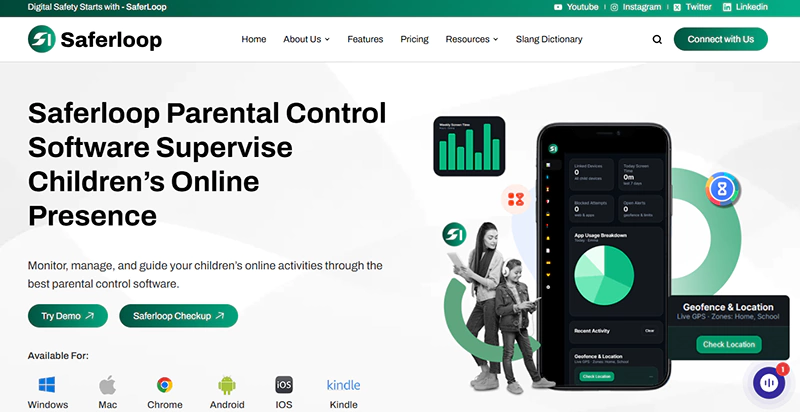
Ratings: ★★★★★ (5.0)
Free Trial: Yes
Price: $44.95/Year
Platforms: Compatible with iOS and Android
Best for: AI-powered web filters and real-time alerts
The Saferloop parental control app offers a wide range of advanced and AI-powered safety features, including:
- Screen time management
- Web filtering
- Restricting inappropriate content
- Location tracking and geofencing
- SOS updates, reports, and emergency alerts
This indicates that it provides a one-stop solution to protect your kids online, whether you are an iOS or Android user. Its user-friendly interface is compatible with MacBooks, iPads, laptops, and tablets.
2. Findmykids
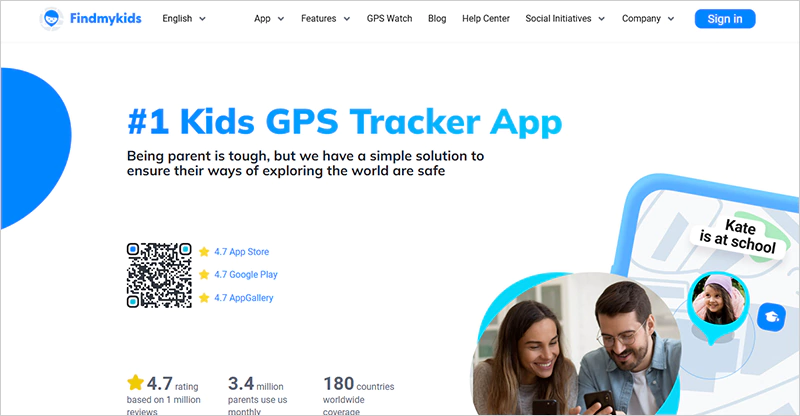
Ratings: ★★★★ (4.0)
Free Trial: Yes (7 days)
Price: $39.12 per year
Platforms: Compatible with iOS and Android devices
Best for: GPS tracking and real-time alerts
Findmykids is a secure parental control app that focuses on tracking the real-time location of your children to ensure their safety. It offers various features, such as:
- Real-time location tracking
- Loud signal
- Sound around children
- App usage statistics
- SOS signal
- Kid’s location alerts
Not only this, but it is compatible with iOS and Android devices, similar to the Saferloop parental control app. However, it has limited functionality for iPhone users due to Apple’s system restrictions.
How to Set Up the Saferloop Parental Control App?
To set up the Saferloop parental control app, you should download the app > create a parent and child accounts > link both devices > customize all settings.
Step 1: Firstly, download the Saferloop parental control app on your and your kids’ devices.
Step 2: Secondly, create a parent and child account by entering an email address and a password.
Step 3: On the parent device, go to the “Devices” in the menu bar.
Step 4: Enter your child’s name and device model.
Step 5: Click on “Generate Link Code,” and you will see a 6-digit code appear in the drop-down list.
Step 6: On the child’s device, go to the “Pair” option and enter the 6-digit code.
Step 7: Click on “Pair Now” to connect the child and parent accounts.
Step 8: Now, you can customize screen time limits, web filtering, and monitoring according to your preferences.
How to Set Up the Findmykids Parental Control App?
To set up the Findmykids parental control app, you should download Findmykids on the parent device > send the link to the child’s phone > download the Pingo app > follow the in-app prompts.
Here are the detailed and simple steps to set up the Findmykids app.
Step 1: Download the Findmykids app (parent version) on your mobile device.
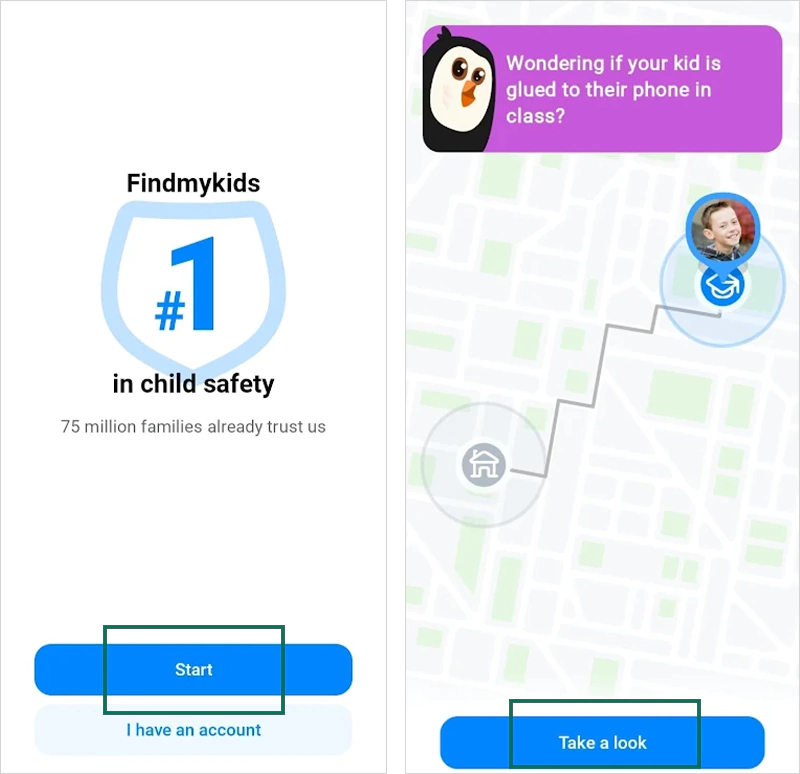
Step 2: Click “Start” and “Take a look” when the app introduces a glimpse of features.
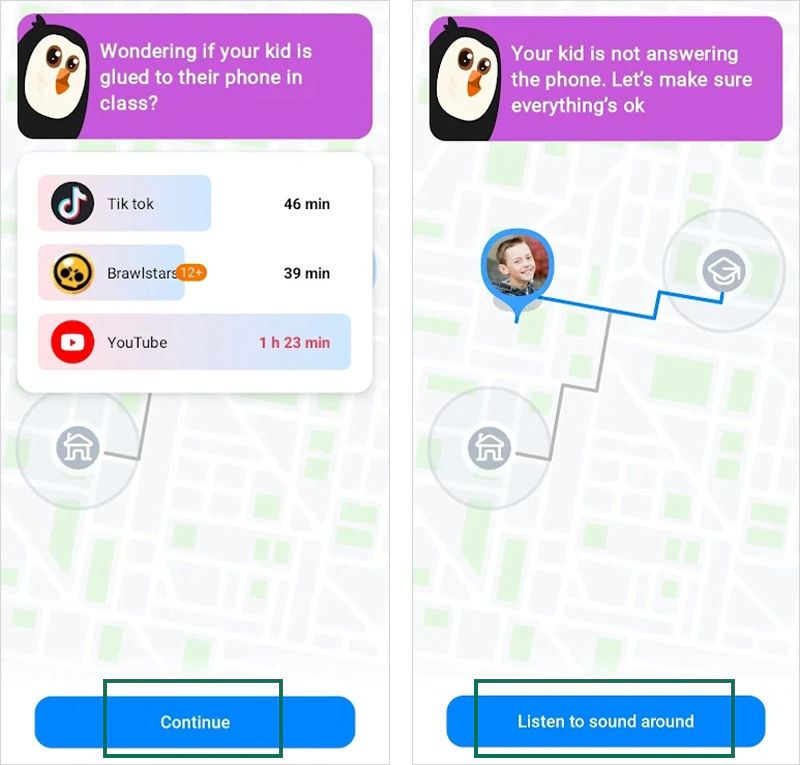
Step 3: Tap on “Continue” and “Listen to sound around.”
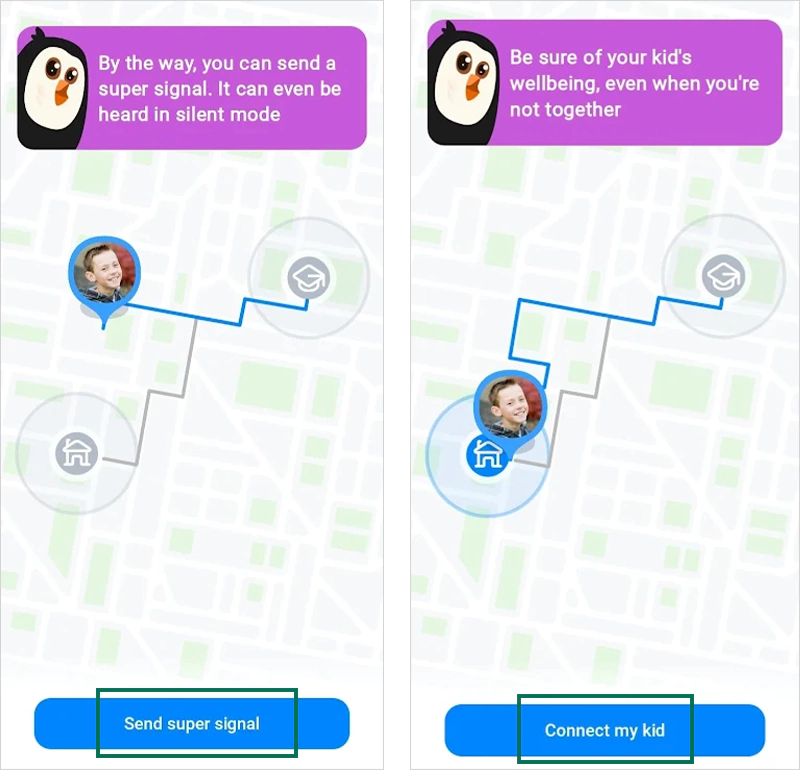
Step 4: Next, you click on “Send super signal” and “Connect my kid.”
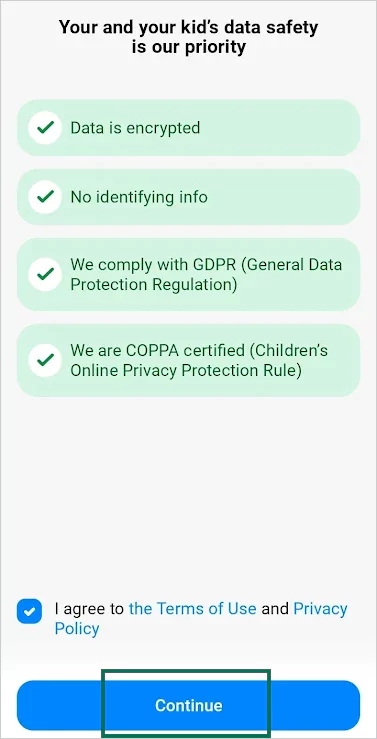
Step 5: Tap on the check box to agree to the Terms and Conditions and click on “Continue.”
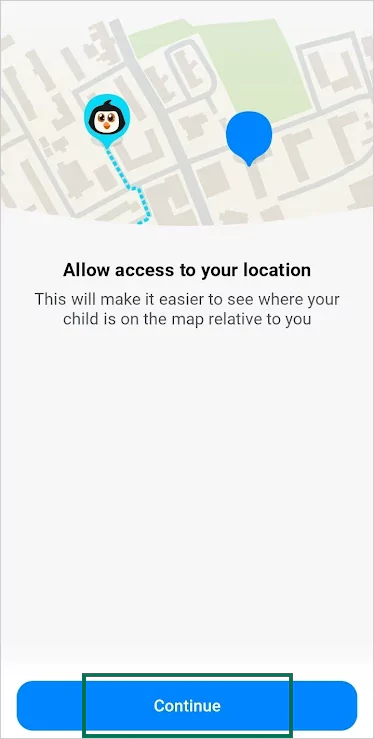
Step 6: Now, allow the app to access your location by tapping “Continue.”
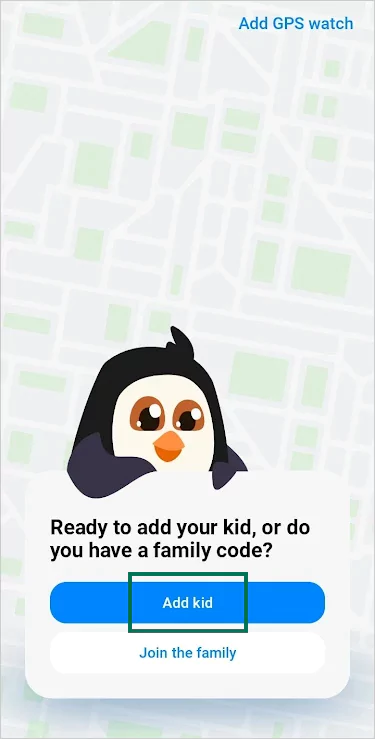
Step 7: Tap on “Add kid,” and your phone is ready to connect with your child.
Step 8: Click on “Set up kid’s phone” and “Send your kid the link.”
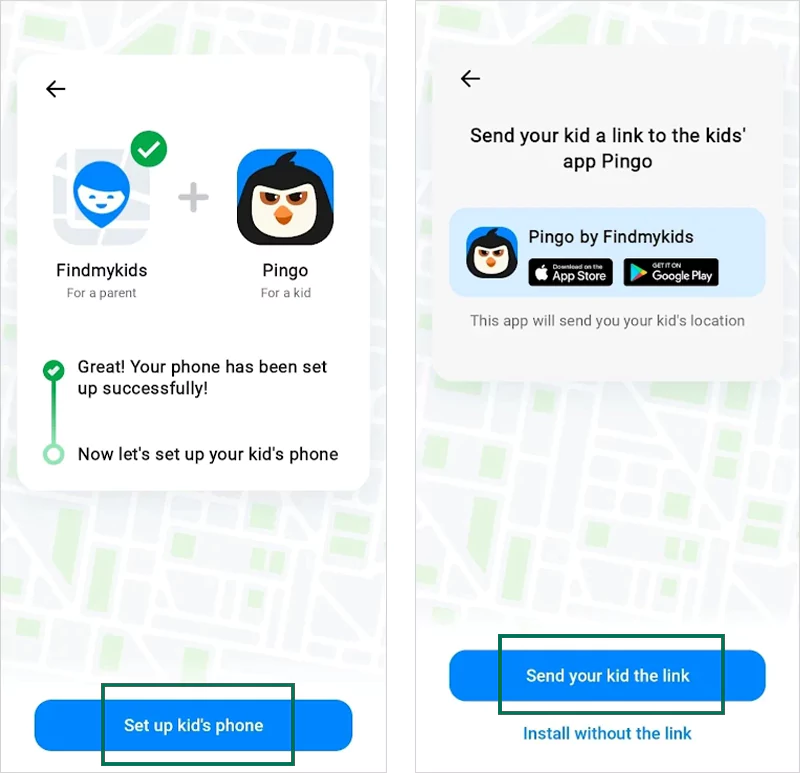
Step 9: Share the download link to your kid’s WhatsApp and other messaging apps, and copy the code.
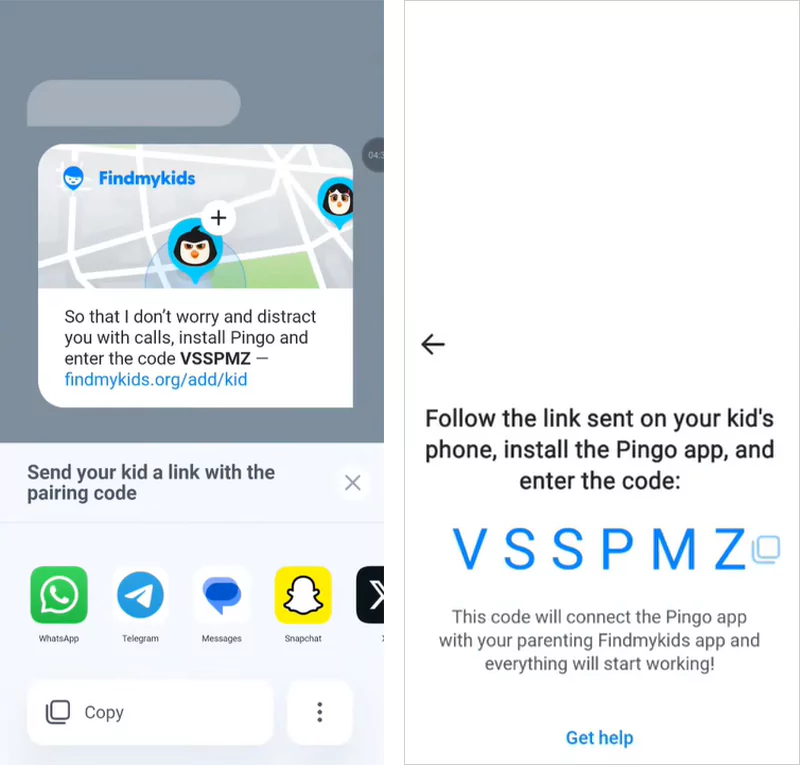
Step 10. Now, download the Pingo app (child version) on your kid’s mobile from the link.
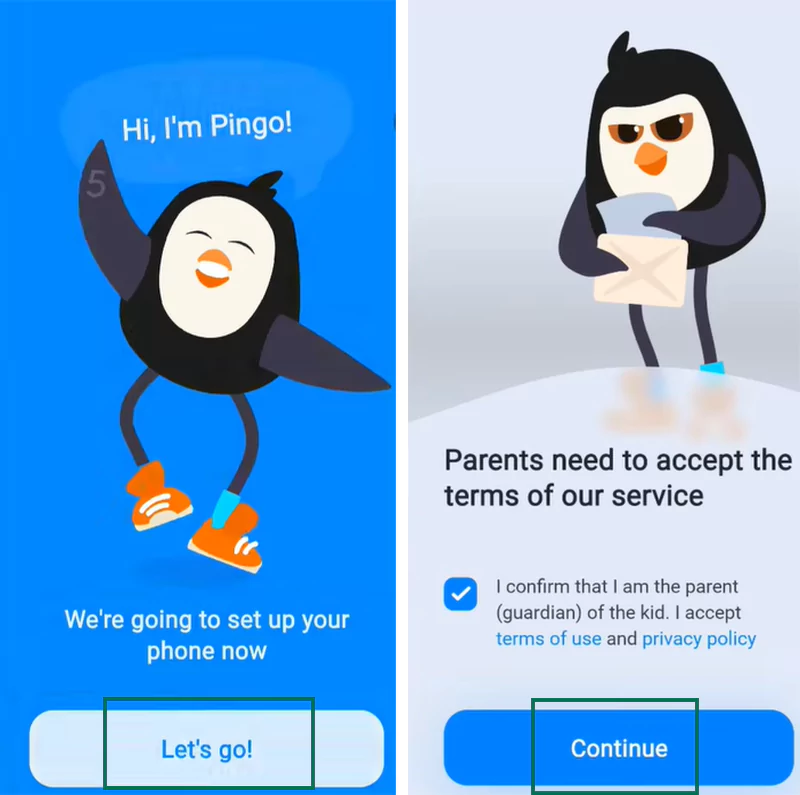
Step 11: Open the app and click on “Let’s go.” Next, click the checkbox and then “Continue.”
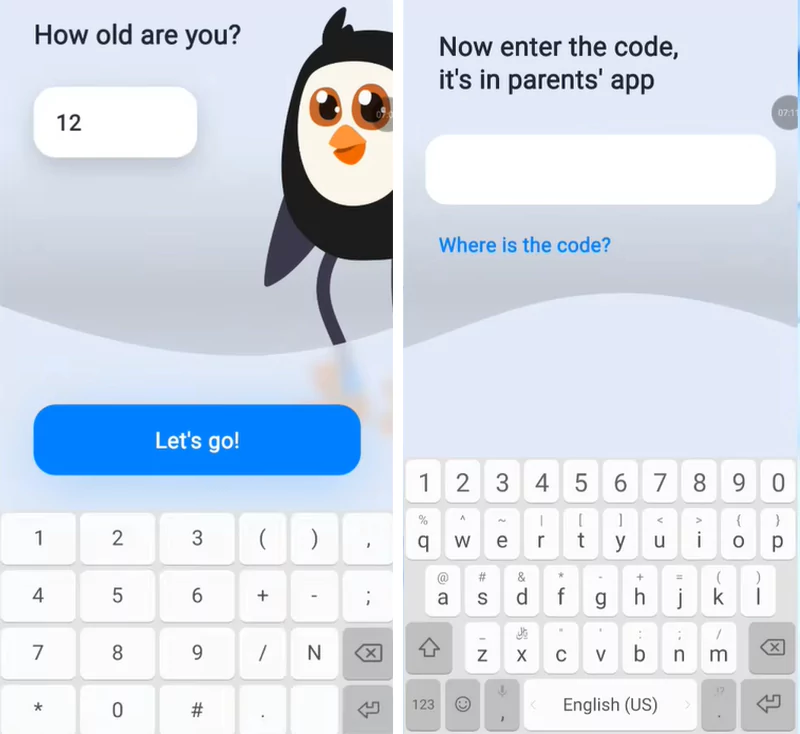
Step 12: Enter the age of your child and the code that you copied in the parent app.
Step 13: The app now asks for several permissions, like access to location, contacts, display over other apps, usage information, etc. You should click on Allow and grant permissions.
Step 14: Now, you have successfully connected the Findmykids and Pingo apps to protect your children online.
Also Read: Which is the Safest Parental Control App to Protect Children Online? Features, Price, and Ratings
Features-by-Features Comparison: Saferloop Vs Findmykids
Both Saferloop and Findmykids parental control apps offer various features like screen time management, compatibility, location tracking, and much more to enhance children’s security.
Therefore, I’ve mentioned the features-by-features comparison of these two apps to help you find the best parental control app. Let’s take a look at the following pointers!
| Features | Saferloop Parental Control App | Findmykids Parental Control App |
| Compatibility with Devices | Compatible with iOS and Android devices. | Compatible with iOS and Android devices but has limited iOS functionality. |
| Screen Time Management | Offer real-time adjustments, faster controls, and scheduling screen time limits. | Provides advanced screen time limits but lacks in deep integration as advertised. |
| Location Tracking and Real-Time Alerts | Track real-time location and send emergency alerts without delays. | Has a slow update process and shows a false location. |
| Bypassing and Uninstallation | Children cannot bypass restrictions and uninstall the app without parents’ permission. | Tech-savvy kids can change settings and uninstall the app in the absence of parents. |
1. Compatibility with Devices
You can use the Saferloop parental control app on your iOS and Android devices for smoother functionality. On the other hand, the Findmykids app claims to be compatible but lacks functionality on iOS devices.
2. Screen Time Management
The Saferloop parental control app offers real-time adjustments, faster controls, and scheduling options to set screen time limits for children’s browsing activities. Meanwhile, Findmykids also offers screen time limits, but it doesn’t support the deep integration as advertised.
3. Location Tracking and Real-Time Alerts
On Saferloop, you can track your kids’ real-time location from your smartphone and get updates or emergency alerts without a delay if something suspicious is detected. However, the Findmykids parental control app sends slow updates and shows false locations, making it unreliable for safety.
4. Bypassing and Uninstallation
In addition to this, the Saferloop parental control app has advanced security measures that don’t allow kids to uninstall it or bypass restrictions without parents’ permission. Meanwhile, tech-savvy children can change settings and uninstall the Findmykids app without their parents.
Pros and Cons of Saferloop and Findmykids Parental Control Apps
Every coin has two sides. That’s why Saferloop and Findmykids parental control apps have some benefits and drawbacks in their fields.
Let’s skim through this section to discover the pros and cons of Saferloop and Findmykids before making any informed decision.
1. Saferloop Parental Control App
Here are the advantages and disadvantages of the Saferloop parental control app.
| Pros | Cons |
| The app provides an AI-powered mechanism to restrict inappropriate content and filter websites. | The free version is limited to monitoring and tracking. So, you have to purchase premium plans to unlock other features. |
| The app sends emergency alerts, SOS updates, and weekly reports to parents without delays. | |
| You can use the app across iOS, Android, MacBooks, iPads, laptops, and tablets. | |
| It also tracks real-time location faster and offers geofencing services. |
2. Findmykids
Here are the advantages and disadvantages of the Findmykids parental control app.
| Pros | Cons |
| The app provides a sound-around child feature that allows you to listen to the surrounding noise to ensure safety. | It lacks in providing real-time alerts and true location tracking, making it untrustworthy. |
| It also offers reports and SOS updates on Android and iOS devices to keep track of children’s online activities. | If the app continuously tracks children’s online activities, it can drain the child’s device battery faster. |
| It monitors the kids’ phone battery and allows sending a loud signal when a mobile is silent. | It claims to be compatible with iOS and Android devices, but users experience limited iOS functionality. |
| You can also watch over the app usage statistics to make sure kids don’t use unsafe and restricted apps. |
Saferloop Vs Findmykids: Which is Suitable for Your Kids?
Choosing the best parental control app is based on your personal preferences, location, and financial budget. Still, I have mentioned some recommendations in this section to help you in selecting between Findmykids and Saferloop.
- If you want to utilize the full parental control app, along with smooth functionality across iOS and Android devices, you should opt for the Saferloop parental control app.
- Additionally, the Saferloop parental control app offers advanced AI-powered safety features with budget-friendly premium plans that never leave you broke.
- On the other hand, the Findmykids parental control app is mainly known for its GPS tracking and sound recording features. If you prefer these two features, you can choose this app.
Also Read: Top 5 Best Parental Monitoring Software to Track Children’s Activities in 2026
Conclusion and Recommendations
Overall, the above-mentioned pointers and features-by-features comparison of Saferloop vs Findmykids indicate that the Saferloop parental control app is suitable for protecting children online. On the flip side, Findmykids only offers suitable GPS tracking and lacks maintenance of other safety features.
Author’s Note:
As a parental control expert, I compare both the Saferloop parental control app and Findmykids because everyone claims to be perfect and protective.
Then, after comparing them, I concluded that Saferloop offers a comprehensive package of safety measures. It gives you peace of mind by sending updates, tracking real-time location, and monitoring everything on your child’s device.
However, FindmyKids lacks in real-time monitoring and drains the child’s device battery quickly.
Frequently Asked Questions
Q: Which is the best internet blocker for kids?
Q: Is the Findmykids app worth it?
Ans: The answer might vary from person-to-person. The app offers loud signal alerts and sounds around the child, which are rarely included in other parental control apps.
Q: What is the best parental control app for kids?
Ans: Saferloop is the best parental control app for kids, as it is designed to prioritize children’s safety. Also, it offers a wide range of features, including web filtering, screen time management, location tracking, geofencing, monitoring, tracking calls and messages, and much more.
Q: Is Findmykids a safe app?
Ans: Yes, Findmykids is generally considered a safe parental control app. However, there are many allegations that the app gathers the user’s information and invades their privacy through the listening sound feature.
 Neha Sharma
Parental Control & App Safety Writer
About article
The author of this article Neha Sharma, an Parental Control & App Safety Writer at Saferloop, brings practical experience and industry knowledge to the subject.
The review and editing by Evan Patterson have been done to make sure that it is accurate, clear, and relevant.
At Saferloop, we are determined to provide high-quality, well-researched, and updated content. To understand further how we produce and revise our articles, please refer to our Editorial Guidelines.
Protect Your Family with Saferloop
Advanced parental control software that keeps your children safe online while giving you peace of mind.
- Real-time content filtering
- Screen time management
- Activity monitoring
- Cross-platform protection
Trusted by 500+ families