Ans: The Saferloop parental control app offers many safety features, like screen time management, app blocking, web filtering, and location tracking for parents to enhance children’s safety and privacy.
×

Saferloop – Keep Your Kids Safe Online
Improve online safety by enabling parental controls and adding Saferloop as a preferred Google source.
Saferloop vs Canopy: Overview, Setup Guidance, Features-By-Features Comparison, and Pros & Cons
Saferloop and Canopy both provide strong safety features for your children’s safety. That’s why parents are always confused about choosing Saferloop vs Canopy.
To ease your problem, I’ve compiled the detailed information on the overview, setup guidance, features-by-features comparison, pros and cons, and personal recommendations.
So, stay adherent to this article!
Quick Answer:
Saferloop is the winner of Saferloop vs Canopy. It allows you to set screen time limits, block apps, filter content, track location, and monitor messages and call logs. Meanwhile, the Canopy app lacks monitor calls and SMS features and doesn’t work properly.
Table of Contents:
- Saferloop Vs Canopy: Overview of Both Parental Control Apps
- How to Set Up the Saferloop Parental Control Software?
- How to Set Up the Canopy Parental Control App?
- Features-By-Features Comparison: Saferloop Vs Canopy
- Pros and Cons of Saferloop and Canopy Parental Control App
- Saferloop Vs Canopy: My Personal Recommendations
- Wrapping Up!
- Frequently Asked Questions
Saferloop Vs Canopy: Overview of Both Parental Control Apps
Saferloop and Canopy parental control apps are big names in protecting kids online. So, I’ve mentioned the overview of both software to erase your confusion about choosing the better one.
1. Saferloop Parental Control Software
Ratings: ★★★★★ (5.0)
Free Trial: Yes
Price: $44.95/Year
Platforms: Compatible with Android and iOS devices
Best for: AI-powered monitoring and location tracking
The Saferloop parental control software allows parents to keep an eagle eye on their children’s online activities. So, as a parent, you can also use its safety features to protect your little ones on digital platforms.
It offers various safety features, such as the following:
- Monitor online activities
- Track location and geofencing
- Block unsafe apps and websites
- Restrict inappropriate content
- Set screen time limits
- Send reports, SOS updates, and emergency alerts
Not only this, you can easily run this software on both Android and iOS devices without worrying about compatibility. It also offers a single dashboard, safety checkup extension, and GPT to help parents like you who are concerned over kids’ safety and privacy.
2. Canopy Parental Control App
Ratings: ★★★ (3.1)
Free Trial: Yes (7 days)
Price: $8.33/month
Platforms: Compatible with iOS and Android devices
Best for: Blocking porn content and restricting apps
The Canopy parental control app is designed to protect children from pornographic websites and content. It helps parents to block such adult images and videos instantly with the help of its safety features.
It also offers many features, including:
- Filter AI chatbots
- Real-time filtering
- Sexting alerts
- Internet downtime
- Location alerts
- Removal prevention
Similar to Saferloop, it is also compatible with iOS and Android devices. But many parents report complaints that even after purchasing a paid premium, it doesn’t work and lacks comprehensive monitoring.
How to Set Up the Saferloop Parental Control Software?
To set up the Saferloop parental control software, download the software > create a parent and child account > link both devices > customize settings.
Here is the simple guidance on how to set up the Saferloop parental control software.
Step 1: Download the Saferloop parental control software on your and your child’s devices.
Step 2: Create a parent and child account by entering your email address and password.
Step 3: On a parent account, go to the “Device” option from the menu bar.
Step 4: Enter your child’s name and device model, and tap on “Generate Link Code.” A 6-digit code appears in the drop-down list.
Step 5: On a child’s account, go to the “Pair” option from the menu bar.
Step 6: Now, enter your generated code and your name.
Step 7: Tap on “Pair Now” to link both parents’ and the child’s accounts.
Step 8: After pairing, you can customize settings like screen time management, web filtering, app blocking, etc., for your kid’s safety.
How to Set Up the Canopy Parental Control App?
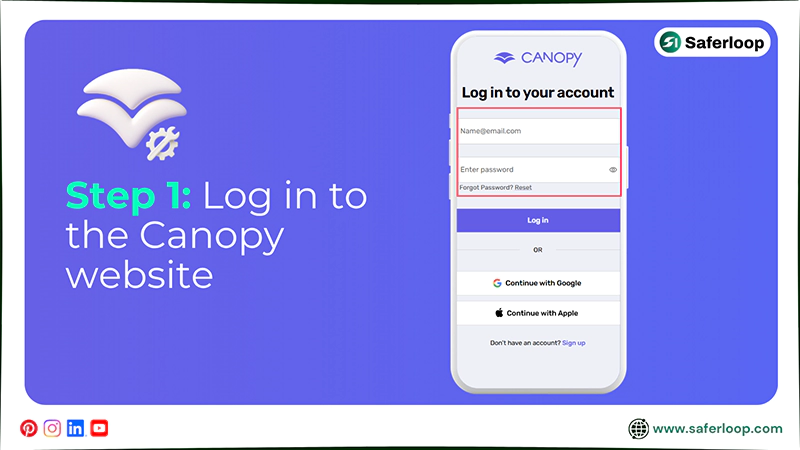
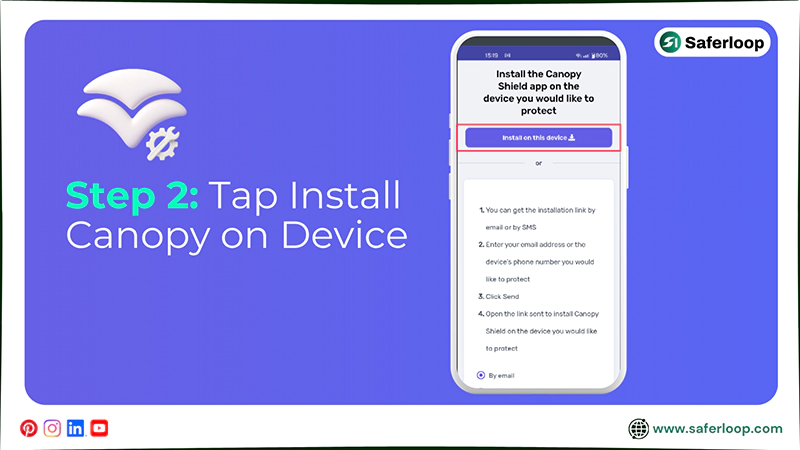
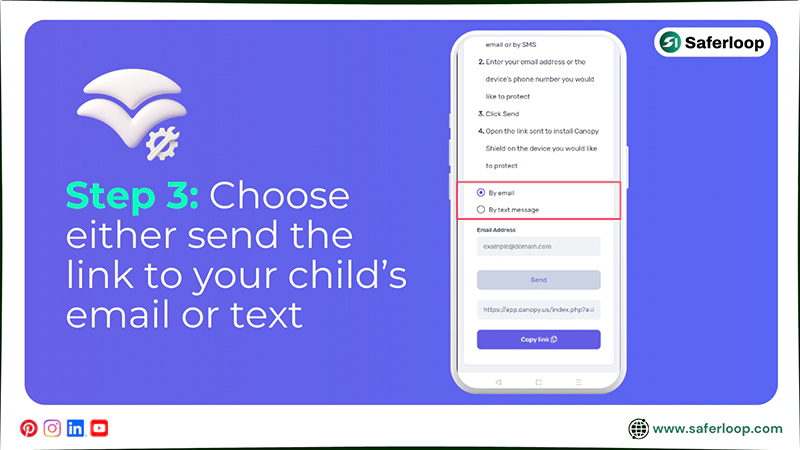
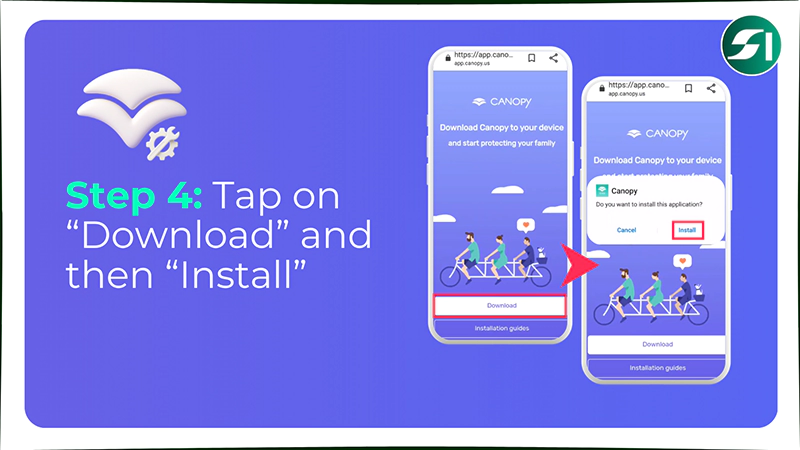
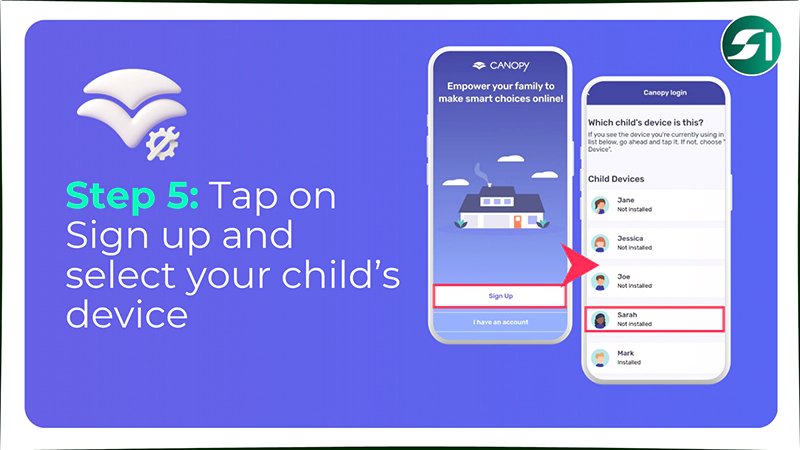
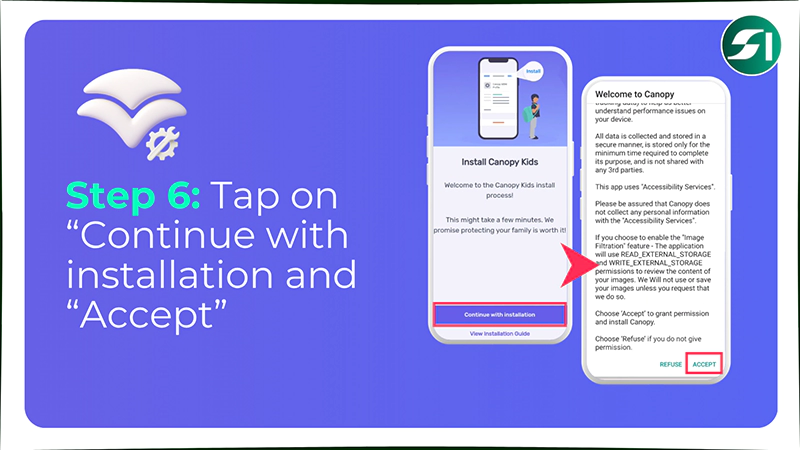
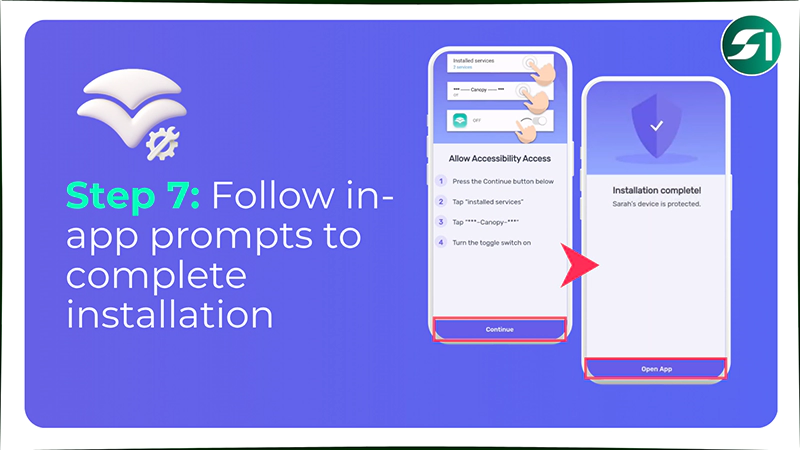
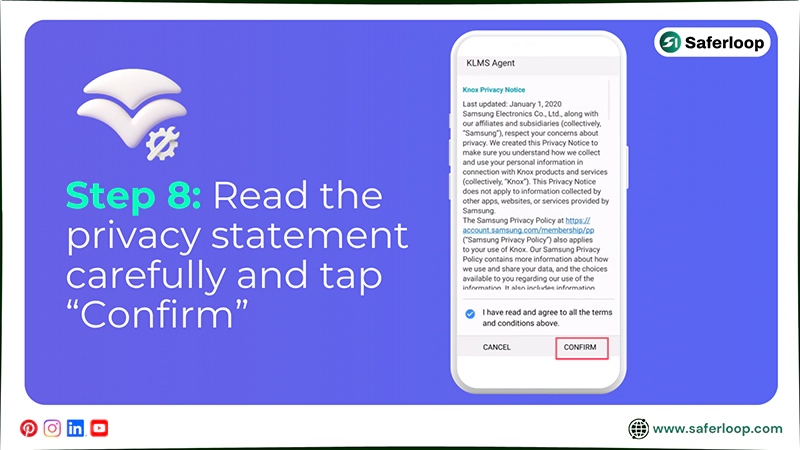
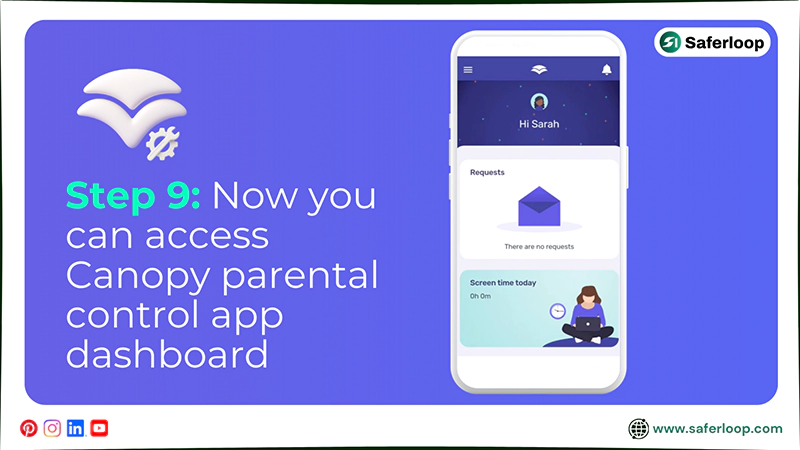
To set up the Canopy parental control app, you should log in to the website > install the app on the kid’s device > follow in-app prompts > monitor activities.
Must Know: I used a Samsung Galaxy S9 phone to verify the Canopy installation steps. Your Android or iOS devices may have different settings from those.
Here are the detailed steps for setting up the Canopy parental control app on your child’s phone.
Step 1: Log in to the official Canopy website to create an account.
Step 2: Tap on “Install Canopy on Device” from the dashboard.
Step 3: Now, you have two options to download the Canopy Kids app to your child’s device:
- Visit canopy.us/install or
- Send the link to your child’s email or phone number (text message).
Step 4: Open the website (canopy.us/install) and tap on “Download” and “Install” on your kid’s phone.
Step 5: Now, sign up using your email address or phone number and select your child’s device.
Step 6: Tap on “Continue with installation” and “Accept” the terms of use.
Step 7: Now, follow the in-app prompts to grant permissions (automatic installation, location, usage data access, photos, and SMS) to complete the installation.
Step 8: You’ll get an additional privacy statement if you use Canopy on a Samsung, read it carefully, and tap on “Confirm.”
Step 9: Now, you have a single dashboard to monitor your child’s screen time, friend requests, and more.
Also Read: Saferloop vs AirDroid Parental Control: Choose the Best Parental Control for Your Children
Features-By-Features Comparison: Saferloop Vs Canopy
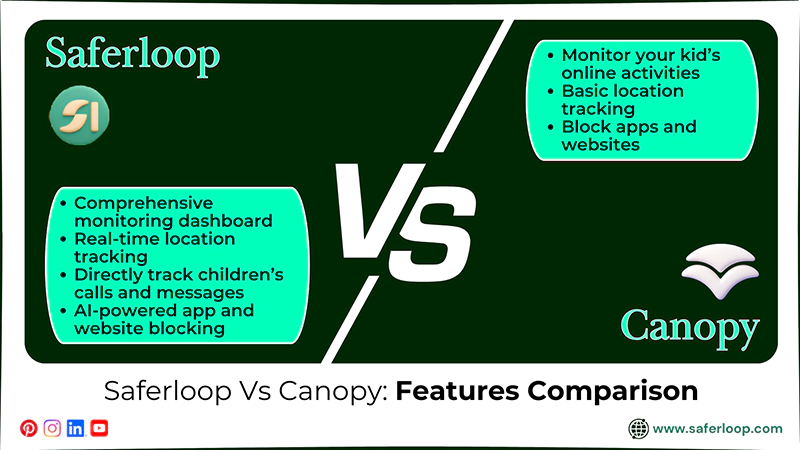
Saferloop provides a call and message tracking feature; meanwhile, Canopy lacks offering this feature. This indicates that the right comparison helps you to select between Saferloop and the Canopy parental control app.
That’s why I’ve mentioned the features-by-features comparison to help everyone check out what they offer.
| Feature | Saferloop Parental Control Software | Canopy Parental Control App |
| Monitoring Online Activities | Offer a comprehensive monitoring dashboard, including social media monitoring. | Monitor your kid’s online activities, but lack social media monitoring. |
| Tracking Location and History | Provides real-time location tracking and sends geofencing alerts to protect children from dangers. | It offers basic location tracking and doesn’t allow parents to see location history and receive geofencing alerts. |
| Detecting Calls and Messages | Directly track children’s calls and messages to know how they interact with people. | Sadly, it doesn’t detect calls and messages due to the kids’ privacy reasons. |
| Blocking Unsafe Apps and Websites | The AI-powered app and website blocking feature seamlessly blocks harmful sites immediately. | It claims to block apps and websites, but doesn’t restrict them properly, and children can access adult apps easily. |
1. Monitoring Online Activities
Saferloop provides a comprehensive dashboard to keep an eye on what your kids are doing online, especially social media monitoring (TikTok and Instagram).
On the other hand, the Canopy parental control app offers a single dashboard to watch over your kids’ online activities. But it lacks social media monitoring, so you won’t be able to track their social media accounts.
2. Tracking Location and History
You can also track your children’s real-time location to have an idea of their physical availability using Saferloop location tracking. It also sends geofencing alerts that help you protect them from reaching dangerous places.
Meanwhile, the Canopy app offers basic location tracking and doesn’t support location history and geofencing alerts. This means that you don’t monitor where your kids are.
3. Detecting Calls and Messages
Calls and messages are also tracked regularly to ensure your little ones’ safety. To keep this point in mind, Saferloop parental control software also allows you to read your kids’ messages and see call logs directly.
But the Canopy parental control app doesn’t offer a call and SMS tracking feature due to privacy reasons. It means that you don’t know with whom your children are interacting.
4. Blocking Unsafe Apps and Websites
You can easily block unsafe apps and websites from your kids’ devices with a few clicks on Saferloop parental control software. It helps you to prevent them from accessing inappropriate content.
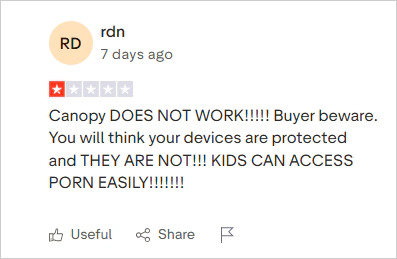
On the flip side, the Canopy parental control app claims to offer an app blocker, but it doesn’t work properly. Many parents on Trustpilot complain about its false marketing.
Also Read: Saferloop vs Aura: Which Parental Control Software Should You Choose?
Pros and Cons of Saferloop and Canopy Parental Control App
Although Saferloop and Canopy offer various features like monitoring and compatibility across devices, they have drawbacks like a premium version and functionality issues.
So, it’s better to read the pros and cons of both parental control apps before selecting between Saferloop vs Canopy.
1. Saferloop Parental Control Software
Here are the advantages and disadvantages of the Saferloop parental control software.
| Pros | Cons |
| It offers a comprehensive dashboard to monitor your kids’ online activities with a few clicks. | The free version lacks some advanced features. So, you have to purchase a premium plan to unlock a wide range of safety features. |
| It offers screen time limits to decrease excessive use of smart devices and encourage healthy habits. | |
| The software also provides location tracking and geofencing alerts to help you find out where your children are. | |
| You can also read messages and call logs directly from your kids’ phones to have an idea of whom they can interact with. |
2. Canopy Parental Control App
Here are the advantages and disadvantages of the Canopy parental control app.
| Pros | Cons |
| It provides an intelligent filtering system to prevent children from porn sites and explicit content. | It doesn’t offer a call and message tracking feature, so you won’t be able to watch your kids’ activities closely. |
| The removal prevention feature doesn’t allow kids to change settings without parents’ permission. | The app quickly drains your children’s device battery. |
| You can also use the internet downtime feature to keep your children away from digital devices for a specific time period. | Many parents experience that the app won’t function properly and lags frequently. |
| It also offers compatibility across various devices, including iOS and Android devices. |
Saferloop Vs Canopy: My Personal Recommendations
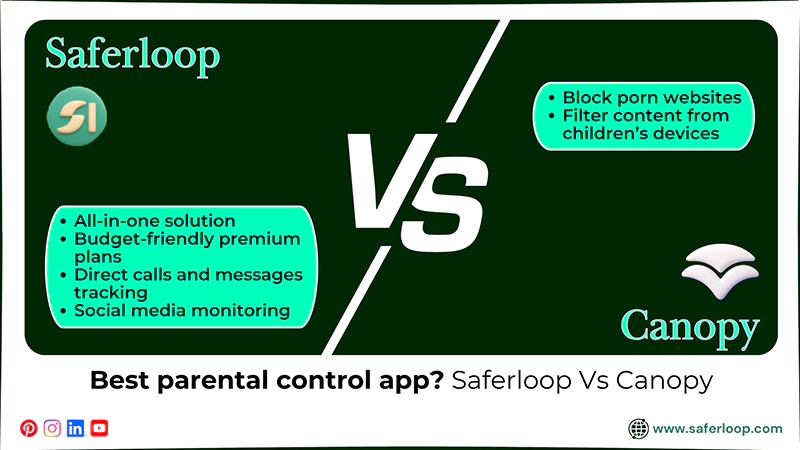
I know choosing the best parental control app entirely depends on your personal choices and financial budget. Still, I’ve mentioned some personal recommendations based on my experience here.
- If you want to use an all-in-one solution to protect your children online with budget-friendly premium plans, you can trust the Saferloop parental control software.
- The Saferloop parental control software also provides direct calls and messages tracking and social media monitoring to watch over your kids’ activities closely and deeply.
- Also, you can choose the Canopy parental control app to block porn websites and filter content from children’s devices. But always remember that the app lags frequently and faces functionality issues.
Wrapping Up!
Overall, Saferloop is better than the Canopy parental control app, as it provides the best comprehensive safety features. This safe parental control app helps you to protect your children from online threats and scammers.
Also, I advise you to build healthy relationships with your little ones to gain their trust. This way, you can easily teach them safety measures and empower them to make informed decisions on their own.
Author’s Note:
After testing both Saferloop and Canopy, I have come to the conclusion that the Saferloop parental control software offers the best safety features.
Saferloop provides advanced features such as monitoring online activities, tracking location, blocking unsafe apps, and detecting calls & messages. It can become your one-stop solution for your little ones’ safety and privacy.
On the other hand, the Canopy parental control app offers digital filtering and blocking of explicit content. But it doesn’t allow you to read messages directly.
Frequently Asked Questions
Q: What is the Saferloop parental control app?
Q: Is Canopy a good parental control app?
Ans: Yes, Canopy is a good parental control app that prevents kids from accessing porn sites and explicit content. But you can encounter some issues while using this app.
Q: Which is the best parental control app?
Ans: Saferloop is the best parental control app that prioritizes your kids’ safety and privacy on digital platforms with budget-friendly plans.
Q: Should I let my kids use Snapchat without parental controls?
Ans: No, using Snapchat without parental controls can be harmful for your kids because of inappropriate content and strangers’ engagement. So, you should use the Saferloop parental control software to keep your children safe.
 Neha Sharma
Parental Control & App Safety Writer
About article
The author of this article Neha Sharma, an Parental Control & App Safety Writer at Saferloop, brings practical experience and industry knowledge to the subject.
The review and editing by Vinithra Karunanidhi have been done to make sure that it is accurate, clear, and relevant.
At Saferloop, we are determined to provide high-quality, well-researched, and updated content. To understand further how we produce and revise our articles, please refer to our Editorial Guidelines.
Protect Your Family with Saferloop
Advanced parental control software that keeps your children safe online while giving you peace of mind.
- Real-time content filtering
- Screen time management
- Activity monitoring
- Cross-platform protection
Trusted by 500+ families