

Because they are free and also offer ways to set up and manage family accounts, Bark recommends Gmail, iCloud email, and Outlook.
×

Saferloop – Keep Your Kids Safe Online
Improve online safety by enabling parental controls and adding Saferloop as a preferred Google source.
Email Providers: Building a Safer Digital World for Kids
Children are growing up with digital communication as a part of their daily lives. School updates, club sign-ups, learning platforms and family coordination all rely on online messaging systems, with email still a key tool.
This is a practical problem for parents. This isn’t just about managing screen time and apps; it’s about understanding how personal information moves through digital systems and how to keep that information safe as children begin to use technology more independently.
Even if they’re not managing accounts themselves, email is often one of the first places children encounter structured digital communication. That makes it a key area for safety and education.
Table of Contents:
- Email is a Gateway to Personal Information
- Online Safety Starts With Everyday Tools
- Children Learn Digital Habits From Observing You
- Security Risks Grow as Children Become More Independent Online
- Privacy Protection is Part of Modern Parenting
- Building Safer Habits Through Consistent Use
- Teaching Children To Recognise Trustworthy Communication
- Creating Healthy Boundaries Around Digital Communication
- The Role of Trust in Digital Safety
- Preparing Children For a Connected Future
- The Verdict
- Frequently Asked Questions
Email is a Gateway to Personal Information
Although children may not be using e-mail themselves, it is often used on their behalf. Parents receive school correspondence, account notices and login information for educational tools through email systems.
This builds a digital record over time containing names, schedules, locations and sometimes sensitive personal details. If that account was compromised, it could reveal more than just messages.
This can impact access to other services linked to the same inbox.
Using a secure mail setup helps reduce unnecessary exposure and gives families more control over how information is stored and accessed across devices.
However, it is very common for beginners to make mistakes. Have a look at this infographic to witness the common mistakes made by beginners, so you can avoid them.
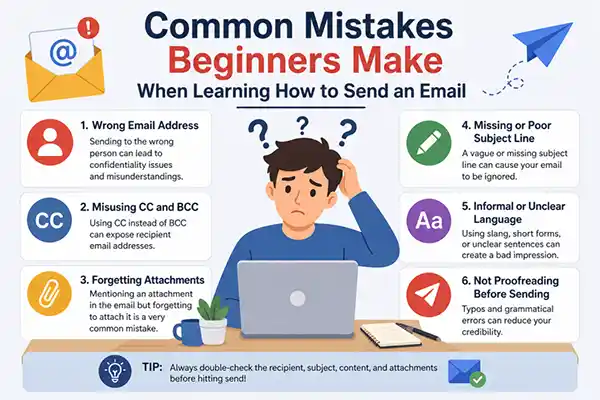
Online Safety Starts With Everyday Tools
Digital safety is not just about monitoring apps or blocking access. It is also about knowing the tools we use on a daily basis and how they process personal data.
Parental controls are one part of that picture, but they work best when combined with an understanding of how communication systems work. Email, in particular, is often linked to multiple accounts and services and is a major control point in a child’s digital life. That’s why you’re seeing more families focusing on protecting kids in the digital age, through safer digital habits and tools at the system level, not just the app level.
The NSPCC’s online safety and parental controls guidance stresses the importance of a combination of technical tools and ongoing conversations about safe online behaviour.
Children Learn Digital Habits From Observing You
Children rarely learn online safety from formal instruction alone – they learn from what they see at home, how adults manage passwords, respond to messages and handle personal information.
These lessons could be structured around email as a familiar and practical starting point. It is already part of school life and family organisation and therefore easier to explain why some messages have to be taken care of.
Simple habits such as checking the sender details and not clicking on unknown links or responding to unexpected requests before asking an adult can help build strong foundations over time.
Security Risks Grow as Children Become More Independent Online
As children get older, they begin to use more platforms that rely on email for account creation, verification and communication. That increases exposure to phishing attempts, fake messages and account-related risks.
Most of these risks aren’t immediately apparent. Messages can seem to come from trusted sources like a school, a game or a popular app. And without guidance, younger users can have a hard time telling legit from dodgy communication.
A more controlled email environment reduces this complexity and gives parents better oversight of how accounts are being used.
Privacy Protection is Part of Modern Parenting
Digital parenting now includes managing how personal data is shared across systems. Email sits at the centre of that process because it connects so many services.
Choosing tools that prioritise privacy is one way to reduce unnecessary exposure. It also helps create clearer boundaries between different types of communication within the household.
The intention isn’t to prevent access, but to create a safer framework that kids can learn to navigate as they become more independent online.
Building Safer Habits Through Consistent Use
Repetition, not one-off lessons, is the foundation of long-term digital safety.
When families consistently use safe systems, children start to understand what safe communication looks like in practice.
Email is one of the most reliable tools in the digital life of a household.
It is a natural place to build awareness, habits and understanding around privacy and security.
As children grow, those early experiences help shape how they interact with the wider digital world.
Teaching Children To Recognise Trustworthy Communication
One of the most valuable digital skills children can develop is the ability to recognise whether a message is genuine.
Email provides regular opportunities to practise this because messages arrive from many different sources, including schools, sports clubs, online services and family contacts.
Parents could use everyday examples to help explain why some emails are safe and some emails should be questioned.
Children can learn to spot unusual wording, unexpected attachments or urgent requests that put pressure on users to click quickly.
These small observations help children develop critical thinking skills, which will serve them well later on social media, messaging apps and other digital platforms.
The earlier children are taught that not every message they get online is trustworthy, the better equipped they will be to navigate the internet confidently and responsibly.
Rather than relying solely on restrictions, families can work on building awareness and encouraging open communication when something online seems suspicious or confusing.
Fun Fact
The first email was sent in 1971, the same year it was invented. Tomlinson sent the first email to himself, and you’ll be surprised at how underwhelming it was.
Tomlinson claims his first email said something along the lines of “QWERTYUIOP”, which is the first line of letters on a keyboard.
Creating Healthy Boundaries Around Digital Communication
As technology becomes more and more integrated into school and social life, children are often bombarded with constant notifications and digital distractions.
Email is generally more deliberate and slower than instant messaging tools, so it can help introduce a more disciplined and manageable approach to communication.
Email can be part of a balanced digital routine if families establish clear expectations about when and how online communication is monitored. This also helps children learn that they don’t have to respond to any message or notification they receive immediately.
It also allows parents to still be involved without being intrusive, as healthy boundaries provide opportunities.
Families can create a safer environment by reviewing communication habits together and discussing how different platforms are used, allowing children to gradually gain independence while still feeling supported.
The Role of Trust in Digital Safety
Technology alone cannot make the internet safe. Filters, parental controls and secure email are important tools, but trust between parents and children is essential. Children are more likely to seek help when they feel safe talking about mistakes or strange messages or online experiences without fear of punishment.
This is even more important when children start to create their own accounts and handle communication themselves.
Things happen.
You click on the wrong link, share information too quickly, or respond to a suspicious message. Supportive guidance can turn those moments into learning opportunities and not anxiety.
Families can build a healthier relationship with technology by using secure communication tools combined with open conversations. kids learn how to be safe with their information and they gain confidence in making good choices when they are online
Preparing Children For a Connected Future
Digital communication will shape education, work and social interaction for generations to come.
Teaching children how to use email safely is therefore not just about protecting accounts today, it is about preparing them for long-term participation in an increasingly connected world.
Children with a good understanding of privacy, security and responsible communication are better prepared to adapt to future technologies and online environments.
They learn that convenience must be balanced with caution and that protecting personal information is a commonplace part of everyday digital life.
Parents don’t need to be cybersecurity experts to make a difference. Stable habits, safe systems and ongoing dialogues have already laid the groundwork. In time, these small actions help children develop the awareness and resilience they need to navigate the digital world more safely and independently.
The Verdict
As kids spend more time online, choosing safe and secure email providers is crucial to protect their privacy and digital well-being.
Good platforms come with parental controls, spam protection and safer communication tools that help families build healthy online habits. With security and responsible technology use in mind, parents can cultivate a safer digital environment where kids can learn, connect, and grow with confidence.
Frequently Asked Questions
What email addresses are safe for kids?
What is the safest email system?
Proton Mail is the world’s largest end-to-end encrypted email service. Proton Mail makes sure no one can access your emails by using end-to-end encryption and zero-access encryption.
What is a safe digital space for children?
Overall, a ‘safe digital space’ refers to an online environment where individuals, especially children and vulnerable users, can interact, communicate, and engage in various digital activities without the risk of experiencing harm, exploitation, or abuse.
Are kids allowed to have emails?
Most email providers require users to be at least 13 years old due to the Children’s Online Privacy Protection Act (COPPA).
 Divya Kakkar
Internet Content Writer
About article
The author of this article Divya Kakkar, an Internet Content Writer at Saferloop, brings practical experience and industry knowledge to the subject.
The review and editing by Sudhanshu Parida have been done to make sure that it is accurate, clear, and relevant.
At Saferloop, we are determined to provide high-quality, well-researched, and updated content. To understand further how we produce and revise our articles, please refer to our Editorial Guidelines.
Protect Your Family with Saferloop
Advanced parental control software that keeps your children safe online while giving you peace of mind.
- Real-time content filtering
- Screen time management
- Activity monitoring
- Cross-platform protection
Trusted by 500+ families