Yes, through Exchange resource calendars. Dedicated platforms become useful when you need richer search, check-in, analytics, displays, or workplace management.
×

Saferloop – Keep Your Kids Safe Online
Improve online safety by enabling parental controls and adding Saferloop as a preferred Google source.
Protective Software Solutions: 5 Secure Outlook Meeting Room Booking Tools to Evaluate in 2026

“The longer the meeting, the less is accomplished.” – Tim Cook (Apple Ex-CEO)
Planning for a meeting in a traditional manner takes more time than needed. A meeting-room calendar helps a bit, but as the organization’s complexity grows, even that doesn’t make much difference. The workforce grows, teams multiply, and to accommodate that, even more meeting spaces come up. But the situation that arises is three teams standing in front of the same glass door.
This is when the importance of tighter booking rules, room details, check-ins, and better workplace data control rises. These systems have access to names, schedules, locations, and other company data, so security matters a lot.
This guide evaluates the top five Outlook meeting room booking options of 2026. The ranking is based on their control capabilities around integration, permissions, privacy, and administration.
Table of Contents:
What Makes an Outlook Booking Tool Secure?
Room bookings can reveal sensitive data about the people involved, time and place, etc.
So, this review evaluates the selected tools based on four aspects:
- Outlook integration
- Access control
- Data handling
- Proven security capabilities
A tool showing a glossy room map but is weak at security control is not your option.
Permissions matter a lot. Take Robin, for instance. It references Outlook’s account and calendar permissions for add-in bookings. This keeps the employee’s identity tied to the process.
Also, even physical security should be thought through. Public displays showing enough information that helps in room booking are good. They shouldn’t divulge sensitive data.
The following sections list the top 5 security-focused Outlook meeting room booking software. If you need a list of the overall best 5 Outlook meeting room booking tools, read here.
1. Microsoft Places
Most people already being in the Microsoft ecosystem makes Places an obvious choice. It lets users reserve rooms through Outlook and Teams, with rooms represented as resource mailboxes that handle availability and conflicts.
There’s a clear security advantage. Places works inside Microsoft 365, so Microsoft 365 security capabilities such as role-based access, identity management, and app management apply to it. Microsoft also says Places data remains within the organization’s tenant.
A Microsoft-first team should try this first. That keeps the booking layer close to the calendar layer.
Check licensing carefully. Microsoft changed some Places requirements in 2026, including auto-release, analytics, and AI features.
If you’re a working mom, here are additional tools that can make your life easier.
2. Robin
Robin is also a strong option. Its Outlook add-in suggests spaces using availability, permissions, amenities, location, and meeting criteria, then syncs events with Robin’s dashboard, display, and mobile app.
Robin’s cloud data centers are certified by ISO 27001 and SOC 2. Customers can even choose U.S. or European data residency for application data.
I like the permission model because Outlook remains the source of the booking identity. Still, admin review is needed for add-in consent and resource-calendar permissions before rollout.
A good fit for hybrid offices where rooms, desks, and workplace rules need to work together.
3. Envoy
If the visitor management system is integrated, Envoy makes greater sense. Its Outlook integration can handle meeting locations and visitor invites, while Envoy Rooms handles reservations and check-ins.
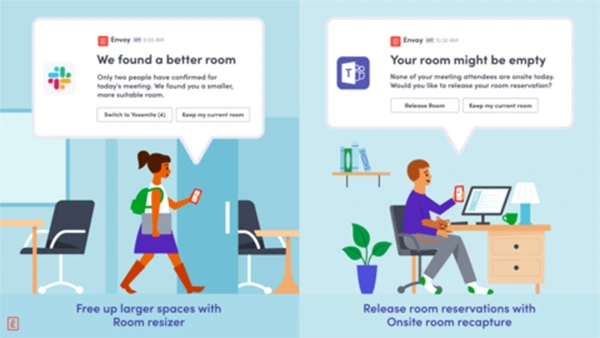
Envoy provides top-notch security. It has a SOC 2 Type 2 report and uses controls including two-factor authentication, encryption, administrator activity logging, and controlled access grants. It also states that its platform is ISO/IEC 27001 certified.
This is the option if your office gets frequent guests, contractors, or regulated workspaces. Meeting and visitor data can stay connected in one workflow.
Keep room-display data lean. A screen outside a conference room should help people use the space, not become a public directory of sensitive meetings.
4. Smartway2
Smartway2 is also a nice option to book rooms through Outlook. Its software works with Outlook, Office 365, Teams, and Outlook for Mac, with filters for capacity, location, equipment, and room layout.
The security controls are granular. Smartway2 says it is certified to ISO 27001 and ISO 27701, is GDPR compliant, and provides customizable privacy controls. Its compliance page also states “no PI data storage.”
This one’s perfect for privacy-focused teams. It also handles service requests such as catering and AV.
Still, don’t let certification badges end the review. Ask what your tenant data contains, how long it is retained, and which admins can access it.
5. Archie
Archie provides a comprehensive set of features like:
- Floor plans
- Smart filters
- Two-way calendar syncing
- Broader workspace management
Its Outlook integration lets employees book directly from the calendar, while bookings made in Teams or Archie can sync back to Outlook.
Talking of security, Archie says sensitive data is protected with AES-256 encryption at rest and TLS 1.2 or above in transit, access follows a least-privilege approach, and annual penetration tests cover its applications and API. Its data processing addendum also describes infrastructure with SOC 2 Type II and ISO 27001 compliance.
Just like a red room tablet signifying occupied status, this implements it for Outlook and floor plans as well. Fewer moving parts can mean fewer workarounds.
And this is where an adjacent engineering partner can matter. A custom software development company can be relevant when the booking platform has to fit a larger internal workflow rather than stand alone.
The Security Checks That Matter Before You Buy
Before signing up for any service, clarify your doubts with the five questions:
- Who owns the calendar data
- Where it is stored
- How long it stays there
- What permissions the Outlook add-in requests
- How access is removed when someone leaves
Keep it simple with custom software development services. Get the answers in writing.
Conclusion
The best option is the one that aligns the most with your current workflow. Microsoft Places is the natural fit for a Microsoft-native environment, whereas Robin suits broader workplace management. Similarly, we have Envoy that fits visitor-heavy offices, Smartway2 puts extra weight on privacy controls, and Archie is worth a close look for floor plans and workspace management.
If unsure, try the least disruptive platform that solves a real problem. Complexity has a cost.
Frequently Asked Questions
Can Outlook Book Meeting Rooms by Itself?
Is Microsoft Places Secure?
If you trust Microsoft, then yes. Places uses Microsoft 365 security capabilities and keeps organizational data within the customer tenant.
Which Tool Is Best for Regulated Offices?
There’s no universal “best”. Envoy, Robin, Smartway2, and Archie publish security or compliance information, but your retention, identity, and access requirements should decide the final choice.
Should Room Booking Software Use Single Sign-On?
Absolutely check for the feature. Centralized identity can simplify onboarding, offboarding, and access reviews when the integration is configured with appropriate admin permissions.
Can Custom Software Fit Around a Room Booking Platform?
Yes. A custom software development services provider can be considered for organizations with unusual workflows for its integrations or internal systems around the booking platform.
Sources
- Microsoft Learn — Microsoft Places: Room and Desk Booking Microsoft Places room and desk booking documentation
- Microsoft Learn — Privacy, Security, and Compliance in Microsoft Places Microsoft Places security documentation
- Robin — Microsoft Outlook Integration Robin Outlook integration
- Robin — Platform Security Robin security practices
- Envoy — Outlook Conference Room Scheduling Envoy Outlook room scheduling
- Envoy — Compliance and Security Envoy compliance documentation
- Smartway2 — Outlook Meeting Room Booking Smartway2 Outlook meeting room booking
- Smartway2 — Security and Compliance Smartway2 compliance documentation
- Archie — Microsoft Outlook Integration Archie Microsoft integration
- Archie — Platform Security and Privacy Archie security documentation
 Justin Thomas
Cybersecurity Analyst and Digital Safety Writer
About article
The author of this article Justin Thomas, an Cybersecurity Analyst and Digital Safety Writer at Saferloop, brings practical experience and industry knowledge to the subject.
The review and editing by Evan Patterson have been done to make sure that it is accurate, clear, and relevant.
At Saferloop, we are determined to provide high-quality, well-researched, and updated content. To understand further how we produce and revise our articles, please refer to our Editorial Guidelines.
Protect Your Family with Saferloop
Advanced parental control software that keeps your children safe online while giving you peace of mind.
- Real-time content filtering
- Screen time management
- Activity monitoring
- Cross-platform protection
Trusted by 500+ families