No, it was a time that prove benefits of this hidden gem. It should be used by every child, but with some considerations.
×

Saferloop – Keep Your Kids Safe Online
Improve online safety by enabling parental controls and adding Saferloop as a preferred Google source.
Parental Control Over Online Tutoring: How Parents Can Safeguard Learning During Their Child’s Online Sessions
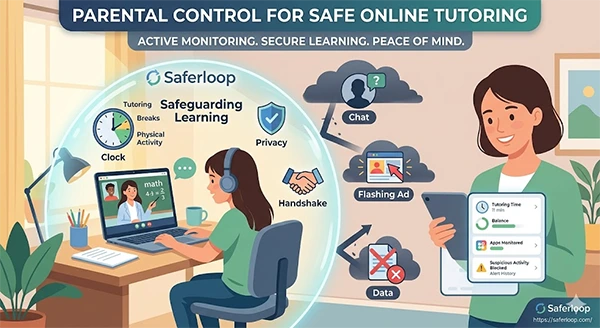
Getting online tuitions for children has become a standard nowadays. And why should it not? It is more convenient, comes with 24/7 support and encourages a flexible culture.
But there is a side most parents don’t fully see.
According to reports, 1 in every 5 children is approached by strangers online, and surprisingly, through platforms that look safe–including chat features used during online sessions. (Source: TECH MONITOR)
For every responsible parent, this alarms them to be more vigilant. The good news? With the right awareness, tools and habits, parents can ensure their child benefits from Online learning without compromising safety.
This post explains how parents can use modern tutoring services, such as Tutor.com and make the most of online tutoring while keeping their child’s learning safe.
Key takeaways
- Online learning is a great way to study with more convenience – but only when utilised in the right way.
- Screen monitoring, app restrictions and time control allow parents to safeguard their children’s online learning.
- When advanced tools, best practices and human bond are used altogether, they result in a safe and independent learning environment.
Table of Contents:
- Why Online Tutoring Safety Is a Growing Concern for Parents
- Common Risks Kids Face During Online Learning Sessions
- How Parental Control Tools Help Secure Online Tutoring
- Key Features Parents Should Use During Online Sessions
- Best Practices for Creating a Safe Online Learning Environment
- Conclusion
- Frequently Asked Questions
Why Online Tutoring Safety Is a Growing Concern for Parents
Online tutoring has become a standard way of learning these days, and this all skyrocketed after the COVID-19 lockdowns. With the ease of ways to learn and gain knowledge from the world’s top teachers.
Here are the top reasons why parents choose to rely on online tutoring:
- Global access to top faculties
- No time and travel restrictions
- Personalised learning guides
- 24/7 doubts support
- Cost-effective as compared to personal home tuitions
Despite all these conveniences, the question remains the same: Is it truly safe for your children?
Common Risks Kids Face During Online Learning Sessions
The purpose behind online learning sessions is to provide the best education through flexible methods. But still, they operate on digital devices – and that welcomes potential risks.
Some of the most common risks include:
- Stranger Interaction: chat features allow unknown people to make interactions.
- Distraction: Switching tabs and exploring various links distract kinds with ads and much more inappropriate content.
- Privacy Issues: Personal details such as address and name are shared easily.
- Addiction to Screens: Making almost every activity on the internet – from playing games to studying – affects health and focus.
These risks don’t prove that online tutoring is a bad choice; they simply signal that they require smart supervision. For instance, instead of using malicious photo sites, students can rely on safe and reputable stock photo sites that ensure their safety.
Interesting Fact
Children spend an average of 6–7 hours per day on screens. Using their mobile phones for everything – from games and social media to homework and online math classes. This makes it tough for parents to make a difference between productive study time and distraction. (Source: AACAP)
How Parental Control Tools Help Secure Online Tutoring
Parental control tools ensure that parents have much of the control in their hands. This doesn’t mean interfering in the student’s education, but to be aware of things happening.
Effective tools like K-12 student monitoring help parents detect possible risks and keep track of their children’s safety 24/7. These tools also help to block unsafe sites, track learning distraction time and get alerts for any activity that seems suspicious.
At its core, these tools don’t ask for constant checking of children’s phones, hence don’t pamper them. Yes, help to stay informed of the present activities.
Key Features Parents Should Use During Online Sessions
While there are various features available, not all may be worth exploring. Below are the three most effective features that should be known by parents:
Screen Monitoring
This is one of the most effective and popular features, as it allows you to view exactly what your kids are doing in between the sessions.
Which means, for how long they were active and for how long they were scrolling reels – all at your fingertips.
App Restrictions
Various apps and sites are available that are clearly not suitable for kids, as they have inappropriate content. App restriction feature allows for restricting those which alarming you in case they are visited through alternate ways.
Time Controls
Time control features allow one to set limits on the usage for a controlled exposure. This result to a balance between the physical, social and digital life.
Also, help to attend classes on time, take breaks for effective study and avoid excess exposure to scenes.
Take a moment to read how schools are using digital signage to improve safety and communication in schools.
Best Practices for Creating a Safe Online Learning Environment
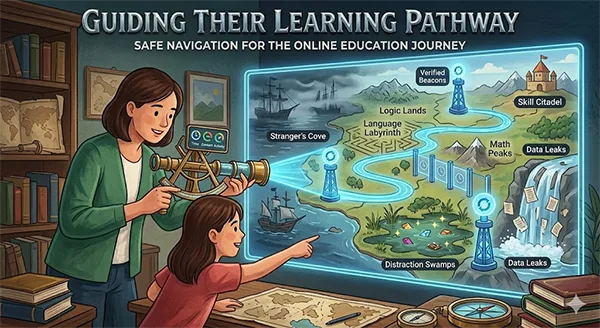
Too much of the involvement in the kids’ daily routine may frustrate them. Below are the best practices for creating a safe online learning environment, without too much interference:
- Building a dedicated study space: This helps them to study without regular distractions. Added surveillance makes this more supportive of an effective study plan.
- Setting a consistent routine: Making them realise the importance of a routine and attending to things on time builds consistency and interest. Children often become lazy by misusing flexible learning options.
- Encourage a bit of freedom and responsibility: Reminding them of studying on time while avoiding unnecessary things makes things stress-free and nurtures independence.
- Stay involved and track results: While independence is crucial, still keeping an eye on activity and things ensures safety. Attending teacher meetings, taking feedbacks and checking grades boost efficiency.
- Make open communication: Even after relying on technology and other strategies, making a bond of love and care is crucial. Without connection, surveillance can be frustrating for kids.
These effective ways ensure the children make the most of their time and actually take advantage of quality learning rather than misusing freedom and flexibility.
Also, get to know about general slang to protect your kids and understand what it means, and learn about the 402 friendly meaning.
Conclusion
Online tutoring is one of the major advancements of technology for kids. It opens the door for various opportunities, allows flexible learning and provides quality education at home. But like every other tool, this needs to be used under surveillance responsibly.
By being aware, using advanced tools and through active involvement, parents can ensure their kids’ bright future without unnecessary risks. Because at the end of the day, education is here to build the future, not to bring out hidden dangers.
Frequently Asked Questions
Was online learning only suitable for lockdown periods?
How can parents ensure better use of technology by their kids?
By taking advantage of that same technology to monitor their kids’ regular activity, putting some restrictions and time alerts.
Is it okay to constantly be around children to monitor them?
No, it can definitely frustrate them. Surveillance is important, but in a way that doesn’t hurt privacy and independence.
 Aditi K
Freelance Cybersecurity Writer
About article
The author of this article Aditi K, an Freelance Cybersecurity Writer at Saferloop, brings practical experience and industry knowledge to the subject.
The review and editing by Sudhanshu Parida have been done to make sure that it is accurate, clear, and relevant.
At Saferloop, we are determined to provide high-quality, well-researched, and updated content. To understand further how we produce and revise our articles, please refer to our Editorial Guidelines.
Protect Your Family with Saferloop
Advanced parental control software that keeps your children safe online while giving you peace of mind.
- Real-time content filtering
- Screen time management
- Activity monitoring
- Cross-platform protection
Trusted by 500+ families