Microsoft Entra ID is a cloud-based security system that helps companies manage and control access to their data.
×

Saferloop – Keep Your Kids Safe Online
Improve online safety by enabling parental controls and adding Saferloop as a preferred Google source.
Role of Microsoft Entra ID in Identity and Role-Based Access Control (RBAC) for Secure Systems (2026 Guide)
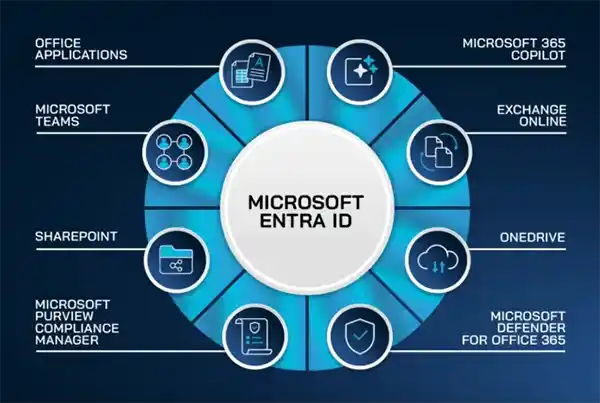
As modern businesses are evolving, they are no longer dependent on one single network. Also, traditional security methods are becoming less effective because organisations are moving deeper into SaaS and cloud-based software. According to Verizon’s 2023 DataBreach Investigation Report, 74% security violations happen because of human errors. This shows the importance of cybersecurity.
Applications, users, and AI agents are performing beyond the fixed boundary, and this makes Identity and Access Management (IAM) a critical part of cybersecurity.
And this is where Microsoft Entra ID comes in. Entra ID helps companies and organisations in managing user identities and controlling access to data. As companies are following the “never trust, always verify” rule, the Role-Based Access Control (RBAC) ensures that people only get access to the data they need, and this reduces the risk of data leaks or misuse.
This guide will help you to know what Microsoft Entra ID is and how it can help you to secure your systems.
Table of Contents:
- What Is Microsoft Entra ID
- Why Identity and Access Management Is Critical Today
- Understanding Role-Based Access Control (RBAC)
- How Microsoft Entra ID Enables Secure Access Control
- Key Features of Microsoft Entra ID for Identity Management
- License Requirements and Future Scope
- Conclusion
- Frequently Asked Questions
What Is Microsoft Entra ID
Microsoft Entra ID is basically a system that helps companies manage their data, logins, and control data access. This helps the company secure its sensitive data from unauthorised access.
In most organisations, employees use many different apps every day. Remembering usernames and passwords for each of them is very difficult and unsafe. Microsoft Entra ID gives employees access to all apps by allowing them to log in only once. This is called Single Sign-On (SSO).
Why Identity and Access Management Is Critical Today
A Report from CrowdStrike says that in 80% of the cyberattacks, hackers break in by stealing someone’s identity. And around 80% organisations say that better identity and access management would have prevented some cyberattacks on their organisation. This means 8 out of 10 attacks happen by targeting user accounts and login information, not by attacking the software itself.
The following points discuss why identity and access management are important –
- Most cyberattacks only happen by stealing or misusing the data or login credentials
- A few human errors, such as accidental data sharing or weak passwords, increase the security risks.
- Without using the proper controls, hackers or unauthorised owners can easily access and steal information.
- Strong IAM ensures that an attacker can not access everything, even if they have a password.
Fun fact – Microsoft Entra Suite provides a “Face Check” feature to identify the user.
Understanding Role-Based Access Control (RBAC)
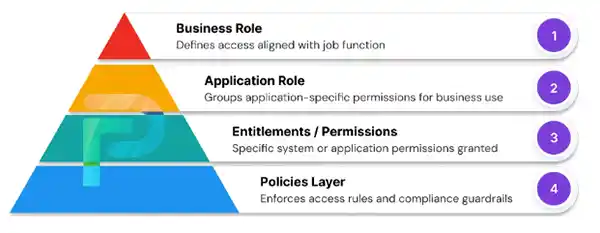
Most cyberattacks are not just about breaking systems; they are also about stealing or misusing the user identities.
In that case, Role-Based Access Control helps by managing and controlling data access by roles. RBAC doesn’t give individual permission to every user; it only gives permissions to roles like HR, Finance, and IT. This reduces the risk of unauthorized data access and leaks.
It is just like giving different keys to different employees based on their job roles; each key will only open the doors they are allowed to enter. By using this method, managing access to data becomes an easy task.
How Microsoft Entra ID Enables Secure Access Control
Controlling and managing access to data in a secure way is very important because organisations are handling many applications, users, and data systems. So, the Microsoft Entra ID helps organisations by verifying user identities and managing access.
Here are some points on how Entra ID secures the access control –
- Microsoft Entra ID works like a gatekeeper for businesses and organisations. It identifies who the user is before allowing access.
- It helps users to use all approved apps by signing in just once, and provides users access based on their job role and need.
- Microsoft Entra ID can add an extra security layer for sensitive information.
- It allows businesses or organisations to handle a large number of users and their data.
- If something unusual happens, Microsoft Entra ID can block or limit all access, and it also monitors user activity to maintain security
Key Features of Microsoft Entra ID for Identity Management
Microsoft Entra ID provides so many features that help an organisation in securely managing user identities and controlling apps, systems, and files. By working together, these features can reduce the security risks and give businesses better control.
The key features of Microsoft Entra ID include –
- SSO or Single Sign-On: It helps users to access multiple approved applications by logging in just once. They don’t need to enter their password again and again for different apps.
- Multi-Factor Authentication: This feature adds an extra layer of security, as after entering your password, you need to verify your identity by using a phone code, a fingerprint or scanner, or by approving the login.
- Conditional Access: This feature checks a few conditions before allowing a user to sign in. These conditions are user location, device info, and the risk level of data. If a login attempt looks fishy, Microsoft Entra ID blocks the access for that specific account.
- Group management: Microsoft Entra ID allows companies to organise users into groups so they can give permission to the whole group in one go rather than managing each person individually.
License Requirements and Future Scope
Microsoft Entra ID offers various licensed options for organizations to choose the best version based on their requirements. The best part is that you don’t need a license to use the basic free version, but if you want to enhance the security and protection, you can use Microsoft’s P1or P2 according to your needs.
Let’s dive into the different versions of Entra ID and their features –
- Free Microsoft Entra ID: This basic version comes with limited features, such as Single Sign-on, user and group management, and Office 365. For cloud users, this basic version provides self-service password change.
- Microsoft Entra ID P1: In this version, organisations can use group-based MFA (Multi-factor authentication). On-premises and cloud users both can access Self-service password reset. It also gives businesses the ability to implement Conditional Access policy, where they can create rules based on users’ activity and location.
- Microsoft Entra ID P2: This version offers features like Identity protection, Review access time to time, and Privileged Identity Management, which restricts admin access. It also controls the access duration by setting limits. It has a feature of verifying identities and detecting risks of any suspicious activities.
The future of Entra ID focuses on machine and human identities with the help of AI cybersecurity. By applying the policy of Zero Trust, Entra ID is evolving security services for modern hybrid environments. It understands the issues of modern IAM and provides solutions to simplify security and management.
Conclusion
As the modern business emerges, problems such as data and identity theft become too common. That’s why role-based access control is so important, and Entra ID is just a part of it.
Entra ID not only helps companies to protect their data, but it also helps them to organise it in a way that only people with access can view the information.
So, Microsoft Entra ID isn’t just a safety tool; it ensures the security of the information and assists organisations in managing user identities.
Frequently Asked Questions
What is Microsoft Entra ID?
What is Role-based Access Control (RBAC)?
Role-based access control assists organizations in controlling data access for different roles. It allows them to give user data access based on their role.
Is Entra ID paid?
Microsoft Entra ID has both a free and paid version. The free version offers the basic security features, and the paid versions, P1 and P2, provide advanced features.
Is Entra ID paid?
Microsoft Entra ID has both a free and paid version. The free version offers the basic security features, and the paid versions, P1 and P2, provide advanced features.
 Divya Kakkar
Internet Content Writer
About article
The author of this article Divya Kakkar, an Internet Content Writer at Saferloop, brings practical experience and industry knowledge to the subject.
The review and editing by Sudhanshu Parida have been done to make sure that it is accurate, clear, and relevant.
At Saferloop, we are determined to provide high-quality, well-researched, and updated content. To understand further how we produce and revise our articles, please refer to our Editorial Guidelines.
Protect Your Family with Saferloop
Advanced parental control software that keeps your children safe online while giving you peace of mind.
- Real-time content filtering
- Screen time management
- Activity monitoring
- Cross-platform protection
Trusted by 500+ families