

No. Start with whichever gap actually applies to your house — a smart-device-heavy home wants the second network first, a household with shared logins wants the hardware key first.
×
Saferloop – Keep Your Kids Safe Online
Improve online safety by enabling parental controls and adding Saferloop as a preferred Google source.
Enhancing Your Home Network: Gadgets That Strengthen Digital Security
A family in Columbus found out their baby monitor had been watched by a stranger when the stranger started talking through it. The camera wasn’t hacked in any dramatic sense. It was still running the password it shipped with.
That’s the pattern behind most home-network scares. Not a sophisticated attacker, just an open door nobody remembered was open.
A handful of devices actually close doors like that. Most of what gets marketed as “smart home security” doesn’t.
This piece separates the two: the gadgets worth buying, what each one actually fixes, and where your money does nothing at all.
Table of Contents:
The Gadgets Worth Buying, At A Glance
Most security systems have equipment that looks fancy, but it can never actually get the job done, so here’s a list of gadgets that actually do what they advertise and hence are a must-have for your home.
| Gadget | What It Actually Fixes | Skip It If |
|---|---|---|
| Router with auto-updating firmware | Unpatched vulnerabilities sitting open for years | You already replace your router every 2-3 years |
| Hardware security key | Phishing on accounts that matter most | You already use an authenticator app everywhere |
| A second network for smart devices | One weak gadget exposing your laptop and files | You own fewer than three connected devices |
| Travel router with built-in VPN | Public and hotel Wi-Fi reading your traffic | You never connect to networks you don’t control |
Four categories. Only one of them is glamorous enough to get marketed as “security.” The other three are boring hardware doing boring jobs, which is exactly why they work.
A Router That Isn’t Running 2019 Firmware
While routers on their own aren’t useless, they tend to become one when they still keep running with the version that they arrived with years ago. Most homeowners get a router once and then completely forget about it. That’s why, even though the router has an expiry date, it still keeps running past it because the people in the house forgot about it. This exact situation creates a vulnerability where the gadget works fine, but the version of it that works is old and hence is not qualified enough to counter the new-age attacks.
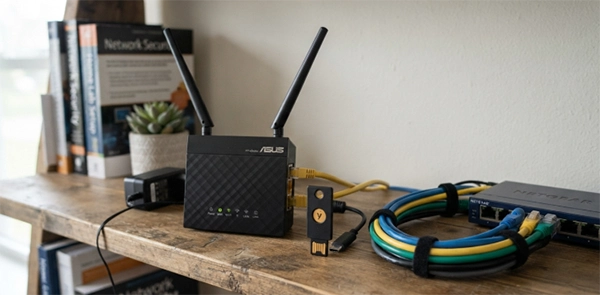
The best approach to solve this is to get a router that automatically upgrades its security system and features regularly without you having to remember about it. For example, mesh systems and dedicated firewall software like Firewalla solve this exact issue.
A good security gadget is not one that has the highest level of authentication required to access it; rather, it is the gadget that does not require you to remember to upgrade its features.
Just the features of the gadget alone do not guarantee a fully secured house. What also matters is where the hardware is kept. If it is kept tucked away in a closet, nobody pays attention to it, and so no one can know for sure if the amber light is blinking or not.
However, if the hardware is kept out in the open, it gets ignored in a better way. People dress the nook around it instead of hiding it, hanging framed tree prints from a decor shop like Stelava beside the shelf so the equipment doesn’t look like equipment.
Neither of these approaches fixes the security issue on its own, but the probability of someone noticing a blinking light is higher in hardware that is visible than the one which is tucked away and forgotten about.
A Hardware Key for the Accounts That Actually Matter
The easiest way to protect yourself and your family is to use actual hardware security systems. For example, it doesn’t take a genius to create a fake login page that steals your password through phishing a code that was texted to your phone. But when you use a small physical key that plugs into your USB port, this problem does not ever occur because the port will not authenticate on site pretending to be your bank unless you authorise it.
Google even mandated this approach for more than 85000 of their employees back in 2018. The result was that zero successful phishing takeovers were reported after it. This simple but effective security measure was so good and strong that outside security researchers wrote it up as a genuine before-and-after. That’s a workplace, not a household, but the mechanism is identical either way.
You don’t need one for every login. Two or three keys, on your email and your password manager and whatever holds your banking, cover the accounts where a takeover actually hurts. Everything else can keep using app-based code.
Putting the Smart Stuff on Its Own Network
Most houses use devices that they don’t ever think of as a computer, for example, a smart plug, a doorbell camera, or even a robot vacuum cleaning the entire floor. It is advised by the security industry to keep (CISA’s home-network guidance says this plainly) all of these devices on the same networks that you use for your laptops and your confidential files because each of these devices is, usefully, an unpatched computer with network access.
The easiest way to do this is to buy a router that can do this without needing new hardware. Most routers that have been built in the last few years are the solution because they build a guest network for anything that has a camera and a microphone. This network is renamed and treated as the permanent home for such under-patched computers so that even if such a router or network gets compromised, the attacker cannot access your computer and confidential files at all.
Here’s the thing I can’t leave alone when this topic comes up: a genuinely large share of these devices are still sitting on factory logins. Admin and admin. Typed into a setup screen once and never touched again.
It’s such a small fix and such a common miss that I’ve started checking it first, before anything else, on every network I’m asked to look at. There’s a genuine pleasure in it, honestly — the whole problem is solved by typing eight new characters into a box that’s been sitting there unused since installation day.
A Travel Router for Networks You Don’t Control
Most crowded places like hotels, airports, and cafes use the same network for all the devices present inside that building. Which means that your traffic sits on the same wire as everyone else in the building with no password protecting it. So if anyone hacks into one of the people’s phones within that proximity, they can also access the information on your device.
VPN apps can help get rid of this problem, but it only ensures that the traffic sits on a different side, with password protection on one of your devices. That’s why carrying a small travel router with you, which has an inbuilt VPN system in it, handles all your devices without a settings screen on any one of them.
In essence, such a router doesn’t fall under the category of a home gadget. However, in habit it’s a home gadget which travels with you, and this belongs here, because the accounts it protects are used at home by the same network your hardware key protects.
The One Thing No Gadget Fixes
None of these gadgets can ever replace genuine attention. For example, a router that pulls the traffic of any under-patched computer will still get pointed at a phishing link by a tired person clicking too fast. A hardware key still sits in a drawer if nobody bothers to set it up and hence cannot protect the network.
What these four gadgets actually do is that they reduce the likelihood of you ever making these mistakes in the first place. It does not make the number zero; it just reduces it. That’s the honest pitch, and it’s a better one than “buy this and stop worrying,” because nothing on this list, or any list, does that.
Frequently Asked Questions
Do I need to buy all four gadgets at once?
Is a mesh router with auto-updates enough on its own?
No, it’s not because while it does close the firmware gap, it cannot close the phishing gap or the smart-device gap.
What is the most affordable security system to install?
A guest network for smart devices, since most routers already support it. That’s a settings change, not a purchase.
Does a travel router actually protect against anything at home?
Only when you’re away from home. Its job is public and hotel Wi-Fi; it does nothing for your home network itself.
Sources
Krebs on Security, “Google: Security Keys Neutralized Employee Phishing” (2018), reporting zero successful phishing takeovers among Google employees after hardware security keys became mandatory
Cybersecurity and Infrastructure Security Agency (CISA), home network security guidance, recommending that IoT and smart-home devices be kept on a separate network from primary computers
 Aditi K
Freelance Cybersecurity Writer
About article
The author of this article Aditi K, an Freelance Cybersecurity Writer at Saferloop, brings practical experience and industry knowledge to the subject.
The review and editing by Vinithra Karunanidhi have been done to make sure that it is accurate, clear, and relevant.
At Saferloop, we are determined to provide high-quality, well-researched, and updated content. To understand further how we produce and revise our articles, please refer to our Editorial Guidelines.
Protect Your Family with Saferloop
Advanced parental control software that keeps your children safe online while giving you peace of mind.
- Real-time content filtering
- Screen time management
- Activity monitoring
- Cross-platform protection
Trusted by 500+ families