

Offboarding. Keep details for the access logins and from point to the details which the employee has set up. Don’t wait to create issues.
×

Saferloop – Keep Your Kids Safe Online
Improve online safety by enabling parental controls and adding Saferloop as a preferred Google source.
Remote Team Security: How to Create a Safer Digital Workplace

An employee left the office months ago, and their VPN is still working because there is no one who actually cares to alert management.
Security teams are having the same type of issues. Not from outside attacks but leakage from inside attempts.
Administration should notice that situation every month and be responsible for that. System are appears to be fine and secure. Theses disturbance creates a real concern in remote team security frameworks, and it weakens here only. This system should maintain such responsive behaviour to be in control and losses that do not actually be a pain that tingling in the head of management.
Table of Contents:
The Account That Outlived the Employee
The problems usually begin while an employee leaves the organization. The reason is normal.
When your distributed team starts to collect needs to attend at the reception desk, waiting for an employee to hand back a laptop and their badge. There is no moment when you find the opportunity. Your management has to notice when an employee exits, and things got worse day by day.
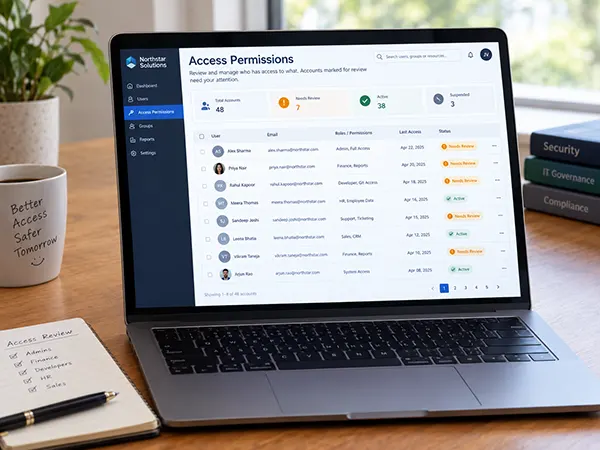
Your past employees have several accounts in different tools. Some were never set up by IT teams initially. A manager needed to identify them, put it on record, and create the account. After months passed, those forgotten details are still there.
Saferloop explains workplace security and covers the credential that caused the problem that occurred. The bigger issue is finding where that credential is located. Most companies simply don’t have a complete list to focus on.
Did You Know?
If you remove the login access of an employee who leaves, it doesn’t mean that their active session, third-party connections, files shared between clients, or tokens are removed immediately. Unless it has been used after removal of email access to the system.
Privilege Creep Is the Actual Mechanism
You noticed that people always change roles according to their preferences. Every change usually means asking for more access, and you generally grant the request because you don’t want to be the person who avoids a coworker on a day when they just try to get things done quickly.
You face such problem is that access is given and never taken back. Permissions get added, and they stay longer than assumed. A marketing coordinator who worked in finance for a longer time has such access for the next two years along. CrowdStrike has given named called privilege creep, and this actually means what happens in the broader term known as insider risk.
This generally makes a compromised account dangerous, and attackers don’t need a highly privileged account to work on. If phishing is done with an ordinary employee’s details, then they may inherit permission which is not allowed to access. The stolen login details give an ultimate path into systems where that employee worked, or they may never be able to reach the system with fresh initial access. This leads to concern.
Where Remote Teams Actually Leak
The actual leaks happen when it’s distracted by deadlines, misplaced, or lacks information spread. This is explained in four categories mentioned below:
Unmanaged Devices
This happens when a personal laptop has company tags because loosen work ethics or machine slowdown. Not encrypted, not managed by the system, and the web browser has overloaded extensions. The system appears to be unknown, and none of it belongs to any person.
Shadow Software
If a team is allowed to use a new tool to solve a specific problem. Company data profile is used; no one reviewed it, and it belongs to the software backend for the time being. When the person leaves, it remains; all the things with them access and permissions both.
Home Networks
An employee’s home router is running firmware from 2019. The admin password for the smart TV, phone, and work laptop could all be connected on the same network. That raises difficulties for an IT team because its cant be controlled and trusted by the company’s admin profile, with or without device instruction.
Contractors and Agencies
Temporary access has a funny way of sticking around. Someone gets an account for a three-month project, the project ends, and the account is still there months later.
Guest accounts should have an expiry date from the moment they’re created. In practice, most systems don’t make that the default, so the team has to remember to clean them up later. That’s usually where things get missed.
The Tunnel Question
When all it requires is the VPN, connected to the office devices, the place needed to it. The idea is straightforward. Find the perimeter and come under that zone. Networks generally automatically build trust. This model does not fit for teams works under cloud servers. The VPN will give access to more of the outer network than they actually require.
This is the point where a zero-trust network comes into the picture. Instead of treating the whole network as a trusted environment, it regularly checks access at a lower level in application level. Products such as Cloud Secure Edge from SonicWall take this approach by combining private application access with things like DNS filtering and cloud access. Then this model is followed for every vendor available with this process.
For smaller companies or SaaS users, they may have nothing to do with internal pipeline networks, which keeps the process in line.
Quick Insight
The Security team may found difficulties to find the account of an employee who exited the company a long time ago. As their accounts were created directly in SaaS. The solution is straightforward: quickly relocate the account securely.
Training Helps Less Than the Invoice Suggests
Awareness training is probably one of the simplest security expenses to get approved. It’s also the hardest to measure, and there’s a reason for that thing.
The usual argument is that you face the weakest link, that training should fix all the problems. The evidence for that part has no stronger claims than the industry marketing is making. Phishing simulations show an initial improvement which faded with time. When click rates fall, the reason is simply that employees have learned what the simulations taught, not it becomes better at spotting real attacks.
The cybersecurity awareness training is not useless; it means training should be treated from the beginning, not as the security control that makes everything else unnecessary. Keep it short, and don’t ever use it as an excuse to put off the access review that no one told you to deal with.
CrowdStrike makes much the same point: digital capabilities provide prevention for breaches.
What Actually Works Is Boring
Your distribution team has some controls that matter the most; it’s the administrative, not the technicals. The reason is the delay in the process of figuring out the issue.
Starting accounts with minimum access controls. Set expiry on given permissions. Review the access regularly, and actually remove it when people are not authorized or off the list.
You add MFA where it’s needed, and get the help desk to be a part of the authentication limitations. Social engineering of a support agent into enrolling a new device can be the best solution for surpassing the multi-facter authentication.
The inventory should be kept clean, and the teams should sign up and possibly get rid of it first for all such things.
Final Words
This work doesn’t need many employees and cost least. Hire one employee to control all the details login with specific details that may add a stronger security layer. This becomes boring and exhaustive, but this is the only task that can help the company more than it seems to be.
All the details covered from entry to exit of an employee and their security login information everyday makes easier management and proper resource location for small companies to be effective.
Frequently Asked Questions
What’s the first thing a remote team should fix?
Do small teams need zero trust tooling?
Not necessary. Because most of the work is handled by internal applications and multi-factor authentication successfully. If its fail, then the case arises.
Is security awareness training worth paying for?
Yes, for instance, as it completes the module, awareness is built and be prepared for the measures to break. This also doesn’t mean that the task is complete.
How often should access be reviewed?
Mostly quarterly; do the review process until the team changes the permission or access. It is generally done for the production environment and external systems to ensure security.
Sources
CrowdStrike — principle of least privilege, by Narendran Vaideeswaran, for privilege creep, the account-type hierarchy, the lateral movement consequence, and the line that digital capabilities alone will not prevent breaches
 Aditi K
Freelance Cybersecurity Writer
About article
The author of this article Aditi K, an Freelance Cybersecurity Writer at Saferloop, brings practical experience and industry knowledge to the subject.
The review and editing by Vinithra Karunanidhi have been done to make sure that it is accurate, clear, and relevant.
At Saferloop, we are determined to provide high-quality, well-researched, and updated content. To understand further how we produce and revise our articles, please refer to our Editorial Guidelines.
Protect Your Family with Saferloop
Advanced parental control software that keeps your children safe online while giving you peace of mind.
- Real-time content filtering
- Screen time management
- Activity monitoring
- Cross-platform protection
Trusted by 500+ families