Answer: Probably yes, if a child shares enough personal details, that data can be harvested if the app’s database is breached. So the best way to prevent this is to restrict what they post to begin with.
×

Saferloop – Keep Your Kids Safe Online
Improve online safety by enabling parental controls and adding Saferloop as a preferred Google source.
How Kids Can Stay Safe Using AI Apps: Safety Considerations and Practical Measures

AI is rapidly becoming the go-to assistant for many young people.
Especially, children are using algorithms in many ways, including as tutors for their homework and as companions through social media. However, the issue arises when using AI introduces vulnerabilities that current internet safety methods do not adequately address.
A recent Forbes article stated that approximately 42% of parents do not understand how their children’s AI applications gather data about their children and use it for marketing purposes. Fortunately, this guide is here to help parents work through the many aspects of AI safety.
It provides a guideline for keeping AI as a source of creativity and inspiration rather than a source of risk.
KEY TAKEAWAYS
- AI apps require specialized filters because they generate content in real-time.
- Every interaction with an AI contributes to a permanent digital profile.
- Digital literacy means teaching children that AI can “hallucinate” or provide biased information.
- Effective safety involves monitoring high-level patterns and sentiment.
Table of Contents:
- Why AI App Safety is Becoming Essential for Kids
- Common Risks Kids Face When Using AI Applications
- Monitoring AI Usage While Respecting Kids’ Privacy
- Teaching Kids Responsible AI Usage Habits
- Safe Device Settings and Content Filtering Practices
- Role of Family Communication in Digital Safety
- Frequently Asked Questions
Why AI App Safety is Becoming Essential for Kids
An AI tool that shifts based on your child’s unique personality, creating a feedback loop that can lead to unintentional digital dependency or a loss of privacy.
- AI applications produce results in real time, which may occasionally cause them to bypass standard keyword safety measures and provide subtle yet dangerous suggestions.
- Over time, these applications establish a highly accurate psychological profile of users that could be exploited should the application be compromised.
- Children may be lured into a false sense of security, making them an easy target for automated grooming or social engineering by a malicious actor.
- Without appropriate guidance, the distinction between using AI to learn and using it to avoid critical thinking could become very blurred.
Adopting a safe zone allows children to reap the benefits of the efficiency of AI, while still having the ability to think independently and maintain their safety as they develop into adulthood.
About 72% of kids see AI chatbots as friends, and they will provide more confidential personal information to this software.
Common Risks Kids Face When Using AI Applications
To develop a strong defense system, it is necessary to identify the new threats that are being created by the intelligent platforms emerging today. The dangerous changes have been based on sophisticated forms of manipulating data and content.
| Risk | Context | Mitigation Strategy |
| Privacy Concern | Indefinite history storage for training. | Use “Incognito” mode; restrict app permissions. |
| Misinformation | IEEE reported that on one test, AI hallucinates false facts. | Cross-reference with verified databases. |
| Inappropriate Content | “Jailbreaking” to bypass safety filters. | Use network-level filtering and age-vetted tools. |
| Emotional Manipulation | “Digital echoes” reinforcing negative moods. | Monitor usage; prioritize offline social time. |
Monitoring AI Usage While Respecting Kids’ Privacy
The guiding principle of digital parenting is to provide support to children to create an environment where they feel secure and confident while providing necessary guidance through a nurturing relationship.
- Activity Tracking: Reviewing children’s usage of their AI applications and how long a child spends using them provides parents with a high-level picture of their child’s digital interests.
- Alerts: Using an alerting system for indications of self-harm, extreme ideologies, and requests for personal data, parents can provide an immediate and empathetic response to their children’s AI interactions.
- Healthy Boundaries: Establishing strict off-hours for AI use allows for ensuring that technology is not negatively impacting sleep or quality time doing things that require face-to-face interaction with family members.
- Contextual check-in: Periodically asking your child to show you something really “cool” that their AI has taught them provides an avenue for improving transparency between the parent and child.
As a result, monitoring is no longer merely a chore but becomes an opportunity for both parent and child to learn from each other. For this, Saferloop offers integrated tools.
Teaching Kids Responsible AI Usage Habits
The most effective safety tool is a child’s own judgment. In today’s world, children need to be taught how to establish their own filter.
- Be sure to remind children that when they are using an AI chatbot, it is not a person but just code, and that they should not provide any personal information to the app.Those interested in understanding how these technologies function can learn artificial intelligence through a structured online course.
- Encourage children to verify what they know using a reliable book or website.
- Teach them that creating an image, or text, of another person without their permission is a violation of digital responsibility.
- Let them know that whatever they type in a text box is “public” to the company that created the app, even though it may feel private to them.
Furthermore, you may go through MongoDB’s article on AI text generation, image creation, voice synthesis, etc., to understand more about this delicate topic.
Fun Fact As of January 2026, an estimated 1.1 billion people actively use AI, demonstrating roughly 13.3% of the global population.
Safe Device Settings and Content Filtering Practices
The use of hardware and software settings provides the physical boundaries required to ensure that children are safe while using digital playgrounds.
| App Restrictions | Set age ratings and block unverified AI apps at the OS level. |
| Privacy Lockdown | Disable location tracking within AI apps to prevent geo-tagging. |
| Younger Kids | Use a “white list,” which allows access only to manually vetted apps. |
| Teens/Older Kids | Use a “blacklist” with transparent data-sharing monitoring. |
Wondering which parental control app keeps your child safer? Well, there are many, and SaferLoop is one of the outstanding ones.
Role of Family Communication in Digital Safety
Technology can block a link, but it cannot replace the nuance of a parent-child conversation. Communication is the “glue” that holds all other safety measures together.
As experts in digital habits say, the most resilient children are those who feel they can talk to their caregivers when they encounter something “weird” online without fear of losing their device.
Creating a “Family Tech Agreement” can clarify expectations. This isn’t just a list of rules; it’s a mutual commitment to safety.
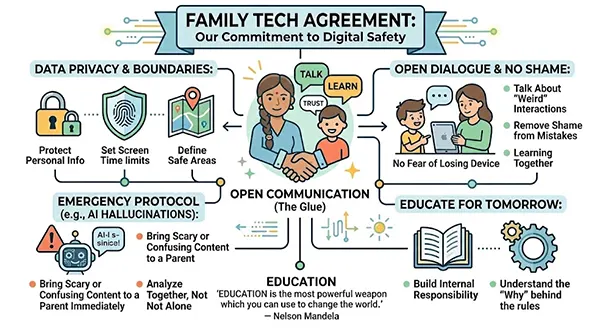
Open dialogue removes the shame associated with digital mistakes, ensuring that if a boundary is crossed, the focus is on learning today for a safer tomorrow. As Nelson Mandela famously said, “Education is the most powerful weapon that you can use to change the world,” and that education starts with the conversations held at the dinner table.
Frequently Asked Questions
Question 1: Can apps steal my child’s identity?
Question 2: Should I get rid of all AI apps?
Answer: No. It is better to use an age-appropriate, vetted AI tool together so they can see the benefits of using them and understand the consequences in a safe environment.
Question 3: Do apps have access to my child’s microphone?
Answer: Many AI apps need access to the microphone to provide voice-to-text features. Make sure that you turn off any “always on” settings for your device and give permissions for “only when using the app.”
Question 4: How do I know if an AI app is “safe”?
Answer: Look for a “children’s privacy policy,” be cautious of data collection practices, and lastly, read recent reviews from experts on all platforms.
 Divya Kakkar
Internet Content Writer
About article
The author of this article Divya Kakkar, an Internet Content Writer at Saferloop, brings practical experience and industry knowledge to the subject.
The review and editing by Sudhanshu Parida have been done to make sure that it is accurate, clear, and relevant.
At Saferloop, we are determined to provide high-quality, well-researched, and updated content. To understand further how we produce and revise our articles, please refer to our Editorial Guidelines.
Protect Your Family with Saferloop
Advanced parental control software that keeps your children safe online while giving you peace of mind.
- Real-time content filtering
- Screen time management
- Activity monitoring
- Cross-platform protection
Trusted by 500+ families