
No. They can reduce some exposure and limit certain actions, but they cannot judge a relationship, cover every device, or replace an adult who listens.
×

Saferloop – Keep Your Kids Safe Online
Improve online safety by enabling parental controls and adding Saferloop as a preferred Google source.
Securing the Digital Doorstep: Modern Online Safety Strategies for Protecting Children at Home
The internet has allowed for more freedom and reach than expected; that goes for the children as well,l who are involved in or use online resources.
Random messages, chats, games, or any other way the children could be exposed to harmful parts of the internet. It is the responsibility of the parent to protect their child from anything that could harm them.
This blog offers a guide on how to manage the digital doorstep and keep your child safe when online.
Table of Contents:
- The Digital Doorstep Has More Than One Entrance
- Secure the Devices and Home Network
- Use Parental Controls for Specific Jobs
- Teach Children to Notice Pressure and Secrecy
- Protect Privacy Beyond the Chat Window
- Plan for the Moment Something Goes Wrong
- Make Safety a Routine Your Child Can Keep
- Frequently Asked Questions
- Sources
The Digital Doorstep Has More Than One Entrance
Online safety needs to cover more than the device with parental controls installed. Because a child can move from a homework laptop to a game console to the family smart TV in a single afternoon,
Games may have voice chat and private messages; video apps shape recommendations from viewing history; school tools store names and assignments. Different doors create different risks. A useful family rule starts with knowing what each device and account can do.
A shared tablet may stay signed into a parent’s account, carrying browser history, payment details, or recommendations from one person to the next.
The aim isn’t to watch every minute. Reduce exposure, limit data sharing, and keep help easy to ask for.
Secure the Devices and Home Network
Start with the basics.
Start With a Device Inventory
Use a guest network for visitors and smart-home devices that don’t need to reach children’s devices. If supported, though it is no magic wand, it reduces unnecessary sharing on the home network.
List the phones, computers, consoles, tablets, smart TVs, and connected toys the child uses. Keep them updated, including the router; security fixes only help after installation. Change the router’s default admin password and set a strong Wi-Fi password.
Protect the Accounts That Reset Other Accounts
CISA’s Secure Our World guidance recommends unique passwords, multi-factor authentication (MFA), a second check after the password, and software updates. Use those steps on parent email, app stores, cloud storage, and gaming accounts; parent email often controls account recovery.
Keep child and adult accounts separate where possible. Sign out of adult accounts on shared tablets and check saved cards or automatic logins before passing the device on.
Use Parental Controls for Specific Jobs
A parental-control feature is useful when you know which problem you want it to solve.
Time, Content, and Purchases
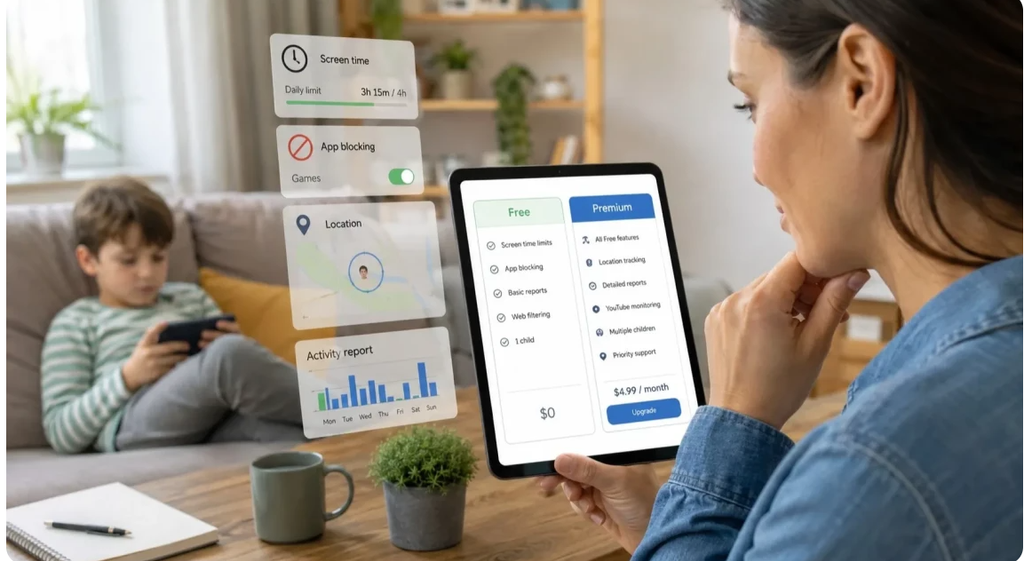
The FTC lists these as common features, though settings vary by device and service. Screen-time settings can limit hours; content filters restrict some websites or media; app approval and purchase controls stop downloads or spending without permission.
Apple Screen Time and Google Family Link may help on compatible devices, but before assuming it controls every browser, game, or chat, check what each setting covers. Start with the limits your family needs and revisit them as habits change.
Be Open About Monitoring
Stealth monitoring is a poor default in ordinary family life. If you review app activity or messages, explain what, why, and when you’ll step in. Secret checks can teach children to hide activity instead of asking for help. For an urgent risk, increase supervision for that specific concern and seek support.
Teach Children to Notice Pressure and Secrecy
Children may miss the risk when someone gradually shifts the conversation into private messages and asks for secrecy. Because contact often begins through a game or shared hobby,
Watch for a change in the conversation:
- Someone asks to move from a public game or group to private chat and keep it secret.
- A contact offers gifts or game credits, then asks for personal details or images.
- Messages create urgency, guilt, or threats to expose something.
- The person asks for a home address, school, live location, or a meeting without an adult.
- The chat turns sexual, asks for intimate images, or uses threats to demand more. This may be sextortion, a form of blackmail involving sexual images.
They mean a child should pause and ask a trusted adult. These signs don’t prove every contact is dangerous. The FBI and NCMEC warn that online enticement can begin on social platforms, messaging apps, or games.
Protect Privacy Beyond the Chat Window
Privacy travels beyond chat.
Review What Each App Can See
Check whether profiles expose a real name, school, or live location. Private settings help, but cannot make every message safe. Review an app’s access to location, camera, microphone, contacts, and photos. Turn off what it doesn’t need.
Ask before family posts identifiable photos; avoid sharing live location publicly. Photos can reveal more than faces: a team jersey, school sign, or regular posting time may expose a child’s routine.
Remember the Connected Home
Voice assistants, cameras, doorbells, and smart TVs can store recordings or account history. Check who can access each app and whether its features are needed. In the U.S., COPPA gives parents certain rights over personal information collected by covered services from children under 13; it is not a content filter or universal privacy law.
The physical doorstep has its own controls. A smart doorbell may record visitors; apartment buildings may use secure parcel management software to log deliveries and confirm handoffs. It serves a different purpose, but reminds families to decide who can access household records and how long they remain available.
Plan for the Moment Something Goes Wrong
- Save the message and account details. Capture usernames, dates, and relevant conversation before blocking the sender.
- Do not argue with the sender or investigate alone. Block and report the account through the platform.
- If an account may be compromised, change its password from a trusted device and review recovery options and active sessions.
- Get help for grooming, threats, blackmail, or sexual exploitation. Contact the platform and local child-protection services or law enforcement; in the U.S., report suspected exploitation to the NCMEC CyberTipline.
Don’t demand an explanation before helping or assume taking the device away will fix it. Tell the child they can come to you without being blamed. Don’t pay or send more content if money or intimate images are involved.
Make Safety a Routine Your Child Can Keep
A routine may look workable in a calm weekend meeting but vanish when a child is embarrassed or desperate to return to a game after an awkward message.
After a new app arrives, ask what felt strange and who they’d tell.
No app: pause, question the request, tell an adult. No blame. Just help. There is something satisfying about a rule that needs: children under pressure shouldn’t improvise. Write to a trusted adult and take the next step into family rules.
Frequently Asked Questions
Do parental controls guarantee that a child is safe online?
Should I secretly check my child’s messages?
For routine family use, explain what you review and why. If there is a credible and immediate safety concern, focus monitoring on that risk and seek appropriate support.
What if my child has already shared an image or personal information?
Stay calm, preserve relevant messages and account details, and report the content to the platform. If there are threats or suspected exploitation, contact local child-protection services or law enforcement; U.S. families can also use the NCMEC CyberTipline.
Sources
- Federal Trade Commission: How To Use Parental Controls To Keep Your Kid Safer Online
- Federal Trade Commission: Protecting Your Child’s Privacy Online
- Federal Trade Commission: Complying with COPPA – Frequently Asked Questions
- Cybersecurity and Infrastructure Security Agency: Secure Our World
- Federal Bureau of Investigation: Parents, Caregivers, and Teachers – Protecting Your Kids
- National Center for Missing & Exploited Children: Online Enticement
 Neha Sharma
Parental Control & App Safety Writer
About article
The author of this article Neha Sharma, an Parental Control & App Safety Writer at Saferloop, brings practical experience and industry knowledge to the subject.
The review and editing by Evan Patterson have been done to make sure that it is accurate, clear, and relevant.
At Saferloop, we are determined to provide high-quality, well-researched, and updated content. To understand further how we produce and revise our articles, please refer to our Editorial Guidelines.
Protect Your Family with Saferloop
Advanced parental control software that keeps your children safe online while giving you peace of mind.
- Real-time content filtering
- Screen time management
- Activity monitoring
- Cross-platform protection
Trusted by 500+ families