

Yes. Life360 records top speeds during trips. Premium plans provide even more detailed driving reports, allowing parents to review speeding behavior over time.
×

Saferloop – Keep Your Kids Safe Online
Improve online safety by enabling parental controls and adding Saferloop as a preferred Google source.
What Does Life360 Do for Teen Driving Safety: A Complete 2026 Guide for Parents

“Sending a text message while driving at 55 mph is like driving the length of a football field with your eyes closed.” That’s one of the most cited road safety warnings, signifying the danger of distracted driving.
Distracted driving continues to be a significant risk factor. About 10% of all teen drivers involved in fatal crashes in recent years were distracted at the time of the crash.
So, for parents of newly licensed drivers, their child’s first solo trip is bound to make them anxious. While you can’t sit in the passenger seat forever, modern safety tools can provide valuable insight into your teen’s driving habits. Apps like Life360 help families monitor key behaviors such as speeding, distracted driving, and crash events without constant check-ins.
This guide explains exactly what Life360 tracks, which safety features are worth paying attention to, and how parents can use the app to encourage safer driving habits in 2026.
KEY TAKEAWAYS
- Life360 can track speeding, hard braking, rapid acceleration, route history, and distracted phone use on premium plans.
- Distracted driving remains one of the leading causes of crashes among young drivers, making phone-use monitoring especially valuable.
- Premium Life360 plans include enhanced crash detection and automatic emergency dispatch for faster accident response.
- The most effective safety strategy combines technology with honest parent-teen conversations and clearly defined driving expectations.
Table of Contents:
What Driving Features Does Life360 Actually Monitor?
Before relying on any driving-monitoring app, it’s important to understand both its strengths and limitations so you know what insights you’re actually getting. Life360 tracks several key metrics to build a clearer picture of daily driving habits. Think of it less like a surveillance camera and more like a highlight reel of the moments that matter most.
Here’s what the app monitors:
- Top Speed Tracking: The app records the highest speed reached during a drive, so you can see at a glance whether your teen stayed within safe limits or pushed it on the highway.
- Phone Usage Detection: It can detect when the driver picks up or interacts with their phone while the vehicle is in motion; this one alone makes the premium tier worth considering.
- Hard Braking and Acceleration: Sudden stops and aggressive take-offs are automatically flagged, which can signal distracted or risky driving behavior.
- Crash Detection: Using built-in device sensors, the app can detect major collisions and, on premium plans, automatically dispatch emergency services.
Not sure which version makes sense for your family? The comparison table below outlines exactly what to expect from the free and paid tiers, so you can weigh the cost against the features you actually need.
| Feature | Life360 Free | Life360 Premium (Gold/Platinum) | Why It Matters |
| Top Speed | Basic maximum speed reporting | Detailed speed reports per drive | Review whether your teen drives within safe limits |
| Route History | 2 days of location history | up to 30 days of location history | review specific routes and driving habits over time |
| Phone Usage Detection | not included | full distracted driving reports | Identify dangerous texting and scrolling while driving |
| Crash Detection + Emergency Dispatch | Basic crash detection, no dispatch | crash detection plus automatic emergency dispatch | Fast emergency response to severe accidents |
Why Is Monitoring Teen Distracted Driving So Important in 2026?
Today’s teen drivers face a unique challenge: constant notifications, social media alerts, and digital distractions that didn’t exist for earlier generations. According to NHTSA distracted driving data, distracted driving killed more than 3,200 people on U.S. roads in 2024. The same source notes that answering a single text takes a driver’s eyes off the road for about 5 seconds. At 55 mph, a brief five-second glance at a phone means your teen just drove the length of a football field completely blind.
When teens transition to university or relocate across long distances, arranged transport through specialized Motorrad Transportierern ensures their two-wheelers are moved safely without requiring inexperienced young drivers to undertake risky long-haul road trips.
The Legal and Physical Risks of Texting Behind the Wheel
Lawmakers across the country are actively cracking down on phone usage to keep roads safer. Ohio, for example, recently made focusing on a digital device while driving a primary offense. This marks a major shift in enforcement: law enforcement can now initiate a traffic stop solely because a driver is holding or operating a mobile device. Officers no longer require a secondary infraction, such as a broken taillight or a speeding violation, to pull you over.
Beyond the legal side, the physical dangers are well documented. Studies consistently show that texting increases the risk of an accident, and the consequences can range from fender benders to catastrophic injuries. A monitoring tool can help your teen build better habits before something goes wrong. It can also reduce the legal and financial fallout tied to negligent phone use. This isn’t about being a helicopter parent; it’s a practical safety step that might save you (and your teen) from a nightmare scenario.
How Speeding and Phone Use Overlap
Speaking on the cell phone and reading instant messages while you drive may seem like an obvious way of getting killed. However, plenty of people still do both.
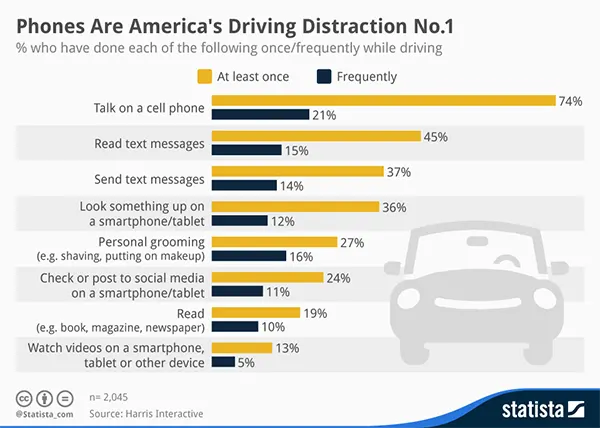
And when it comes to teens, the issue becomes even weirder. An AutoBlog article discussing an IIHS-related study linked speeding and increased phone use by stating that for every 5 mph above the speed limit, phone use rose by 12%.
That means your teen may actually be more likely to reach for their phone at 70 mph than at 45. It’s counterintuitive, and it’s exactly why setting clear boundaries before they get behind the wheel matters so much.
3 Conversations to Have With Your Teen
Your child will follow the rules only when he/she understands the reasoning behind them. Here are three conversations worth having before you hand over the keys:
- The “No-Touch” Rule: Have your teen set their smartphone to “Do Not Disturb While Driving” (both iOS and Android support this natively now) so notifications are silenced automatically the moment the car starts moving.
- The Music Rule: Playlists, podcasts, or whatever they’re listening to need to be queued up before the car goes into drive. No scrolling through Spotify at a stoplight.
- The Passenger Duty: If not solo, the front-seat passenger handles texting and navigation. It gives the passenger a job and keeps the driver’s hands on the wheel.
Is Life360 Safe for Kids?
Yes. Used transparently, Life360 improves safety and promotes accountability among new drivers. Parents need to balance safety with mutual trust for the app to actually work the way you want it to. The goal should be guidance, not round-the-clock surveillance.
Overly restrictive monitoring tends to backfire. Ask any parent who’s been through it, and they’ll tell you the same thing: teens who feel spied on will find creative ways to disable location tracking, borrow a friend’s phone, or leave their own device at home. Transparency goes a long way here. Tell your teen exactly why the app is on their phone (road safety and peace of mind) and make clear that it’s not there to intrude on every part of their personal life. You’ll get better results with a conversation than with a crackdown.
The Saferloop Solution
While Life360 excels at reporting driving activity, some families prefer additional tools that actively reduce distractions before risky behavior occurs. A location tracker on its own can’t block incoming notifications while the car is moving. To help limit digital distractions and online risks in real time, some families pair Life360 with a parental controls app like Saferloop on their child’s device which adds:
- App Blocking: Disable access to highly distracting apps (think TikTok, Instagram, or Snapchat) during driving hours or any other time you choose.
- Screen Time Management: Set daily limits that encourage healthier digital habits across the board, not just behind the wheel.
- Real-Time Activity Tracking: See how and when devices are being used throughout the day, so you can spot patterns before they become problems.
- Content Filtering: Helps protect kids from inappropriate online content, a separate concern that often comes up in the same conversation.
Wrapping Up
Teen driving comes with a steep learning curve, and even responsible young drivers can make mistakes. But the right combination of technology and honest conversation can make a real difference. Apps like Life360 give families visibility into speed, routes, and possible phone use, while parental control tools can help reduce digital distractions before they lead to trouble. Used thoughtfully and paired with trust, these tools support safer driving habits without turning your household into a surveillance state.
You’re now better equipped to handle the teenage driving years with a bit more confidence and a lot less guessing. If nothing else, you’ll sleep a little easier knowing you’ve got the right tools in place.
FAQs
Does Life360 notify parents when a teen is speeding?
Can Life360 detect texting while driving?
Life360 can detect phone interactions while a vehicle is moving, helping parents identify potential distracted-driving behavior. However, it does not display the content of messages.
Is Life360 free for teen driving safety?
The free version includes basic location sharing, route history, and crash detection alerts. Premium plans unlock advanced features such as phone-use detection, detailed driving reports, and emergency dispatch.
Should parents tell their teens they’re using Life360?
Absolutely. Be transparent about why you installed it. It helps build trust and encourages cooperation. Experts generally recommend using driving-monitoring apps as safety tools rather than surveillance tools.
 Divya Kakkar
Internet Content Writer
About article
The author of this article Divya Kakkar, an Internet Content Writer at Saferloop, brings practical experience and industry knowledge to the subject.
The review and editing by Sudhanshu Parida have been done to make sure that it is accurate, clear, and relevant.
At Saferloop, we are determined to provide high-quality, well-researched, and updated content. To understand further how we produce and revise our articles, please refer to our Editorial Guidelines.
Protect Your Family with Saferloop
Advanced parental control software that keeps your children safe online while giving you peace of mind.
- Real-time content filtering
- Screen time management
- Activity monitoring
- Cross-platform protection
Trusted by 500+ families