SaferLoop’s Digital Shield is a guideline for kids’ safety and security on the internet.
×

Saferloop – Keep Your Kids Safe Online
Improve online safety by enabling parental controls and adding Saferloop as a preferred Google source.
Saferloop’s Digital Shield: Kids’ Tech Safety Guide from Ground to Roof (2026)

In 2016, around 92% kids aged 3-18 had internet access, which jumped to 97% in 2021. And today, this number is higher than ever. This data, collected by ACS, highlights the growing concerns about the digital safety of children, including addiction to social media, cyberbullying, and exposure to violent and exposure to inappropriate content.
Social media platforms like Instagram, Facebook, Snapchat, TikTok, and X (formerly Twitter), online games, and chat rooms have become a security threat to children. Along with this, some parents lack digital literacy, which increases the risk of cybercrime with their kids.
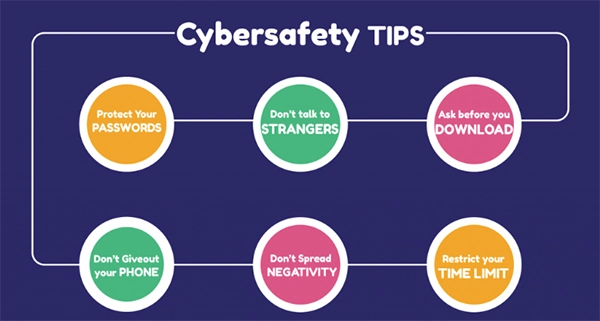
To help the parents, Saferloop has introduced a Digital Shield guide for the safety and security of kids on social media. The digital shield will help parents and children to create a safe and secure digital environment.
This guide provides tools, Digital safety education for kids, and a few tips to parents, which will help protect private and personal data from fraudsters and online threats.
Table of Contents:
What is a “Digital Shield” for Modern Kids
The Digital Shield is a protector of modern kids in this connected era. As cybercrime cases are rising, it is very important to focus on the safety and security of our kids’ personal data.
Digital Shield includes –
- Tools: Apps and software such as Saferloop, Google Family Link, and EyeOnKid help parents control their children’s devices and can set time limits.
- AI-Powered protection: AI learns and analyses new data to detect any pattern that can harm the child. AI tools can prevent and respond to security threats.
- Safety Education: Educational programs on the safety and security of children in the digital age.
Foundation Level: Device Safety and Basic Controls
Trying to control your kid’s online habits and the content they consume can be very challenging. On the Foundation Level, parental controls can help keep kids safer online by preventing them from accessing inappropriate or harmful content.
These parental control tools can help –
- Screen Time limitation: This parental tool helps parents limit the screen time of their child’s phone. This helps children avoid overuse and develop healthy habits.
- App Restrictions: Parents can control and restrict the usage of any app, and they can also block app installation.
- Secure Device Setup: Parents may install tools like SaferLoop on both their own and their children’s devices by creating an account and following a 6-digit code. You can pair them very easily.
- Safe Browsing: SaferLoop blocks all the explicit, inappropriate, and harmful content for a safe browsing experience for children.
PRO TIP – Parents can initiate open communication and spend time playing online games with their children for a healthy digital environment.
Mid-Level Protection: Monitoring and Behavioral Insights
In Mid-Level protection, parents often monitor their child online, like what they are doing, what kind of stuff they are looking at, and what kind of behaviour they are projecting. On SaferLoop, parents can monitor their child’s online activities, like what websites they are visiting or what apps they are using.
In this Mid-Level protection, parents can –
- Monitoring of Digital devices: The safest parental control apps, like SaferLoop, help parents monitor their child’s online activity.
- Open Communication: Offering open communication so that the children feel safe enough to open up and share any uncomfortable experiences with their parents.
Advanced Layer: Network Security and Content Filtering
The advanced layer is the final layer of parental controls and monitoring. In this level, parents can filter the content and add network security for their children’s safe browsing experiences.
Parents can use –
- Wi-Fi Controls: In this feature, parents have access to limit and control access to Wi-Fi on any connected device. This feature helps manage screen time and build healthy habits.
- Safe Internet access: Safe internet access includes Content filtering, safe browsing, and restrictions on websites. This helps children access age-appropriate and secure content.
Roof Level: Real-Time Alerts and Threat Detection
In this digital era, these modern tools work just like a Customer Relationship Management system. A good CRM tracks leads and provides customer history. Just like CRM setup for residential roofer, these digital tools store history, provide real-time location access, give alerts, and detect any threats that can harm children.
Few parental control apps and software provide real-time alert services. With these real-time alerts and threat detection tools, parents can –
- Protect their child from cyberbullying or exploitation for money
- Secure their child’s personal and private information from cyberattacks
- Parents can take immediate action to prevent their child from accessing malware or spammy links
Conclusion
Digital safety and security are no longer just an option; it has become essential for both parents and children, and for this necessity, SaferLoop has the “Digital Shield” guideline as a protector. It provides information and tips about how to protect your child from cybercrime and how you can build a safe and secure digital environment for them.
Digital awareness, cybersecurity, and parental tools with device safety, Wi-Fi controls, app restrictions, screen time limitation, real-time alerts, and a location tracker can help parents detect threats and fraud online.
Building a healthy digital habit also plays a crucial role. The more children depend on social media, the more long-term harm it can cause. With SaferLoop, you can build a structure so your child can learn and grow in this digital world.
Frequently Asked Questions
What is SaferLoop’s Digital Shield?
How do parental control tools or apps help parents ensure their child’s safety?
Parental tools have features like screen time limitation, app restrictions, website blocking, location tracking, and threat detection, which help parents monitor their children online.
How can parents create a safe and healthy digital environment for children?
Parents can create a safe and healthy environment by initiating open communication, setting rules, monitoring their online activity, and educating them about cybersecurity.
 Divya Kakkar
Internet Content Writer
About article
The author of this article Divya Kakkar, an Internet Content Writer at Saferloop, brings practical experience and industry knowledge to the subject.
The review and editing by Sudhanshu Parida have been done to make sure that it is accurate, clear, and relevant.
At Saferloop, we are determined to provide high-quality, well-researched, and updated content. To understand further how we produce and revise our articles, please refer to our Editorial Guidelines.
Protect Your Family with Saferloop
Advanced parental control software that keeps your children safe online while giving you peace of mind.
- Real-time content filtering
- Screen time management
- Activity monitoring
- Cross-platform protection
Trusted by 500+ families