

In general, no. It is virtually instantaneous and can even be faster than standard routing.
×

Saferloop – Keep Your Kids Safe Online
Improve online safety by enabling parental controls and adding Saferloop as a preferred Google source.
What Is ISP Filtering? How Parents Can Use It to Control Their Kids’ Internet Access
ISPs are vital for securing your home and provide significant protection against viruses; they filter what is coming through to your computers. The majority of users may see the Internet as an informed ocean, but ISPs see the Internet as an intricately designed, multi-tiered system of data, but dysfunctional at times.
The Internet architecture includes multiple filtering layers, serving to protect consumers from malicious content, viruses, etc. In this guide, I address ISP filtering and its use to create a protected environment for children to browse the Internet openly.
KEY TAKEAWAYS
- ISP filtering is performed at the source by the service provider.
- Most filtering technologies employ DNS redirection to prevent users from accessing sites that may contain restricted material.
- Enhance security and improve privacy while bypassing localized web congestion by using IPRoyal’s ISP proxies together with traditional ISP filters.
- Filtering, when viewed as the primary defence against restricted and inappropriate activity, will be augmented by the use of device-based parental controls.
Table of Contents:
Understanding ISP Filtering and How It Works
As per the Internet Engineering Task Force, ISP filtering uses technical methods, like packet and DNS request inspection, to determine if a destination meets security requirements.
- Providers can block pages using a blacklist if they find the page is harmful to children.
- Some use DPI to prevent specific types of traffic, such as P2P sharing or unencrypted streams, from loading.
- Entire IP address ranges known to contain malware or other explicit content can be blocked from routers.
- Filters are updated regularly through real-time threat intelligence, so they can identify new malicious domains as soon as they appear.
FUN FACT
The term “internet surfing” was coined by a librarian named Jean Armour Polly.
Types of ISP Filtering Parents Should Know
Not all filters are created equal. Depending on the provider, the mesh of the net may be wider or finer.
| Filter Type | How It Functions |
| DNS Filtering | Redirects requests for known bad sites to a “Access Denied” page. |
| URL Filtering | Blocks specific web pages or sub-folders rather than the entire domain. |
| Category-Based | Group websites into “buckets” like Adult, Gambling, or Violence. |
| Keyword Filtering | Scans metadata and headers for specific prohibited words. |
How to Set Up ISP Filters for Home Internet
Setting up filters requires accessing either your provider’s web portal or by logging into the router settings and using the options provided by the ISP to set up filters. The Federal Communications Commission has repeatedly stated that protecting the edge of the network is the most efficient way to control traffic in your home.
- Log in to your ISP account and find settings that allow you to set up Family Safety or Clean Pipes.
- Most ISPs have a toggle switch that allows for network-level filtering. These toggles apply the IETF standards for child protection.
- If your ISP does not have any family-safe filtering options, you can still change the router’s DNS settings to a family-safe provider. Whitelist/blacklist specific websites that the children may use for school.
- Finally, after filtering is set up, you should test your connection to see if you are filtered on all the devices by attempting to access known blocked categories on the best 4g mobile proxy on the device through the Wi-Fi connection.
Internet Statistics According to BrightCRM, the ISP market in India is estimated at Rs. 85,000 crores (2025) and is growing annually at 18-20%.
Limitations of ISP Filtering Parents Should Be Aware Of
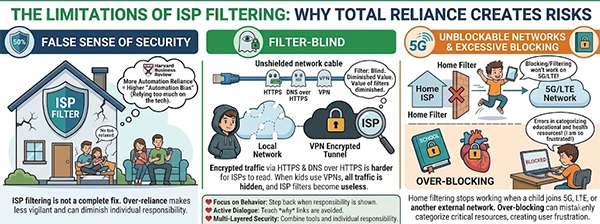
ISP filtering won’t fix every internet security problem; over-reliance on ISP filtering can lead to a false sense of security. As noted in Harvard Business Review, the more you rely on automation, the more “automation bias” you’ll experience.
- Encryption of Traffic via HTTPS/DNS over HTTPS makes it harder for ISPs and diminishes the value of their filters.
- If a tech-savvy kid uses a VPN, the ISP filter is “blind” as all traffic is routed through an encrypted tunnel.
- When a Child Uses 5G/LTE or Joins Another Network, the home ISP’s blocking/filtering does not work.
- Over-Blocking means errors in categorizing educational resources and health resources. Therefore, many kids will become frustrated trying to do homework.
Here is a visualized breakdown of specific points:
Benefits of Using ISP Filters Alongside Parental Control Tools
In the professional world of cybersecurity, this is known as “Defense in Depth.” By combining the ISP’s broad net with a tool, you create a multi-layered shield that is incredibly difficult to penetrate.
| Safety Layer | Function | Benefit |
| ISP Filtering | Blocks major bad neighborhoods of the web at the door. | Saves bandwidth by stopping junk traffic before it hits the router. |
| ISP Proxies | IPRoyal’s reliable isp proxies mask the home IP. | Enhances privacy and prevents advertisers from tracking a child. |
| Device OS Controls | Locks down camera and microphone permissions. | Prevents hardware-level privacy breaches. |
Wrapping Up
ISP filtering is a foundational block to a safe home. However, it also requires a solid structure built on top, like leading eCommerce seo services have. Utilizing network-level blocks eliminates many of the more obvious dangers associated with internet access, but the human factor is what can keep a child safe.
Remember, “it is better to light a candle than curse the darkness.” Taking the first step of configuring your ISP filter takes only 10 minutes but will help ensure your child has a safer experience on the Internet today.
Frequently Asked Questions
Will using DNS Filtering slow my internet speed down?
If I use incognito mode, will that bypass DNS filtering?
No. Incognito will only hide your local browsing history, but your ISP will see your request using DNS and will block it if they have a policy to do so.
Is there a charge for DNS filtering?
Many ISPs can provide this service free of charge, but some premium security level offerings may have an associated charge.
Do I need DNS filtering if I use an App?
Yes. DNS Filtering works for devices with no App Interface or UI, such as Smart Speakers and video game consoles.
 Divya Kakkar
Internet Content Writer
About article
The author of this article Divya Kakkar, an Internet Content Writer at Saferloop, brings practical experience and industry knowledge to the subject.
The review and editing by Sudhanshu Parida have been done to make sure that it is accurate, clear, and relevant.
At Saferloop, we are determined to provide high-quality, well-researched, and updated content. To understand further how we produce and revise our articles, please refer to our Editorial Guidelines.
Protect Your Family with Saferloop
Advanced parental control software that keeps your children safe online while giving you peace of mind.
- Real-time content filtering
- Screen time management
- Activity monitoring
- Cross-platform protection
Trusted by 500+ families