No, for once, you will need to access your children’s phone to get it installed. Later on, it will run smoothly.
×

Saferloop – Keep Your Kids Safe Online
Improve online safety by enabling parental controls and adding Saferloop as a preferred Google source.
Is Xnspy Really Effective? Our Independent Review (2026)
There is a moment most parents don’t expect. Your child isn’t little anymore, but they are not grown up either – but all of a sudden, smartphone becomes part of everyday life. The process begins with games, school tasks and a few YouTube videos. Then the watching time elevates, privacy comes into play and before you realize it – you are confused about what’s being done behind the screen.
The confusion pushes parents to look for visibility – not control, but clarity of what’s happening behind the screen. And Xnspy pops up again and again when you search for monitoring apps. But this visibility only helps when the tool really works.
So, to help you narrow down the potential prospects to use, today, we are reviewing one of the better-known solutions called Xnspy in the safest parental control app market.
The article will have the following discussions underway:
- What is Xnspy?
- What features does it offer?
- Is the app any good compared to its competitors?
- When can parents use it?
What is Xnspy?
Xnspy, as is evident by now, is an app for monitoring phones that first hit the market over 13 years ago. Within this tenure, it seems to have gained a loyal following of parents who need to keep tabs on their children’s phones.
The app claims to monitor all offline and online activities, with data from social media apps like Snapchat, X (Twitter), Tinder, etc.
What Should Parents Know Before They Start Using the Xnspy App?
Since 1 in every 7 parents does not feel confident that they know what their child is doing online, they tend to employ solutions like Xnspy. But before they get into it, they fail to take the following things into consideration.
- Compatibility: Xnspy works with both Android and iOS phones and tablets, with minor differences in the feature range of the two. To find exactly whether Xnspy runs on your target phone’s make and model, you can also go with the online compatibility checker.
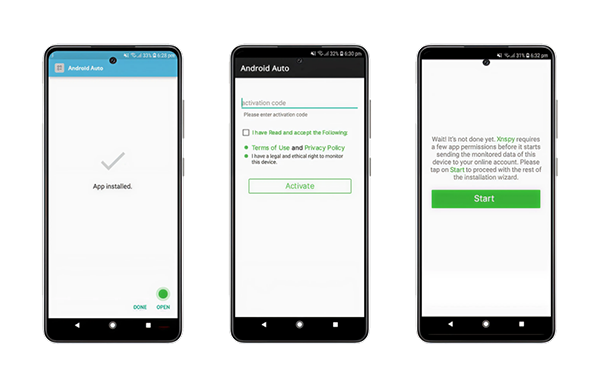
- Access Requirement: To try Xnspy once, get one-time access to the target phone. Without taking the device in your hand, you can neither install the app nor use it. Once done, you will no longer need to maintain physical access as Xnspy auto-updates from there onwards.
- Installation: The complete installation and setup process for Xnspy takes around 7-10 minutes. In case of any issues, their live chat for customer support can be used.
- Price Point: Xnspy has two plans, i.e., basic and premium, both offering different levels of monitoring depending on parenting needs. As far as its price is concerned, Xnspy’s basic annual plan starts at around $4.99 per month.
- Consensual Use: Xnspy is to be used for children under 18, but even if you own the monitored phone, it is always important that you have a proper discussion with them before employing the app. With them on board with the idea of monitoring, they will be more willing to compromise.
- Internet Stability: To get timely updates and instant monitoring of all activity logs, you must ensure that both your and your target device’s internet connection is stable.
- Intuitive Dashboard: Xnspy’s online web dashboard is end-to-end encrypted and user-friendly with a responsive design. For monitoring, all the collected logs are made accessible here under the relevant feature.

- Data Categorization: Since the collected data can cause cluttering within the dashboard, all of the logs are divided into proper categories and subcategories for easier navigation. To add more to the user experience, various filters are also offered for narrowing down the data on display.
- Stealth Mode: Xnspy works in stealth mode after installation to avoid uninstallation and provide discretion. While working on the target phone – it never appears in the notification tab, app drawer, home screen, or other places.
- Real-Time Updates: When a new activity is found by the Xnspy system on the target phone, the same moment it is uploaded to the user dashboard for parents to see.
Also Read: Learn How to Disable Parental Controls on Different Devices
What Does Xnspy Offer for In-Depth Monitoring?
Multiple features of the Xnspy app for monitoring phones contribute to comprehensive insights into a child’s activities. SIM logs, internet history, screen time, IM chats, screen records, keylogs, media files, and location are to name a few.
- SIM Logs: Xnspy records contacts, text messages, calls, and SIM location from the target phone. While the contacts show all saved numbers with relevant information, the text messages offer a list and chat view of all interactions. Calls, on the other hand, come with a detailed history of the caller, duration, call type, time, and recording.
- Internet History: The target user’s internet history and bookmarks are made available on Xnspy, alongside an analysis of the history. Saved data includes the number of visits, time of last visit, visited URL, page title, etc.
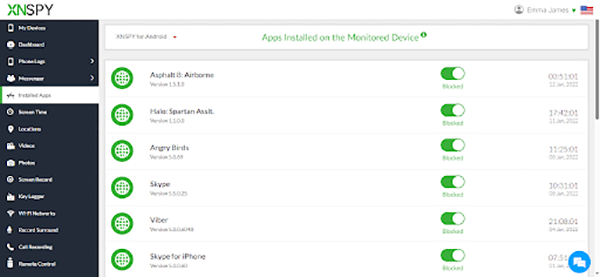
- Screen Time: Time spent on all the apps on your child’s phone is accumulated by Xnspy into a list. From the most visited and used apps to the least, the list gives parents the understanding of phone usage they need.
- IM Chats: Over 13 social media chats are collected from the apps directly through Xnspy. These logs are then uploaded to the dashboard in both a chat and a list view.
- Screen Records: Screen recorder on Xnspy captures the target screen every 5-10 seconds to monitor for inappropriate content consumption and overall phone activity.
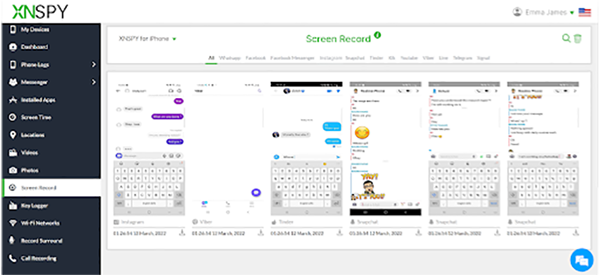
- Keylogs: Everything typed on the target device is recorded by Xnspy’s built-in keylogger. Logs like these end up providing details regarding internet searches, comments, notes, typed messages, and more.
- Media Files: Photos, videos, and other files available on the target phone are both saved and made playable within the dashboard, too. Also provides an extra layer of protection against data safety risks of AI apps.
- Location: GPS history and live location are captured using Xnspy. In both a map and list view, the visited places, their exact addresses, timestamps, coordinates, and view on map buttons are displayed.
What Features Are There for Instant Insights and Remote Phone Control?
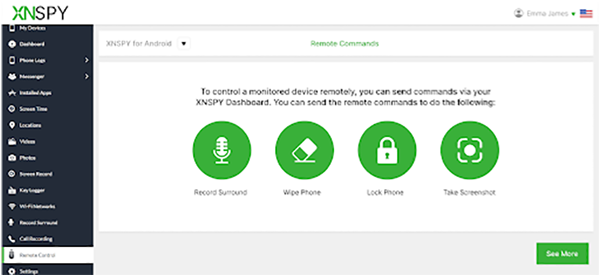
While Xnspy is primarily an app for monitoring phones, some of its features also work to offer immediate notifications and remote control. Now, in all honesty, due to the app’s focus not being primarily on controls, it does fall short with only five remote commands for parents. Let’s look into both its alerts and controls.
By setting up different watchlists, parents can get alerts for contacts, emails, locations, and keywords. As soon as any of the flagged logs are detected by the system, parents will receive a notification about the activity.
On the other hand, the commands include app blocking, phone locking, surround recording, live screenshot, and data wiping. Using these controls, parents can:
- Restrict specific apps,
- Lock the phone entirely,
- Record ambient sounds in the child’s surroundings,
- Take an instant snapshot, and
- Factory reset the phone.
What Situations can Xnspy be Used In?
Well, what is not there on the internet? From bullying to harassment to sextortion, no evil seems too far-fetched at this point.
Can you imagine that more than 300 million children are sexually exploited and abused online annually? One cannot fathom, but that really is the depraved reality we are a part of.
In circumstances like these, parents can opt for such monitoring tools or choose the right parental control app for their child, whatever floats their boat.
Not only for online safety but for physical protection too, Xnspy can be utilized. With parents knowing what their child is doing and where they are located, it can be easy to prevent any dangerous situations from escalating.
How Does Xnspy Perform Compared to Other Apps in the Market?
When compared to other apps in the market, Xnspy yields the following results:
- As a monitoring app, Xnspy is sufficient and is more detail-oriented than its counterparts. With the logs provided, parents can find the app reliable and use it to easily protect their children.
- However, as far as its remote commands are concerned, those who need parental controls specifically can opt for other safer parental control solutions since this is not the primary area of concern for the app.
Wrapping Up!
Xnspy isn’t a magic solution – and it doesn’t even try to be. What it performs well is visibility – clear and detailed insights of messages, apps, locations and online habits.
Where it gets a little down is control. If you are in search of strict limits and heavy parental restrictions – this might be less for you. As it puts more focus on awareness than enforcement. Although it should be kept in mind that parenting is never about micromanaging.
If used responsibly, it can support safer parenting. In the end, real digital safety comes from trust, conversations and not knowing when to stop.
Will I be able to use Xnspy without touching the target’s phone?
Can I also monitor my child who is not residing in the same country?
Yes, you can monitor your child in any country till the time they have the app installed on their phone and an active internet connection.
Where can to access Xnspy’s customer support?
On the official Xnspy website, you can find their 24/7 live chat to connect with their customer support. Or else you can reach out to them via email.
Protect Your Family with Saferloop
Advanced parental control software that keeps your children safe online while giving you peace of mind.
- Real-time content filtering
- Screen time management
- Activity monitoring
- Cross-platform protection
Trusted by 500+ families