

The threat intelligence lifecycle is a continuous cybersecurity process of spotting, analyzing, and responding to online threats as they keep changing over time.
×

Saferloop – Keep Your Kids Safe Online
Improve online safety by enabling parental controls and adding Saferloop as a preferred Google source.
Understanding the Threat Intelligence Lifecycle: Cyber Safety Issues Explained for Concerned Parents

The threat intelligence lifecycle may sound technical, but it actually matters for parents because safety risks keep changing in the same online spaces kids use every day.
Things like scams, fake profiles, and harmful content don’t just disappear even if they’re found. They get spotted, studied, and then come back in slightly different forms. That loop is what cybersecurity teams call the threat intelligence lifecycle.It’s relevant because children are heavily online. UNICEF estimates that around 1 in 3 internet users are children, and exposure to harm isn’t rare either, with 46% of teens reporting cyberbullying or online harassment (Pew Research Center, Teens and Cyberbullying / Online Harassment Report 2022).
So it’s less a technical system and more a way in which online harm continuously evolves. This article explains how that cycle connects everyday parenting decisions to the evolving nature of online safety.
Table of Contents:
What the Threat Intelligence Lifecycle Means in Simple Terms
Most people don’t deal with cybersecurity terms every day, so the threat intelligence lifecycle can sound more complex than it actually is. At its core, it’s just a loop where digital threats are spotted, studied, and used to improve protection as new versions keep appearing.
For parents, it matters because children are using apps that are constantly shaped by this process. The harder part is that online threats don’t always look suspicious at first; they often show up as normal chats, recommendations, or friendly interactions.
- Something suspicious appears online
- It gets detected
- It’s analyzed and understood
- Protection systems are updated
- A slightly changed version shows up again
Key Stages of the Threat Intelligence Lifecycle
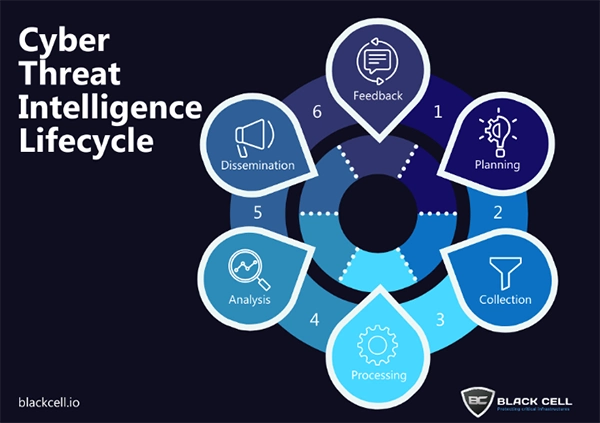
The threat intelligence lifecycle is often explained in clear steps known as different threat intelligence phases, but real online activity is usually more confusing than that. Things overlap, patterns change quickly, and online threats do not always look dangerous at first.
Still, understanding the process helps parents see how online safety systems work in the background. This model is widely used in cybersecurity operations to track and respond to emerging threats.
- Direction – This step is about deciding what needs attention. For parents, this can mean app limits, privacy settings, or blocked websites. The hard part is that online risks keep changing all the time.
- Collection – Systems collect activity from apps, browsing, messages, and devices. At this point, nothing is called dangerous yet. It is simply information being gathered.
- Processing – This stage filters normal activity from unusual behavior. One message or search usually means nothing alone, but repeated patterns may start to look concerning.
- Analysis – Here, systems try to understand what certain behavior could mean. This can include signs of manipulation, grooming, or harmful content. AI-generated content is also making it harder to tell what is real and what is fake.
- Dissemination – Once something important is found, the information is shared with platforms or safety tools. Usually, it appears as simple warnings instead of technical details.
- Feedback – Systems learn from mistakes and improve over time. Some risks are missed, while others are flagged incorrectly. Since online behavior changes quickly, especially among young users, the cycle keeps repeating.
Common Cyber Safety Issues Kids May Face Online
Online threats today do not always look dangerous. A lot of them blend into normal online activity, which is part of what makes them easy to miss at first.
- AI-Generated Manipulation – Images, videos, and even voices can now be made or edited to look real. Something might look like it came from someone your child knows, even when it didn’t. Most young users won’t check first; they’ll just react.
- Social Engineering & Grooming – This usually starts in normal places like games or chat apps. A simple chat turns into regular talking, trust builds slowly, and nothing feels off in the beginning. That’s why it can go unnoticed for a long time.
- Algorithmic Exposure – Even if parents set limits, recommendation systems still decide a lot of what shows up. Suggested videos or autoplay can slowly bring in content that children didn’t even search for.
- Digital Identity Misuse – Kids often share small things without thinking much about it. A school name, a uniform photo, or a location tag may not feel important alone, but together they can reveal more than expected later.
How Parents Can Use Threat Awareness at Home
This part is more about what happens at home than systems. Being aware doesn’t mean checking everything a child does online all the time; that usually just pushes them away. It’s more about picking up small changes in how they act day to day.
- Suddenly wanting more privacy with devices
- Spending more or less time online than usual
- Avoiding conversations about online activity
- Mood changes after using a phone or a laptop
None of these actually means that something is wrong. But if you start seeing a pattern, it’s worth paying attention. Simple, normal chats usually work better than strict questions or repeated checking.
Tools and Habits That Support Safer Digital Monitoring
Parental tools like SaferLoop can help manage and protect kids online, but they don’t cover everything. They can support safety, but they can’t really understand the intent or context behind behavior. That’s why they work best when they’re used along with simple habits at home.
But even with tools in place, safe habits still matter a lot. Regular conversations, simple rules, and teaching children to pause before sharing personal information can make a big difference. Helping them notice risky situations without creating fear is just as important.
- reduce exposure to unsafe content
- Highlight unusual activity patterns
- manage screen time boundaries
- Provide location awareness features
Conclusion
The threat intelligence lifecycle is basically a structured way of understanding how digital risks appear, evolve, and get managed over time. For parents, the key takeaway is not the technical process itself, but what it represents.
Online threats don’t stay still. They adapt, shift shape, and often hide inside normal-looking interactions. And because of that, awareness becomes more valuable than reaction. Small observations, regular conversations, and balanced use of tools together create a safer environment than any single solution alone.
The internet will keep changing. But understanding how risks evolve inside it is often what helps you notice trouble before it becomes visible.
What is the threat intelligence lifecycle in simple terms?
What kind of online risks do children commonly face today?
Children can face risks like AI-generated fake content, grooming in chat apps, algorithm-driven exposure to inappropriate content, and digital identity misuse from oversharing personal information.
How does the threat intelligence lifecycle help improve online safety?
It works by continuously collecting and analyzing threat data to detect patterns and update protections, helping systems respond quickly to new and evolving online risks.
 Divya Kakkar
Internet Content Writer
About article
The author of this article Divya Kakkar, an Internet Content Writer at Saferloop, brings practical experience and industry knowledge to the subject.
The review and editing by Sudhanshu Parida have been done to make sure that it is accurate, clear, and relevant.
At Saferloop, we are determined to provide high-quality, well-researched, and updated content. To understand further how we produce and revise our articles, please refer to our Editorial Guidelines.
Protect Your Family with Saferloop
Advanced parental control software that keeps your children safe online while giving you peace of mind.
- Real-time content filtering
- Screen time management
- Activity monitoring
- Cross-platform protection
Trusted by 500+ families