
A firewall is essentially a digital gatekeeper. It monitors and inspects traffic in real time, blocking untrusted connection requests.
×

Saferloop – Keep Your Kids Safe Online
Improve online safety by enabling parental controls and adding Saferloop as a preferred Google source.
How Firewalls Help Protect Your Home Network

Your home network encompasses all your digital devices, be it for entertainment, convenience, or security. These include your desktop, laptops, tablets, smartphones, TVs, gaming consoles, speakers, security cams, thermostats, etc. Being on the same network, they also share the same internet connection.
This consolidation of all devices on a single network brings a lot of convenience. But this convenience also brings security vulnerabilities with it.
A firewall keeps your domestic network safe from wider internet threats. The name makes sense, as walls keep adversaries away while the fire acts as a purifier of the incomining traffic. This mechanism thwarts unwanted connections and reduces exposure to online threats.
Understanding what a firewall can and can’t do is essential to regulate the household digital habits and keep the domestic network secure.
Table of Contents:
What Does a Firewall Do?
A firewall is simply a monitoring tool for incoming and outgoing network traffic. It applies predefined rules to decide which connections can be permitted and which should be blocked. Most modern home routers include basic firewall functionality. This provides enough protection for home network devices to stay away from online threats.
More advanced security products can offer additional features. Businesses commonly use sophisticated firewall platforms, but people researching broader network security concepts may also encounter technologies such as UTM Firewalls. Unified threat management solutions are basically traditional firewalls but on steroids. It includes additional security functions, potentially including intrusion prevention, web filtering, application controls, and malware protection.
A business is multiple times more vulnerable to cyber threats compared to an average household. So, the latter doesn’t need as much digital security. Yet, the underlying principle is useful: security is stronger when several complementary protections work together.
Why Home Networks Need Protection
Maybe not on an enterprise level, but a domestic network still contains a lot of valuable information. Cybercriminals are after that data. Computers and smartphones may provide access to email accounts, financial services, personal photographs, cloud storage, shopping accounts, and work-related documents.
With smart homes, the number of IoT devices is also growing in an average household. This makes the security situation even more serious. Smart devices vary considerably in their security capabilities. Some may receive regular software updates, while older products can eventually stop receiving manufacturer support.
A firewall is especially good at keeping unsolicited devices from connecting to your home network. However, it should not be viewed as a complete solution for every cybersecurity threat.
Besides the conventional firewall, it’s also important to adopt family digital security workflows for better domestic network safety.
How Firewalls Control Network Traffic
Network traffic is essentially data and instructions travelling between devices and servers. When you visit a website, stream a programme, play an online game, or make a video call, data moves between your home network and external servers.
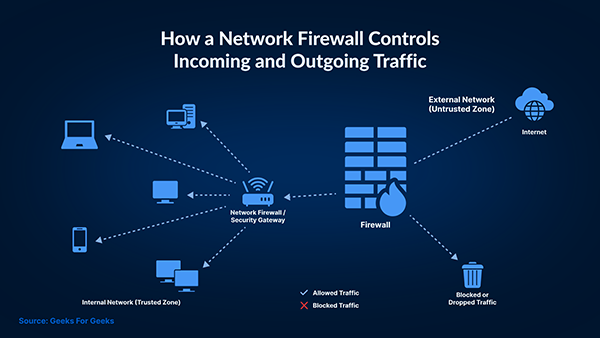
A firewall examines aspects of these connections and applies security rules. Depending on its capabilities, it may consider factors such as where traffic originates, where it is going, which network protocol is being used, and whether the connection matches expected behaviour.
Modern firewalls have come a long way compared to traditional systems. Some can identify applications or suspicious traffic patterns rather than relying exclusively on basic connection information.
Firewalls Can Help Protect Smart Devices
Smart home technology has simplified the interconnectivity of IoT devices like doorbells, cameras, plugs, appliances, lighting systems, and voice assistants. It has become increasingly common. Many of these devices remain connected to the internet throughout the day. If a device has weak security settings or outdated software, it could potentially create an additional vulnerability.
Two of the most basic and impactful measures to keep the security situation under control are keeping device firmware updated and changing default passwords. Where the router supports it, placing smart devices on a separate guest or IoT network can add another useful layer of protection. Network separation can help prevent a problem affecting one category of device from providing unrestricted access to everything else connected to the home network.
To protect your kids online, a properly configured firewall is essential, in addition to the usual antivirus solutions, VPN, MFA, and password managers.
A Firewall Cannot Stop Every Threat
A firewall is an essential security measure, but it’s still a basic one. That’s why understanding its limitations is important. A firewall cannot prevent every scam, malicious download, compromised password, or phishing attack. For example, if someone receives a convincing phishing email and voluntarily enters their password on a fraudulent website, a basic network firewall may not prevent the credentials from being stolen. Similarly, downloading software from unsafe sources puts your device at risk. For this, a more robust security mechanism that can deal with viruses and malware is needed. This is why firewalls work best as part of a layered approach rather than as the only cybersecurity measure in a household.
Even the most advanced automated security systems are unable to fix 56% of detected threats immediately.
Secure Your Wi-Fi as Well
Just a firewall isn’t enough to secure your domestic network, especially if it’s wireless. Homeowners should use modern Wi-Fi encryption supported by their equipment and protect the wireless network with a strong, unique password. The router’s administrator password should also be changed if it still uses a default or easily guessed credential. A router admin has many privileges to change how a network functions, so it is particularly important to protect it.
Households should also periodically check which devices are connected to the network. An unknown device doesn’t straightaway become malicious, since device names can sometimes be unclear, but unexpected connections are worth investigating.
Keep Routers and Devices Updated
With newer security vulnerabilities being exploited by cybercriminals every day, software updates are another essential element of home network security. Manufacturers release firmware and operating system updates to improve functionality and address identified vulnerabilities. People remember to get those updates as it’s right in front of them. But usually, routers are forgotten because they operate quietly in the background. Check periodically whether the router updates automatically or needs manual updates.
Similarly, keep all other IoT devices updated, including computers, smartphones, smart TVs, cameras, streaming devices, and other connected equipment. Devices that no longer receive security updates may eventually become a greater risk.
Create a Safer Connected Home
People don’t pay much heed to a home firewall as it usually works largely behind the scenes. But it can play an important role in controlling network traffic and reducing exposure to unwanted connections. As households continue adding internet-connected technology, protecting the network itself becomes increasingly important.
Still, firewalls aren’t a definitive solution. You should practice good online habits involving careful online behaviour, secure passwords, updated software, and good account protection. Combined with these measures, however, firewall technology can form a strong foundation for a safer domestic network and help households enjoy connected devices with greater confidence.
Frequently Asked Questions
How does a firewall help protect your network?
How do you protect your home network?
Besides a properly configured firewall, you should change the default router credentials, enable Wi-fi encryption, and keep all firmware updated.
What are four types of firewalls?
They are packet filtering, stateful inspection, proxy (application-level), and circuit-level gateway firewalls.
 Aditi K
Freelance Cybersecurity Writer
About article
The author of this article Aditi K, an Freelance Cybersecurity Writer at Saferloop, brings practical experience and industry knowledge to the subject.
The review and editing by Vinithra Karunanidhi have been done to make sure that it is accurate, clear, and relevant.
At Saferloop, we are determined to provide high-quality, well-researched, and updated content. To understand further how we produce and revise our articles, please refer to our Editorial Guidelines.
Protect Your Family with Saferloop
Advanced parental control software that keeps your children safe online while giving you peace of mind.
- Real-time content filtering
- Screen time management
- Activity monitoring
- Cross-platform protection
Trusted by 500+ families