It is a fraudulent message that is made in such a way to fool the viewers into believing it is genuine and reliable.
×

Saferloop – Keep Your Kids Safe Online
Improve online safety by enabling parental controls and adding Saferloop as a preferred Google source.
Configuring Inbound Email Filters to Shield Kids from Phishing Exploits
Many of the parents will be seen taunting their kids the whole day for exploring unnecessary things related to online activity, but a very few actually try to safeguard them. They think about the popular risks that quietly harm through the inbox.
Emails have become necessary for kids’ schoolwork, newsletter and more. Unfortunately, scammers take advantage of it and spam with the messenger them seem reliable and triggering clicks.
Keep reading to explore how to configure inbound email filters to shield kids from phishing exploits.
Table of Contents:
Common Phishing Tricks That Target Children
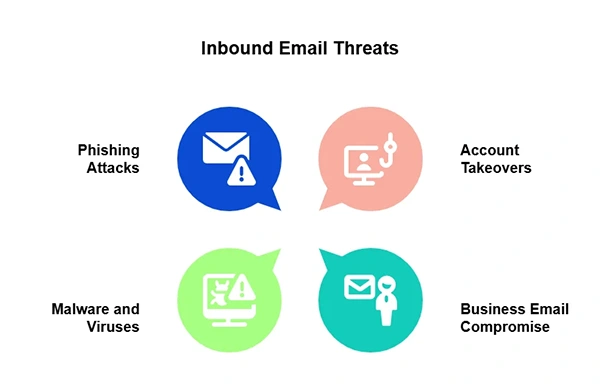
Kids do not read email like adults. They scroll, click, and react. That is why phishing works so well. The FBI ranked phishing and spoofing among the top reported cybercrimes in 2024, and many scams start with one small lie: “Your account needs action.”
- Fake account alerts
These emails copy gaming sites, school portals, or video apps. They warn that the account will close unless the child clicks now. - Prize and gift card scams
Free coins? A new phone? A gift card? Kids want the prize, so they may miss the fake login page. - School impersonation emails
A scammer may pretend to be a teacher and send a “homework file.”
An effective practice by parents for yes-or-no decisions can effectively reduce overthinking and ensure safety.
How Inbound Email Filters Help Stop Bad Messages Early
A child should not have to go over every strange email alone. That is too hard for him. Inbound email filters do the first check before a message crosses the inbox. They read the sender, subject line, links, files, and wording. Then they figure out what happens next: allow it, mark it, move it to spam, hold it for review, or block it.
Good filters are not designed to stop normal email. They sort it. School notes, family messages, coach updates, and verified email newsletters should still land where kids can see them.
Parents and schools should use filters that check risky links, scan attachments, and alert senders that appear to be someone else. Above this, for better safety, learn what parents should know about AI generated kids’ content.
Key Filter Settings Parents and Schools Should Use
Filters work best when they have clear rules. Not unclear “block bad stuff” settings. Real rules. The kind that identifies a fake school login before a child clicks it, while still allowing teacher updates and trusted email newsletters arrive.
- Turn on sender checks
Use SPF, DKIM, and DMARC. These checks help prove that a message really came from the domain it pretends to use. - Hold sensitive attachments
Block or quarantine files such as scripts, zipped folders, and unknown file types. - Scan links before delivery
A link may look safe, but direct you to a fake page. This matters when scams hide inside fake email newsletters. - Allow trusted senders
Add school domains, family contacts, learning apps, and valid email newsletters.
Balancing Safety with Useful Email Access
Blocking every odd email may sound safe, but it can go wrong fast. A child might miss a coach’s schedule change, a teacher’s file, a club reminder, or one of the email newsletters they actually need. Then, adults end up picking through quarantine papers at night. Not fun. Not smart either.
A better setup starts closely, then gets altered. Check blocked mail once or twice a week. Add secure school domains, family contacts, learning apps, and approved email newsletters to the safe list. Remove old senders when the child no longer uses that site or club.
For complete safety, explore 10 parenting tips to keep kids safe both online and offline.
Filters Work Best When Adults Stay Involved
Email filters detect a lot, but they cannot hold a child’s hand and say, “This feels wrong.” That part still relates to adults. The FBI’s 2024 Internet Crime Report shows why this matters. Online crime brought in 859,532 complaints and $16.6 billion in estimated losses. Phishing and spoofing sat near the top.
A strong filter can block bad links, spot fake senders, and save strange files for review. Still, scammers change words, logos, and tricks. The safest plan is simple – use smart rules, clear trusted contacts, review blocked mail, and watch email newsletters closely. Some are useful. Some are bait.
Kids also need one clear habit: ask before reacting when an email feels urgent, scary, or too warm. That mix of filters and adult backup gives scams far less room to work.
Conclusion
No email filter can replace the human decision to identify things, but it definitely results in a safer environment. The best way is to mix the technology while sharing the right aspects and doable approaches for a safe exploration for kids.
Above this, filters can definitely help to block unnecessary messages, avoid dangerous links and block fake senders before they reach the inbox.
FAQs
What is a phishing email?
Why are children more vulnerable to scams?
Children are more likely to trust fake logos and fall into the trap of the ‘urgent message’ trap, as they are not known to these things.
Can email filters stop every phishing attempt?
No, not every. But it can definitely reduce the risk. The rest of the privacy is more dependent on the user’s awareness.
 Justin Thomas
Cybersecurity Analyst and Digital Safety Writer
About article
The author of this article Justin Thomas, an Cybersecurity Analyst and Digital Safety Writer at Saferloop, brings practical experience and industry knowledge to the subject.
The review and editing by Evan Patterson have been done to make sure that it is accurate, clear, and relevant.
At Saferloop, we are determined to provide high-quality, well-researched, and updated content. To understand further how we produce and revise our articles, please refer to our Editorial Guidelines.
Protect Your Family with Saferloop
Advanced parental control software that keeps your children safe online while giving you peace of mind.
- Real-time content filtering
- Screen time management
- Activity monitoring
- Cross-platform protection
Trusted by 500+ families