Ans: Yes, you can put parental controls using “Family Center” on Discord. It allows you to supervise your teenager’s online activities.
×

Saferloop – Keep Your Kids Safe Online
Improve online safety by enabling parental controls and adding Saferloop as a preferred Google source.
Discord Parental Control: Safety Concerns and Setup Guide
Due to a lack of age verification, children can easily access Discord and join servers. However, it is not safe for them because they can encounter inappropriate content and cyberbullying. Therefore, parents should enable built-in Discord parental control to protect their kids.
So, as a concerned parent, you should stay adherent to this article to uncover how to set up parental controls on Discord. Alongside, I’ve compiled information on safety concerns and tips for parents.
Quick Answer:
Discord is an online gaming community that connects every player through voice and text messages. But it is also dangerous for kids because it might contain sensitive content and scammers. So, parents need to follow safety measures to protect children on Discord.
Table of Contents:
What is Discord?
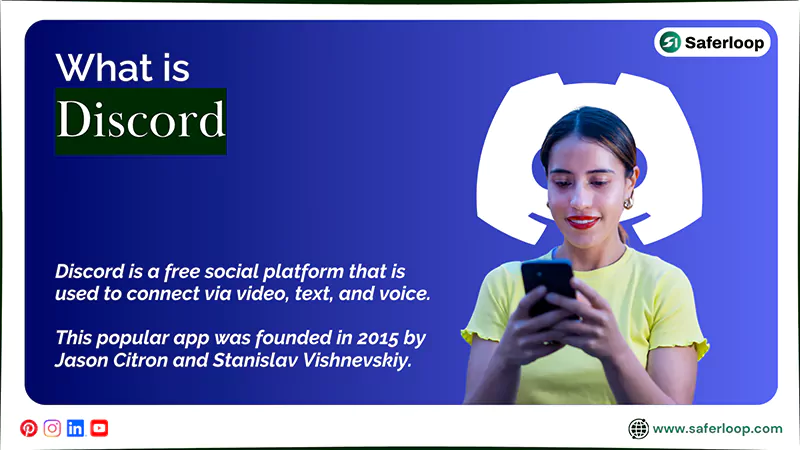
Discord is a free social platform that is used to connect via video, text, and voice. It is designed to make it easier for gamers to talk with their teams while playing.
This popular app was founded in 2015 by Jason Citron and Stanislav Vishnevskiy and has millions of users in 2026. It lets you enjoy real-time chats by joining communities called servers.
Now, it is also used to host meetings and other events with the help of the screen-sharing feature. This makes it a mainstream platform among the young generation and Gen Z.
However, it can connect teenagers with strangers worldwide, making it concerning for parents about their online safety and privacy.
Is Discord Safe for Kids?
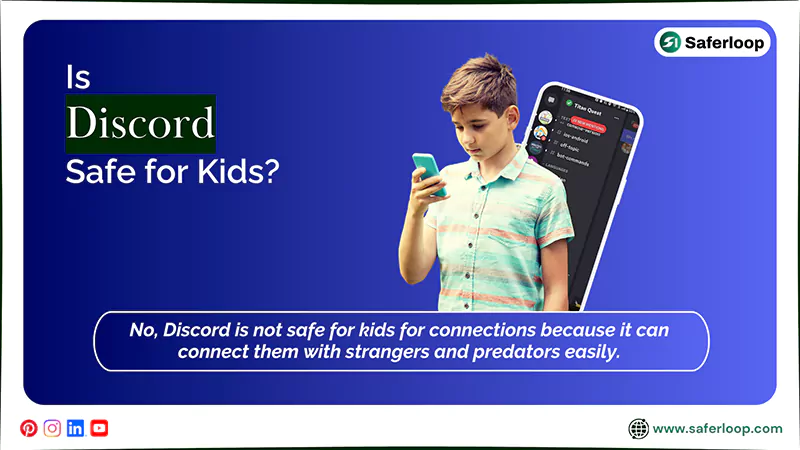
No, Discord is not safe for kids for connections because it can connect them with strangers and predators easily.
If children and teenagers use this app and join public servers for group chat, they might encounter cyberbullying, exploitation, inappropriate content, and predatory risks. This can affect their mental and emotional well-being.
According to the Discord Age Restriction Policy, the user must be at least 13 years old to access the app or website, while some specific countries have different Terms and Conditions.
This indicates that children and teenagers should stay away from using Discord, and parents should take responsibility. Additionally, I recommend that you install the Saferloop parental control app to restrict harmful apps, ensuring your kids’ protection online.
It also offers a wide range of safety features, such as:
- Monitor your children’s online activities to track how they surf the internet.
- Set screen time limits to foster healthy and offline habits.
- Block unsafe and adult apps and websites to prevent your kids from using them.
- Restrict explicit and inappropriate content to create a safe digital environment.
- Track real-time location and create digital boundaries to receive notifications when your little ones reach or leave the place.
- Send emergency alerts, SOS updates, and reports if something suspicious is detected.
- Track calls and messages directly from your children’s SMS and social media apps.
- Provide the Saferloop safety checkup extension for Chrome to add an extra layer of security to your devices.
- Offer the Saferloop GPT to guide you about digital parenting and answer all your queries.
On the whole, the Saferloop parental control software provides high-end solutions to protect your children from cyberattacks and pedophiles.
How to Set Up Parental Controls on Discord?
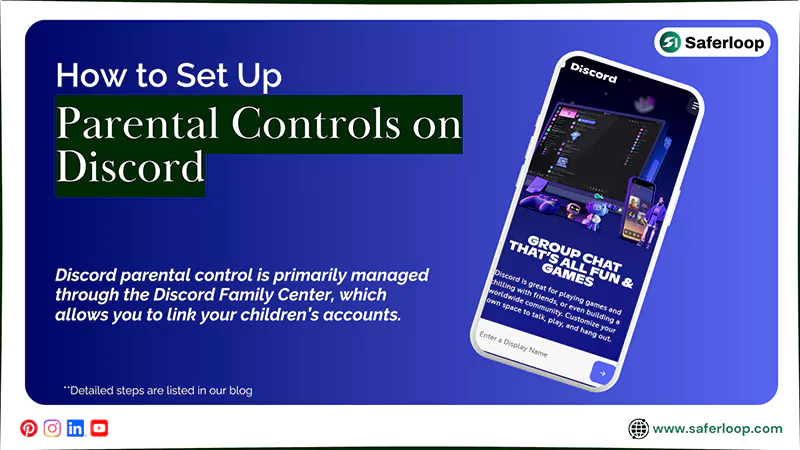
Discord parental control is primarily managed through the Discord Family Center, which allows you to link your children’s accounts. It helps you to protect your kids from cyberattacks, predators, and inappropriate content.
Let’s skim through the next section to understand how to set up parental controls on Discord.
1. Discord Family Center
To set up the Discord Family Center, you should open the app > You > Settings > Family Center > Connect with Teen > Send Connection Request > Accept the parent request from a child’s phone.
Here are the following steps on how to set up the Discord family center with detailed information.
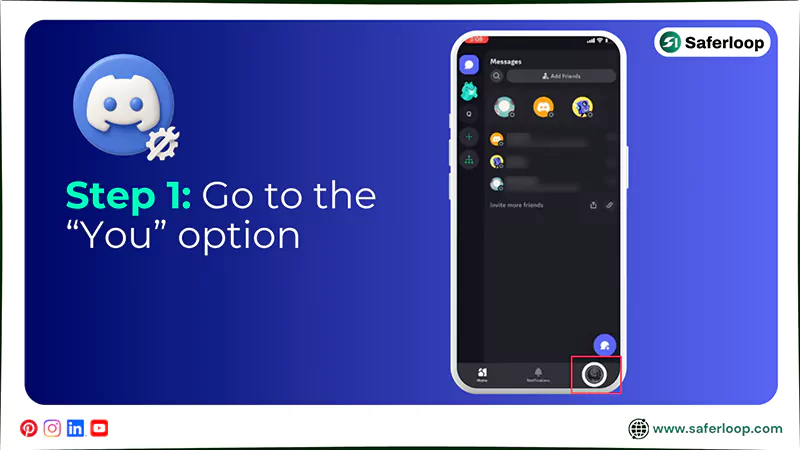
Step 1: Open the Discord app on your phone and go to the “You” option.
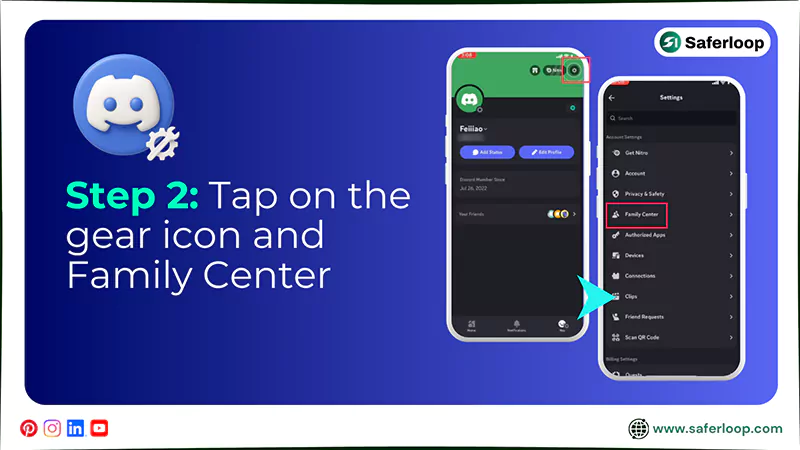
Step 2: Tap on the gear icon and then “Family Center.”
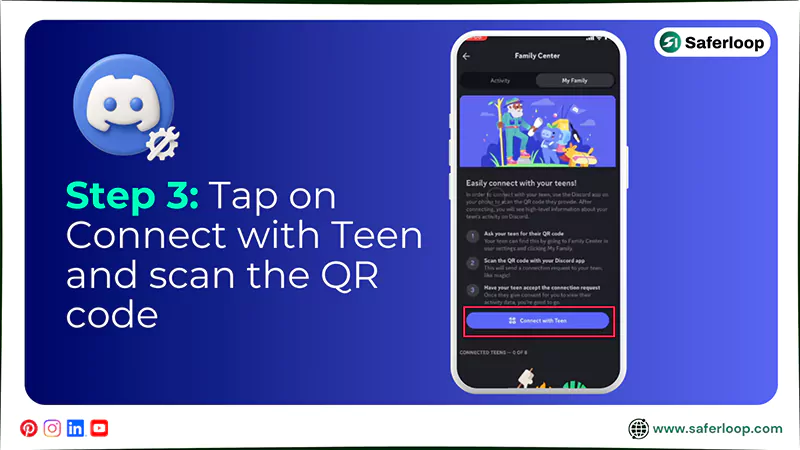
Step 3: Now, tap on “Connect with Teen” and wait for scanning the QR code of your kid’s account.
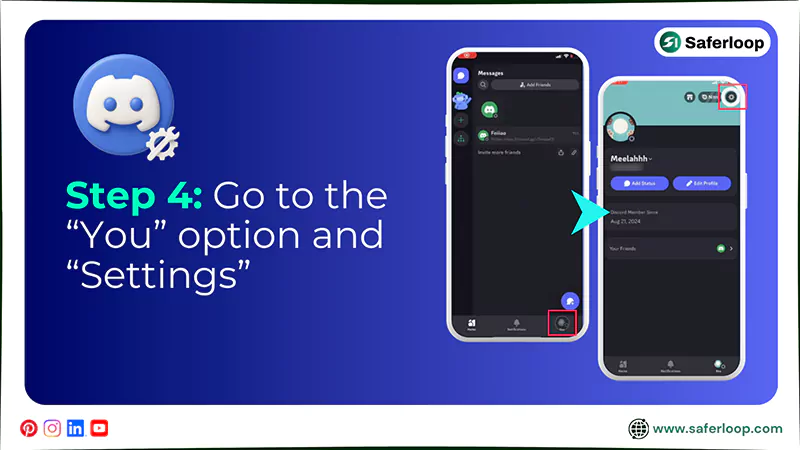
Step 4: Now, open Discord on your child’s phone and go to “You” and “Settings.”
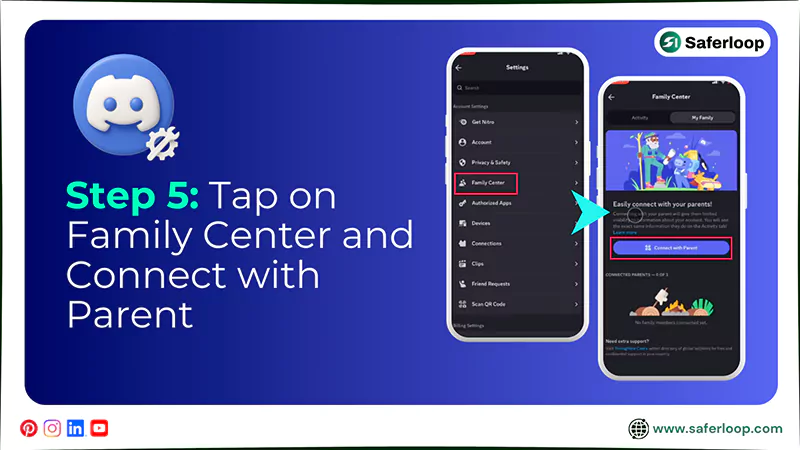
Step 5: Tap on the “Family Center” and “Connect with Parent.”
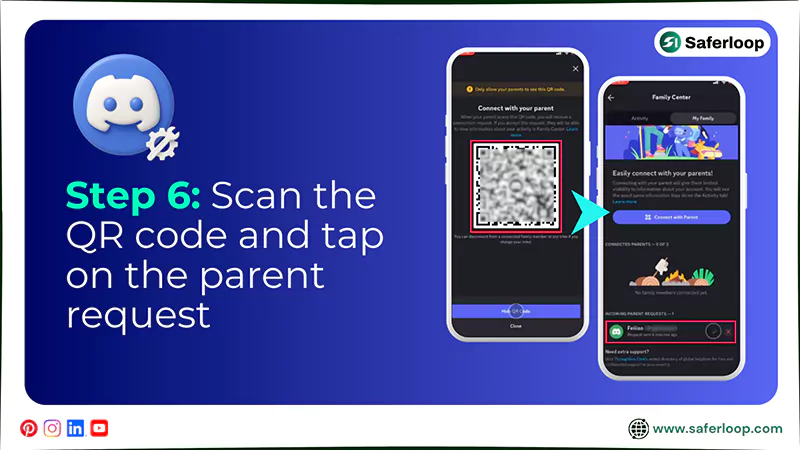
Step 6: Get the QR code scanned and tap on the parent request.
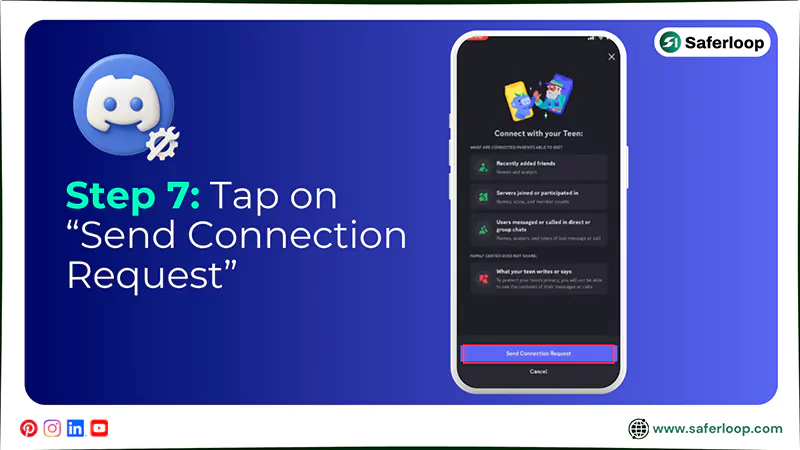
Step 7: Next, on the parent device, tap on “Send Connection Request.”
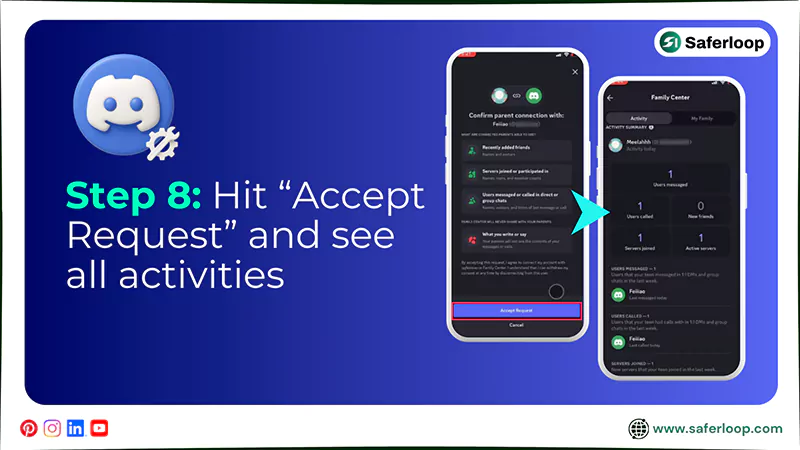
Step 8: Next, hit “Accept Request” and watch over your kids’ Discord activities, servers, and chats.
2. Restrict Sensitive Content
To restrict sensitive content on Discord, you should open the app > You > Settings > Content & Social > Sensitive content filters > Customize Settings.
Here are the steps on how to restrict sensitive content on Discord for in-depth guidance.
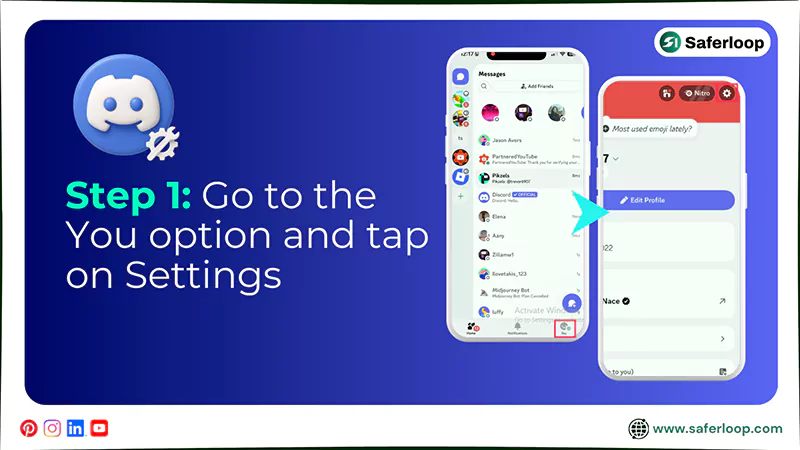
Step 1: Open Discord on your phone, go to the “You” option, and tap on “Settings.”
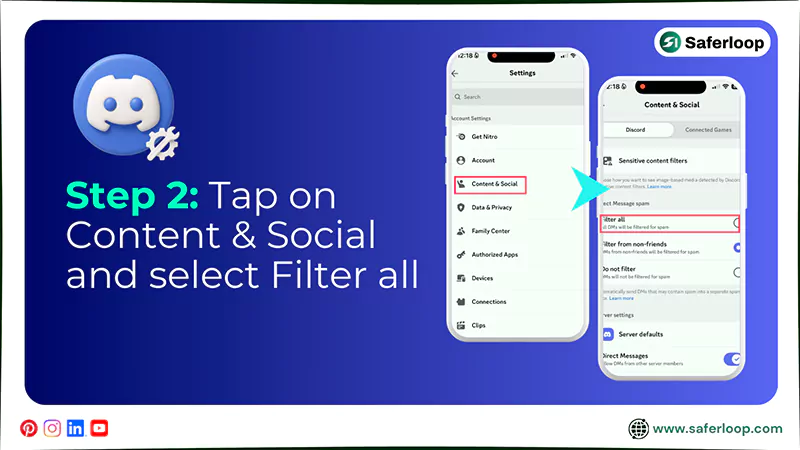
Step 2: Tap on “Content & Social” and “Sensitive content filters.”
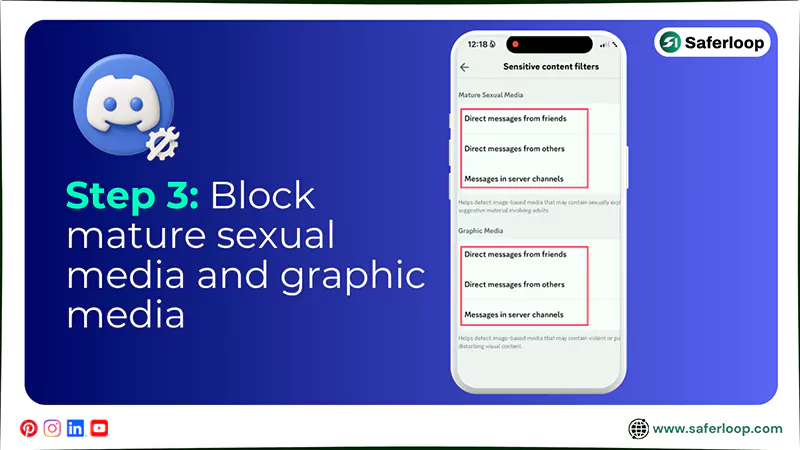
Step 3: Now, you can block mature sexual media and graphic media to protect your kids.
3. Filtering for Spam
To filter for spam on Discord, you should open the app > You > Settings > Content & Social > Filter all.
Here are the following steps that guide you on how to filter spam on Discord.
Step 1: Open the Discord app, tap on the “You” option, and select “Settings.”
Step 2: Tap on “Content & Social” and select the “Filter all” option to filter spam.
Also Read: iPad Parental Control: How to Set Up and Manage Screen Time Safely?
Safety Concerns on Discord for Children
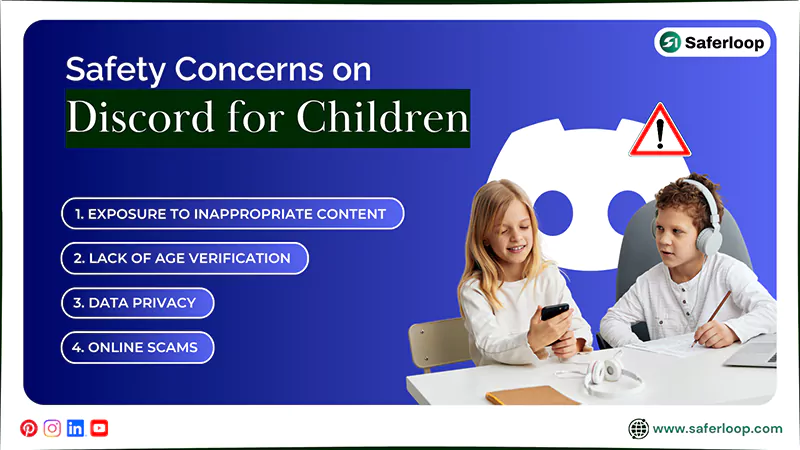
As a helicopter parent, you should uncover safety concerns such as exposure to inappropriate content, lack of age verification, data privacy, and online scams to take essential precautions.
Here are the online risks on Discord for kids in great detail for your guidance.
1. Exposure to Inappropriate Content
Discord allows everyone to create their own servers, focusing on any topic. This signals that children can join the server that is designed to share explicit and obscene videos and photos, increasing the chances of engaging in pornography and violence.
2. Lack of Age Verification
The app or website claims that users 13 or older are only allowed to access it. However, it lacks in verifying age, so that kids can lie about their age and enter the app easily without bypassing any restrictions.
3. Data Privacy
In addition to safety concerns, the app collects your kids’ data, such as name, age, email address, IP address, device information, and chat logs, along with location tracking. This raises the risk of safety and privacy infringement.
4. Online Scams
When your innocent children join communities and initiate chats, hackers might manipulate them to open a phishing link for rewards and free gaming. This infects their system or phone and steals their personal information for online scams.
Also Read: Top 5 Best Web Filtering App for Android to Safeguard Children from Adult Content
How Should Parents Ensure Kids’ Online Safety?
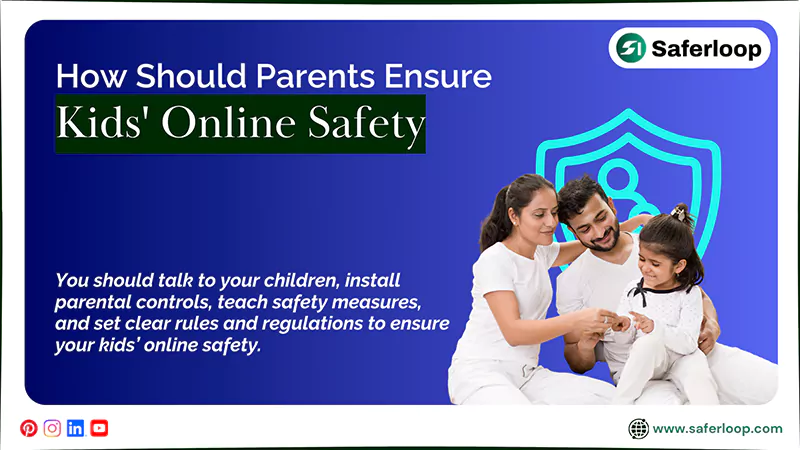
You should talk to your children, install parental controls, teach safety measures, and set clear rules and regulations to ensure your kids’ online safety.
Here, I’ve mentioned some great tips for in-depth guidance. So, take a look!
1. Talk to Your Children
Firstly, you should have an open conversation with your children regarding predatory risks and cyberbullying in Discord servers. It helps them to understand the risks behind glam and how to surf the internet mindfully.
2. Install Parental Control Software
Significantly, you should install the best parental control app like Saferloop to block unsafe apps, restrict explicit content, monitor your kids’ online activities, and track their real-time location.
3. Teach Safety Measures
Not only this, but you should teach safety measures to your little ones, such as never sharing personal information and passwords with anyone, and how to block or report strangers on Discord. It empowers them to make informed decisions in your absence.
4. Set Clear Rules and Regulations
Moreover, you should establish clear rules and regulations regarding your children’s smartphone usage time, with whom they can interact, and which server they can join. It helps you to manage their offline and online lifestyles.
Wrapping Up!
In simple terms, Discord is not generally safe for kids and teenagers. That’s why I advise you to set up Discord parental controls along with third-party parental controls like Saferloop to enhance their online safety and privacy.
In addition, you should also focus on building healthy relationships with your children to gain their trust. As a result, your little ones share their online space with you, making monitoring easy.
Author’s Note:
As a cybersecurity expert, I have figured out that Discord is not safe for kids, as it contains inappropriate and obscene content on its servers. That’s why I advise you to enable built-in Discord parental control to set up filters.
Additionally, you can install the Saferloop parental control software to monitor your children’s online activities, set screen time limits, filter content, and track location.
Believe me, it gives you peace of mind and protects your little ones effectively.
Frequently Asked Questions
Q: Can I put parental controls on Discord?
Q: Is there a way to monitor my child’s Discord?
Ans: Yes, you can install the Saferloop parental control software and built-in Discord parental control to monitor your child’s Discord account.
Q: Should I let my 12-year-old use Discord?
Ans: No, Discord allows 13-year-old users to access the website or app, so you should prevent your 12-year-old from using it.
Q: How do I block inappropriate content on Discord?
Ans: You can block inappropriate content on Discord from the “Content & Social” feature. It helps you to filter sensitive content and block DMs from other people.
 Neha Sharma
Parental Control & App Safety Writer
About article
The author of this article Neha Sharma, an Parental Control & App Safety Writer at Saferloop, brings practical experience and industry knowledge to the subject.
The review and editing by Evan Patterson have been done to make sure that it is accurate, clear, and relevant.
At Saferloop, we are determined to provide high-quality, well-researched, and updated content. To understand further how we produce and revise our articles, please refer to our Editorial Guidelines.
Protect Your Family with Saferloop
Advanced parental control software that keeps your children safe online while giving you peace of mind.
- Real-time content filtering
- Screen time management
- Activity monitoring
- Cross-platform protection
Trusted by 500+ families