Businesses rely on more connected systems, cloud applications, remote work environments, and third-party platforms than ever before. While these technologies improve efficiency, they also increase the number of potential attack surfaces.
×

Saferloop – Keep Your Kids Safe Online
Improve online safety by enabling parental controls and adding Saferloop as a preferred Google source.
9 Practical Ways Businesses Can Build Safer Digital Operations in 2026

“It takes 20 years to build a reputation and a few minutes of cyber-incident to ruin it.” – Stéphane Nappo (Security Specialist)
Modern businesses run on technology. Remote work, cloud data, online customers, and connected systems. While this digital-first environment creates new opportunities, it also expands the number of ways things can go wrong.
A single compromised account, unpatched device, or phishing email can disrupt operations, expose sensitive information, and damage customer trust. The challenge is particularly significant for small and mid-sized businesses that need strong protection without maintaining large internal IT teams.
Cybercrime is set to cost businesses up to $15.63 trillion by 2029.
The good news is that improving digital safety does not require massive investments or complex technology. It starts with practical safeguards, consistent processes, and a proactive approach to risk management. Here are nine proven ways businesses can build safer digital operations in 2026.
KEY TAKEAWAYS
- A clear security baseline helps businesses identify vulnerabilities and prioritize improvements.
- Strong password management and multifactor authentication remain among the most effective security controls.
- Employees play a critical role in preventing cyber incidents through awareness and training.
- Reliable backups and incident response planning are essential for business continuity and rapid recovery.
1. Start With a Clear Security Baseline
Many organizations invest in new security tools before understanding their existing environment. A security baseline is a simple snapshot of your current technology environment, including:
- Devices
- Users
- Software
- Cloud platforms
- Access permissions
- Backup systems
- Security tools
Many businesses skip this step and jump straight into buying new software. That often leads to overlapping tools, blind spots, and unnecessary costs. A better approach is to document what exists first.
A useful baseline should answer questions such as: Who has access to company systems? Which devices connect to the network? Are all computers updated? Is multifactor authentication enabled? Are backups tested? Which apps store sensitive customer or business data?
This baseline becomes the reference point for smarter decision-making. It helps business owners see whether they are dealing with a password problem, a device management problem, a backup problem, or a broader operational security issue.
2. Treat Passwords as Business Infrastructure
Passwords may seem basic, but they remain one of the most common weak points in business security. Regarding passwords, employees often:
- Reuse across work and personal accounts
- Choose simple credentials
- Store in browsers and notes apps
A safer approach is to treat password management as essential infrastructure. Every business should use a reputable password manager, require unique passwords for every system, and enforce multifactor authentication on critical accounts.
Multifactor authentication, often called MFA, adds a second verification step beyond the password. Even if a password is stolen, MFA can stop unauthorized access. This is especially important for email, accounting software, cloud storage, customer databases, and administrative accounts.
The goal is not to work harder. The goal is to make secure behavior easier than risky behavior. When employees have approved tools and clear rules, they are less likely to create shortcuts that expose the company.
3. Secure Every Device That Touches Business Data
A business is only as secure as the devices connected to its systems. Attackers can easily enter through:
- Laptops
- Desktops
- Smartphones
- Tablets
- Personal devices
Device security should include automatic updates, endpoint protection, screen locks, encryption, and the ability to remove business data from lost or stolen devices. Companies should also maintain an inventory of all devices used for work.
This is especially important for hybrid and remote teams. A laptop used at home, in a coffee shop, or while traveling may connect to unsecured networks. Without proper controls, that device can expose business email, files, passwords, and customer information.
The practical rule is simple: if a device can access business data, it should be managed, monitored, and protected.
4. Build Cybersecurity Into Daily Operations
The strongest security programs are embedded into everyday workflows rather than treated as separate IT initiatives.
This means creating repeatable processes. New employees should receive secure accounts, approved devices, and basic security training. Departing employees should have access removed immediately. Software updates should be scheduled. Backups should be checked. Suspicious emails should have a clear reporting process.
When cybersecurity becomes operational, it becomes less dependent on memory or luck. Everyone understands their role, and the company becomes more resilient. This is where local IT experts for secure business operations can play an important role by helping businesses turn scattered security tasks into organized, ongoing processes.
5. Protect Email Like a Critical Business System
Email is still one of the most important tools in business, and that makes it a top target. Phishing, fake invoices, credential theft, and business email compromise can all begin with a single message.
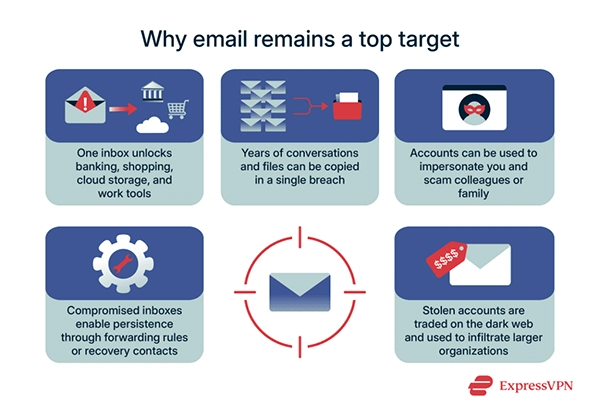
Businesses should protect email with spam filtering, phishing protection, MFA, employee training, and clear payment verification procedures. Any request to change bank details, send gift cards, transfer funds, or share sensitive information should be verified through a second channel.
A strong email security process is not just technical. It is behavioral. Employees should feel comfortable:
- Slowing down
- Questioning unusual requests
- Reporting suspicious messages
A safer culture is one where employees do not hide mistakes. They report them early, giving the business a better chance to respond before damage occurs.
6. Make Backups Reliable, Tested, and Separate
Backups serve as a business continuity lifeline when systems fail, data is deleted, or ransomware strikes.
A strong backup strategy should include regular automated backups, secure cloud or off-site storage, and routine recovery testing. Testing matters because a backup that cannot be restored is not a real backup.
Businesses should also avoid keeping all backups connected to the same systems they protect. If ransomware can access the main network and the backup location, recovery becomes much harder.
The best backup plan is simple to explain: important data should be copied, protected, separated, and tested.
7. Real-World Training For Employees
Security training should be practical, not intimidating. Employees do not need to become cybersecurity experts, but they do need to recognize common threats.
Training should cover phishing emails, suspicious links, unsafe downloads, password reuse, public Wi-Fi risks, social engineering, and safe handling of customer information. The most useful training includes examples employees might actually see during the workday.
For instance, a finance employee should know how to handle a fake vendor payment request. A receptionist should know what information not to share over the phone. A manager should know how to verify a login alert or unusual file-sharing request.
Security awareness improves with short, regular, and practical training sessions as it becomes more familiar.
8. Choose Cloud Tools With Security in Mind
Cloud platforms can make businesses more flexible, but convenience should not replace control. Every cloud tool should be evaluated for security, access management, data protection, and administrative visibility.
Businesses should ask: Does the platform support MFA? Can permissions be limited by role? Is data encrypted? Can activity be monitored? What happens if an employee leaves? How easy is it to recover deleted files?
Cloud security is not only the provider’s responsibility. Businesses must configure platforms correctly, manage users carefully, and review access regularly. Many companies rely on local IT experts for secure business operations when they need help aligning cloud tools, user permissions, backups, and cybersecurity policies across the organization.
A good practice is to give employees the minimum access they need to do their jobs. This reduces the damage that can occur if an account is compromised.
9. Create a Simple Incident Response Plan
Security incidents are no longer a question of if, but when. Organizations that prepare in advance typically:
- Minimize downtime
- Reduce financial losses
- Recover more quickly
An incident response plan explains what to do when something suspicious happens. It should include who to contact, how to isolate affected devices, how to preserve evidence, how to communicate internally, and when to notify customers, vendors, insurers, or legal advisors.
The plan does not need to be complicated. In fact, simple plans are often more useful during stressful situations. Employees should know the first three steps: stop using the affected system, report the issue immediately, and avoid deleting anything until the situation is reviewed.
Prepared companies recover faster because they are not inventing a response during the crisis.
Conclusion: Safer Operations Come From Better Habits and Smarter Support
In 2026, cybersecurity is no longer just a technical concern. It is a business requirement that directly affects customer confidence, operational continuity, regulatory compliance, and long-term growth.
Secure business operations come from consistent habits, clear processes, protected devices, trained employees, reliable backups, and expert oversight.
The most resilient businesses are proactive. They know what systems they use, who has access, where their data lives, and how they would respond if something went wrong. They also understand that digital safety is not only an IT concern. It affects customer trust, employee productivity, financial stability, and long-term growth.
For any business that depends on technology, the next step is simple: review the basics, close the obvious gaps, and build a security plan that supports daily operations instead of slowing them down. With the right systems, stronger internal habits, and local IT experts for secure business operations, companies can protect their data while staying focused on growth.
Frequently Asked Questions
Why are digital operations more vulnerable today than in the past?
What is the most important first step in improving cybersecurity?
Creating a security baseline is often the best starting point. Understanding your devices, users, applications, and existing controls helps identify the most urgent risks and opportunities for improvement.
Is multifactor authentication really necessary for small businesses?
Yes. Small businesses are frequent targets because attackers often assume they have weaker defenses. Multifactor authentication provides an additional layer of protection even if passwords are stolen.
How often should businesses test their backups?
Businesses should verify backup functionality regularly and perform recovery tests at least several times per year. Testing confirms that data can be restored successfully when needed.
What should an incident response plan include?
A basic plan should define reporting procedures, key contacts, containment steps, communication guidelines, and recovery processes. Simplicity is often more effective than overly complex documentation.
 Divya Kakkar
Internet Content Writer
About article
The author of this article Divya Kakkar, an Internet Content Writer at Saferloop, brings practical experience and industry knowledge to the subject.
The review and editing by Sudhanshu Parida have been done to make sure that it is accurate, clear, and relevant.
At Saferloop, we are determined to provide high-quality, well-researched, and updated content. To understand further how we produce and revise our articles, please refer to our Editorial Guidelines.
Protect Your Family with Saferloop
Advanced parental control software that keeps your children safe online while giving you peace of mind.
- Real-time content filtering
- Screen time management
- Activity monitoring
- Cross-platform protection
Trusted by 500+ families