
As with any investigation, the officer must first determine the specific elements of the crime and whether the laws in their jurisdiction support prosecution.
×

Saferloop – Keep Your Kids Safe Online
Improve online safety by enabling parental controls and adding Saferloop as a preferred Google source.
How to Find Out If Your Child's Video Was Stolen or Reposted Online?

Your kids’ video on social media might appear as a cherished memory when posted on social media, but once it is posted online, you lose all control over how and where it ends up.
They can be copied, edited and posted across different platforms without your knowledge of who is exactly watching them.
But here is some good news: What if I told you you can keep track of the videos posted online?
Sounds secure, right?
In this article, we will discuss how to identify stolen & reposted videos, reverse-search them, or protect your child’s videos using better methods.
Table of Contents:
Table of Contents:
Different Methods to Find Your Child’s Stolen or Reposted Videos
Before taking any action, first confirm whether your child’s video has been reposted or used without permission. Reverse video search is an efficient way to do it. It helps you find similar or identical videos online.
This process makes it very easy to identify whether your child’s video has been uploaded to any platform without your permission.
Below are two simple and effective methods you can use.
Method 1: Use a Reverse Video Search Tool
A dedicated reverse video search tool is the best option for direct and detailed analysis results. This tool uses AI and computer vision to analyze the uploaded video or its visual content and find similar videos available online.

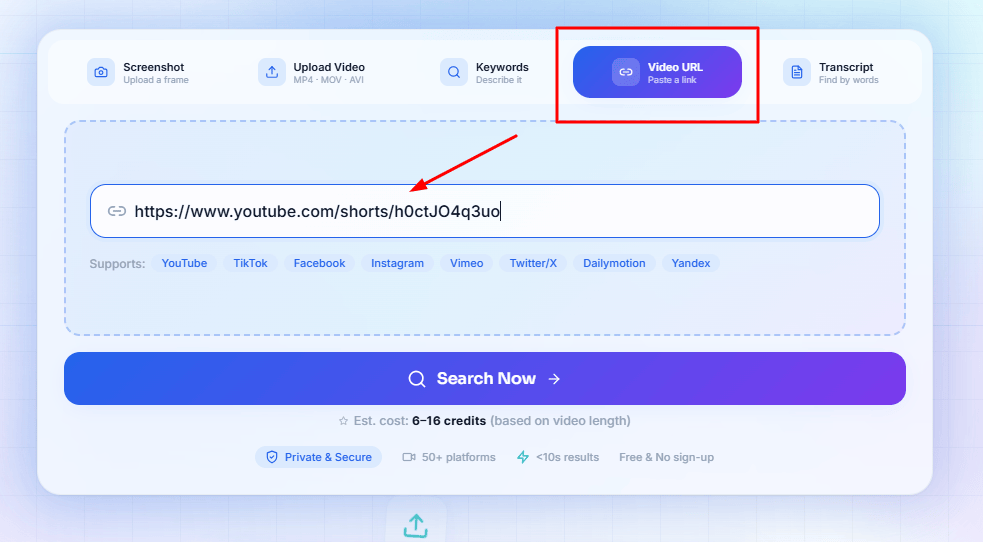
The biggest advantage of this method is that you can use not only screenshots but also the full video or its URL. The steps for using the tool are explained below:
Step 1: Open the Reverse Video Search Tool
Open the website of the Reverse Video Search Tool in your web browser.
Step 2: Upload the Video or Paste Its URL
Now, select a video from your device. However, if the video is available online, its URL can be entered as well.
As shown below;
Step 3: Start Reverse Search of Video
Click on the “Search” button. The tool will analyze the video’s visual details and search for similar clips online.
One of the best advantages of this tool is that it scans your video or image across 50+ platforms to determine whether it has been uploaded without your consent.
Step 4: Review the Results
The matching results will be displayed on the screen once the analysis is completed. Review these results closely and check if your child’s video hasn’t been uploaded to any platform.
If you get similar or reposted copies, it is useful to save their links. It can be used as a copyright claim or as proof for future reporting.

Overall, this method could be very convenient for parents because this tool examines the whole video rather than just relying on a single-frame screenshot.
Method 2: Use Google Lens
Google Lens is another option on the list that can help you find your child’s stolen content online. Unlike the dedicated reverse video lookup tool, this method doesn’t scan the whole video. Rather, it searches for similar images and relevant pages, using each clear screenshot or a video frame.
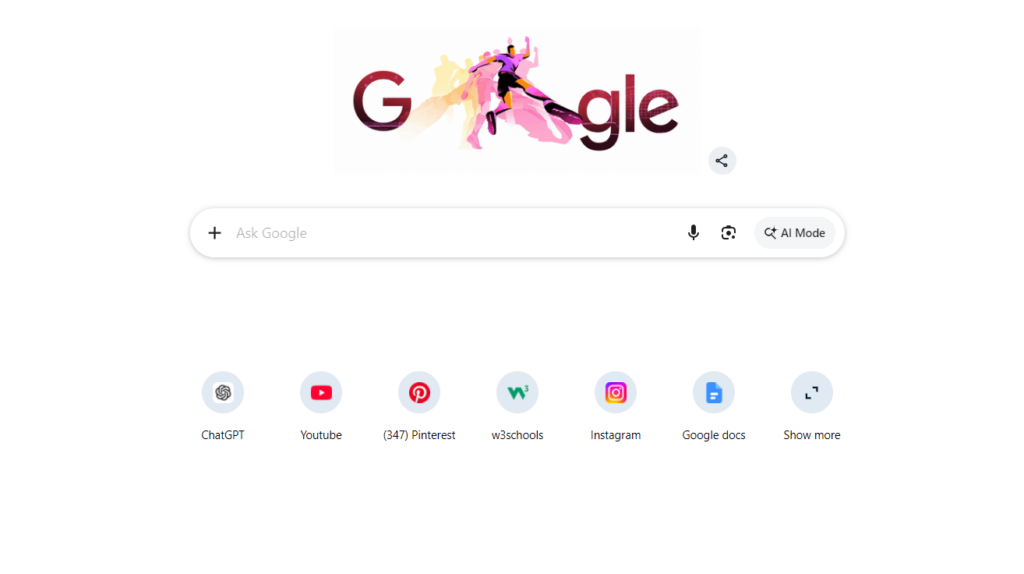
The easy steps to get started with it are listed below.
Step 1: Capture a Clear Screenshot
Play the video and take a screenshot of the particular frame where the child’s face, background, or a distinct object is clearly visible.

Step 2: Open Google Lens
Open Google Lens. You can access it through the Google app, Chrome app, or Google Images.
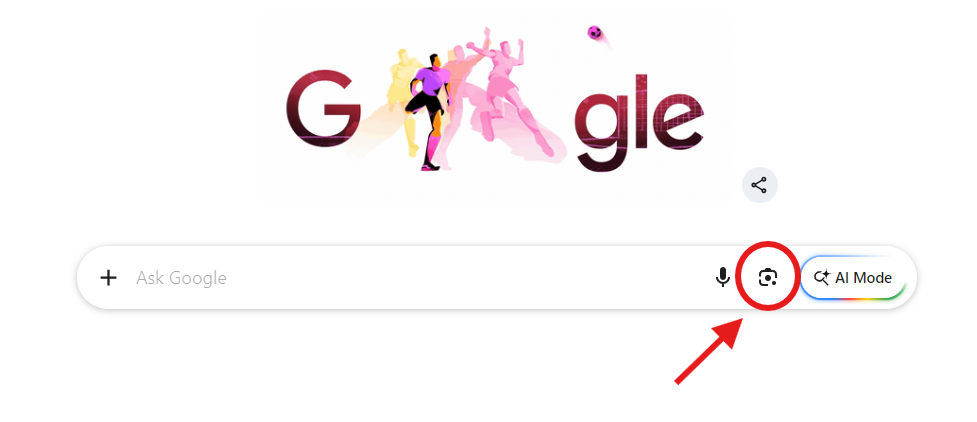
Step 3: Upload the Screenshot
Now select the screenshot you captured from the video. You can also enter the image link.
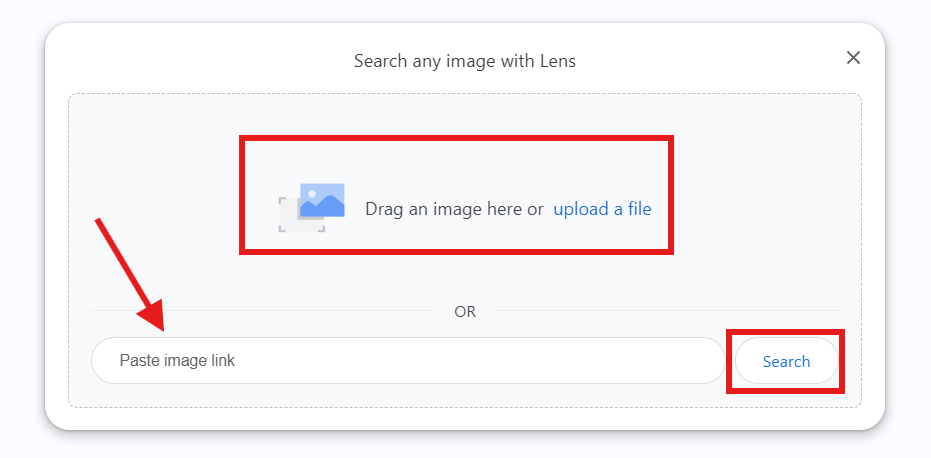
Once your image has been uploaded or pasted, click the search button & let Google Lens scan it.
Step 4: Check the Results
Google Lens will show similar images, relevant websites, and matching visual content. If your screenshot matches any reposted video or copied material, related pages may appear in the results.
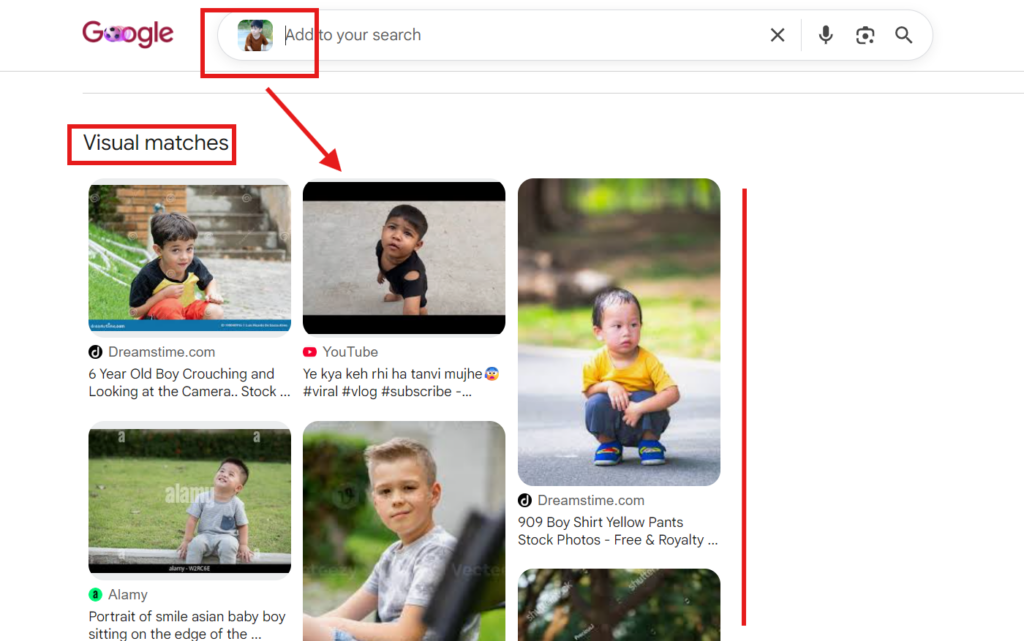
This method is quick and simple. If you just want to do a basic check, then Google Lens could be a great starting point. But if you are expecting detailed analysis and better accuracy, the dedicated reverse video search tool is a more suitable option.
What To Do When You Find a Stolen Video?
When you do a reverse search and find your child’s video posted on another account or website, it is better to act wisely or carefuly, not in panic.
Let’s look at what you should do in this situation.
- Capture the Evidence: First, take a screenshot of a reposted video and record its URL. Note the account name, upload date, and any other important data. This information may be valuable for future reporting.
- Contact the Uploader: If the repost is done by a legitimate person or content creator, try contacting them politely first. Maybe they shared the video without permission and removed it after being asked.
- Report the video: Almost all major platforms, like YouTube, Facebook, Instagram, and TikTok, provide an official to report copyright or unauthorized content. If the uploader doesn’t reply, use the platform’s reporting feature.
- File a Copyright Complaint: The most effective solution could be to file a copyright complaint if the video is being utilized inappropriately on a regular basis.
- Keep Monitoring: After submitting a report, check your child’s content from time to time. Sometimes the same video can be uploaded to another profile.
How to Protect Your Child’s Videos Online?
The Internet is not 100% secure, but by following a few simple measures, you can reduce the risk to a level that is acceptable. Here are some tips:
- Think Before You Post
- Visible a Watermark
- Avoid Sharing Sensitive Information
- Keep Backup Files
- Monitor Your Content Frequently
- Review Privacy Preferences
Conclusion
In today’s online age, it is very common to share children’s videos, yet their safety and privacy are often overlooked. Unauthorized copying or reposting of content is also possible once it has been posted online.
For this reason, it’s important for parents not only to share videos but also monitor them regularly. However, it is very simple to identify copied or reposted content using techniques like reverse video search and screenshot-based search.
FAQs
What is the first step in a cybercrime investigation?
Can I file an FIR for cybercrime?
Yes, you can absolutely file an FIR for a cybercrime. In fact, for financial fraud and serious offenses like identity theft or cyberstalking, it is highly recommended to file a formal complaint so law enforcement can launch an investigation.
How much time do cybercrime investigations take?
Cybercrime investigations typically take anywhere from a few weeks to several months, or even years, depending on the complexity of the case.
How much jail time for cybercrime?
Jail time for cybercrime can range from a few months to life in prison, depending on the severity of the offense, the financial damage caused, and the jurisdiction.
 Srikanth Panasa
Cybersecurity Analyst and Online Safety Specialist Writer
About article
The author of this article Srikanth Panasa, an Cybersecurity Analyst and Online Safety Specialist Writer at Saferloop, brings practical experience and industry knowledge to the subject.
The review and editing by Vinithra Karunanidhi have been done to make sure that it is accurate, clear, and relevant.
At Saferloop, we are determined to provide high-quality, well-researched, and updated content. To understand further how we produce and revise our articles, please refer to our Editorial Guidelines.
Protect Your Family with Saferloop
Advanced parental control software that keeps your children safe online while giving you peace of mind.
- Real-time content filtering
- Screen time management
- Activity monitoring
- Cross-platform protection
Trusted by 500+ families