

Yes, many generators let you upload photos of parents or adults and build a scene around them or skip children entirely.
×

Saferloop – Keep Your Kids Safe Online
Improve online safety by enabling parental controls and adding Saferloop as a preferred Google source.
Make an AI Family Greeting Without Uploading Your Child’s Photo
On the special occasion of someone, send them something more personal than a birthday wish. If you want to send your grandparents a heartwarming message, customize a waving and characterized picture for them. But before you upload it, separate the gift from the photograph.
With the help of your children, choose the idea offline and review what you plan to send. The main point is a thoughtful gift with few personal details in the source material that any AI service is safe for children.
Table of Contents:
Keep The Family Photo In The Family Album
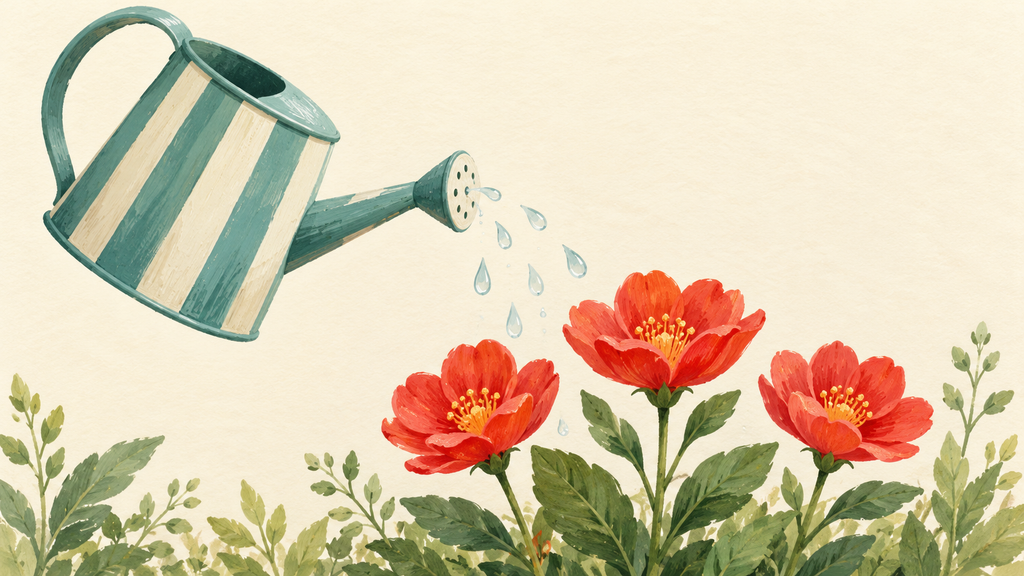
Start with the idea of gardening that you want to share with grandparents. A tripped watering can tipping toward a row of flowers can carry that idea. Now, for preparing a video or gift, you don’t need a photograph of your child in the grandparent’s garden.
Choose a subject now that doesn’t depend on a real person’s likeness. You can make your own fictional character using words, or make a fresh drawing on plain paper and photograph only the drawing. Before uploading, check the actual file, including a name in the corner, a school worksheet underneath, or part of the room around the paper can defeat the point of choosing artwork.
Keep the personal message separate from the generation request.
“A striped watering can tips toward three red flowers against a plain background” gives the scene a subject and action. Your child’s full name, age, school and the date of a family gathering do not help animate the watering can.
Give The Tool A Small Creative Job
Once you’ve selected the source material, use AI for the animated scene; the Animx AI Video Generator page describes creating clips from text or images and downloading MP4 files.
Read the terms and policies before starting; it was updated in May 2026 and set a minimum age of 13. It also says retention and deletion are subject to operational and legal requirements.
An adult operating the account does not make the uploaded material exempt from those terms.
For every tool you’re using, ask some answers to the questions:
- What happens to uploaded files and prompts after generation?
- Can outputs appear in a public gallery, and which setting controls that?
- What does the applicable plan say about training or service improvement?
- How do you request deletion, and what limitations does the policy describe?
If you find any answer doubtful, don’t upload your family picture in the experiment.
For the gardening greeting, you might ask for a small stream of water from the can with the camera held still. This is an example prompt, not a tested promise about what a model will produce. After getting the result, review it by yourself before showing it to your child.
After downloading an acceptable clip, add the greeting in a separate editor you already understand. If you want personal words to stay on your device during that stage, verify that the editor works locally and check its cloud-sync settings. After setting up all the details and preparing the video, add the text.
You can stop with a still card if the animation adds little.
Agree On Who Gets The Finished Greeting
After completing the experiment and before sending it, review this again whether your child is comfortable with the words and artwork being included. “Can I send this to Nana?” is a clearer question than “Is this okay?” It will give them the confidence and real decision to send it or not.
UNICEF’s guidance for parents using AI recommends discussing what information children share and reviewing what platforms collect. You can consult with your child about which words you’ve used in the prompt and which you have left. If your child says no, offer a different drawing or a message from you instead. With a child too young to understand the choice, keep the source material general instead of treating the absence of an objection as agreement.
The eSafety Commissioner’s advice on children’s privacy points out that even a photo sent in a private chat can be copied and reposted. Ask the receiver not to upload the greeting to any other platform. That request sets a family expectation; it cannot technically prevent copying.
Send a warm message: “We made this for you, please check with us before sharing it elsewhere”.
Before the next birthday, choose the message together before opening a generator. Let your child decide what makes it theirs. Keep the family photograph in the album when the greeting works perfectly well without it.
Frequently Asked Questions
Can I make an AI family greeting using only adult photos?
Is it safe to upload children’s photos to AI generators?
Privacy and security experts recommend avoiding uploading pictures of minors to third-party AI tools because data and images can be stored or repurposed.
What are the alternatives instead of using a child’s face?
You can use illustrated templates, festive typography, per portraits, or symbolic winter/holiday themes that convey warm family wishes without biometric data.
 Aditi K
Freelance Cybersecurity Writer
About article
The author of this article Aditi K, an Freelance Cybersecurity Writer at Saferloop, brings practical experience and industry knowledge to the subject.
The review and editing by Vinithra Karunanidhi have been done to make sure that it is accurate, clear, and relevant.
At Saferloop, we are determined to provide high-quality, well-researched, and updated content. To understand further how we produce and revise our articles, please refer to our Editorial Guidelines.
Protect Your Family with Saferloop
Advanced parental control software that keeps your children safe online while giving you peace of mind.
- Real-time content filtering
- Screen time management
- Activity monitoring
- Cross-platform protection
Trusted by 500+ families