
Ans: Yes, parents can monitor their teens’ TikTok accounts through the family pairing option and install a parental control app like Saferloop.
×

Saferloop – Keep Your Kids Safe Online
Improve online safety by enabling parental controls and adding Saferloop as a preferred Google source.
TikTok Guide: Features, Parental Controls & Safety Tips
Well, who doesn’t know TikTok? However, it faced scrutiny due to privacy and safety concerns for children. Therefore, TikTok parental controls can be a savior for parents to protect their kids online.
So, as a parent, you should stay till the end of this article to acknowledge how to enable TikTok parental controls, online risks while using the app, and tips for parents to safeguard minors on TikTok.
Table of Contents:
Key Takeaways:
- TikTok is a popular social media app among Gen Z and Gen Alpha. However, it also carries online risks for children and minors.
- It is not safe for kids, as they may encounter inappropriate content, predatory risks, online scams, and cyberbullying on TikTok.
- Hence, TikTok parental controls, including family pairing, private account, restricted mode, and limiting comments, can protect children on this app.
What is TikTok App?
TikTok is a social media app for sharing short-form videos, ranging from 15 seconds to 10 minutes. It is widely popular among young generations, including Gen Z and Gen Alpha.
Interestingly, TikTok has approximately 2 billion active users monthly globally, making it one of the most used social media platforms. It offers in-app editing tools, music, filters, and sounds, along with a “For You” personalized feed.
With this strong user base, your children might feel like babes in the woods and might engage with creepy strangers or inappropriate content. That’s why, as a helicopter parent, you should focus on TikTok parental control to protect your little ones.
What are TikTok Features for Users?
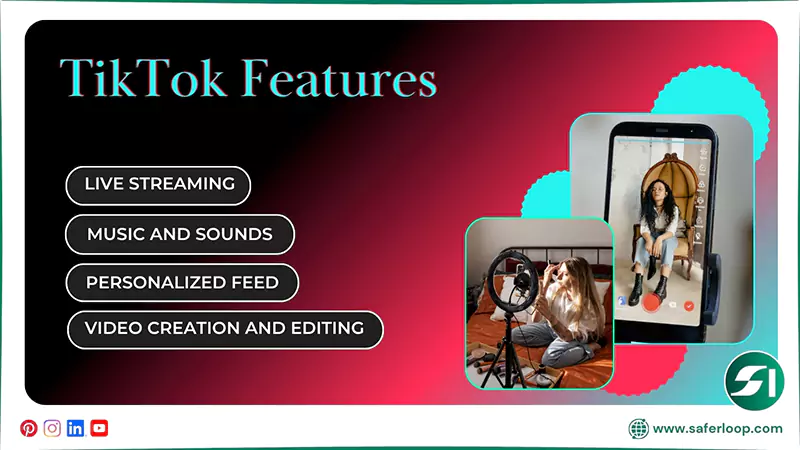
As a TikTok user, you can utilize video creation and editing, music and sounds, live streaming, and a personalized feed.
Here, I’ve discussed these amazing features for in-depth guidance.
1. Video Creation and Editing
You can create engaging videos and utilize the in-app editing tools to showcase your creativity. It allows you to upload your own 15-second to 10-minute video with trimming, cutting, and adding special effects.
2. Music and Sounds
Moreover, you can use a vast library of music and sounds to add to your videos. You can also discover other users’ videos using the same sound to get inspiration for making engaging, attractive videos.
3. Live Streaming
Not only this, but you can use TikTok’s live streaming feature to connect with your followers seamlessly and naturally. It is the best way to foster great interaction or to announce great news directly.
4. Personalized Feed
It also offers a personalized feed “For you” according to your personal choices from a variety of niches, such as lifestyle, fashion, education, technology, and much more.
Is TikTok Safe for Kids?
No, TikTok is not safe for kids, as they encounter inappropriate content and interaction with strangers.
According to the TikTok Teen Privacy and Safety Settings, the user must be 13 years and older. This indicates that you should prevent your underage 13-year-old kids from using the app.
If children and teenagers use this social media app, there are chances that explicit and harmful content might slip into their feeds. It affects their self-image, behavior, or mental health. Therefore, protecting them should be your topmost priority.
Additionally, I recommend that you enable TikTok parental controls and install the Saferloop parental control software to watch over what your kids are doing or how they surf the internet. This software also provides a wide range of safety features, such as:
- Monitor your children’s online activities to keep track of their behavior.
- Set screen time limits to encourage offline and healthy habits.
- Block unsafe apps and websites to create a safe digital environment.
- Restrict inappropriate and obscene content to keep kids safe from predators.
- Track real-time location and create digital boundaries to keep an eye on your children’s physical availability.
- Send emergency alerts, SOS updates, and reports if something suspicious is detected.
- Provide the Saferloop safety checkup extension for Chrome to add an extra layer of security.
- Offer the Saferloop AI version to answer queries on your digital parenting issues.
On the whole, the Saferloop parental control app provides a one-stop solution to protect your children.
Also Read: iPad Parental Control: How to Set Up and Manage Screen Time Safely?
What are TikTok Parental Controls?
TikTok parental controls are managed through “Family Pairing” to link a parent account to their children’s accounts. It allows you to enable restrictions on using TikTok to ensure your kids’ protection.
Let’s dig deeper into this section to understand how to set up TikTok parental controls.
1. How to Set Up Family Pairing on TikTok
To set up family pairing on TikTok, you should go to the profile icon > three horizontal lines > Settings and privacy > Family Pairing > Send invite > Check status.
Here is the following step-by-step guidance to set up family pairing.
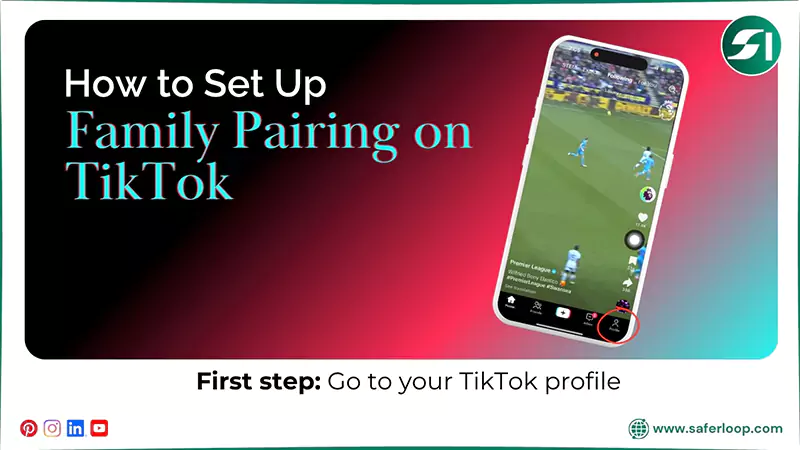
1. Open the TikTok app on your smartphone and go to your profile icon.
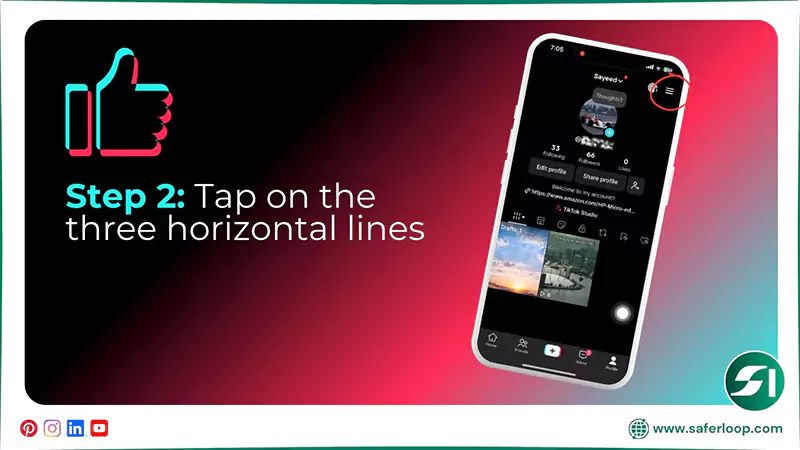
2. Tap on the three horizontal lines at the top right corner.
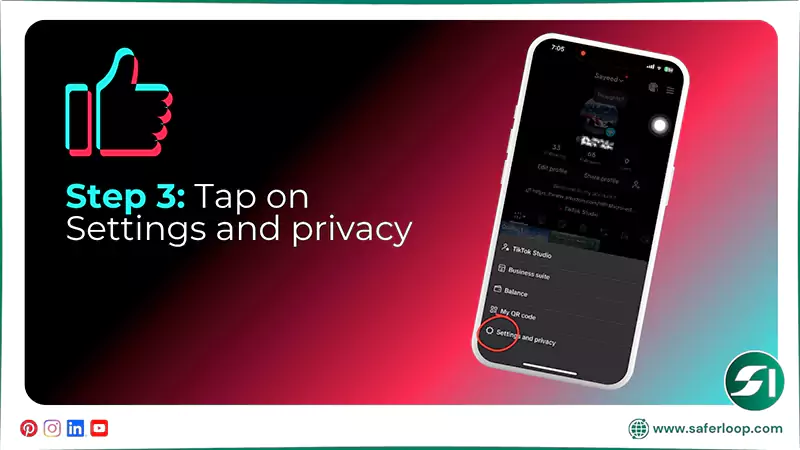
3. Now, tap on the “Settings and privacy.”
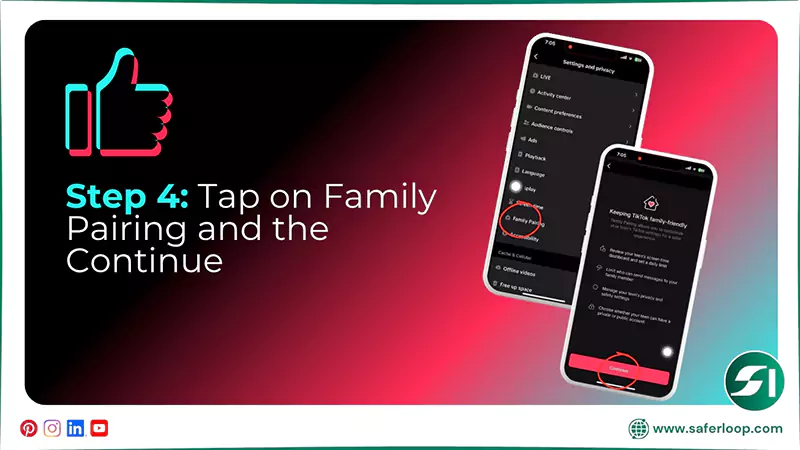
4. Tap on the “Family Pairing” option and “Continue”.
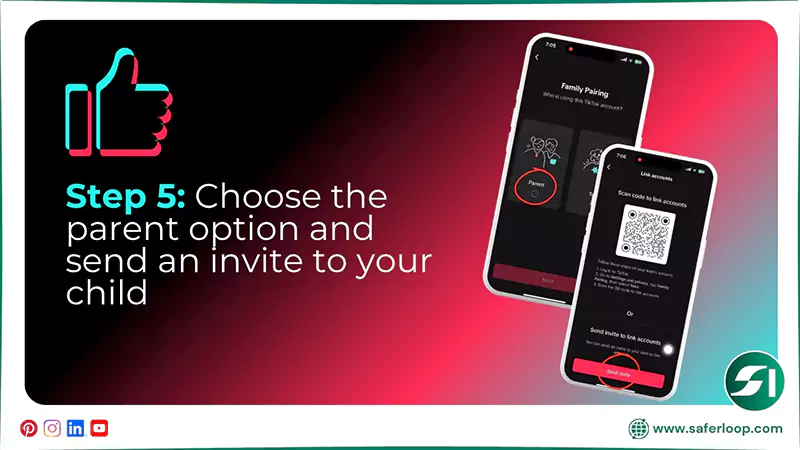
5. As a parent, choose the “Parent” option and click on “Next.” After that, send an invite link to your child or scan a QR code on their device to link accounts.
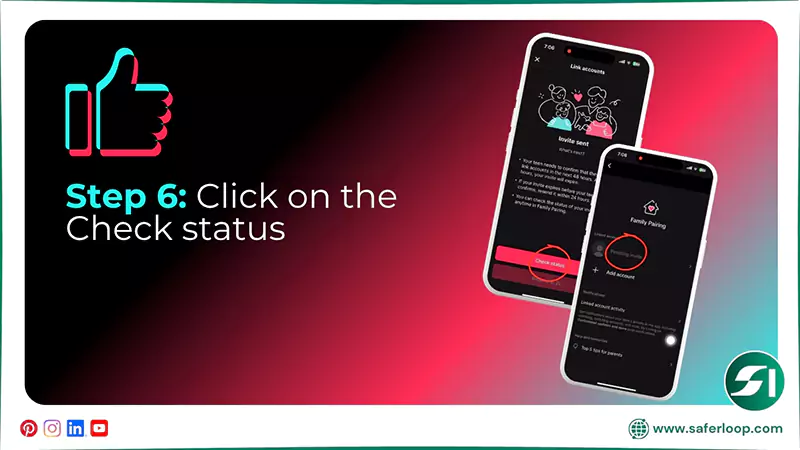
6. Now, click on “Check status” to check the status of your invite.
2. How to Switch Your Child’s Account to Private
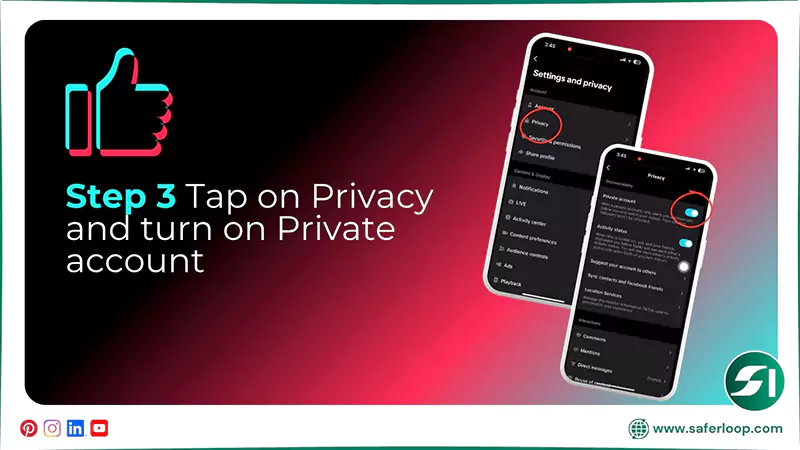
To switch your child’s account to private, open your kid’s TikTok > profile icon > three horizontal lines > Settings and privacy > Privacy > Privacy account.
Let’s take a look at these steps in great detail.
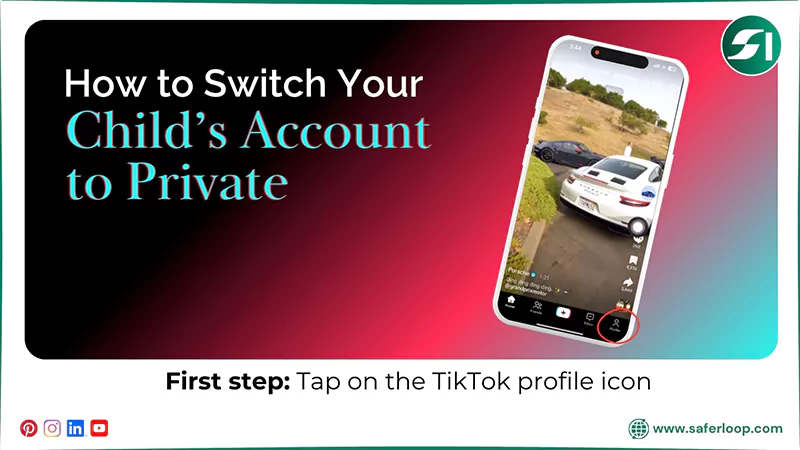
1. On your child’s phone, open the TikTok app and tap on the profile icon.
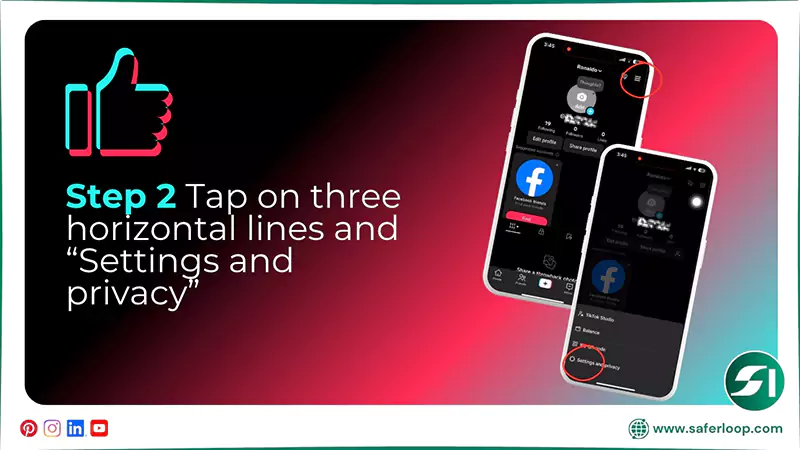
2. Tap on the three horizontal lines at the top right corner and select “Settings and privacy.”
3. Now, tap on “Privacy” and turn on the blue toggle of a private account.
3. How to Enable Restricted Mode on TikTok
To enable restricted mode on TikTok, open the app > profile icon > three horizontal lines > Settings and privacy > Content preferences > Restricted mode > turn on > set a password.
Here are the following simple and easy steps to help you to enable restricted mode.
1. Open the TikTok app and click on the profile icon.
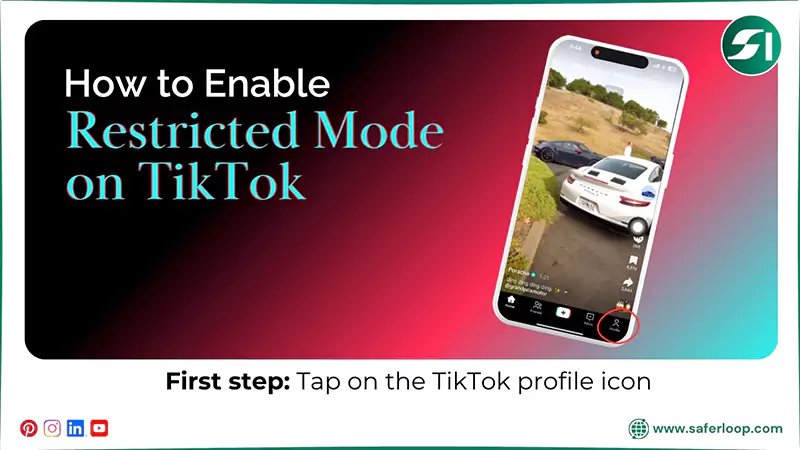
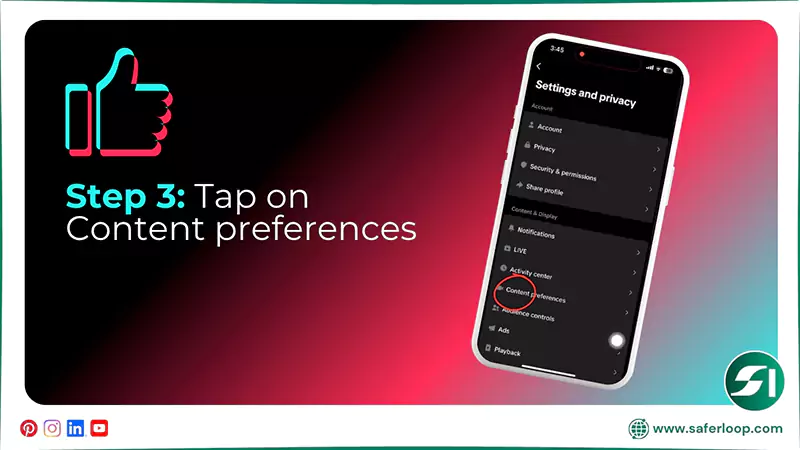
2. Tap the three horizontal lines and click on “Settings and privacy.”
3. After that, tap on “Content preferences.”
4. Tap on “Restricted Mode” and “Turn on” to switch on restricted mode.
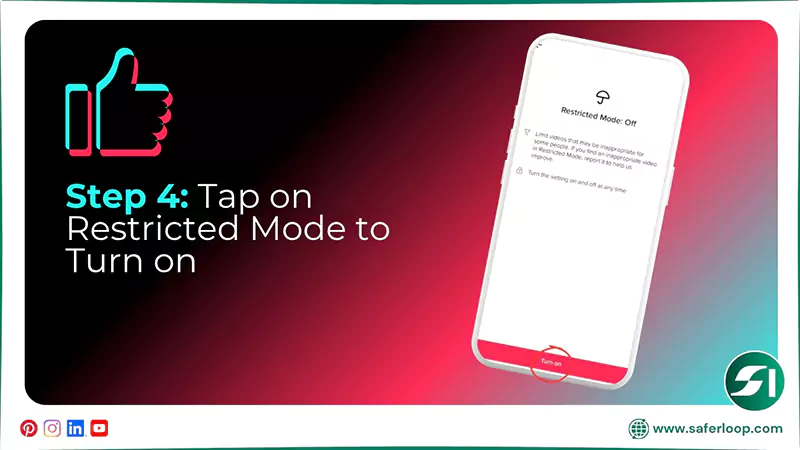
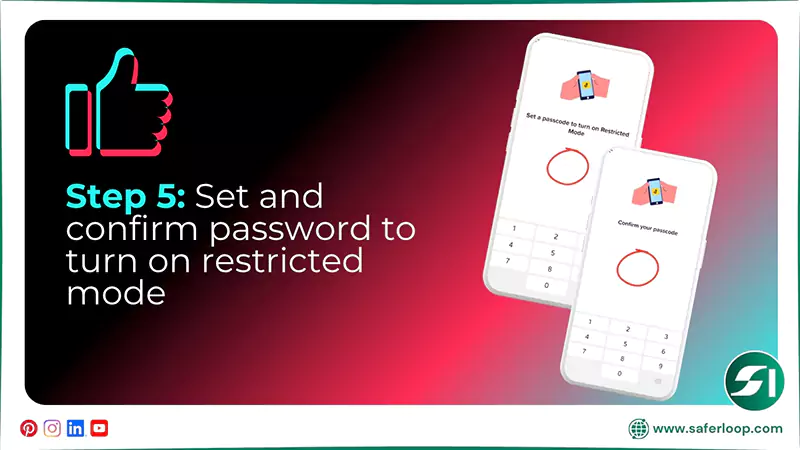
5. Now, set a passcode and confirm it to lock the settings.
4. How to Control Comments on Your Child’s Posts
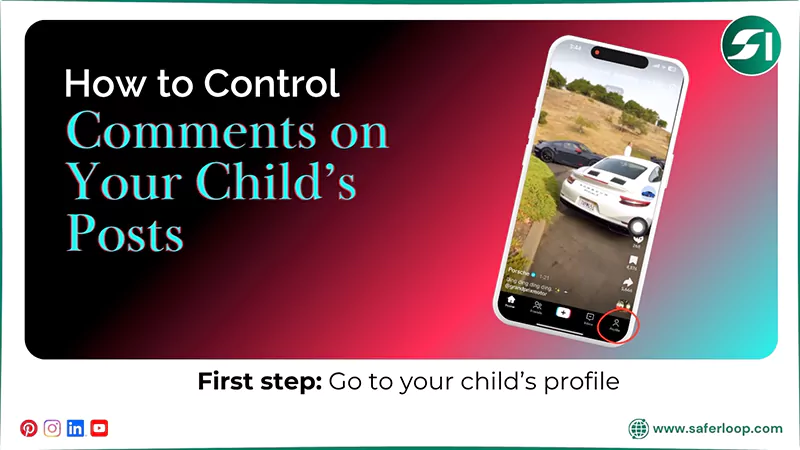
To control comments on your child’s posts, you should open the TikTok app > profile icon > three horizontal lines > Settings and privacy > Privacy > Comments > Allow comments from > Friends.
Here are the following steps to control comments on your child’s posts.
1. Open the TikTok app and go to the profile icon.
2. Tap on the three horizontal lines and “Settings and privacy.”
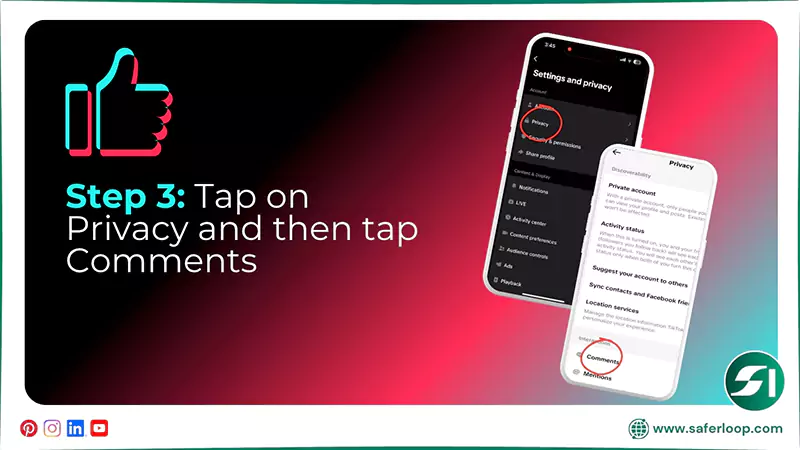
3. Tap on “Privacy” and select “Comments.”
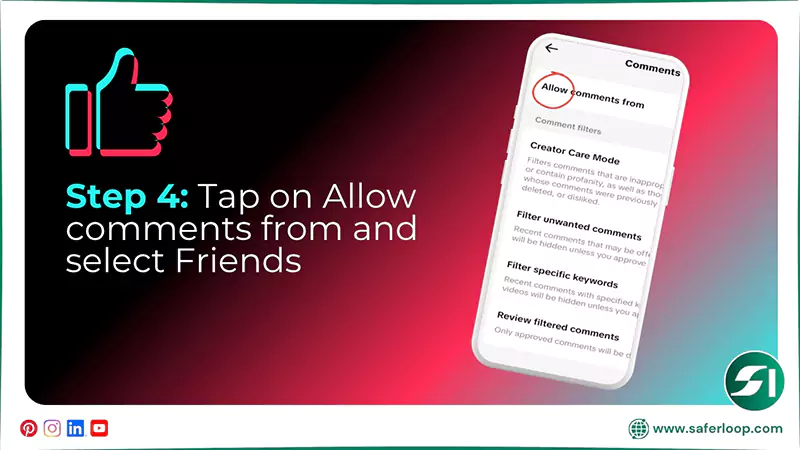
4. Now, tap on “Allow comments from” and choose “friends.”
5. How to Enable Privacy on DMs
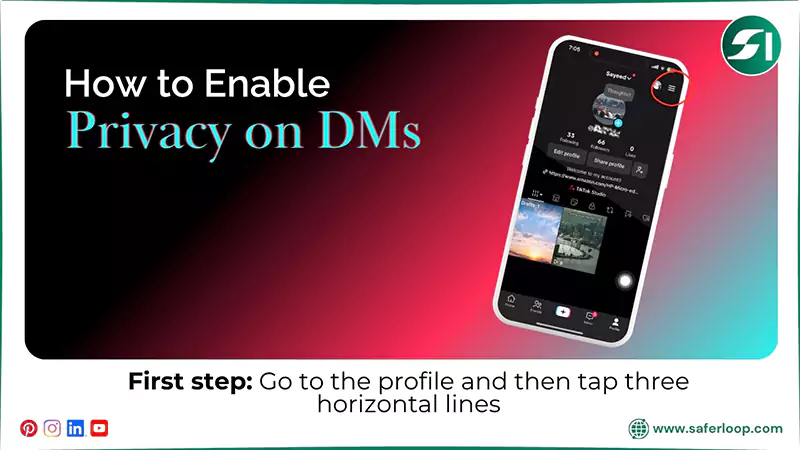
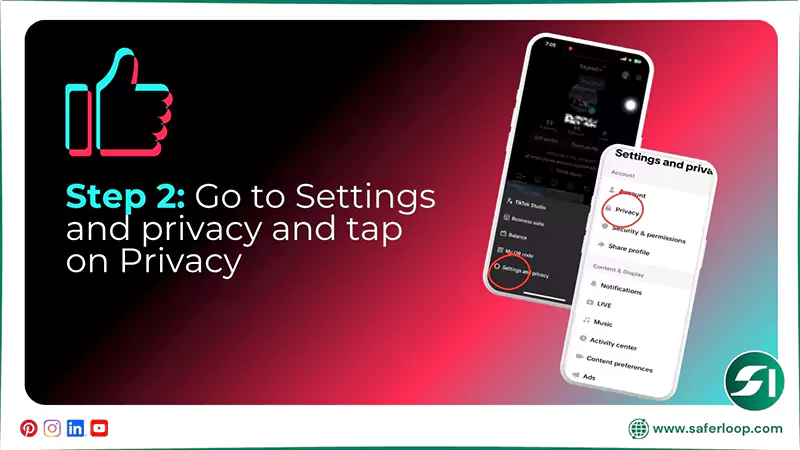
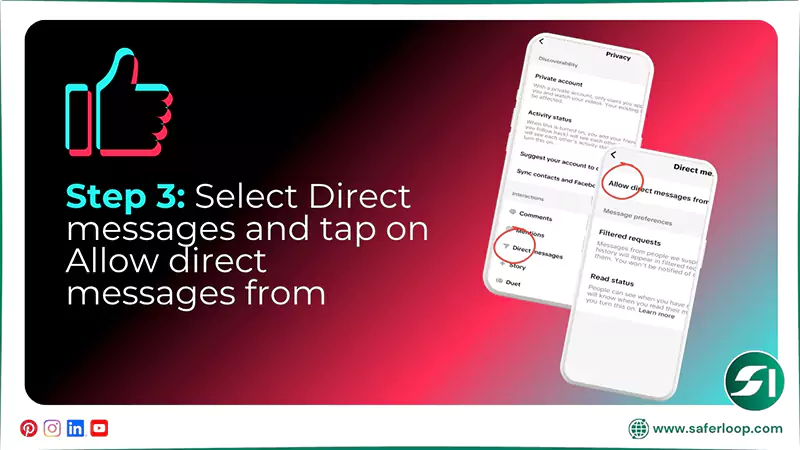
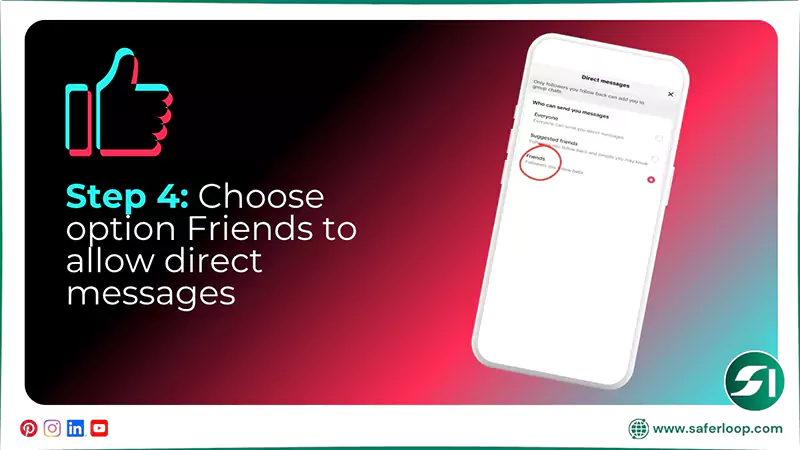
To enable privacy on direct messages, you should open the TikTok app > Profile icon > three horizontal lines > Settings and Privacy > Privacy > Direct messages > Allow direct messages from > Friends.
Let’s skim through this section to discover the steps on how to enable privacy on DMs.
1. Open the TikTok app and go to the profile icon and three horizontal lines.
2. Go to “Settings and privacy” and then tap “Privacy.”
3. Now, tap on “Direct messages” and “Allow direct messages from.”
4. Afterward, you can choose “Friends” to allow only friends to send direct messages.
6. How to Report or Block a TikTok User
To report or block a TikTok user, you should open the app > person’s profile > share button > report or block.
Here are the following steps on how to report or block a TikTok user or scammer.
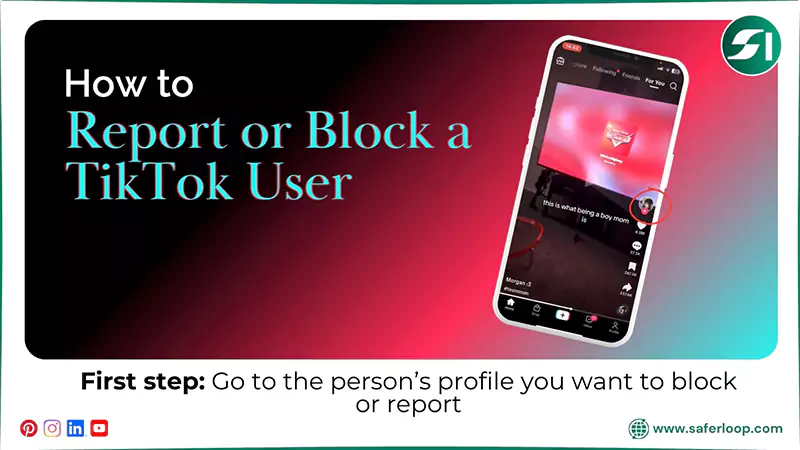
1. Open the TikTok app and click on the profile of a person you want to block or report.
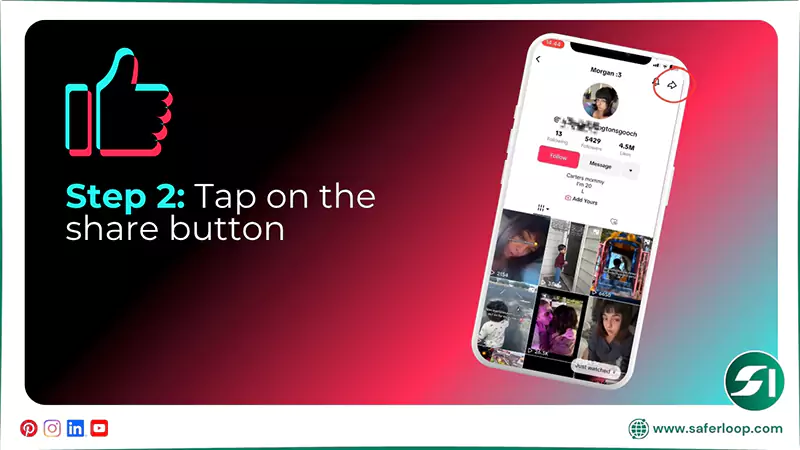
2. When the profile opens, tap on the share button in the top right corner.
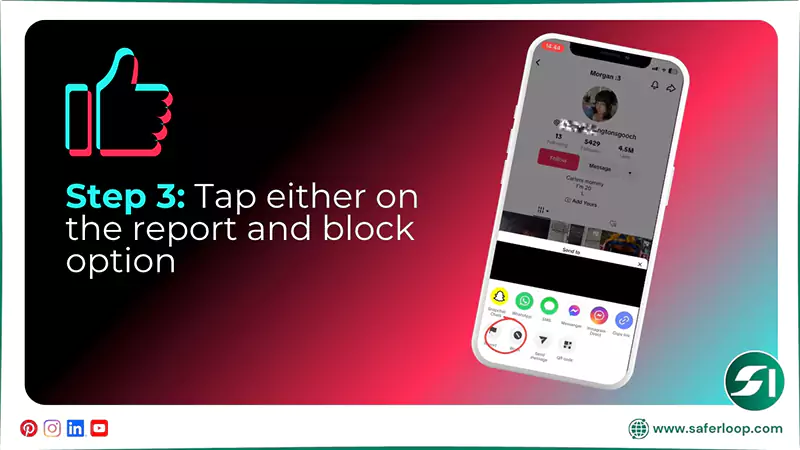
3. Now, you have two options at the bottom: report or block. By clicking on them, you can either block or report the person you want.
7. How to Delete a TikTok Account
To delete a TikTok account, you should open the app > Profile > Three horizontal lines > Settings and privacy > Account > Deactivate or delete account > Delete account permanently > Enter the password > Delete.
Here are the steps with full guidance on how to delete a TikTok account.
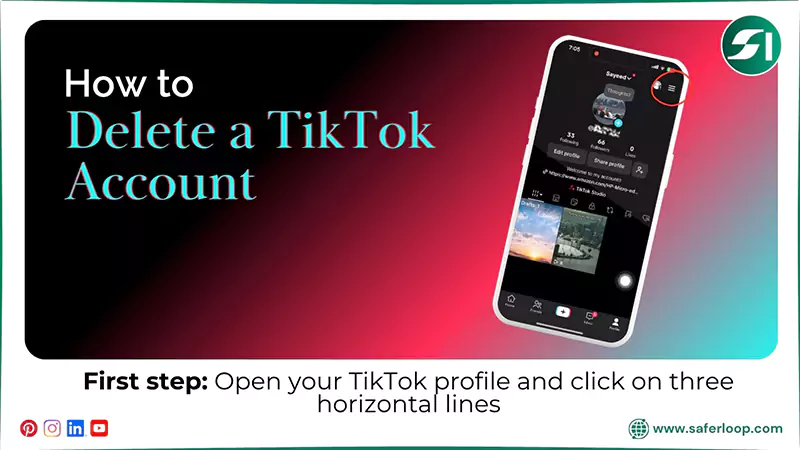
1. Open the TikTok app, go to your profile, and click on three horizontal lines.
2. Tap on “Settings and privacy” and then “Account.”
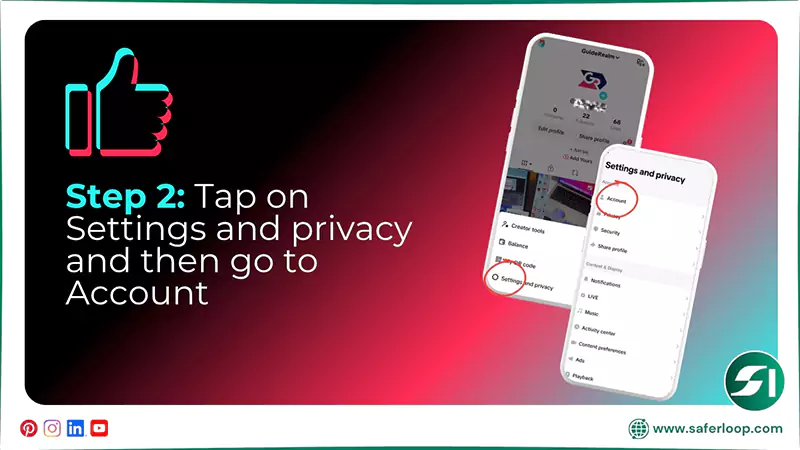
3. Now, click on “Deactivate or delete account” and “Delete account permanently.”
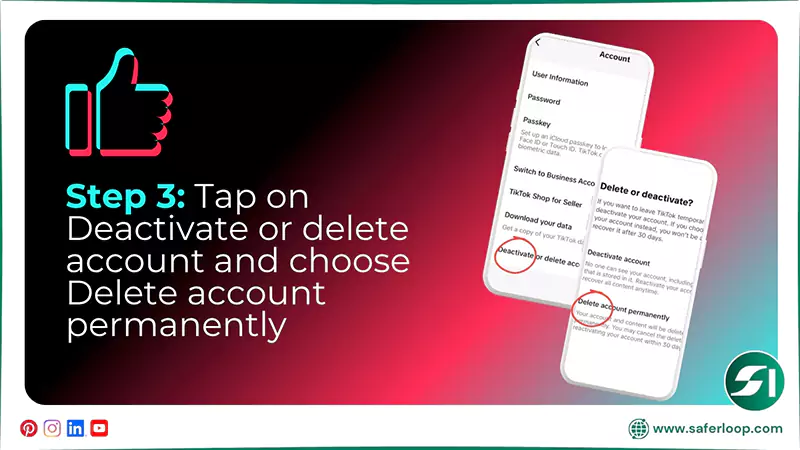
4. Next, you can give the reason for deleting the TikTok account (optional) and download your TikTok data by clicking on “Continue.”
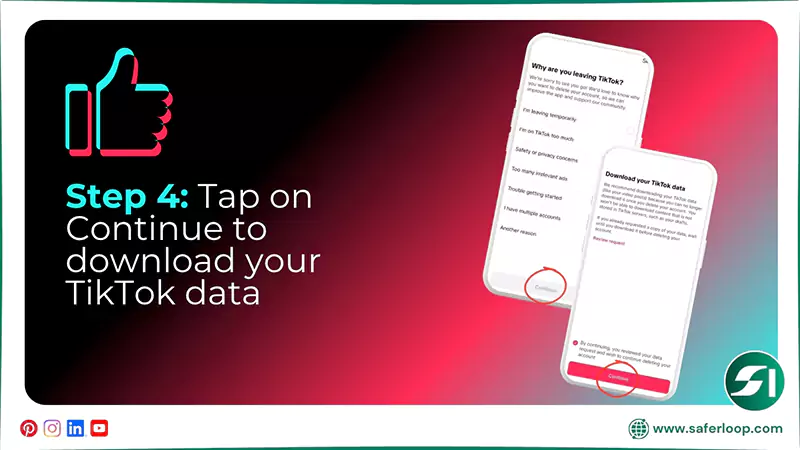
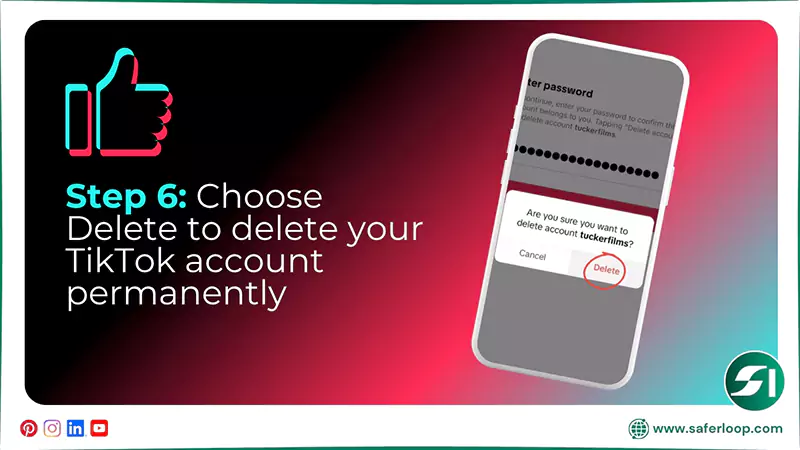
5. Now, tap on “Continue” and enter the password to confirm the deletion of TikTok.
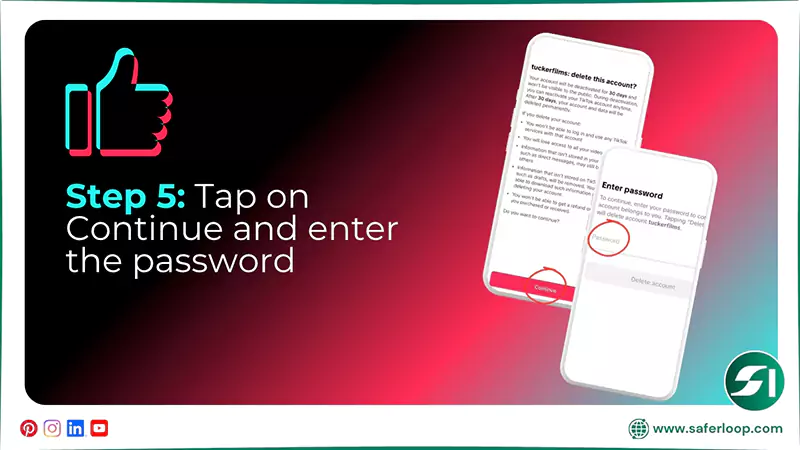
6. At last, click on “Delete,” and your TikTok account is permanently deleted.
Safety Concerns Related to TikTok for Children
Your children can face exposure to inappropriate content, cyberbullying, invasion of data privacy, and addiction to TikTok. That’s why you should prevent them from using the app.
Here, you can thoroughly address these safety concerns to have an idea of the hazards.
1. Exposure to Inappropriate Content
Despite activating built-in TikTok parental controls, your children may encounter inappropriate, explicit, and obscene content in their feed, increasing the chances of engaging with predators. As a result, it affects their mental and physical well-being.
2. Cyberbullying
According to the Security.org report, 64% of children experience cyberbullying, which includes harassment, offensive comments, threatening messages, and spreading rumors. This can lead to emotional and psychological problems.
3. Invasion of Data Privacy
TikTok is under scrutiny for collecting users’ information. If your children use the app, their name, age, phone number, device information, and location are at risk and affect their privacy. As a helicopter parent, you should be concerned about how this data is being used.
4. Addiction
Like other social media apps, TikTok is also addictive for kids. The “For you” personalized feed can encourage them to stick to the app. As a result, it affects their study, school work, sleep cycle, and other activities.
Also Read: 14 Best Android Parental Control Apps in 2026 | Unleash Cybersecurity With These Recommendations
How Parents Can Protect Children On TikTok?
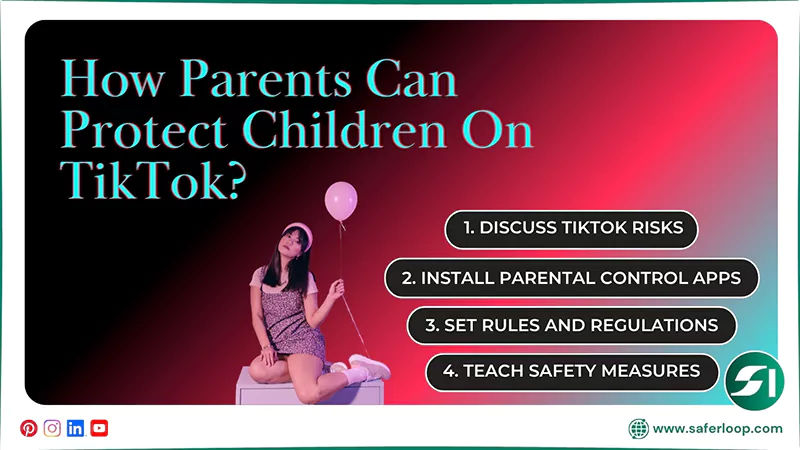
As a concerned parent, you should discuss TikTok risks, install parental control apps, set rules and regulations, and teach safety measures to your kids.
Here, I’ve mentioned some realistic tips to protect little ones on TikTok.
1. Discuss TikTok Risks
Firstly, you should discuss the risks of using TikTok at a young age, including predatory risks, online scams, privacy infringement, and harmful content. It helps them to have a glimpse of online threats.
2. Install Parental Control Apps
Secondly, I suggest you install the safest parental control app, such as Saferloop, even with TikTok parental controls. It helps you to monitor your kids’ online activities, set screen time limits, block scammers, and so on.
3. Set Rules and Regulations
In addition, you should establish clear rules and regulations for how to use TikTok, with whom they can interact online, and when they surf the internet. It helps you to manage their social life effectively.
4. Teach Safety Measures
Not only this, but you should also teach safety measures to innocent children, such as never sharing personal information with anyone, and how to block or report on TikTok. It empowers them to make informed decisions on their own.
Wrapping Up!
Obviously, you all know what is TikTok and why it is popular among young generations. However, safety concerns related to this social media app can’t be neglected, and force you to set TikTok parental controls in order to protect your children.
Additionally, I recommend installing a third-party parental control app like Saferloop to ensure their online protection because built-in parental controls aren’t enough to create a safe digital environment.
Author’s Note:
Being a technophile and cybersecurity expert, I discovered that TikTok parental controls aren’t enough to safeguard children from harmful content and predators. So I recommend setting up the Saferloop parental control software.
It truly amazes you with its comprehensive safety features, such as web filtering, screen time limits, app blocking, and restricting explicit content. By installing this software, your kids are enjoying online activities without fear and stress.
Frequently Asked Questions
Q: Can parents monitor their teens’ TikTok?
Q: Is TikTok safe for 12-year-olds?
Ans: No, TikTok is not safe for 12-year-old kids. The age limit to access this social media app is 13 or older.
Q: How do you control what your kid watches on TikTok?
Ans: You must turn on restricted mode on your kid’s TikTok account separately or through the family pairing option.
Q: How do you block inappropriate content on your child’s TikTok?
Ans: You should install the Saferloop parental control app on your child’s device to block inappropriate content on their TikTok.
 Gunjan Saini
Cyber Safety & Parental Control Writer
About article
The author of this article Gunjan Saini, an Cyber Safety & Parental Control Writer at Saferloop, brings practical experience and industry knowledge to the subject.
The review and editing by Evan Patterson have been done to make sure that it is accurate, clear, and relevant.
At Saferloop, we are determined to provide high-quality, well-researched, and updated content. To understand further how we produce and revise our articles, please refer to our Editorial Guidelines.
Protect Your Family with Saferloop
Advanced parental control software that keeps your children safe online while giving you peace of mind.
- Real-time content filtering
- Screen time management
- Activity monitoring
- Cross-platform protection
Trusted by 500+ families