

Children can use a calculator for homework, but only after trying to solve it by themselves, or they should use it for difficult and long sums.
×

Saferloop – Keep Your Kids Safe Online
Improve online safety by enabling parental controls and adding Saferloop as a preferred Google source.
How Parents Can Teach Their Child to Use a Calculator Safely
Nowadays, calculators are pretty much everywhere, on phones, tablets, laptops, smartwatches, and even in kids’ learning apps. Whether a child is doing homework at the dining table, solving problems while watching TV, or revising in the classroom, they can open a calculator in seconds.
Because of this easy access, calculators are now frequently used in schools. In fact, studies show that calculator use in schools is already very common, with most students having access from middle school onwards.
However, this can affect a child’s ability to solve problems and calculate on their own. That’s why this article will help parents understand how they can guide their children to use calculators in a balanced way without affecting their learning skills.
Table of Contents:
- Understanding the Right Age to Introduce Calculator Use
- Teaching Kids the Difference Between Learning and Shortcut Use
- Safe Calculator Use on Phones, Tablets, and Online Tools
- How Parents Can Set Rules for Calculator Use During Homework
- Role of Parental Controls in Managing Calculator Apps
- Final Thoughts
- Frequently Asked Questions
Understanding the Right Age to Introduce Calculator Use
There’s no fixed right age to decide when a child should use a calculator, because kids don’t learn at the same pace. What matters first is the basic teaching, like simple addition, subtraction, multiplication, and division. A child should be able to work through these without immediately reaching for a device.
Because once they start using a calculator for even small additions, it will become their default tool instead of just being a support tool. As children move into more difficult topics like fractions, decimals, and even systems of equations, calculators can start to play a role. A system of equations calculator can help at that stage, but mainly for checking answers or handling longer steps, not replacing the actual learning process.
Calculators should be used only at a certain level. This ensures that they continue developing strong problem-solving skills while learning how they can use modern tools responsibly.
Teaching Kids the Difference Between Learning and Shortcut Use
One of the biggest lessons kids need isn’t just how to calculate, but understanding the difference between learning something and taking a quick shortcut. A calculator can easily give answers in seconds without effort, and that’s exactly where the problem can start if a child begins using it without thinking first.
When a child actually puts effort into solving a problem, they begin to understand the steps, notice patterns, and build confidence over time. Parents can help kids keep a balance between calculator use and learning by:
- Teach them to use the calculator only to check answers or handle harder steps
- Keep some regular practice time without a calculator
- Appreciate the effort and thinking, not just the correct answer
Safe Calculator Use on Phones, Tablets, and Online Tools
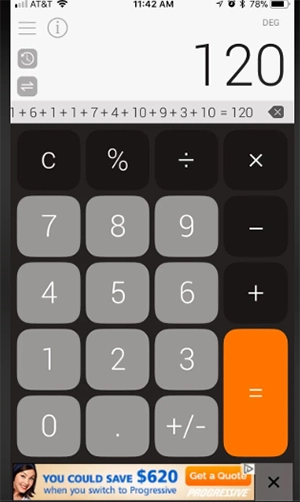
Calculators are easy to find these days, like phones, tablets, random websites, and apps. Just one tap and you’re done. But not all of them are actually safe, especially for kids.
Some apps are fine, but are filled with ads that keep popping up in between. Others lead to strange pages or ask for permissions that don’t even make sense for a calculator. So, it is better to stick with trusted ones that are used for learning.
Avoiding Ads
A child clicks to solve one problem, and suddenly there’s a banner or a pop-up. These ads might look harmless, but it breaks focus, and sometimes it even leads to unrelated pages that have nothing to do with equations.
That’s why cleaner tools like ad-free calculators are best, especially for younger kids. They help children to keep their attention on the problem, not on the ads that keep popping up.
Unsafe Websites
Not every calculator site on the internet is built for learning. Some of them are poorly designed, filled with pop-up ads, and sometimes redirect users to suspicious pages. This is not just unsafe, but it also confuses children a lot.
Therefore, it’s better to stick with known educational platforms or websites that are widely used in schools. Because a quick search result may seem easy and convenient, but it isn’t always the safest option.
Unverified Calculator Apps
There are thousands of calculator apps available online, and not all of them go through proper safety checks. Some are fine and easy to use, but others come with too many ads, unnecessary features, or ask for permissions that don’t actually match their purpose.
So, before downloading any random calculator app, check its ratings and reviews, and download only from trusted app stores. If something feels off for a basic calculator, don’t download it.
How Parents Can Set Rules for Calculator Use During Homework

Most of the kids usually use a calculator while doing homework. One small sum turns into another, then eventually the calculator is the solution for almost every sum. And after a while, children stop trying to solve sums on their own.
That’s why parents need to set some simple rules to help, not overly strict ones. So the calculator stays as a backup tool instead of becoming the first thing children reach for.
Here are some rules parents can set –
- First, let children solve questions on their own
- Use calculators mainly for longer or more difficult calculations
- Keep some homework time completely calculator-free
- Check the answers by themselves instead of using a calculator
- Remind them that making mistakes while learning is completely normal
Role of Parental Controls in Managing Calculator Apps
Most parents don’t even look at calculator apps while setting up parental controls on their child’s device, because it seems harmless. But whenever they open it, there’s a flood of pop-up ads and random links that can pull attention away from what the child is actually trying to do.
What starts as a simple calculation can easily turn into scrolling, tapping around, or getting distracted without even noticing it.
Parental controls help reduce this noise by keeping things in control. Just basic steps, such as blocking unknown apps, limiting downloads, and allowing only trusted tools, can keep the device a bit more focused, especially during study time. That way, the calculator stays what it should be, just a support tool, nothing more.
Final Thoughts
A calculator is not the problem; it is just a tool, but the real issue occurs when children start depending on it too much. If used in the right way, it can help solve complicated sums in an easy way and save time.
But if it becomes the first thing children go for every question, then they will slowly move away from thinking and solving problems on their own. Their habit of thinking or solving a problem slowly fades away. And in the long run, this matters a lot.
Calculators should just be a supporting tool, not something that replaces thinking. In the end, it’s not about choosing between learning and tools. It’s about knowing when to pause, think first, and only then use the available support.
Frequently Asked Questions
When should children be allowed to use a calculator while doing homework?
Do calculators affect learning?
Yes, if children use calculators too often, it can reduce their ability to solve problems on their own.
Can calculator apps or websites be unsafe?
Yes, some websites or apps contain ads, pop-ups, or redirect links. These can expose children to inappropriate websites and break their focus.
 Divya Kakkar
Internet Content Writer
About article
The author of this article Divya Kakkar, an Internet Content Writer at Saferloop, brings practical experience and industry knowledge to the subject.
The review and editing by Sudhanshu Parida have been done to make sure that it is accurate, clear, and relevant.
At Saferloop, we are determined to provide high-quality, well-researched, and updated content. To understand further how we produce and revise our articles, please refer to our Editorial Guidelines.
Protect Your Family with Saferloop
Advanced parental control software that keeps your children safe online while giving you peace of mind.
- Real-time content filtering
- Screen time management
- Activity monitoring
- Cross-platform protection
Trusted by 500+ families