Choosing the right digital guardian for your child’s social media life is a high-stakes decision. There are two names that seem to come up over and over again: Saferloop and uMobix.
After research, I’ve found that these two applications have their own distinct opinions on how parents should approach the digital world with their kids.
uMobix uses a very sophisticated way to monitor everything about your child, while Saferloop emphasizes building trust and finding a balance between not being overly parented and being overindulged. The question remains—who will keep your child safer on platforms like Instagram? No problem! Just read and catch the details.
Now it’s time to get a deeper dive into both SaferLoop and uMobix, and check which one of them truly protects a child. To help you decide, I have directly created the table with core differences based on the features:
Feature
Saferloop
uMobix
Primary Approach
Content Filtering & Management
Real-time Monitoring & Spy Features
Social Media
Category Blocking & Alerts
Full Tracking (Screenshots/Logs)
Update Frequency
Real-time Filtering
Screenshots every 10 seconds
Devices
Win, Mac, iOS, Android, Kindle, Chrome
Android & iOS
Privacy Focus
Balanced Guidance/Transparency
Discreet/Invisible Monitoring
Best For
Establishing long-term digital habits
Investigative tracking for high-risk kids
Social Media Monitoring Capabilities Compared
Social media platforms have undoubtedly become an indispensable part of the modern way of interaction. However, they also possess harms, such as cyberbullying and predatory behavior. This is where the two platforms play significant roles:
uMobix Instagram, with the help of an intensive Instagram spy feature, captures every action. On Android devices, it sends DMs, comments, and followers directly to the parents’ dashboard every 10 seconds. This way, parents can identify immediate danger and get visual evidence of what their child is seeing.
On the other hand, safer loop approaches social safety by prohibiting inappropriate content before it reaches the child. It uses an advanced profanity filter and appearance to restrict access to specific sites. Basically, it will refrain the child from exposure to toxic environments entirely via management rather than just observation.
Privacy and Ethical Differences
The ethical divide between these two tools is distinct. uMobix is basically built for scenarios where there is an apparent need to monitor a child discreetly due to serious safety concerns. It operates silently, providing eyes and ears where they are not close.
Based on the research, Saferloop emphasizes a privacy-first philosophy combined with transparency. Furthermore, when the child learns and grows in an environment, parents can share screen-free movements and routines, too.
Fun Fact Kids360 is highlighted as a “first” of its kind, specifically focusing on fostering healthy habits by allowing kids to earn extra screen time through educational tasks, rather than just blocking apps!
Which Parental Control App Has Better Social Media Support?
If your priority as a parent is visibility, uMobix wins. Nevertheless, in case protection is a priority, then Safeloop is the stronger choice.
When you have a 10-second peak into the child’s social media activity, there is no such concern of messages being deleted or edited. NOTHING IS HIDDEN.
Saferloop takes the upper hand by using tools to filter out inappropriate content and block anything that could cause emotional distress. At this stage, children can be kept away from digital dangers before needing a spy app.
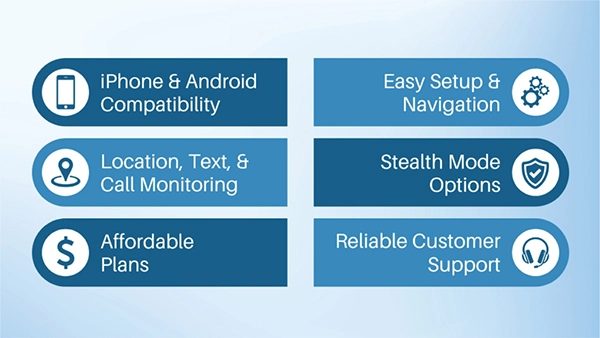
Adding in than that, these are the features a parent must look for in the app:
When Should You Choose Each App?
Now you must be wondering, “When to choose what?” Don’t worry, let me break it down to you in simple words:
Choose Saferloop If
You wish to obtain a simplified and all-in-one package.
For protecting every device in the household, including PC, Mac, Kindle, and mobile.
You need effective content filtering and to promote a positive balance between screen time and other activities.
Go for uMobix If
Having an urgent, specific request for monitoring a child’s Android phone.
You expect a high frequency update for real-time tracking purposes.
For extracting evidence of how a child is using social media.
You can also take a look at the analysis below for better decision-making:
Final Verdict: Best Choice for Kids’ Social Media Safety
In my POV, both apps serve their specific purpose with high efficiency. A technical powerhouse, uMobix, is there for deep investigations. However, for the majority of families looking for a sustainable way to supervise their children online, paper looks can offer a kind of balanced approach.
Remember: Children are great imitators. So give them something great to imitate.
Frequently Asked Questions
Can I install Saferloop on an iPhone?
Absolutely, yes. Saferloop supports iOS and Android, allowing you to access using either device.
Can my child uninstall Saferloop or uMobix?
Probably yes. Although Saferloop will always remain a visible part of the family rules, uMobix will continually attempt to stay invisible.
Does Saferloop show me my child’s Instagram passwords?
No. Saferloop does not recover passwords or store them on its server. It is designed to provide only oversight of your child’s use of the application.
Which application is more suitable for use by a parent who is not tech-savvy?
Saferloop has been developed with simple use in mind. From the easy setup to everyday management, Saferloop has been designed for uncomplicated safety.
The author of this article Aditi K, an Freelance Cybersecurity Writer at Saferloop, brings practical experience and industry knowledge to the subject.
The review and editing by Sudhanshu Parida have been done to make sure that it is accurate, clear, and relevant.
At Saferloop, we are determined to provide high-quality, well-researched, and updated content. To understand further how we produce and revise our articles, please refer to our Editorial Guidelines.
Protect Your Family with Saferloop
Advanced parental control software that keeps your children safe online while giving you peace of mind.



 Aditi K