
To verify if an app is safe, you should look for approvals, such as COPPA/GDPR-K certification, and data deletion policies.
×

Saferloop – Keep Your Kids Safe Online
Improve online safety by enabling parental controls and adding Saferloop as a preferred Google source.
How Parents Can Create Secure Educational Environments Using Modern Technology

Updated On Oct 09, 2026
As schools and families increasingly rely on AI-driven platforms and virtual learning tools, it brings significant responsibilities. Statistics from The Times of India reveal that over 70% of parents are concerned about how Educational technology based apps handle their children’s sensitive data.
Building a secure learning environment is no longer just about choosing the right software; it is about creating a holistic shield that balances academic opportunity with rigorous safety standards.
This guide explores how to leverage modern technology to craft a sanctuary for learning, ensuring that a child’s intellectual growth is never compromised by digital vulnerabilities.
KEY TAKEAWAYS
- A secure environment integrates privacy settings, content filters, and behavioral guidance into one cohesive strategy.
- Protecting a child’s personal information is the foundation of digital safety in the learning landscape.
- Effective tech usage focuses on educational value rather than mere screen minutes.
- Creating verified channels for peer and tutor interaction prevents unauthorized access and social engineering risks.
Table of Contents:
- What Does it Mean by Secure Digital Learning Environment
- Understanding Risks in Technology-Driven Learning
- Managing Screen Time and Device Usage Effectively
- Protecting Kids’ Data and Online Privacy
- Creating Safe Communication Channels for Online Learning
- Encouraging Responsible Digital Behavior in Children
- Frequently Asked Questions
What Does it Mean by Secure Digital Learning Environment
A secure digital learning environment means having more than just a device that is locked down or secured in some way. This entails the establishment of a “walled garden” for edtech, with thoroughly vetted technology to ensure that it complies with both pedagogical and security protocol requirements.
The types of policies that need to be put into place are:
- Privacy First Design
- Filter Integrity
- Mental Clarity
- Supervised Connectivity
- Transparency of Operations
Establishing this type of secure digital learning environment, technology can be used as a bridge to connect learners to information while protecting them from potential risk.
Understanding Risks in Technology-Driven Learning
While technology accelerates learning, it also introduces specific friction points that can derail a child’s focus and safety. Understanding these shadows is the first step toward illuminating a safer path.
| Risk Category | Impact on the Student |
| Privacy Concerns | Unauthorized data harvesting can lead to a permanent digital footprint before a child turns ten. |
| Online Distractions | Algorithmic “rabbit holes” and gaming notifications reduce deep-work capacity by up to 50%. |
| Unsafe Content | Accidental exposure to explicit or violent material via an educational search breach. |
| Social Engineering | Malicious actors may use educational forums to groom students or extract family information. |
Managing Screen Time and Device Usage Effectively
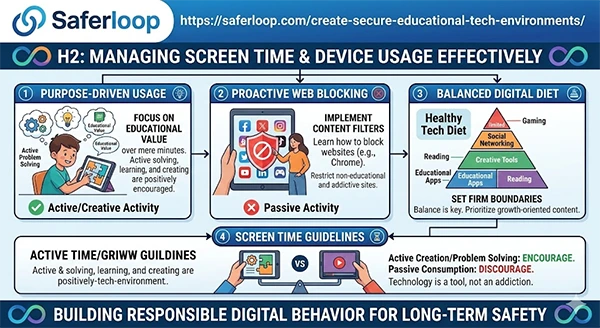
Managing effectively means using it with purpose. The goal is to establish a healthy diet of digital media that promotes cognitive growth without causing burnout.
As a proactive measure, parents can learn how to block websites on chrome to create a barrier. By establishing firm boundaries for using social networking sites while allowing unlimited use of properly vetted educational sites, they can use a testnav practice test and then make sure that the device stays a device to help them grow. Not a device to keep you occupied.
If the screen time is related to creating or actively solving a problem, it is positively encouraged. In case the screen time is a passive activity, then it could be negatively discouraged. Using this guideline will teach the children that technology is a tool to manage, not an addiction to pursue.
Take quick notes with the help of the infographic attached below:
Protecting Kids’ Data and Online Privacy
As we transition into an economy driven by machine learning, a child’s personal data is now a currency. Therefore, protecting it through a “zero-trust” policy toward new software and continued vigilance regarding app permissions is critical.
- Before downloading an app, evaluate audio and location tracking capabilities in order not to record unnecessary data.
- Instead of using a real name or a picture of a kid, use an alias or avatar for public learning forums.
- By going into your child’s device settings, you can limit ad tracking. This will prevent third parties from creating a behavioral profile for your child.
The Privacy Dashboard can be checked to find out where apps accessed your child’s settings. So make sure that all learning is done on a secure and private Wi-Fi network rather than through public hotspots, which can be hacked using “man-in-the-middle” technology.
Creating Safe Communication Channels for Online Learning
The same verification standard should apply to anyone teaching your child outside school hours. Vetted private tutors work through established providers with identity checks and working-with-children clearances already completed, which is a meaningfully different arrangement from hiring through an open marketplace where the platform verifies little beyond a payment method.
Parents need to educate their kids about the changing definitions of digital language. A parent may identify if there has been a change in content, for example, finding what does Fein meaning in slang. By maintaining open communication about who their child is communicating with and what they are discussing, parents can achieve the top level of social security.
Encouraging Responsible Digital Behavior in Children
The strongest firewall a child has is their own ability to make decisions. Therefore, parents must teach their children how to behave online as they do in real life, just as they would teach them how to read and do mathematics.
- Permanent Ink Analogy: Teach children to think before posting everything, as it is written in permanent ink and will still be available forever.
- Respect Intellectual Property: Remind them that copying from a website and pasting it into another location is called “plagiarism,” which is unethical, and as kids grow into young inventors and creators, that same respect for original ideas eventually extends to understanding protecting an invention the right way.
- Digital Empathy: Behind every screen is a human being; having “courage to speak up online” does not give someone the right to say unkind things.
- Verification Skills: Teach the “Three Source Rule” – never believe something unless you can find three independent, credible sources that confirm the accuracy of what you have found.
Technology can be both a “tool for achieving your goals” or “an avenue leading to distracted danger.” Therefore, the goal of parents should be to incorporate AI app safety considerations and provide digital safety that will enable today’s children to eventually navigate the digital world with the knowledge necessary to protect themselves.
Frequently Asked Questions
What are the best ways to verify the safety of an app they are developing?
Should I block social media apps from being used in my child’s school?
Yes, there are strong reasons for preventing social media app usage in public schools. Use “whitelisting” to allow only the required educational programs to be used and prevent distractions.
Does SaferLoop let children use the internet without being tracked?
Yes, SaferLoop uses increased filter capabilities to stop most third-party data collection scripts from working.
Is it a good idea for kids to use AI when doing homework?
Use AI as a resource for how to get a more in-depth understanding of subject material. AI should only explain the schoolwork concept, not supply final answers.
Divya KakkarInternet Content Writer
About article
The author of this article Divya Kakkar, an Internet Content Writer at Saferloop, brings practical experience and industry knowledge to the subject.
At Saferloop, we are determined to provide high-quality, well-researched, and updated content. To understand further how we produce and revise our articles, please refer to our Editorial Guidelines.
Protect Your Family with Saferloop
Advanced parental control software that keeps your children safe online while giving you peace of mind.
- Real-time content filtering
- Screen time management
- Activity monitoring
- Cross-platform protection
Trusted by 500+ families