No, this is a scam; you lose your personal information and get expelled from school.
×

Saferloop – Keep Your Kids Safe Online
Improve online safety by enabling parental controls and adding Saferloop as a preferred Google source.
Online Learning Security Strategies: A Parent’s Guide to Course Safety and Kids’ Privacy
The educational system received well over four thousand cyberattacks in mid-2025. And the complexity of Gen Z learning means students are often accessing dozens of third-party EdTech apps, many of which lack standardized security regulations. Although the third-party applications offer remarkable potential for growth, at the same time, they expose personally identifiable information (PII) to individuals with the intent to cause malicious damage.
Therefore, this guide provides a complete tactical plan for parents to secure their child’s learning environment. So the opportunity for learning does not come with the potential for compromising privacy or safety.
KEY TAKEAWAYS
- Only use platforms that comply with current global privacy standards.
- Educate students to recognize AI-generated misinformation and manipulative bots.
- Effective safety involves monitoring sentiment and interactions to catch issues of bullying.
- Implementing a “zero trust” approach is the most effective way to shield personal information.
Table of Contents:
- Why Online Learning Security Matters for Kids Today
- Common Online Learning Risks Parents Should Know
- Choosing Safe and Secure Online Learning Platforms
- Protecting Kids’ Personal Information During Online Learning
- Building Healthy Digital Habits Around Learning Devices
- How Parents Can Stay Informed About Online Safety Trends
- Frequently Asked Questions
Why Online Learning Security Matters for Kids Today
In an age when the kids are establishing digital footprints long before they’ve even completed middle school, the foundation of future opportunity is security. The virtual classroom has become a means by which a child can create their entire digital identity.
| Security Pillar | Impact on Student Safety |
| Identity Protection | Prevents the creation of shadow profiles used by advertisers and malicious actors to target minors. |
| Psychological Safety | A secure learning environment free from harassment allows for the vulnerability required to learn truly. |
| Academic Integrity | Protects a student’s original work and research from being scraped or used to train unauthorized AI models. |
| Device Longevity | Strong security habits prevent malware from degrading the hardware needed for daily education. |
Common Online Learning Risks Parents Should Know
Identifying the risks posed by these types of issues, thus neutralizing the risk, begins with understanding them. Risks have evolved from basic pop-up ads to more sophisticated psychological & data-driven risks in today’s world.
A few examples of these types of risks include:
- Data Privacy Issues
- Cyberbullying
- Unsafe platforms
Many students feel overwhelmed and have searched for terms like “Can someone take my online class for me?”, leading them to reach a predatory site where they steal credit cards and put malware in the form of homework help. Directing students to vetted assignment help services instead reduces the risk of them landing on fraudulent platforms during high-stress academic periods.
Choosing Safe and Secure Online Learning Platforms
When selecting a platform, you should be just as careful as if you were selecting a physical school; high-quality platforms opt for “Safety by Design.”
The best platforms have a designated “Privacy Center” for parents to find out more about their security practices. When assessing a new tool, be on the lookout for clear indicators of “zero trust” architecture and “age-specific” measures.
Make sure to use platforms that do not allow profiling-based advertisements for children and that minimize the amount of data collected. Take a quick view below:
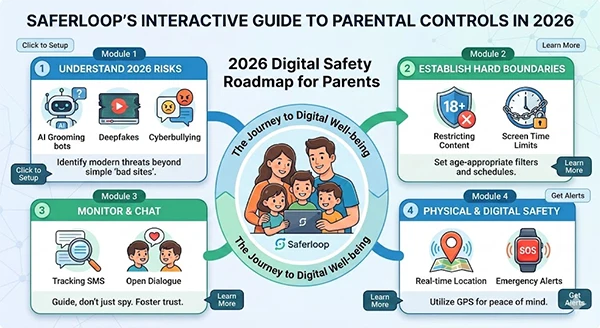
As the saying goes, “If the product is free, you (or the student’s data) are the product.” It reinforces that the platform has legal obligations to protect student records by utilizing “Certified for Education” software.
Protecting Kids’ Personal Information During Online Learning
To protect your personal data in 2026, it is crucial to take a deliberate approach when creating digital footprints.
- To secure personal data, you should encourage the use of nicknames and non-identifiable avatars, unless it’s the official documentation.
- Always check the advanced settings feature of any new app before you start using it to disable the default settings for GPS location tracking, microphone usage, and how the camera is enabled.
- It is important that all study groups occur on end-to-end encrypted platforms to avoid third-party eavesdropping during student discussions.
- A family password manager should be used to provide every educational account with a unique, strong password. Thus, if one account is compromised by a breach, the security of all family members will not be compromised.
Building Healthy Digital Habits Around Learning Devices
Security requires more than software. “Cyber hygiene” must be created to provide a secure online experience for students, even when staff are unable to closely monitor them.
- Effective Time management: Encourage students to use “focus modes” to disable all notifications that are unrelated to education.
- Decoding Slang: It is critical to keep track of the unforeseen changes in how students communicate with technology over time.
- The “Wait Before You Click” rule: Students should be shown how to hover over a link to reveal the URL before clicking.
- Regular patching: Get used to treating routine software updates as mandatory safety drills.
Case Study: The Homework Help A group of middle school students in Delhi recently fell victim to a scam while searching for a Python developer training course. They landed on a fraudulent site that promised free premium access in exchange for installing a browser extension. By the time it was discovered, the malware had spread across the household network. This serves as a stark reminder that even educational searches can lead to high-risk areas without a robust web filter in place.
How Parents Can Stay Informed About Online Safety Trends
Saferloop is a centralized control panel to help take away parents’ concerns and give parents back meaningful control over all digital activity. It is essential to be aware of today’s Gen Z slang as an early warning sign to support their new style of learning.
That’s where the tools below will help keep parents at least one step ahead of the curve:
- Real-time Notifications: Receive alerts whenever the system detects harmful words/phrases or high-risk slang in incoming messages.
- Activity Summaries: Weekly summary reports showing how much time is spent on education versus social platforms and the number of new applications added each week.
- Emergency SOS Feature: Children can use a “panic button” if they are approached by an online predator or feel unsafe during an online session.
- Trend Report: Curated trend reports allow parents to create a brief that describes new “online crazes” before they reach your child’s device, including risky applications.
Education is the greatest gift we can give. However, keeping their education safe while they are learning is the ultimate responsibility we have as adults.
To provide a strong foundation for that education, it takes an ongoing conversation between the child and parent, with collaboration from technology to ensure safety during this time. By utilizing professional monitoring tools like Saferloop and a critical eye for platform security, one can ensure the child thrives in the virtual classroom.
Frequently Asked Questions
Can someone take an online class for another person safely?
How do I find out if my child’s app is selling their information?
Look for third-party marketing or data sharing for advertising in the privacy statement.
Is using the incognito mode adequate protection for my child?
It is not; while it covers history on your computer, it does not protect your child from web pages and hackers.
What to do if any of the school applications are hacked?
You need to change all your passwords immediately and keep a close eye out for identity theft.
 Divya Kakkar
Internet Content Writer
About article
The author of this article Divya Kakkar, an Internet Content Writer at Saferloop, brings practical experience and industry knowledge to the subject.
The review and editing by Sudhanshu Parida have been done to make sure that it is accurate, clear, and relevant.
At Saferloop, we are determined to provide high-quality, well-researched, and updated content. To understand further how we produce and revise our articles, please refer to our Editorial Guidelines.
Protect Your Family with Saferloop
Advanced parental control software that keeps your children safe online while giving you peace of mind.
- Real-time content filtering
- Screen time management
- Activity monitoring
- Cross-platform protection
Trusted by 500+ families