Ans: No, Instagram is not safe for kids due to a high risk of unwanted messages from strangers, cyberbullying, inappropriate content, privacy issues, and mental health impact.
×

Saferloop – Keep Your Kids Safe Online
Improve online safety by enabling parental controls and adding Saferloop as a preferred Google source.
Instagram: Features, History, & Parental Control Guide
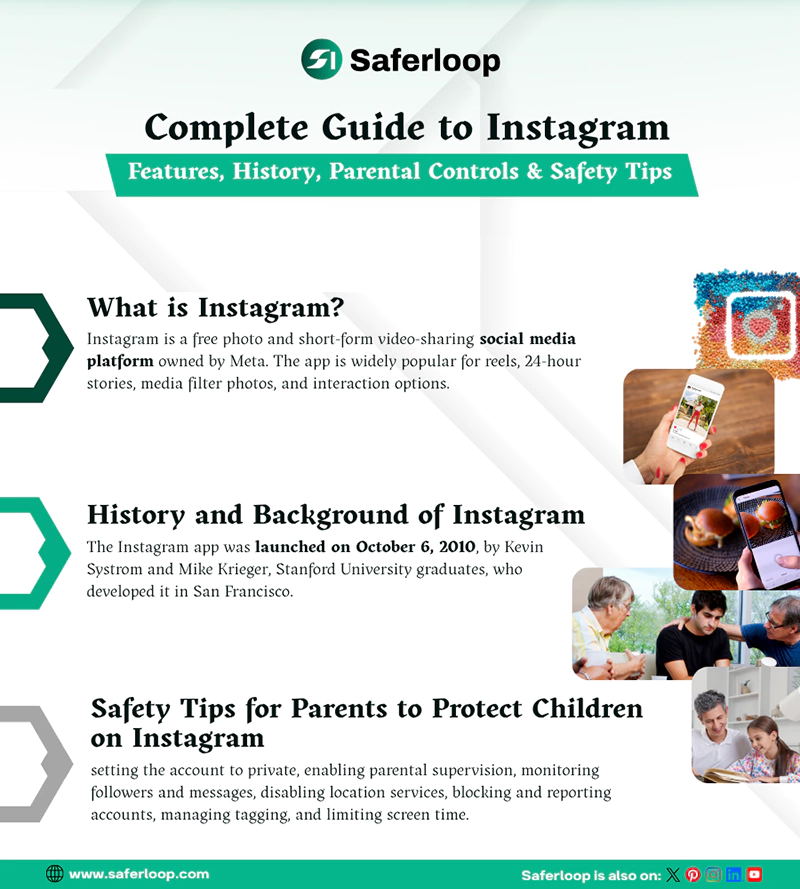
Who doesn’t know the Instagram app? It is widely popular among younger generations and Gen Z for sharing content and is dominated by brands and influencers.
However, the app is generally not safe for kids because of exposure to inappropriate content, cyberbullying, and online scams. That’s why I have compiled information on Instagram parental controls and safety tips to help parents.
So, stay adherent to this article!
Key Takeaways
- Instagram is the most used social media app for direct messages, sharing videos and photos, and business marketing.
- Due to over 2 billion users, it is generally not safe for kids, and they may encounter age-inappropriate content, cyberbullying, and predators on the app.
- Therefore, you should enable built-in parental supervision features using Family Center to control teen accounts.
- Additionally, parents should install third-party parental control apps like Saferloop to restrict harmful content and scammers.
Table of Contents:
- What is Instagram? Popular Social Media Platform
- History and Background of Instagram
- Key Features of Instagram
- Growth and Popularity of Instagram
- Types of Content on Instagram
- Benefits of Using Instagram
- Risks and Concerns for Teenagers on Instagram
- Why is Parental Control Needed on Instagram?
- Instagram Age Requirements
- What is the Instagram Supervision Feature?
- How to Set Up Parental Controls on Instagram?
- How to Make an Instagram Account Private?
- How to Manage Comment and Message Controls on Instagram?
- How to Enable Sensitive Content Control on Instagram?
- How to Set Screen Time Limits on Instagram?
- How to Block and Report Users?
- Important Safety Tips for Parents to Protect Children on Instagram
- Common Mistakes Parents Should Avoid on Instagram
- Final Safety Recommendations for Families
- Wrapping Up!
- Frequently Asked Questions
What is Instagram? Popular Social Media Platform
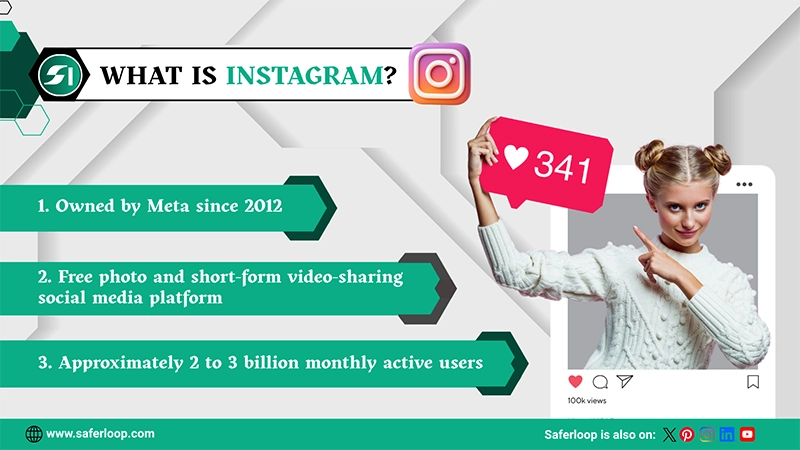
Instagram is a free photo and short-form video-sharing social media platform owned by Meta. It is primarily used for entertainment, personal connections, influencer marketing, and business, allowing everyone to share content across the world.
The app is widely popular for reels, 24-hour stories, media filter photos, and interaction options (likes, comments, saves, shares, and direct messaging). It is one of the top three global social media apps, with approximately 2 to 3 billion monthly active users.
As a result, you can use this app to share your skills or creativity, build communities, promote business, and stay entertained without spending a single penny.
History and Background of Instagram
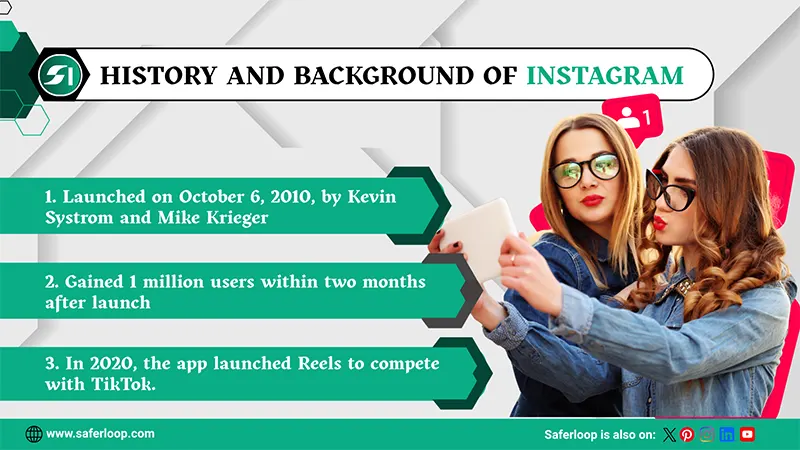
The Instagram app was launched on October 6, 2010, by Kevin Systrom and Mike Krieger, Stanford University graduates, who developed it in San Francisco. Surely, it solves your query about “Who founded Instagram?”
- The app was designed to focus mainly on mobile photo sharing, filters, simplicity, and location-based check-in.
- Interestingly, it gained 1 million users within two months after launch.
- In 2012, Facebook (now Meta) acquired it for $1 billion.
- Later, Facebook launched a video-sharing feature in 2013, which has gained immense popularity among young users.
- In 2016, the app launched a 24-hour story feature that allows users to share temporary content, heavily inspired by Snapchat.
- In 2018, IGTV, a long-form video platform, was introduced on Instagram.
- In 2020, the app launched Reels to compete with TikTok.
Interesting Fact: Reels has dominated Instagram in India, the United States, and Brazil, giving rise to social media influencers.
After acquiring knowledge on Instagram history and launch year, let’s move towards its features in the next section.
Key Features of Instagram
Instagram features and functions include reels, 24-hour stories, AI integration, and creator/business insights. These key features help every user to create content seamlessly and efficiently.
Here are the most common key features of IG.
1. Reels
Reels are short-form video content in a 9:16 aspect ratio that allows you to create and share 15- to 90-second clips with music and editing tool options. They are essentially designed for entertainment and help you to discover new content and reach a wider audience.
2. 24-Hour Stories
An Instagram story is a vertical, full-screen photo or video that disappears 24 hours after being shared. Stories are designed for sharing temporary content and daily life moments, along with music, stickers, and links to drive engagement. Also, you can add stories to highlights, which are permanently shown on your IG profile.
3. AI Integration
Instagram has deeply integrated artificial intelligence (AI) into content creation and editing, the Meta AI chatbot, audio/music suggestions, and business operations. It reduces manual, time-consuming tasks such as brainstorming, editing, and hashtag research, enabling faster content creation.
4. Creator/Business Insights
Creator and business insights are extremely significant for influencers and business owners by providing data-driven audience behavior and trending search topics. It offers tracking engagement, content gaps, and useful insights, enabling people to increase monetization sources.
Growth and Popularity of Instagram
As I mentioned in the Instagram platform overview, this app is the third most popular platform, with over 2 billion active users around the globe. This indicates that it is the fastest-growing social media app, with the largest user base aged 18-34.
Interestingly, active users grew from 110 million in 2013 to over 2 billion in 2024 and are expected to reach 3 billion in 2026. From entertainment to business goals, Instagram generated an estimated $66.9 billion in revenue, nearly 40% of Meta’s total revenue. As a result, it has become the second most downloaded app worldwide.
On the other hand, it launched Reels in 2020 in response to competitors, and it now averages 150 billion views per day. This means that IG is a crucial marketing tool for businesses and creators in 2026.
Types of Content on Instagram
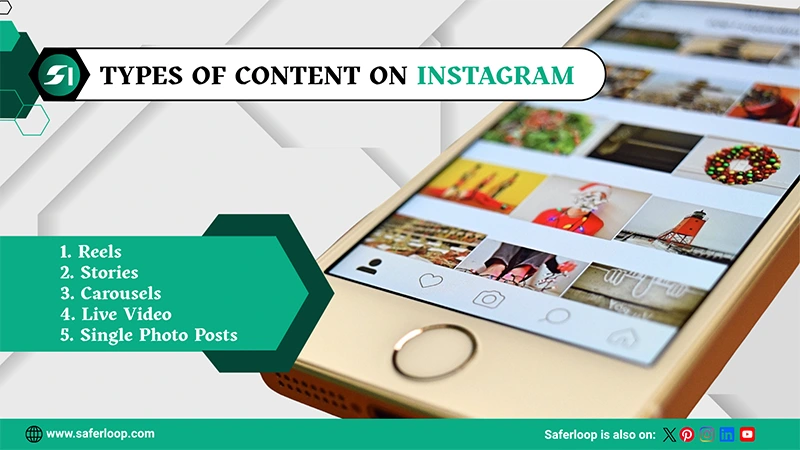
There is a wide range of content you share on Instagram, such as reels, stories, carousels, single photo posts, and live video. Therefore, you can upload content according to your preferences.
Here are the following types of content on IG in great detail.
1. Reels
Reels are short-form and vertical videos designed for sharing instant content, including entertainment, comedy, and creativity, to reach a wider audience. The IG reels can last from 15 seconds to 3 minutes.
2. Stories
An Instagram story is temporary content that only appears for 24 hours on your IG account. It is designed for quick, casual, and daily updates and allows you to add creativity by using stickers, polls, emojis, filters, and music.
3. Carousels
Carousels are a blend of multiple photos and videos in a post that allows you to share videos and images together, which followers can view by swiping left. These posts are often used for storytelling, tutorials, or product showcases to increase engagement.
4. Single Photo Posts
Single photo posts are a classic and traditional format for high-quality visuals that appear in the feed. This format is designed for sharing straightforward updates, announcements, portraits, products, and polished content.
5. Live Video
Live video is another type of content on IG that allows you to broadcast video in real-time for your followers. It is primarily used to interact with followers directly, such as interviews, Q&As, and to invite other individuals to join the live room.
Benefits of Using Instagram
Companies and individuals can use Instagram to utilize features like connecting with friends and family, visual storytelling, influencer marketing hubs, business tools and marketing, and high engagement and reach.
Let’s skim through this section to uncover the benefits of using this app.
1. Connecting with Friends and Family
Similar to other social media platforms, Instagram offers direct and personal connections through text messages, audio calls, and video calls. Also, you can stay in touch with your friends and family members through photos and stories.
2. Visual Storytelling
The platform emphasizes photos, videos, and reels so that you can tell compelling stories to your followers. It helps you to showcase your talent and skills without spending money and deeply connects with people, building stronger relationships.
3. Influencer Marketing Hubs
Nowadays, Instagram has become the most-loved place for brands and influencers regarding marketing and collaborations. It offers monetization opportunities for influencers and increases brand awareness for companies.
4. Business Tools and Marketing
Features like shopping, insights, targeted advertisement, and user-centric algorithms help businesses gain maximum followers and convert them into real and loyal customers. This results in earning higher profits and revenue.
5. High Engagement and Reach
With over 2 billion active users, this platform has one of the highest engagement rates among social media apps, enabling brands, influencers, and local businesses to reach, connect, and interact with people all over the world.
Risks and Concerns for Teenagers
If your kids and teenagers use Instagram, there are various risks and concerns, like addiction and wastage of time, mental health and body image, safety and privacy infringement, and exposure to inappropriate content.
As a concerned parent, you should understand these risks thoroughly here.
1. Addiction and Wastage of Time
The platform is designed to keep users engaged through automatically scrolling reels and content. As a result, it increases children’s and teenagers’ screen time, leading to social media addiction and procrastination.
2. Mental Health and Body Image
The pursuit of “likes,” filtered photos, and idealized images may affect the mental health of young children and force them to doubt their self-worth and body image issues. It is linked to increased rates of depression and anxiety.
3. Safety and Privacy Infringement
Teens and kids might face safety and privacy infringement due to oversharing with strangers and predators. This includes malicious comments, humiliating photo sharing, and fake profiles.
4. Exposure to Inappropriate Content
Furthermore, your kids can encounter inappropriate, abusive, violent, and sexually explicit content. It will lead to cyberbullying, harassment, predatory risks, and online threats.
Why is Parental Control Needed on Instagram?
Parental control is needed on Instagram to protect teens from exposure to harmful, age-inappropriate, or sensitive content. Third-party parental control apps offer advanced safety features to resolve digital parenting issues.
Hence, I recommend you install the Saferloop parental control app to monitor your children’s online activities and other features, including:
- Supervise online activity, calls, and messages directly.
- Set screen time limits to encourage healthy habits.
- Filter content and apps to prohibit inappropriate content.
- Block unsafe websites and apps to create a safe digital environment.
- Track real-time location and build online boundaries for safety.
- Send emergency alerts, reports, and SOS updates if something unusual is suspected.
- Provides Saferloop safety checkup extensionfor Chrome users to add an extra layer of protection.
- Offers Saferloop AI version to guide on digital parenting issues.
On the whole, Saferloop safety features provide high-end tools to safeguard your kids from cybercrimes and dangerous content.
Instagram Age Requirements
According to Instagram’s terms of use, users must be at least 13 years old to sign up for an IG account. You can confirm your age by providing your birthday, photo identification, or submitting a video selfie.
The information required to verify your age will not be visible on your profile, to followers, or to other individuals, to protect your privacy. To prioritize online safety, users aged 13-17 are automatically placed into strict “Teen Accounts,” with privacy settings and content filters.
If children want to remove these restrictions, they will require parental permission to accept or deny modifications in default settings. However, parents are not allowed to read direct messages on their kids’ accounts.
What is the Instagram Supervision Feature?
The Instagram supervision feature is a set of tools that allows parents to monitor their teens’ accounts under 18. It is an optional function, and both parents and children must agree to turn on these settings.
Here are the following settings parents can do in the Family Center.
1. You can set screen time limits to control how long your kids can use the Instagram app. Interestingly, you can also choose whether your children can see a reminder or automatically close it when the time limit is completed.
2. Set up sleep mode to limit your teen’s use during specific days and hours. If the IG account is running on multiple devices, this setting is applicable across all devices.
3. Additionally, you can monitor the average amount your children spend on this app over the past 7 days.
4. You are able to see followers, followings, block lists, account privacy, and content settings on your kids’ accounts.
5. Furthermore, you can control who can send them friend requests and send them to a group chat.
Also Read: Top 5 Best Parental Monitoring Software to Track Children’s Activities in 2026
How to Set Up Parental Controls on Instagram?
To set parental controls on Instagram, you should open the app > three horizontal lines > Supervision for Teen Accounts > Get Started > Invite.
Here is the following step-by-step guidance on setting up parental controls on IG.
Step 1: Open the Instagram app on your mobile.
Step 2: Go to your profile and click on the three horizontal lines in the top-right corner.
Step 3: Now, scroll down and tap on “Supervision for Teen Accounts” under Family Center.
Step 4: Click on “Get Started” when the prompt for supervision for teen accounts appears.
Step 5: Now, search your child’s profile and click on it, and tap on “Invite.”
After sending a supervision request, you should wait for your kids to accept it to customize further settings and set up Instagram parental control.
How to Make an Instagram Account Private?
To make an Instagram account private, you should open the app > profile > three horizontal lines > Account privacy > Switch to private.
Let’s dig deeper to understand how to set up an Instagram account as private.
Step 1: Open your Instagram account on your smartphone.
Step 2: Click on your profile at the bottom right corner.
Step 3: Tap on the three horizontal lines at the top-right corner.
Step 4: Scroll down and click on “Account privacy.”
Step 5: Turn on the toggle and click on “Switch to private” to make your and your kids’ accounts private.
How to Manage Comment and Message Controls on Instagram?
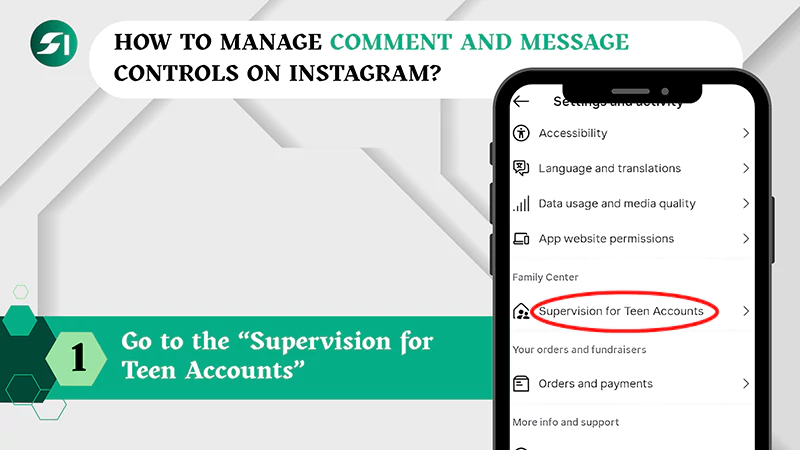
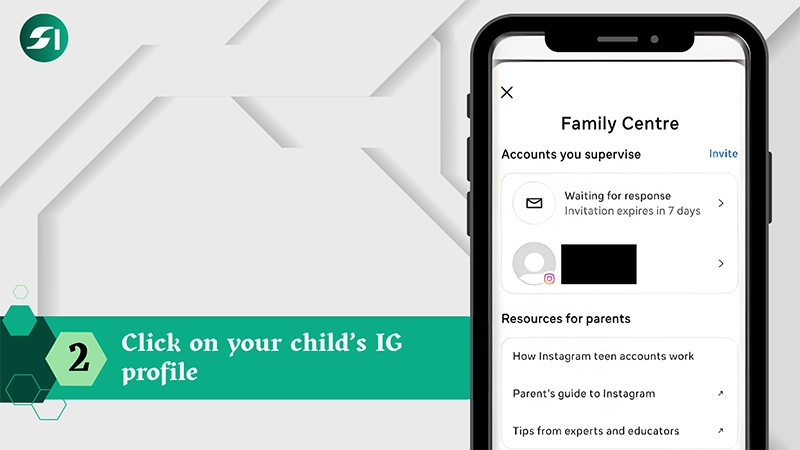
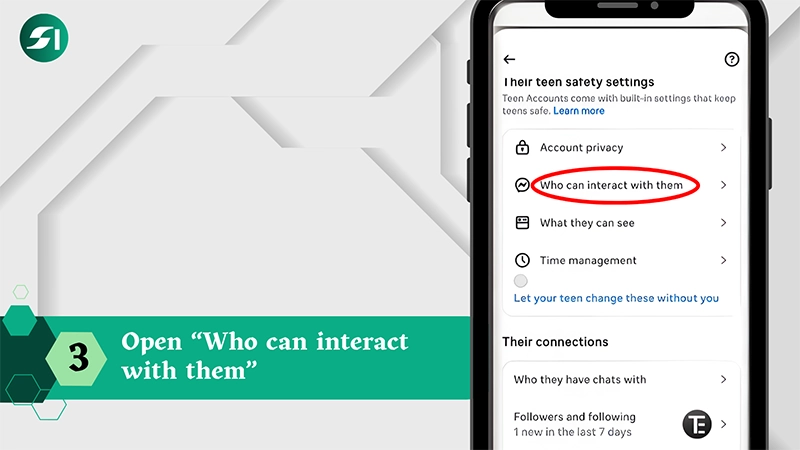
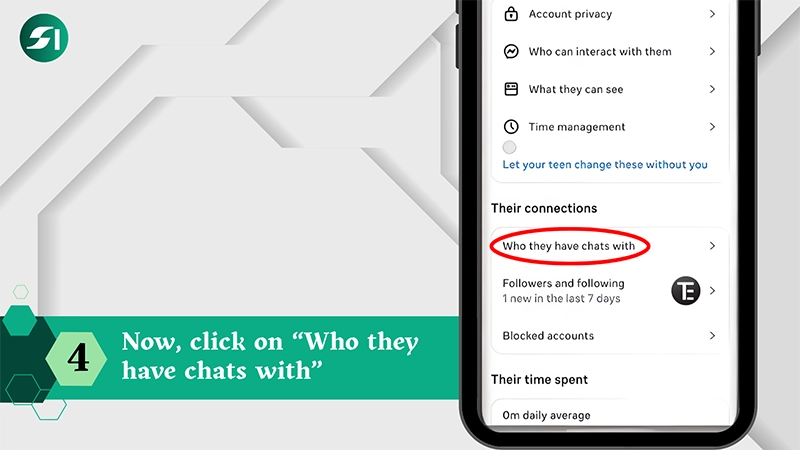
To manage comment and message controls on Instagram, go to Supervision for Teen Accounts > IG profile > three horizontal lines > Who can interact with them > Who they have chats with.
Here are the following simple and easy steps for your guidance. So, take a look!
Step 1: After adding your kid to the Family Center, go to the “Supervision for Teen Accounts.”
Step 2: Click on your child’s IG profile.
Step 3: Open “Who can interact with them” and manage message and chat controls.
Step 4: Now, click on “Who they have chats with” to see who your teen chatted with from the last 7 days.
Also Read: iPad Parental Control: How to Set Up and Manage Screen Time Safely?
How to Enable Sensitive Content Control on Instagram?
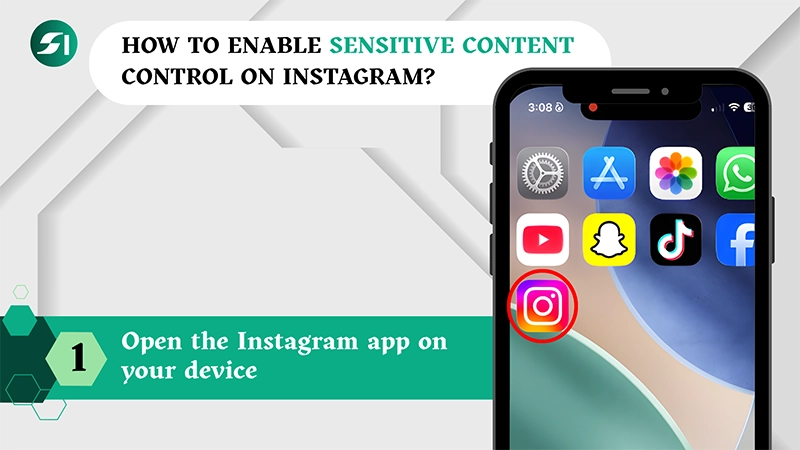
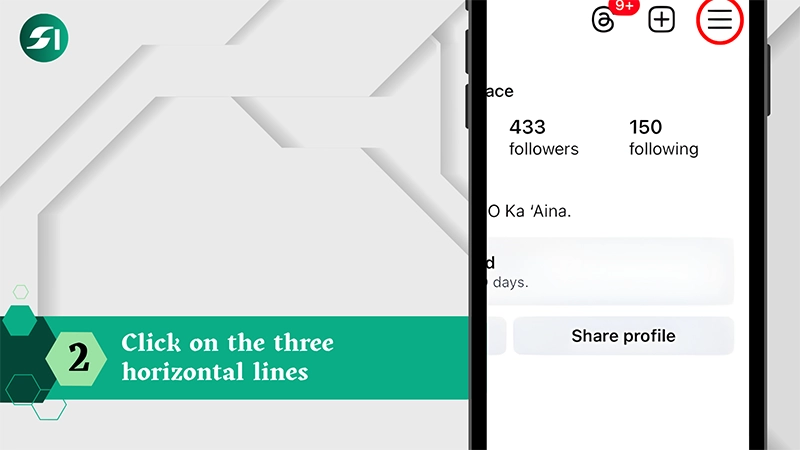
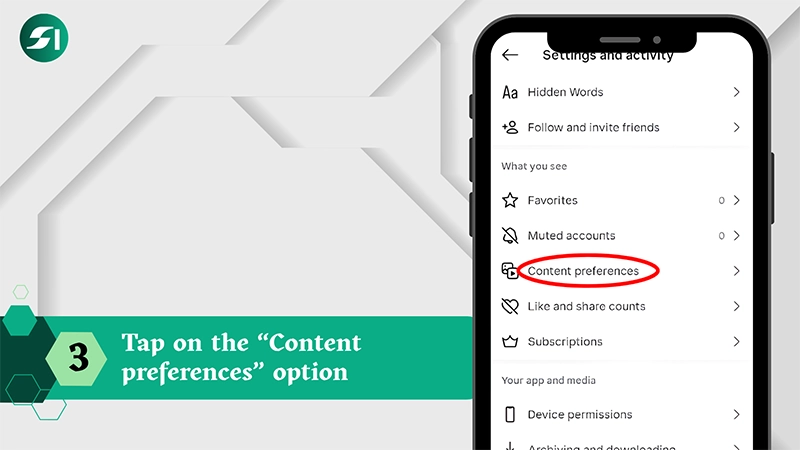
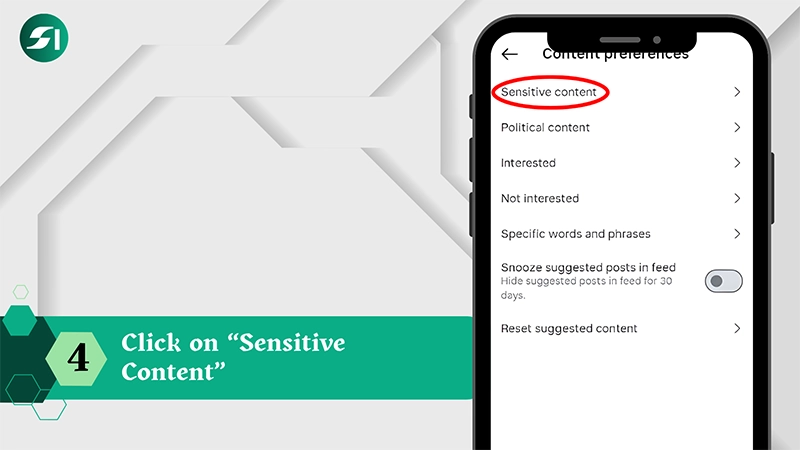
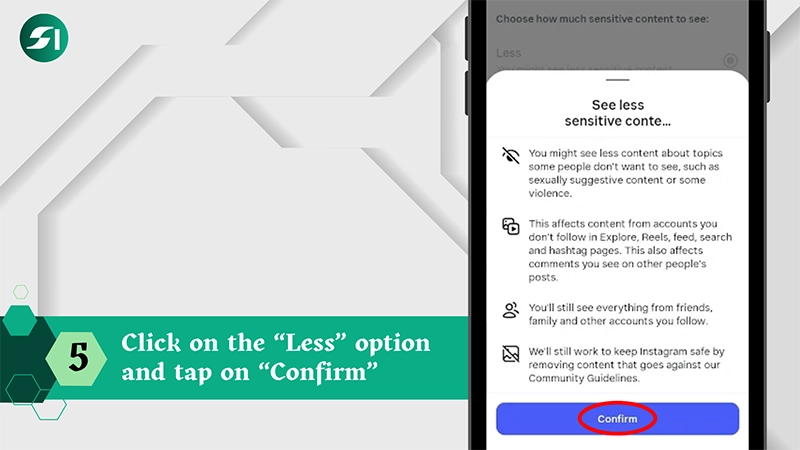
To enable sensitive content control on Instagram, open the app > profile icon and three horizontal lines > Content preferences > Sensitive content > Less > Confirm.
Let’s take a look at the steps of how to enable sensitive content on Instagram to protect your kids.
Step 1: Open the Instagram app on your device.
Step 2: Go to the profile and click on the three horizontal lines.
Step 3: Now, scroll down and tap on the “Content preferences” option.
Step 4: Click on “Sensitive Content.”
Step 5: Now, click on the “Less” option and tap on “Confirm” to control sensitive content.
How to Set Screen Time Limits on Instagram?
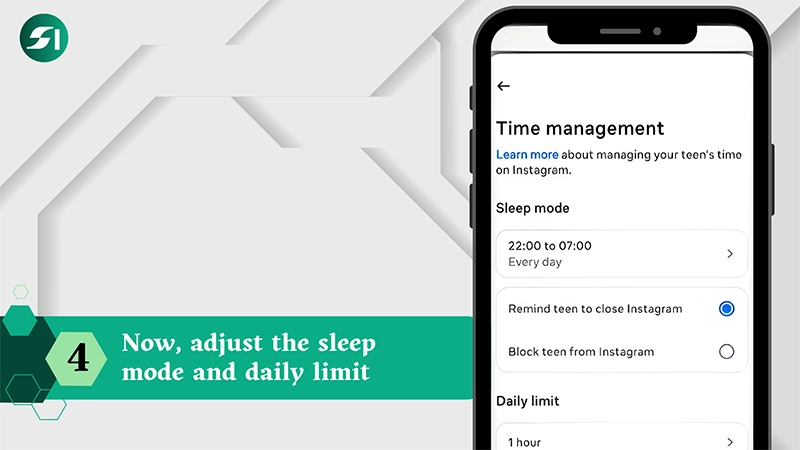
To set screen time limits on Instagram, go to Supervision for Teen Accounts > kid’s profile > Manage time limits > Sleep mode > Daily time limits.
Here is the step-by-step guidance on how to set screen time limits on your child’s Instagram.
Step 1: After adding your kid’s profile in Family Center, go to the “Supervision for Teen Accounts.”
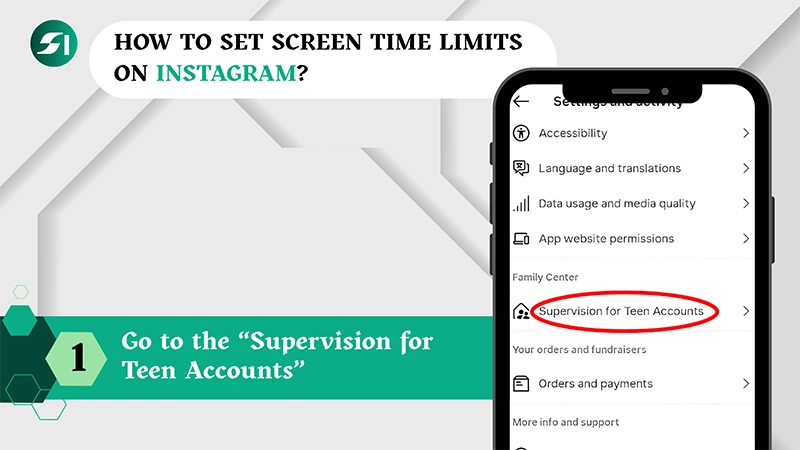
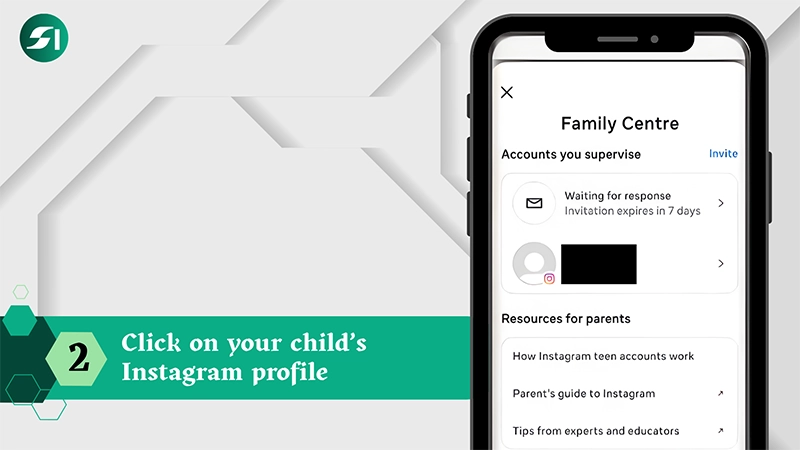
Step 2: Click on your child’s Instagram profile.
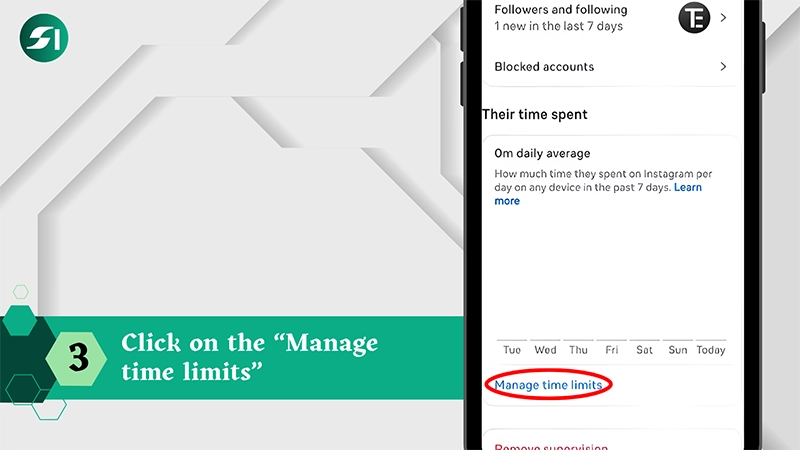
Step 3: Now, scroll down and click on the “Manage time limits.”
Step 4: Now, you are allowed to adjust the sleep mode and daily limit under time management.
How to Block and Report Users?
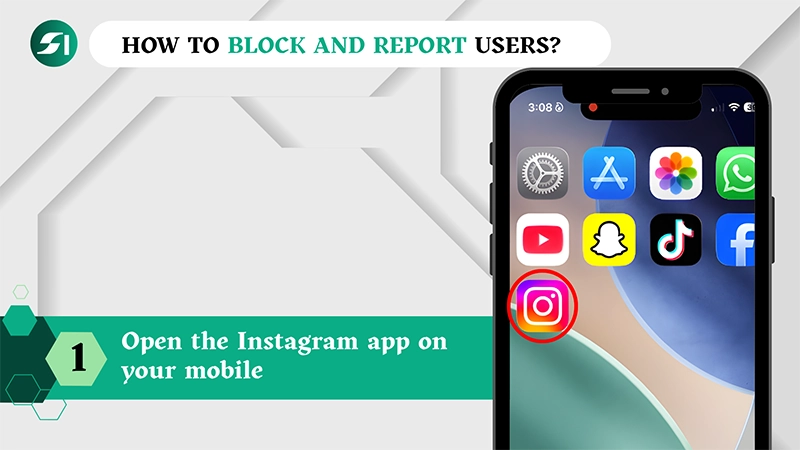
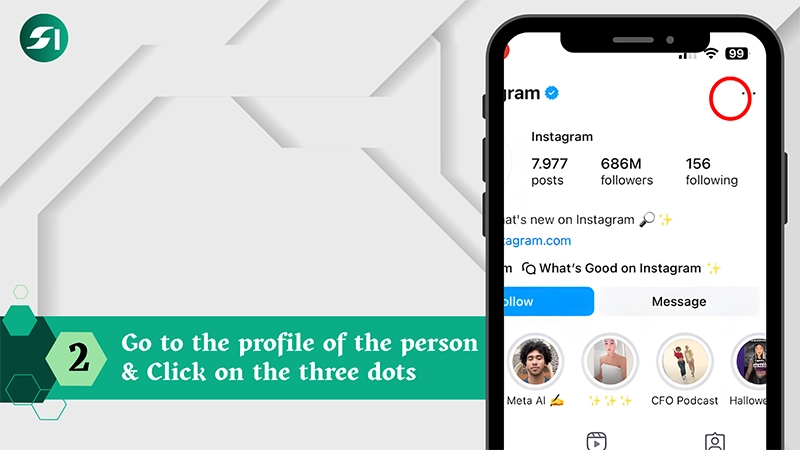
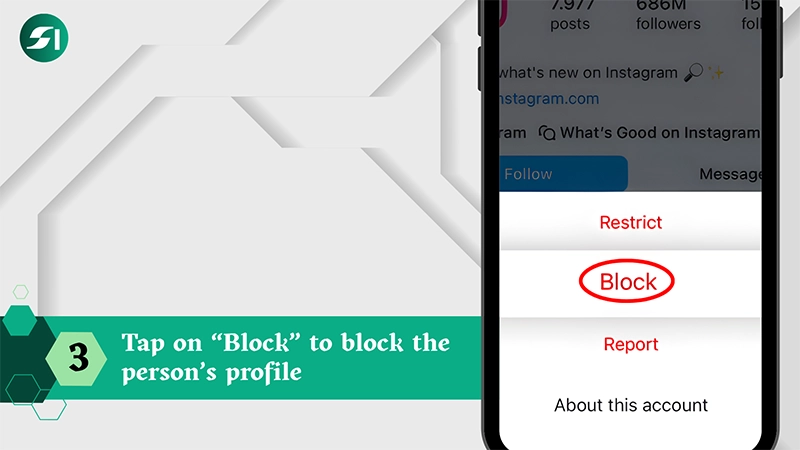
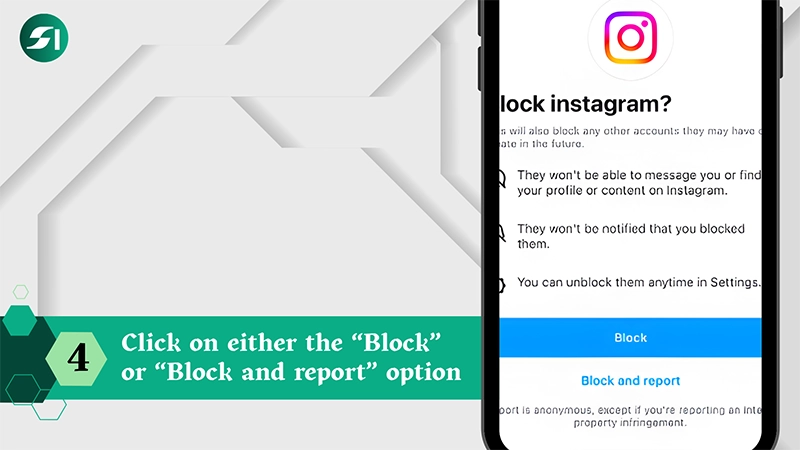
To block and report users, you should open the app > go to the user profile > click on three dots > tap block > choose either “Block” or “Block and report.”
Here are the steps on how to block and report someone on Instagram in great detail.
Step 1: Open the Instagram app on your mobile.
Step 2: Go to the profile of the person that you wish to block and report.
Step 3: Click on the three dots at the top right corner.
Step 4: Tap on “Block” to block the person’s profile.
Step 5: After reading the following prompts, click on either the “Block” or “Block and report” option.
Important Safety Tips for Parents to Protect Children on Instagram
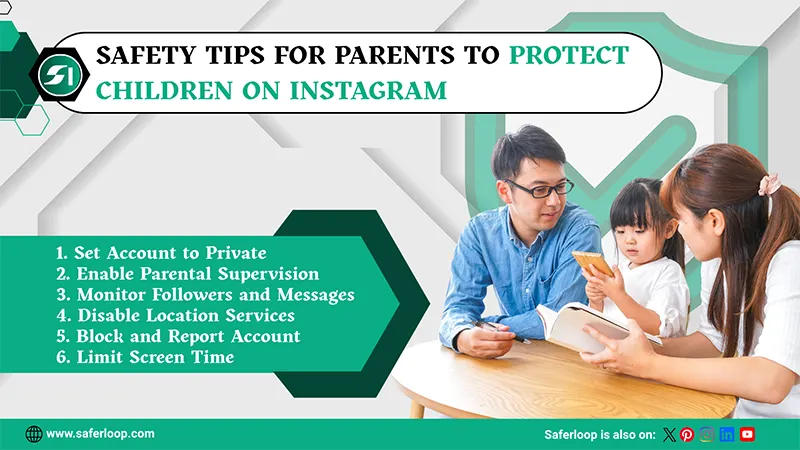
There are various safety tips for parents to protect children on Instagram, such as setting the account to private, enabling parental supervision, monitoring followers and messages, disabling location services, blocking and reporting accounts, managing tagging, and limiting screen time.
As a helicopter parent, you can uncover these safety tips here for in-depth guidance.
1. Set Account to Private
Firstly, you should set your children’s accounts to private instead of public to manage who sees their content, photos, and stories. It helps you supervise their online activities effortlessly.
2. Enable Parental Supervision
Use Instagram’s built-in supervision tools to monitor time spent, followers, and receive alert notifications. It allows you to have control over your innocent IG account.
3. Monitor Followers and Messages
Additionally, you should regularly review who your kids follow and with whom they are interacting through messages. Always encourage them not to accept requests from strangers.
4. Disable Location Services
Always remember to disable location services or turn off geotagging on posts to prevent sharing your kids’ real-time location. It protects them from being lured by pedophiles and cybercriminals.
5. Block and Report Account
Educate your child about safety measures, such as how to report and block suspicious accounts, delete malicious comments, and stay away from harmful content. It empowers them to make informed decisions on their own.
6. Manage Tagging
Configure settings so your child must approve tagged photos before they appear on their profiles. It helps to control the profile appearance, review, or remove existing tags from the profile.
7. Limit Screen Time
You can also use app settings to limit screen time to prevent addiction and wastage of time. It helps you to encourage your children to engage in physical and offline activities.
Also Read: 10 Best Parental Control Apps for Families: Features, Benefits, and Top Picks
Common Mistakes Parents Should Avoid on Instagram
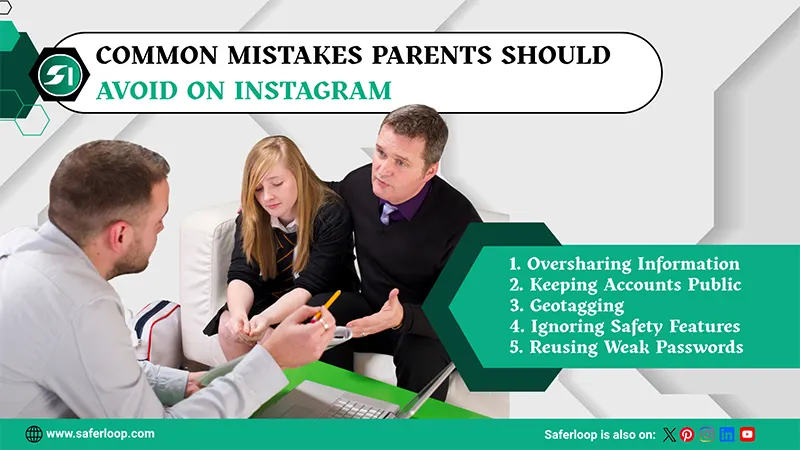
Parents should avoid oversharing information, keeping accounts public, geotagging, ignoring safety features, and reusing weak passwords on Instagram.
Let’s skim through this section to understand what should be avoided on Instagram to keep children protected.
1. Oversharing Information
Sometimes parents overshare information about their children by uploading unnecessary posts and reels. This triggers cybercrimes and unintentionally invites predators.
2. Keeping Accounts Public
One of the most common mistakes parents make is keeping their kids’ accounts public. It allows strangers to view photos and gather information, which increases the chances of online threats and exposure to harmful content.
3. Geotagging
Posting real-time location with photos, using location tags, and uploading children’s school uniforms reveals where they live, go to school, or spend time. It gives spammers and cybercriminals an idea of easy victim status.
4. Ignoring Safety Features
If parents are continuously ignoring the built-in safety features of Family Center and third-party parental controls, it might cause dangers like cyberbullying, predatory risks, and online scams.
5. Reusing Weak Passwords
Using the same weak passwords that parents often use for other devices surely causes dangerous activities and increases the chances of account hacking and privacy infringement.
Final Safety Recommendations for Families
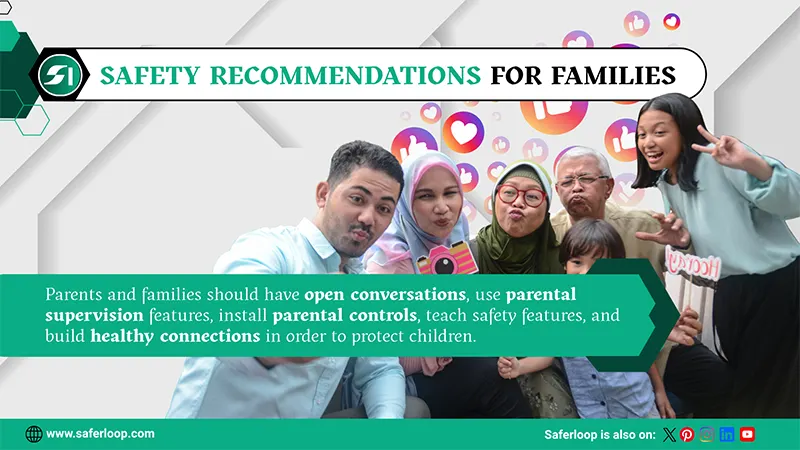
Parents and families should have open conversations, use parental supervision features, install parental controls, teach safety features, and build healthy connections in order to protect children.
Here, I’ve mentioned final safety recommendations to prioritize kids’ safety and privacy.
1. Have Open Conversations
Firstly, as a parent or guardian, you should have open conversations with your children about online crimes and how social media apps like Instagram may slip inappropriate content despite safety filters. It helps them to have an idea of the digital world.
2. Use Parental Supervision Features
Instagram provides built-in supervision for teen accounts aged under 18 to monitor daily usage, set screen time limits, and supervise your kids’ followers and following lists. It helps you to keep track of their Instagram handles.
3. Install Parental Controls
Sometimes, built-in safety features are not enough to protect your innocent little ones from predators and scammers. That’s why I advise you to install trustworthy and safe parental control apps like Saferloop. It provides advanced AI tools, from local tracking to blocking unsafe websites and apps.
4. Teach Safety Measures
On the other hand, you should teach safety measures, including how to block and report creepy strangers and not share personal information on IG. It empowers your children to make informed decisions in your absence.
5. Build Healthy Connections
Significantly, you should focus on building healthy relationships with your young children instead of heavily relying on technology. The strong connections help them to trust you regarding their social circle or when something unusual happens to them.
Wrapping Up!
In simple terms, Instagram is a widely popular app among the young generation and is highly dominated by businesses and influencers. However, this also comes with safety infringement for innocent kids and teens due to exposure to inappropriate content, strangers, and fake profiles.
Therefore, you should install the Saferloop parental control app to create a safe digital environment and have control over the online behavior of children.
Author’s note:
I always rely on Instagram’s built-in supervision for my children’s safety. Until one day, I found out that my kids easily bypass these restrictions, and I realised Instagram’s safety features are not enough for them.
Afterward, I discovered the Saferloop parental control app, which offers better control and AI-powered safety features. Believe me, it gives peace of mind in managing my children’s safety.
Frequently Asked Questions
Q: Is Instagram safe for kids?
Q: How to set parental controls on Instagram?
Ans: To set up parental control on Instagram, you should open the app > Supervision for Teen Accounts > Invite your teen. After adding your teen to Family Center, set screen time limits and manage message controls.
Q: Can I block the Instagram app from my child’s phone?
Ans: Yes, you can block the Instagram app from your child’s phone by installing the Saferloop parental control app. It offers an app-blocking feature to restrict kids from using certain apps.
Q: Can I let my 10 year old son use Instagram?
Ans: No, Instagram’s Terms of Use clearly state that the app is generally permissible for users who are 13 years old. The platform automatically places accounts aged 13-17 into “Teen Accounts” with restricted settings.
Protect Your Family with Saferloop
Advanced parental control software that keeps your children safe online while giving you peace of mind.
- Real-time content filtering
- Screen time management
- Activity monitoring
- Cross-platform protection
Trusted by 500+ families