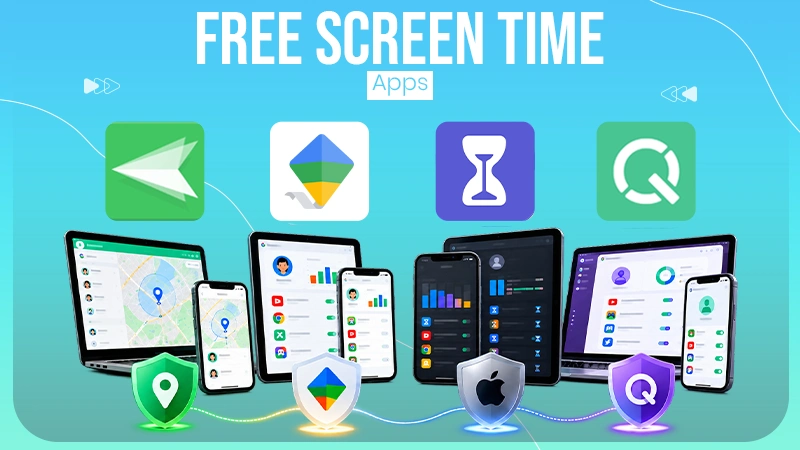
Using parental controls together with DNS filtering is one of the most effective ways to block harmful or explicit websites across all devices in your home.
×

Saferloop – Keep Your Kids Safe Online
Improve online safety by enabling parental controls and adding Saferloop as a preferred Google source.
How to Filter and Control Online Content for Kids: A Practical Guide
“Children are not things to be molded, but people to be unfolded.”
— Jess Lair (Author)
Modern children are born and raised with the internet: online classes, educational videos, gaming, social interaction, etc. They spend more time connected virtually than ever before. While the digital world offers incredible learning opportunities, it also exposes kids to harmful content, cyberbullying, scams, and online predators.
That is why online safety is no longer optional for parents. The bad news? You may not be able to control the entire internet. The good news? You can still create a safer digital environment at home. With the right mix of parental controls, smart monitoring, and open communication, you can significantly reduce online risks while helping your children build healthy internet habits.
In this guide, I’ll list some practical ways to filter and control online content for kids using content restrictions, DNS filters, app locks, and healthy digital habits to create a safer online environment.
Table of Contents:
Understand the Risks and Set Clear Rules
Not all online safety measures need to rely on technology. In many cases, honest conversations and clearly defined boundaries are just as effective as digital tools.
Start by identifying what you are trying to limit. For example:
- Voilent content
- Explicit material
- Excessive screen time
Teach your children why these boundaries exist. Teach them the moral and ethical implications of engaging with such content. Tell them the bad psychological effects of consuming such content.
The way you approach this has to be determined by the children’s ages. Choose your words wisely.
1. Use Built-In Parental Controls
Modern devices and operating systems come with parental controls. Use them to manage online safety more effectively. For example, set a screen time limit to prevent excessive device use.
Parental controls allow you to create profiles that are forbidden from accessing any website or software not on a predetermined white list.
You will need to look up the specific instructions for the device and operating system you are using to set them up. It’s not complicated, and there are detailed guides online that can teach you how to set things up with these safety features.
Configure these settings on smartphones, tablets, gaming consoles, and smart TVs to create a consistent layer of protection.
2. Set Up DNS Filters in Your Router
One of the most effective ways to control internet access across your home is website filtering tools at the router level.
DNS filtering works by blocking access to specific categories of websites before they even load. Basically, if any device on your network tries to access a website/app that is blocked at the DNS level, the request is dropped.
The infographic depicts it clearly:
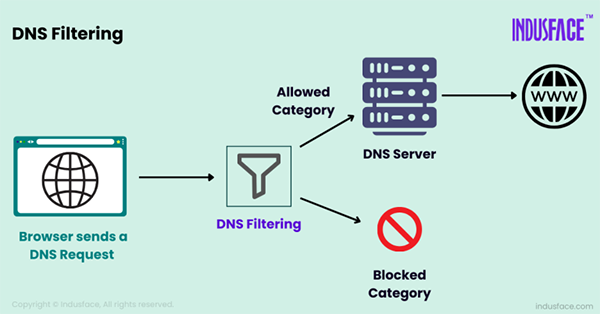
To set up DNS filtering, you will have to check your router’s manual to learn how to access its settings. You will also have to procure a blacklist of websites and domains that you want to prevent access to.
So, in essence, you can do the following with filtering.
- Block adult or harmful content automatically
- Prevent access to malicious or phishing websites
- Apply rules to every device connected to your Wi-Fi
This approach is especially useful because it doesn’t require installing software on each device. The filtration system is centralized and works in the background.
3. Password-Protect Apps Not Suitable for Kids
Shared devices often contain apps or accounts that may not be appropriate for children. This is common with smart TVs, tablets, family computers, or gaming consoles.
In these cases, password protection adds an extra layer of security. You can lock such apps or accounts with passwords so that kids can’t access them.
You can use device settings or third-party tools to lock specific apps. When creating passwords, avoid simple combinations like birthdays or common words. Instead, use a password generator to create strong, unpredictable passwords that children cannot easily guess.
Strong passwords should:
- Include a mix of letters, numbers, and symbols
- Be long and unique for each app
- Avoid personal information
And don’t make the mistake of saving the password on the device or on a note. Memorize it.
4. Monitor Activity Without Overstepping
Monitoring online activity is important, but excessive surveillance can damage trust between parents and children.
Ensure that children always use their devices in open spaces like the lounge, not in seclusion. It makes it easier to monitor their screen time, app usage, and browsing habits.
Also, encourage your children to talk to you whenever they encounter something uncomfortable or confusing online. That way, they will be able to handle things better than they would alone.
5. Create a Safe Digital Environment
Technology alone cannot fully protect children online. Long-term digital safety comes from combining filtering tools with education, communication, and healthy routines.
As stated before, keep devices in shared spaces. This creates natural and unobtrusive opportunities for monitoring without becoming overbearing.
Ensure there are strict screen time limits and that your children don’t exceed them unnecessarily.
As children grow, you should gradually adjust the restrictions and involve them in the decision-making process too. Older children feel more independent and appreciated, and trust you more that way.
All in all, teaching healthy digital habits is as important as the digital safeguards.
Final Thoughts
Protecting children online requires more than a single app or filter. The most effective approach combines practical tools like parental controls and DNS filtering with open communication and active parenting.
By using tools like router-based filtering, app restrictions, and strong password practices, you can create a safer digital space while helping children build lifelong online habits.
Frequently Asked Questions
What is the best way to block inappropriate websites for kids?
Are parental controls enough to keep children safe online?
No. Digital safety tools are helpful, but children also need guidance, education, and open communication to develop safe online habits.
At what age should children learn about online safety?
Children should start learning basic internet safety as soon as they begin using connected devices, even at an early age.
Can DNS filtering slow down internet speed?
In most cases, content filtering systems have little to no noticeable impact on internet speed while still improving online safety and blocking harmful sites.
 Divya Kakkar
Internet Content Writer
About article
The author of this article Divya Kakkar, an Internet Content Writer at Saferloop, brings practical experience and industry knowledge to the subject.
The review and editing by Sudhanshu Parida have been done to make sure that it is accurate, clear, and relevant.
At Saferloop, we are determined to provide high-quality, well-researched, and updated content. To understand further how we produce and revise our articles, please refer to our Editorial Guidelines.
Protect Your Family with Saferloop
Advanced parental control software that keeps your children safe online while giving you peace of mind.
- Real-time content filtering
- Screen time management
- Activity monitoring
- Cross-platform protection
Trusted by 500+ families