At least 200 meters, and more in a built-up area. Anything tighter will generate false alerts as the phone’s position estimate drifts.
×

Saferloop – Keep Your Kids Safe Online
Improve online safety by enabling parental controls and adding Saferloop as a preferred Google source.
Geofencing for Parents: Enhancing Child Safety and Location Awareness
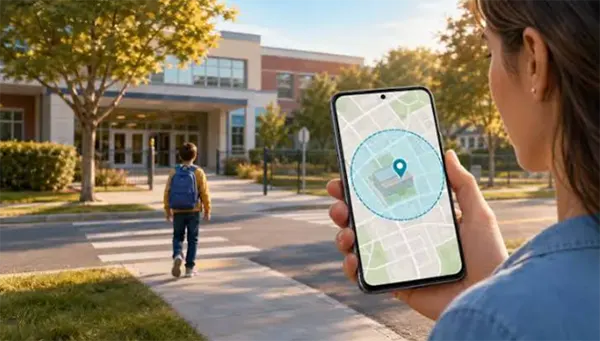
Have you ever been confused about why your app keeps telling you that your daughter has left the school when she is already in the class studying?
It isn’t broken, and she isn’t sneaking out. The phone in her bag simply isn’t as certain about where it is as the little dot on your map suggests, and the fence you drew around the building is probably smaller than the phone’s own margin of error.
That gap explains most of what’s frustrating about parental geofencing.
So here’s what the technology can actually do, where it falls over, and the radius question that decides whether any of it works.
Table of Contents:
What Your Phone Actually Knows
Your phone doesn’t exactly know where it is; it just constantly catches the signal of your phone and estimates where your phone could be. And only in that way only it tells you where exactly you are standing.
Also, when there is a clear view of the sky in front of you, the satellite can get your position and tell your location within three to ten meters. Good enough. But when it comes to tall buildings, the signal can sometimes bounce off and measure a longer path than the real path, which might degrade the estimates a little.
Indoors, it often gives up on satellites entirely and falls back to Wi-Fi networks or cell towers, which is the difference between knowing which room she’s in and knowing which neighborhood.
None of this is a defect. It’s just physics that the interface doesn’t mention.
Why the Fence Is Bigger Than Your Street
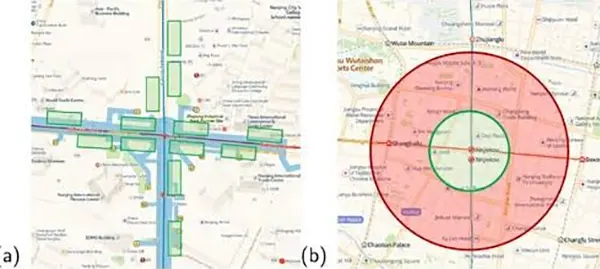
Here is the thing that reframes the whole feature once you know it, and I’d argue every parental app should say it on the setup screen instead of burying it: the smallest geofence a phone can reliably hold is usually larger than the block it sits on.
A patent filing on geofence accuracy puts the practical minimum on modern smartphones at over 200 meters. A dense city block often spans about 100.
So when you draw a circle around your house, you are frequently drawing a circle around your house, your neighbors’ houses, the convenience store and part of the next street.
“Left home” means “left an area roughly two blocks across.” That’s the honest translation, and it changes what the alert is worth.
The Ways It Gets Things Wrong
There are 2-3 ways in which the things might get wrong , the first one can be very tall buildings and the second one can be a very high activity of the satellite etc,.
Phantom Exits
A stationary phone can appear to leave and re-enter a fence repeatedly while its owner hasn’t moved at all. The estimate wanders a few meters, crosses the boundary, wanders back.
Developers who build these systems describe watching the trigger fire while sitting perfectly still in a chair. The standard fix is a dwell requirement, where the alert only counts if the phone stays inside for thirty seconds or so. Consumer apps don’t always tell you whether they use one.
The Indoor Blind Spot
Schools, malls, movie theaters, basements. In one pilot study, satellite positioning was completely unavailable in roughly two-thirds of the indoor venues tested.
Your child is not missing. The building is just opaque to the technology.
The Lag
Alerts are not instant, and they were never designed to be. The phone conserves power by checking less often when it thinks nothing is happening, so an exit can land minutes after the fact.
If you’re using geofencing to catch something in real time, you’ve picked the wrong tool.
The Battery Question
Continuous location polling can eat something like eight to twelve percent of a battery an hour, which is why every operating system throttles it aggressively in the background.
A dead phone reports nothing. That’s the failure mode nobody plans for.
So What Radius Should You Use
Bigger than feels right, which is the single most counterintuitive thing about setting one of these up.
The working rule: set your radius at 200 meters minimum, and closer to 300 for anywhere surrounded by tall buildings. A tight fence doesn’t give you precision. It gives you false alerts, and false alerts are how you stop reading the notifications entirely.
This Technology Wasn’t Built for Parents
Everything in the consumer version of geofencing, from the radius limits and dwell timers to the resigned acceptance that indoors is a dead zone, was worked out first by companies tracking vehicles and field crews, because they hit every one of these problems a decade before parental apps existed and they hit them at scale.
Which is my favorite thing about this whole category, honestly. The parental safety app on your phone is running on lessons learned by delivery dispatchers.
The commercial tools still do it, and do it more openly. FieldTask, an integrated FSM app for HighLevel, lists geofencing among its features for exactly the same enter-and-exit alerts, pointed at job sites rather than schools.
What the Work Version Does Differently
Commercial tracking doesn’t promise precision it can’t deliver, mostly because a dispatcher who stops trusting the alerts is an expensive problem.
So the buffers are generous, the dwell times are explicit, and nobody markets it as certainty. FieldTask can work alongside HighLevel in that setup, and the framing throughout is operational rather than emotional. Where is the crew, roughly, and did they arrive.
Parents deserve the same honesty about the margin of error.
The Part No Setting Fixes
A geofence tells you a phone crossed a line. It cannot tell you your child is safe, and it cannot tell you they’re where they said they’d be, because phones get left in bags, borrowed by friends, and turned off.
Teenagers also work this out faster than parents expect.
Which means the useful version of this technology runs alongside a conversation rather than instead of one. She knows it’s on, she knows what it does, and she knows it’s a rough boundary rather than a tracking beam.
Final Words
Set it wide, expect it to be approximate, and treat every alert as a prompt to ask rather than a fact to act on.
And if you take one thing from this: the alert that says nothing happened is the least reliable one in the system. No news means the phone had signal, had battery, stayed inside a fence bigger than your street, and nothing crossed it.
That’s four assumptions. Most days they hold. The days they don’t are the days you’d want to know.
Frequently Asked Questions
What radius should I set for a school geofence?
Why do I get alerts when my child hasn’t moved?
GPS drift. The phone’s estimated position wanders across the boundary and back while the phone itself sits still, which is why generous radii matter.
Does geofencing work indoors?
Poorly. Satellite positioning is often unavailable inside buildings, and the phone falls back to Wi-Fi or cell towers with much lower accuracy.
Should I tell my child the geofence is there?
Yes. Covert tracking damages trust and teenagers usually find out anyway, which costs you more than the feature is worth.
Sources
USPTO — System and method to register improved accuracy geofences, for the practical minimum geofence radius on modern smartphones and the city-block comparison
LVGPS — How Geofencing Works, for the outdoor, urban and Wi-Fi positioning accuracy ranges
arXiv — Cognibit pilot deployment, for the indoor satellite availability and continuous-polling battery figures
 Aditi K
Freelance Cybersecurity Writer
About article
The author of this article Aditi K, an Freelance Cybersecurity Writer at Saferloop, brings practical experience and industry knowledge to the subject.
The review and editing by Vinithra Karunanidhi have been done to make sure that it is accurate, clear, and relevant.
At Saferloop, we are determined to provide high-quality, well-researched, and updated content. To understand further how we produce and revise our articles, please refer to our Editorial Guidelines.
Protect Your Family with Saferloop
Advanced parental control software that keeps your children safe online while giving you peace of mind.
- Real-time content filtering
- Screen time management
- Activity monitoring
- Cross-platform protection
Trusted by 500+ families