

It is important to be transparent about this technology. Position it as a “digital safety net” to catch external threats, such as predators, rather than judging your child by reading his/her private conversations.
×

Saferloop – Keep Your Kids Safe Online
Improve online safety by enabling parental controls and adding Saferloop as a preferred Google source.
Spotting the Red Flags: A Parent’s Guide to Tools That Identify Risky Digital Patterns
The way we engage with the children in today’s technology-driven society has changed significantly, and this shift has affected the rules of engagement as well.
According to Statista, most standard keyword filters today miss more than 70% of the risky interactions taking place in the digital world, which have been cloaked in AI-generated language and contextually dependent slang.
I’ve come to realize that, in the current era of guardians, relying on outdated technology to filter users’ behavior on social media is similar to attempting to navigate the 2026 landscape.
KEY TAKEAWAYS
- 2026 safety relies on AI that understands context, tone, and behavioral deviations, not just static bad words.
- Leading tools offer instant alerts, enabling immediate guidance.
- The most effective strategy centralizes cross-platform monitoring into a single, comprehensive intelligence dashboard.
- These tools provide concrete evidence, moving conversations from accusations to constructive, safety-focused mentorship.
Table of Contents:
The Rise of Pattern-Recognition in Parental Controls
Standard filtering is now a thing of the past. Instead, parents should turn to an updated philosophy about safety regarding a dynamic digital environment: the “Learning Scientist” approach. Newer versions of parental controls use cutting-edge AI to analyze how children use their devices.
Many of today’s apps do not just block content but rather include a built-in understanding of the content being used and the associated behavioral context of that content. This technology is known as behavioral pattern recognition.
Every time there is a deviation, the behavior recognition software generates alerts and analyzes data streams. Therefore, parents can change their roles from reactive “gatekeepers” to proactive “intelligence analysts.”
Top 5 Parental Control Tools for Real-Time Risk Detection
From my research, these five platforms are the best examples of proactive digital safety for the year 2026 because they provide a single place to manage many types of risk.
- Saferloop: The best example of total intelligence, as it uses a Digital Health Score to take sentiment, location, and activity, and combine them into a real-time risk indicator.
- Qustodio: Best at finding behavioral analytics by recognizing patterns of use across apps so that relative context can be identified around the amount of total screen time.
- Bark: Nuanced monitoring, as it uses artificial intelligence to interpret the use of teen slang, sarcasm, and emotions, which can be valuable in detecting early evidence of bullying and mental health risks.
- FamilyTime: Best example of physical safety by applying geofencing with motion analytics to create a flag when someone moves quickly or leaves a designated area.
- Google Family Link: Best at maintaining system integrity, as it can do OS-level monitoring to alert you when people have sideloaded unverified apps or have circumvented the intended security settings.
Tools That Scan for Predatory Language Patterns
Predators rarely begin with explicit intent; they rely on “grooming,” a gradual process of emotional manipulation masked by innocent language. This is where specialized linguistic AI becomes the ultimate defensive weapon.
| Platform | How It Detects Risk |
| Saferloop | Flag when a conversation pattern starting on a public forum suddenly shifts to a private messaging app, a classic predatory tactic. |
| Bark | Analyzes full conversational threads, identifying subtle emotional shifts, “secret-keeping” language, and isolative tactics used by groomers. |
| Net Nanny | Rather than flagging words, it flags “Emotional Tone.” A sudden shift from happy/neutral to secret/anxious interaction triggers an alert, identifying potential stress. |
| OurPact | Identifies “communication clusters”—sudden, intense spikes in message volume with an unverified account, often an early sign of concentrated grooming or bullying. |
Identifying Compulsive Screen Usage and Late-Night Risks
In healthcare settings, the same pattern-recognition mindset can apply to patient-facing inboxes and portals, where tone shifts and “urgent” requests can signal phishing or misdirected PHI. A virtual healthcare assistant can triage messages against clear SOPs, document escalations, and keep response workflows consistent—so clinicians and admins aren’t forced to make judgment calls in the middle of a hectic day.
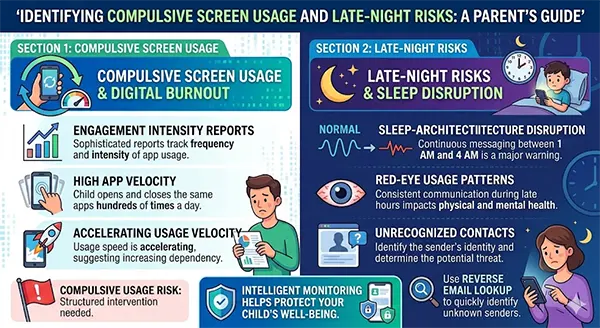
- Digital Burnout Reports: Tools now generate sophisticated “Engagement Intensity” reports. If a child’s pattern shows that they are opening and closing the same apps hundreds of times a day, or if their usage velocity is accelerating, the AI flags a “compulsive usage” risk, suggesting a structured intervention is needed.
- Sleep-Architecture Disruption: AI scans for “Red-Eye Usage Patterns.” Continuous messaging between 1 AM and 4 AM is no longer treated as just “lost sleep.” When an alert reveals your child is communicating with an unrecognized contact during these hours, using a reverse email lookup can help you quickly identify the sender’s identity and determine if the interaction poses a legitimate threat.
Here is a quick picture description of how you can do it:
How to Respond When Your Tool Flags a Risk
Being notified of a risk alert can be overwhelming, but the most effective way to respond to malicious sites attacks is with a detailed process. The information obtained through the alerts should be used as a resource to support connection with the child, rather than to confront them.
“A soft answer turneth away wrath.” A collaborative and non-judgmental manner allows your child to continue to be an active participant in their safety.
Here’s a four-step model I suggest using to provide a coordinated approach:
- Verify vs. Accuse: Start by using an open-ended question, “I received an alert about something you are doing online. Please help me understand what the situation is.” This encourages the child to provide context for the information you received.
- Focus on “Why” vs. “What”: When discussing the specific behaviors identified through the alerts, focus on the “Why” behind the behavior to teach them that these behaviors put their safety at risk.
- Co-Create Solutions: When the child must now have boundaries on how they can use technology appropriately, work with the child to document the specific hours when technology can and cannot be used.
- Validate and Affirm: Reaffirm to your child that the alerts are designed to promote safety and not to monitor them.
Conclude the discussion by expressing to your child that your goal is to ensure they can have a safe, secure, and healthy digital experience.
Conclusion
To create a safe digital environment for their child, parents must not only block things with a parental advisory label but also understand the intent behind those actions. Through AI-driven pattern-recognition capabilities, parents will have the tools they need to create a positive space where technology can help children develop, rather than pose hidden dangers.
Frequently Asked Questions
Will my child think I’m spying on them using some of these devices?
Can these AI-based systems keep up with new slang?
Yes! Adaptive machine learning utilized by software applications like Saferloop and Bark applies context- and intent-based filtering; therefore, no matter how children reference things via new forms of slang, these filtering services will catch it.
What will these advanced filtering systems cost?
Most premium pattern recognition software in 2026 is in the $8-$15/month range, which is a minimal cost for proactive/predictive peace of mind.
Are there any filtering systems that work on both Android and iOS platforms?
Yes, all the major filtering systems currently have cross-platform capabilities. However, there may be limitations to direct message monitoring on iOS compared to the Android platform due to restrictions imposed on developers by Apple.
 Divya Kakkar
Internet Content Writer
About article
The author of this article Divya Kakkar, an Internet Content Writer at Saferloop, brings practical experience and industry knowledge to the subject.
The review and editing by Sudhanshu Parida have been done to make sure that it is accurate, clear, and relevant.
At Saferloop, we are determined to provide high-quality, well-researched, and updated content. To understand further how we produce and revise our articles, please refer to our Editorial Guidelines.
Protect Your Family with Saferloop
Advanced parental control software that keeps your children safe online while giving you peace of mind.
- Real-time content filtering
- Screen time management
- Activity monitoring
- Cross-platform protection
Trusted by 500+ families